
Video File Thumbnails Not Showing!

Rashad

New member
Local time
12:29 AM
Messages
5
Location
New York
Hey guys, I just joined the forums but I've been using it as a guide for the past week haha.

I'm running the x86 (32bit) Windows 7 RTM. My problem is that when I'm in windows Media Center, and I'm in the Movies section, the thumbnails for the videos are just colored rectangular slates with the title of the file on them in caps.

They look horrendous, and I was under the impression that Media Center - like Windows Explorer - would have the thumbnail of the video itself, like a still image of the video, not just slates with the name on it!

Attached is what I see. Is there anyway I can fix this?

Thank you!
 

Attachments
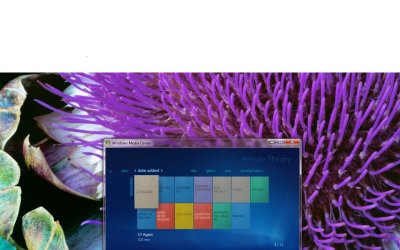
  • Windows Media Center Problem.jpg
    Windows Media Center Problem.jpg
    110.5 KB · Views: 262

My Computer

OS
Windows 7
Hey guys, I just joined the forums but I've been using it as a guide for the past week haha.

I'm running the x86 (32bit) Windows 7 RTM. My problem is that when I'm in windows Media Center, and I'm in the Movies section, the thumbnails for the videos are just colored rectangular slates with the title of the file on them in caps.

They look horrendous, and I was under the impression that Media Center - like Windows Explorer - would have the thumbnail of the video itself, like a still image of the video, not just slates with the name on it!

Attached is what I see. Is there anyway I can fix this?

Thank you!


You need a Media Meta Manager... You need YAMM!! See the YAMM thread --==> Here
 

My Computer

Computer type
PC/Desktop
Computer Manufacturer/Model Number
LENOVO K450 @3.0GHZ
OS
64-bit Windows 8.1 Pro
CPU
Core(TM) i5 CPU 4330 Haswell @ 3.20GHz
Motherboard
LENOVO
Memory
12.00 GB
Graphics Card(s)
Intel(R) HD Graphics
Sound Card
Intel HD integtrated
Monitor(s) Displays
HP 25' ISP Monitor
Screen Resolution
1900/1020
Hard Drives
(1) ST1000DM003-1CH162 (2) Generic STORAGE DEVICE USB Device (3) Generic STORAGE DEVICE USB Device
Internet Speed
100mb down/10mb up
You need a Media Meta Manager... You need YAMM!! See the YAMM thread --==> Here

Thank you so much! Downloading now.

EDIT: I've installed it, but I'm not so sure what to do from there, do I need to restart? Nothing has changed in media center.
 

My Computer

OS
Windows 7
Did you by any chance install codecs, like shark etc..?

No I didn't on my 7 partition, all of my files are playable however, and they have thumbnails in windows explorer.

Should I install a codec pack even though they play fine?
 

My Computer

OS
Windows 7
No I didn't on my 7 partition, all of my files are playable however, and they have thumbnails in windows explorer.

Should I install a codec pack even though they play fine?

No, I misread your post. Sorry.

I deleted my remark
 

My Computer

OS
Win7 Build 7600 x86
CPU
Pentium II 300MHz
Motherboard
Asus
Memory
32mb EDO RAM
Graphics Card(s)
Diamond Viper
Sound Card
Soundblaster 16
Monitor(s) Displays
14" AOC CRT 16K color
Screen Resolution
800x600
Hard Drives
300mb Quantum fireball
PSU
110 Watts
Cooling
Passive
Keyboard
Trust Ergonomic
Mouse
Generic
Internet Speed
256K u 128K d
Oh ok and that's fine.
Do you use a meta manager? Do you know how to use YAMMM?

i use Metabrowser. it's on themetabrowser.com Brilliant program
 

My Computer

OS
Win7 Build 7600 x86
CPU
Pentium II 300MHz
Motherboard
Asus
Memory
32mb EDO RAM
Graphics Card(s)
Diamond Viper
Sound Card
Soundblaster 16
Monitor(s) Displays
14" AOC CRT 16K color
Screen Resolution
800x600
Hard Drives
300mb Quantum fireball
PSU
110 Watts
Cooling
Passive
Keyboard
Trust Ergonomic
Mouse
Generic
Internet Speed
256K u 128K d
i use Metabrowser. it's on themetabrowser.com Brilliant program

Ok I'll try that as soon as I install the .NET Framework.
That was probably the reason why YAMMM didn't work in the first place.
 

My Computer

OS
Windows 7
Yep, meta<browser> is defo the way to go. It can be a pain to use, but once you've got it worked out it's ace.
If you intend on using Starkcovers, please be aware that it converts the folder.jpg into a PNG and WMC default movie library won't recognize it. You'll have to use Media Browser (which everyone should be anyways!) instead.
 

My Computer

Computer Manufacturer/Model Number
HP Touchsmart IQ771.uk
OS
Windows 7 Ultimate x64
CPU
AMD Turion(tm) 64 X2 Mobile Technology TL-56
Motherboard
ASUS Pheonix
Memory
3GB Nanya PC2-6400 DDR2-SDRAM SO-DIM (400MHz)
Graphics Card(s)
NVIDIA GeForce Go 7600 256MB GDDR3 SDRAM
Sound Card
High Definition Intergrated NVIDIA MCP51
Monitor(s) Displays
46" Sony Bravia HDTV
Screen Resolution
1600x1200
Hard Drives
1.5TB Samsug
320GB Seagate ST3320820AS - SATA 3Gb/s 8MB
500GB Maxtor Basics STM305003EHD301-RK
Internet Speed
↓6.32 Mb/s ↑0.35 Mb/s ↔26ms
Other Info
BIOS - American Megatrends Inc. 5.07
Ethernet Port - NVIDIA nForce 10/100/1000 Mbps
DVD Drive - TSSTcorp DVDR/RW TS-T632L
Back
Top