Video lags every 20-30 seconds

Teetr

New member
Local time
10:59 PM
Messages
5
I have problem while watching videos. It does not matter what kind of video or with what player- Bsplayer, VLC, WMP or even on Youtube with firefox.

Video lags every once in a while, the audio plays correctly and video catches up with the audio after lagging.

I am using Windows 7 Ultimate on Asus X53S series laptop with Nvidia Geforce 9300mG VRAM 256MB, CPU Intel Centrino Duo T5550, RAM 4GB

I have reinstalled the video drivers and codecs, no help.
 
Last edited:

My Computer My Computer

At a glance

Windows 7 UltimateIntel Centrino Duo T5550Nvidia Geforce 9300m G
Computer Manufacturer/Model Number
ASUS X53S
OS
Windows 7 Ultimate
CPU
Intel Centrino Duo T5550
Graphics Card(s)
Nvidia Geforce 9300m G
Case
ASUS
I have problem while watching videos. It does not matter what kind of video or with what player- Bsplayer, VLC, WMP or even on Youtube with firefox.

Video lags every once in a while, the audio plays correctly and video catches up with the audio after lagging.

I am using Windows 7 Ultimate on Asus X53S series laptop with Nvidia Geforce 9300mG, CPU Intel Centrino Duo T5550.

I have reinstalled the video drivers and codecs, no help.

How much ram, what network?
 

My Computer My Computer

At a glance

Win 8 Release candidate 8400[email protected]4 gigsNvidia 9600M
Computer Manufacturer/Model Number
HP Pavillion dv-7 1005 Tx
OS
Win 8 Release candidate 8400
CPU
[email protected]
Memory
4 gigs
Graphics Card(s)
Nvidia 9600M
Sound Card
HD built-in
Monitor(s) Displays
17" Wxga
Screen Resolution
1440x900
Cooling
none
Internet Speed
45Mb down 5Mb up
VRAM256MB RAM 4GB

what to you mean by network?
 

My Computer My Computer

At a glance

Windows 7 UltimateIntel Centrino Duo T5550Nvidia Geforce 9300m G
Computer Manufacturer/Model Number
ASUS X53S
OS
Windows 7 Ultimate
CPU
Intel Centrino Duo T5550
Graphics Card(s)
Nvidia Geforce 9300m G
Case
ASUS
I have problem while watching videos. It does not matter what kind of video or with what player- Bsplayer, VLC, WMP or even on Youtube with firefox.

Video lags every once in a while, the audio plays correctly and video catches up with the audio after lagging.

I am using Windows 7 Ultimate on Asus X53S series laptop with Nvidia Geforce 9300mG, CPU Intel Centrino Duo T5550.

I have reinstalled the video drivers and codecs, no help.

How much ram, what network?

Ram - my thoughts too....

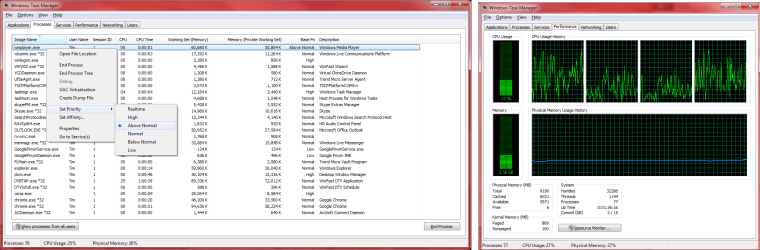
Teetr - if possible could you screen print your performance tab in task manager?

If the problem is ongoing you may also consider looking for media player on the processes tab, right clicking on the exe and setting it to run a higher priority. I do this from time to time if i'm crunching out to my stuff and my vids are lagging. GOMPLAYER (a great media player) allows you to set it to automatically run in a higher priority). Be careful with this though, if you receive any problems, reboot and change back (if gomplayer), or just reboot for any other and it will revert to the normal.

re - Network.. I;m guessing but perhaps Zig is asking if you are playing the file over a local network, over the internet or locally on your pc?

Gomplayer - http://www.gomlab.com/eng/GMP_download.html
 

Attachments

  • ram and prioriy.png
    ram and prioriy.png
    79.5 KB · Views: 140
Last edited:

My Computer My Computer

At a glance

Windows 7 Ultimate 64 bitIntel(R) Core(TM)2 Quad CPU Q8200 @ 2.33GHz8 GB KingstonNvidia GeForce 9600GT
Computer Manufacturer/Model Number
Custom Hack job
OS
Windows 7 Ultimate 64 bit
CPU
Intel(R) Core(TM)2 Quad CPU Q8200 @ 2.33GHz
Motherboard
GigaByte EP45-UD3
Memory
8 GB Kingston
Graphics Card(s)
Nvidia GeForce 9600GT
Sound Card
Soundblaster Audigy
Monitor(s) Displays
AOC x2 22"
Hard Drives
2 x Samsung 500GB (RAID)
2 x Samsung 2TB
1 x WD Green 2TB
1 x Seagate 1TB
1 x Samsung 500GB
PSU
Thermaltake QFan 750W
Case
CM Scout Gaming
Cooling
Coolermaster V10
Keyboard
Microsoft Wireless Keyboard 1000
Mouse
Microsoft Wireless Optical 2000
Internet Speed
320
Other Info
Winfast PVR2000CP
LG DVD-RAM DVD/RW/DL Super Multi
Linksys WMP300Nx2 Wireless Adapter

My Computer My Computer

At a glance

Win 8 Release candidate 8400[email protected]4 gigsNvidia 9600M
Computer Manufacturer/Model Number
HP Pavillion dv-7 1005 Tx
OS
Win 8 Release candidate 8400
CPU
[email protected]
Memory
4 gigs
Graphics Card(s)
Nvidia 9600M
Sound Card
HD built-in
Monitor(s) Displays
17" Wxga
Screen Resolution
1440x900
Cooling
none
Internet Speed
45Mb down 5Mb up

My Computer My Computer

At a glance

Windows 7 UltimateIntel Centrino Duo T5550Nvidia Geforce 9300m G
Computer Manufacturer/Model Number
ASUS X53S
OS
Windows 7 Ultimate
CPU
Intel Centrino Duo T5550
Graphics Card(s)
Nvidia Geforce 9300m G
Case
ASUS
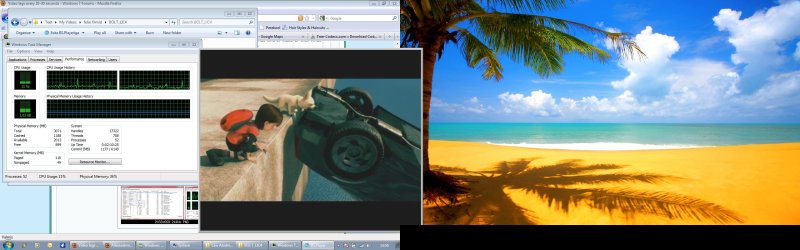
From the performance tab, I can see that the when plaing video the cpu is about 10-15% but when it laggs the cpu goes to about 60%, I also tried to set high priority but the result was the same.
 

Attachments

  • Performance.jpg
    Performance.jpg
    238.8 KB · Views: 87

My Computer My Computer

At a glance

Windows 7 UltimateIntel Centrino Duo T5550Nvidia Geforce 9300m G
Computer Manufacturer/Model Number
ASUS X53S
OS
Windows 7 Ultimate
CPU
Intel Centrino Duo T5550
Graphics Card(s)
Nvidia Geforce 9300m G
Case
ASUS
Interesting, we have a cpu spike during playback... although it's not much.. Bolt should be able to handle that :P

Were you able to see what process is causing it? OR is it the media player or indexing that is spiking?

If it's the last two I'm wondering if your media library is indexing away or downloading album covers etc and causing the lag. If so, you could either switch the indexing off or leave it on for a day (the latter should index everything right?)

If not, then we need to know what process is causing it. So leave task manager on and watch what happens while Bolt is playing.
 

My Computer My Computer

At a glance

Windows 7 Ultimate 64 bitIntel(R) Core(TM)2 Quad CPU Q8200 @ 2.33GHz8 GB KingstonNvidia GeForce 9600GT
Computer Manufacturer/Model Number
Custom Hack job
OS
Windows 7 Ultimate 64 bit
CPU
Intel(R) Core(TM)2 Quad CPU Q8200 @ 2.33GHz
Motherboard
GigaByte EP45-UD3
Memory
8 GB Kingston
Graphics Card(s)
Nvidia GeForce 9600GT
Sound Card
Soundblaster Audigy
Monitor(s) Displays
AOC x2 22"
Hard Drives
2 x Samsung 500GB (RAID)
2 x Samsung 2TB
1 x WD Green 2TB
1 x Seagate 1TB
1 x Samsung 500GB
PSU
Thermaltake QFan 750W
Case
CM Scout Gaming
Cooling
Coolermaster V10
Keyboard
Microsoft Wireless Keyboard 1000
Mouse
Microsoft Wireless Optical 2000
Internet Speed
320
Other Info
Winfast PVR2000CP
LG DVD-RAM DVD/RW/DL Super Multi
Linksys WMP300Nx2 Wireless Adapter
It's not a frame skipping problem is it? It's all beyond me but NTSC/PAL/films run at different FPS and can cause all sorts of juddery/lag problems.
 

My Computer My Computer

At a glance

Windows 7
OS
Windows 7
I tried to find the program causing, when lagging bsplayer cpu usage was the same, other programs had some minor changes, but nothing significant. For the moment i have downloaded Uniblue Registry Booster which detected and fixed about 170 problems in my registry and for now the problem is gone.
What was causing the problem remains unknown for now, but seems that Uniblue fixed it. If it comes back I will start searching again.
 

My Computer My Computer

At a glance

Windows 7 UltimateIntel Centrino Duo T5550Nvidia Geforce 9300m G
Computer Manufacturer/Model Number
ASUS X53S
OS
Windows 7 Ultimate
CPU
Intel Centrino Duo T5550
Graphics Card(s)
Nvidia Geforce 9300m G
Case
ASUS
Well congratulations in getting the issue resolved, it is vexing to not know what the problem was.... but importantly IT IS FIXED!

If you find anything new in the future just reactivate the thread and we'll take it from there.
 

My Computer My Computer

At a glance

Windows 7 Ultimate 64 bitIntel(R) Core(TM)2 Quad CPU Q8200 @ 2.33GHz8 GB KingstonNvidia GeForce 9600GT
Computer Manufacturer/Model Number
Custom Hack job
OS
Windows 7 Ultimate 64 bit
CPU
Intel(R) Core(TM)2 Quad CPU Q8200 @ 2.33GHz
Motherboard
GigaByte EP45-UD3
Memory
8 GB Kingston
Graphics Card(s)
Nvidia GeForce 9600GT
Sound Card
Soundblaster Audigy
Monitor(s) Displays
AOC x2 22"
Hard Drives
2 x Samsung 500GB (RAID)
2 x Samsung 2TB
1 x WD Green 2TB
1 x Seagate 1TB
1 x Samsung 500GB
PSU
Thermaltake QFan 750W
Case
CM Scout Gaming
Cooling
Coolermaster V10
Keyboard
Microsoft Wireless Keyboard 1000
Mouse
Microsoft Wireless Optical 2000
Internet Speed
320
Other Info
Winfast PVR2000CP
LG DVD-RAM DVD/RW/DL Super Multi
Linksys WMP300Nx2 Wireless Adapter
Sound like you're having DPC latency issues. Google for more information
 

My Computer My Computer

At a glance

Windows 7 UltimateIntel C2D SP94002GB DDR3Integrated =(
Computer Manufacturer/Model Number
Dell E4300
OS
Windows 7 Ultimate
CPU
Intel C2D SP9400
Motherboard
Intel GS45
Memory
2GB DDR3
Graphics Card(s)
Integrated =(
Sound Card
Integrated =(
Monitor(s) Displays
Matte LCD
Screen Resolution
1280x800
Hard Drives
Intel X25-M Gen 2 SSD
WD Caviar Black
Mouse
MX 518, V470 - Logitech
Back
Top