
You are using an out of date browser. It may not display this or other websites correctly.
You should upgrade or use an alternative browser.
You should upgrade or use an alternative browser.
Solved video maker
- Thread starter DanielTG
- Start date

Hi i just installed video maker and photo gallery from windows essentials but i cant find the program i typed in the search video maker but it not find it pleas help
It is called "Movie Maker"
Jim

My Computer
- Computer type
- PC/Desktop
- Computer Manufacturer/Model Number
- Home Built
- OS
- Windows 8.1 Pro w/Media Center 64bit, Windows 7 HP 64bit
- CPU
- Phenom II X6 1100T
- Motherboard
- ASUS M5A99X EVO
- Memory
- Crucial Balistic 8gb DDR3-1866 CL9
- Graphics Card(s)
- MSI R6850 Cyclone IGD5 PE
- Sound Card
- On Board
- Monitor(s) Displays
- ASUS VE258Q 25" LED with DVI-HDMI-DisplayPort
- Screen Resolution
- 1920 x 1080
- Hard Drives
- Two WD Cavier Black 2TB Sata III, WD My Book Essential 2TB USB 3.0
- PSU
- Seasonic X650 80 Plus GOLD Modular
- Case
- Corsair 400R
- Cooling
- Antec Kuhler H2O 620, Two 120mm and four 140mm
- Keyboard
- Logitech K120
- Mouse
- Logitech Marble Mouse USB, Logitech Precision Game Pad
- Internet Speed
- 15MB
- Antivirus
- Norton IS 2013, Malwarebytes Pro Beta 2
- Browser
- IE-11, FF-27
- Other Info
- APC UPS ES 750, Netgear WNR3500L Gigabit & Wireless N Router with SamKnows Test Program, Motorola SB6120 Gigabit Cable Modem. Brother HL-2170W Laser Printer, Epson V300 Scanner
Hi i just installed video maker and photo gallery from windows essentials but i cant find the program i typed in the search video maker but it not find it pleas help
It is called "Movie Maker"
Jim
still cant find it
My Computer
- Computer type
- PC/Desktop
- OS
- windows 7 32 bit

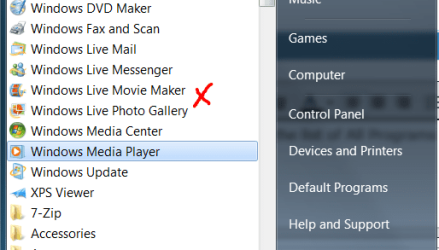
Search in the list of All Programs for Windows Live Movie Maker see here:
My Computer
- Computer type
- PC/Desktop
- OS
- Microsoft Windows 7 Home Premium 64-bit 7601 Multiprocessor Free Service Pack 1
- CPU
- Intel(R) Core(TM) i7-3770 CPU @ 3.40GHz
- Motherboard
- ASUSTeK COMPUTER INC. P8H77-M
- Memory
- 8.00 GB
- Graphics Card(s)
- Intel(R) HD Graphics 4000
- Sound Card
- On Board
- Monitor(s) Displays
- Dell 24"
- Screen Resolution
- 1920 x 1080
- Hard Drives
- (1) INTEL SSDSC2CT180A3 ATA Device (2) ST500DM002-1BD142 ATA Device (3) WDC WD3200AAKS-75L9A0 ATA Device (4) Generic- Compact Flash USB Device (5) Generic- MS/MS-Pro USB Device (6) Generic- SD/MMC USB Device (7) Generic- SM/xD-Picture USB
- PSU
- 500w Corsair
- Case
- Cooler Master
- Cooling
- 3 Fans
- Keyboard
- Logitech MK300
- Mouse
- Logitech WOM
- Internet Speed
- 75Mb
- Antivirus
- Norton 360
- Browser
- Firefox, Opera, IE
Search in the list of All Programs for Windows Live Movie Maker see here:
View attachment 284723
no man its not there either :/
My Computer
- Computer type
- PC/Desktop
- OS
- windows 7 32 bit
The you haven't installed it! Try again. Where are you downloading from, quote URL please?
My Computer
- Computer type
- PC/Desktop
- OS
- Microsoft Windows 7 Home Premium 64-bit 7601 Multiprocessor Free Service Pack 1
- CPU
- Intel(R) Core(TM) i7-3770 CPU @ 3.40GHz
- Motherboard
- ASUSTeK COMPUTER INC. P8H77-M
- Memory
- 8.00 GB
- Graphics Card(s)
- Intel(R) HD Graphics 4000
- Sound Card
- On Board
- Monitor(s) Displays
- Dell 24"
- Screen Resolution
- 1920 x 1080
- Hard Drives
- (1) INTEL SSDSC2CT180A3 ATA Device (2) ST500DM002-1BD142 ATA Device (3) WDC WD3200AAKS-75L9A0 ATA Device (4) Generic- Compact Flash USB Device (5) Generic- MS/MS-Pro USB Device (6) Generic- SD/MMC USB Device (7) Generic- SM/xD-Picture USB
- PSU
- 500w Corsair
- Case
- Cooler Master
- Cooling
- 3 Fans
- Keyboard
- Logitech MK300
- Mouse
- Logitech WOM
- Internet Speed
- 75Mb
- Antivirus
- Norton 360
- Browser
- Firefox, Opera, IE
The you haven't installed it! Try again. Where are you downloading from, quote URL please?
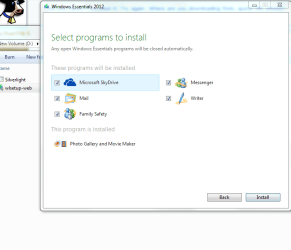
i tried to download it again but its telling me that the program is already installed
Attachments
My Computer
- Computer type
- PC/Desktop
- OS
- windows 7 32 bit
Re boot your machine then:
Click the start button and in the search box type Movie Maker. That should show Windows Live Movie maker at the top of the small window.
Click the start button and in the search box type Movie Maker. That should show Windows Live Movie maker at the top of the small window.
My Computer
- Computer type
- PC/Desktop
- OS
- Microsoft Windows 7 Home Premium 64-bit 7601 Multiprocessor Free Service Pack 1
- CPU
- Intel(R) Core(TM) i7-3770 CPU @ 3.40GHz
- Motherboard
- ASUSTeK COMPUTER INC. P8H77-M
- Memory
- 8.00 GB
- Graphics Card(s)
- Intel(R) HD Graphics 4000
- Sound Card
- On Board
- Monitor(s) Displays
- Dell 24"
- Screen Resolution
- 1920 x 1080
- Hard Drives
- (1) INTEL SSDSC2CT180A3 ATA Device (2) ST500DM002-1BD142 ATA Device (3) WDC WD3200AAKS-75L9A0 ATA Device (4) Generic- Compact Flash USB Device (5) Generic- MS/MS-Pro USB Device (6) Generic- SD/MMC USB Device (7) Generic- SM/xD-Picture USB
- PSU
- 500w Corsair
- Case
- Cooler Master
- Cooling
- 3 Fans
- Keyboard
- Logitech MK300
- Mouse
- Logitech WOM
- Internet Speed
- 75Mb
- Antivirus
- Norton 360
- Browser
- Firefox, Opera, IE
Re boot your machine then:
Click the start button and in the search box type Movie Maker. That should show Windows Live Movie maker at the top of the small window.
i did it it dosent show the movie maker
My Computer
- Computer type
- PC/Desktop
- OS
- windows 7 32 bit
Well try this, go to Control Panel., Programs, uninstall a program and search for this:
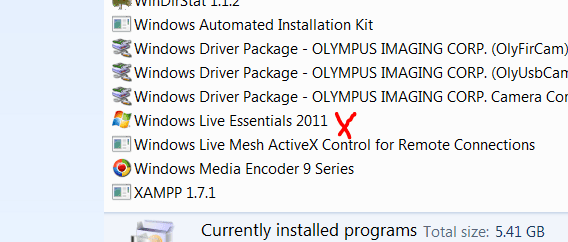
If you can see the one with the red X then uninstall. If it is not there then you need to do a system restore to a point behind when you first installed Windows Live Essentials.
If you can see the one with the red X then uninstall. If it is not there then you need to do a system restore to a point behind when you first installed Windows Live Essentials.
My Computer
- Computer type
- PC/Desktop
- OS
- Microsoft Windows 7 Home Premium 64-bit 7601 Multiprocessor Free Service Pack 1
- CPU
- Intel(R) Core(TM) i7-3770 CPU @ 3.40GHz
- Motherboard
- ASUSTeK COMPUTER INC. P8H77-M
- Memory
- 8.00 GB
- Graphics Card(s)
- Intel(R) HD Graphics 4000
- Sound Card
- On Board
- Monitor(s) Displays
- Dell 24"
- Screen Resolution
- 1920 x 1080
- Hard Drives
- (1) INTEL SSDSC2CT180A3 ATA Device (2) ST500DM002-1BD142 ATA Device (3) WDC WD3200AAKS-75L9A0 ATA Device (4) Generic- Compact Flash USB Device (5) Generic- MS/MS-Pro USB Device (6) Generic- SD/MMC USB Device (7) Generic- SM/xD-Picture USB
- PSU
- 500w Corsair
- Case
- Cooler Master
- Cooling
- 3 Fans
- Keyboard
- Logitech MK300
- Mouse
- Logitech WOM
- Internet Speed
- 75Mb
- Antivirus
- Norton 360
- Browser
- Firefox, Opera, IE

I'm running the older version and did not come with Movie maker,
See what this opens,
Hold the Windows logo key down and press the R key,
Clear the run box and paste this inside it,
C:\Program Files (x86)\Windows Live\Photo Gallery\WLXPhotoGallery.exe
Your showing a 32 bit system so this might be more appropriate to paste in the Run box,
C:\Program Files\Windows\Photo Gallery\WLXPhotoGallery.exe
Like I said this is for the 2011 version,
The new version would be Windows Essentials 2012
C:\Program Files\Windows\Photo Gallery\WLXPhotoGallery.exe
Use the fill in your System spec's page with the Link in my signature.
See what this opens,
Hold the Windows logo key down and press the R key,
Clear the run box and paste this inside it,
C:\Program Files (x86)\Windows Live\Photo Gallery\WLXPhotoGallery.exe
Your showing a 32 bit system so this might be more appropriate to paste in the Run box,
C:\Program Files\Windows\Photo Gallery\WLXPhotoGallery.exe
Like I said this is for the 2011 version,
The new version would be Windows Essentials 2012
C:\Program Files\Windows\Photo Gallery\WLXPhotoGallery.exe
Use the fill in your System spec's page with the Link in my signature.
My Computer
- Computer type
- PC/Desktop
- Computer Manufacturer/Model Number
- Custom assembled by me :}
- OS
- Win-7-Pro64bit 7-H-Prem-64bit
- CPU
- i7-5930K 2nd i9-9940x both water blocked VRM's too
- Motherboard
- ASUS SABERTOOTH X99 2nd ASUS x299 Apex
- Memory
- Trident-z 3200C14 2nd Trident-z 3600C16
- Graphics Card(s)
- EVGA 1080ti ftw3 2nd Titan Xp both water blocked
- Sound Card
- Built-in Realtek
- Monitor(s) Displays
- 1-AOC G2460PG 24"G-Sync 144Hz/ 2nd 1-ASUS VG248QE 24" 144Hz
- Screen Resolution
- 1920 x 1080 144Hz
- Hard Drives
- 2-Samsung M.2 Evo & Evo Plus
2-Samsung 850 EVO 500GB SSD's/ 3-2.5 W.D. Black 1tb-&3-1tb/3-3.5 WD Black 1tb hdd's
- PSU
- EVGA SuperNOVA 1000-P2 2nd 1200-P2
- Case
- 2-Corsair Obsidian Series 450D Black ATX Mid Tower
- Cooling
- Custom water loops
- Keyboard
- Logitech G710+/ 2nd Logitech G910
- Mouse
- 2-RedDragon M901 Perdition 16400 dpi Gaming mouse = wired
- Internet Speed
- Comcast Ping 19ms 89.31mbps download speed 6.12mbps upload
- Antivirus
- Malwarebytes Pro/ Superantispyware Pro
- Browser
- FireFox & Pale moon
- Other Info
- 2nd ASUS X299 Apex/Intel i9-9940x with Custom water loop/7H-Prem-x64/Corsair 450D case/Ram Trident-z 3600C16 4x8gb / Samsung970Evo plus 500gb SSD/Dual ssd EZ swap evo/PSU EVGA SuperNova 1200w-P2 80+Platinum/GPU Titan Xp /8-ML-140 on push-pull on 2-280GTX rads
Well try this, go to Control Panel., Programs, uninstall a program and search for this:
View attachment 284867
If you can see the one with the red X then uninstall. If it is not there then you need to do a system restore to a point behind when you first installed Windows Live Essentials.
i upload a pic from my control panel
I'm running the older version and did not come with Movie maker,
See what this opens,
Hold the Windows logo key down and press the R key,
Clear the run box and paste this inside it,
C:\Program Files (x86)\Windows Live\Photo Gallery\WLXPhotoGallery.exe
Your showing a 32 bit system so this might be more appropriate to paste in the Run box,
C:\Program Files\Windows\Photo Gallery\WLXPhotoGallery.exe
Like I said this is for the 2011 version,
The new version would be Windows Essentials 2012
C:\Program Files\Windows\Photo Gallery\WLXPhotoGallery.exe
Use the fill in your System spec's page with the Link in my signature.
i tried copy and paste all the lines but my com reply me that windows found nothing
Attachments

My Computer
- Computer type
- PC/Desktop
- OS
- windows 7 32 bit
Seems your last attempt just created a folder "Windows Essentials 2012" Just in case it added anything to your registry, perform a system restore to a date on or before 04/09/2013 and that will get rid of that folder plus anything else relative to WE 2012. Then download again and try re installing!
See this if you need help with System restore:
http://www.sevenforums.com/tutorials/700-system-restore.html
See this if you need help with System restore:
http://www.sevenforums.com/tutorials/700-system-restore.html
My Computer
- Computer type
- PC/Desktop
- OS
- Microsoft Windows 7 Home Premium 64-bit 7601 Multiprocessor Free Service Pack 1
- CPU
- Intel(R) Core(TM) i7-3770 CPU @ 3.40GHz
- Motherboard
- ASUSTeK COMPUTER INC. P8H77-M
- Memory
- 8.00 GB
- Graphics Card(s)
- Intel(R) HD Graphics 4000
- Sound Card
- On Board
- Monitor(s) Displays
- Dell 24"
- Screen Resolution
- 1920 x 1080
- Hard Drives
- (1) INTEL SSDSC2CT180A3 ATA Device (2) ST500DM002-1BD142 ATA Device (3) WDC WD3200AAKS-75L9A0 ATA Device (4) Generic- Compact Flash USB Device (5) Generic- MS/MS-Pro USB Device (6) Generic- SD/MMC USB Device (7) Generic- SM/xD-Picture USB
- PSU
- 500w Corsair
- Case
- Cooler Master
- Cooling
- 3 Fans
- Keyboard
- Logitech MK300
- Mouse
- Logitech WOM
- Internet Speed
- 75Mb
- Antivirus
- Norton 360
- Browser
- Firefox, Opera, IE
Seems your last attempt just created a folder "Windows Essentials 2012" Just in case it added anything to your registry, perform a system restore to a date on or before 04/09/2013 and that will get rid of that folder plus anything else relative to WE 2012. Then download again and try re installing!
See this if you need help with System restore:
http://www.sevenforums.com/tutorials/700-system-restore.html
ok i will do it now i download windows essentials from here Windows Essentials - Download Windows Live Essentials its ok?
My Computer
- Computer type
- PC/Desktop
- OS
- windows 7 32 bit
Yes that's fine!Seems your last attempt just created a folder "Windows Essentials 2012" Just in case it added anything to your registry, perform a system restore to a date on or before 04/09/2013 and that will get rid of that folder plus anything else relative to WE 2012. Then download again and try re installing!
See this if you need help with System restore:
http://www.sevenforums.com/tutorials/700-system-restore.html
ok i will do it now i download windows essentials from here Windows Essentials - Download Windows Live Essentials its ok?
My Computer
- Computer type
- PC/Desktop
- OS
- Microsoft Windows 7 Home Premium 64-bit 7601 Multiprocessor Free Service Pack 1
- CPU
- Intel(R) Core(TM) i7-3770 CPU @ 3.40GHz
- Motherboard
- ASUSTeK COMPUTER INC. P8H77-M
- Memory
- 8.00 GB
- Graphics Card(s)
- Intel(R) HD Graphics 4000
- Sound Card
- On Board
- Monitor(s) Displays
- Dell 24"
- Screen Resolution
- 1920 x 1080
- Hard Drives
- (1) INTEL SSDSC2CT180A3 ATA Device (2) ST500DM002-1BD142 ATA Device (3) WDC WD3200AAKS-75L9A0 ATA Device (4) Generic- Compact Flash USB Device (5) Generic- MS/MS-Pro USB Device (6) Generic- SD/MMC USB Device (7) Generic- SM/xD-Picture USB
- PSU
- 500w Corsair
- Case
- Cooler Master
- Cooling
- 3 Fans
- Keyboard
- Logitech MK300
- Mouse
- Logitech WOM
- Internet Speed
- 75Mb
- Antivirus
- Norton 360
- Browser
- Firefox, Opera, IE
When you did the System Restore did you check to make sure the Windows Essentials 2012 folder was removed? Did you install all of the Windows Live Essentials programs?
My Computer
- Computer type
- PC/Desktop
- OS
- Microsoft Windows 7 Home Premium 64-bit 7601 Multiprocessor Free Service Pack 1
- CPU
- Intel(R) Core(TM) i7-3770 CPU @ 3.40GHz
- Motherboard
- ASUSTeK COMPUTER INC. P8H77-M
- Memory
- 8.00 GB
- Graphics Card(s)
- Intel(R) HD Graphics 4000
- Sound Card
- On Board
- Monitor(s) Displays
- Dell 24"
- Screen Resolution
- 1920 x 1080
- Hard Drives
- (1) INTEL SSDSC2CT180A3 ATA Device (2) ST500DM002-1BD142 ATA Device (3) WDC WD3200AAKS-75L9A0 ATA Device (4) Generic- Compact Flash USB Device (5) Generic- MS/MS-Pro USB Device (6) Generic- SD/MMC USB Device (7) Generic- SM/xD-Picture USB
- PSU
- 500w Corsair
- Case
- Cooler Master
- Cooling
- 3 Fans
- Keyboard
- Logitech MK300
- Mouse
- Logitech WOM
- Internet Speed
- 75Mb
- Antivirus
- Norton 360
- Browser
- Firefox, Opera, IE
Did you install all of the Windows Live Essentials programs?
no, only movie maker and photo gallery
My Computer
- Computer type
- PC/Desktop
- OS
- windows 7 32 bit
But I also asked:Did you install all of the Windows Live Essentials programs?
no, only movie maker and photo gallery
When you did the System Restore did you check to make sure the Windows Essentials 2012 folder was removed?
Have you checked to see if that folder is still there?
My Computer
- Computer type
- PC/Desktop
- OS
- Microsoft Windows 7 Home Premium 64-bit 7601 Multiprocessor Free Service Pack 1
- CPU
- Intel(R) Core(TM) i7-3770 CPU @ 3.40GHz
- Motherboard
- ASUSTeK COMPUTER INC. P8H77-M
- Memory
- 8.00 GB
- Graphics Card(s)
- Intel(R) HD Graphics 4000
- Sound Card
- On Board
- Monitor(s) Displays
- Dell 24"
- Screen Resolution
- 1920 x 1080
- Hard Drives
- (1) INTEL SSDSC2CT180A3 ATA Device (2) ST500DM002-1BD142 ATA Device (3) WDC WD3200AAKS-75L9A0 ATA Device (4) Generic- Compact Flash USB Device (5) Generic- MS/MS-Pro USB Device (6) Generic- SD/MMC USB Device (7) Generic- SM/xD-Picture USB
- PSU
- 500w Corsair
- Case
- Cooler Master
- Cooling
- 3 Fans
- Keyboard
- Logitech MK300
- Mouse
- Logitech WOM
- Internet Speed
- 75Mb
- Antivirus
- Norton 360
- Browser
- Firefox, Opera, IE
But I also asked:Did you install all of the Windows Live Essentials programs?
no, only movie maker and photo galleryWhen you did the System Restore did you check to make sure the Windows Essentials 2012 folder was removed?
Have you checked to see if that folder is still there?
yes i checked windows essentials was removed
My Computer
- Computer type
- PC/Desktop
- OS
- windows 7 32 bit