
Video preview issue

yoshirocks

New member
Local time
7:45 PM
Messages
37
Location
Grants Pass, Oregon
My computer will no longer show previews in thumbnails for any video file except AVCHD. Any idea what's up?
 

My Computer

Computer Manufacturer/Model Number
HP G72 Notebook
OS
Windows 7 Professional 64-Bit
CPU
Intel Penitum inside 2.3 GHZ
Motherboard
Not sure
Memory
4 GB
Graphics Card(s)
Intel Mobile Express 400 Chipset (Unfortunately)
Screen Resolution
1600x900
Internet Speed
between 100 bytes/second (Not kidding! BYTES!!!) and 512 k
Put on a print screen of the issue
 

My Computer

Computer type
PC/Desktop
Computer Manufacturer/Model Number
GIGABYTE Rig (Custom)
OS
Windows 7 Professional (x64/SP1) /Linux Mint 16
CPU
Intel i5-3570k 3.40 GHz @ 4.6 GHz
Motherboard
GIGABYTE Z77X-D3H
Memory
8GB (2133MHz) DDR3
Graphics Card(s)
Asus GTX560 Ti (Nvidia)
Monitor(s) Displays
HP 23", Acer 19" and a Dell 17"
Screen Resolution
1080p, 1440x900 and 1280x1024
Hard Drives
Sandisk Extreme 120GB (SSD), WD 2TB green and 4 other HDDs
PSU
Antec 620w High Current Gamer
Case
Corsair Obsidian 600D
Cooling
CPU - Antec KÜHLER H₂O 920
Keyboard
Steelseries 6Gv2
Mouse
Roccat LUA
Internet Speed
4 - 6mb/s
Antivirus
ESET NOD32
Browser
Chrome/Firefox
Other Info
Intel Gigabit CT (PCIE NIC) and Thinkpad T61p,
Hello Yoshirocks, and welcome to Seven Forums.

Double check in Default Programs to make sure that Windows Media Player is the default program with all of it's associations set to open with it as well. Afterwards, see if they will show thumbnail previews.

Hope this helps,
Shawn
 

My Computer

Computer type
PC/Desktop
Computer Manufacturer/Model Number
Self built custom
OS
64-bit Windows 11 Pro for Workstations
CPU
Intel i7-8700K OC'd to 5 GHz
Motherboard
ASUS ROG Maximus XI Formula Z390
Memory
64 GB (4x16GB) G.SKILL TridentZ RGB DDR4 3600 MHz
Graphics Card(s)
ASUS ROG-STRIX-GTX1080TI-O11G-GAMING
Sound Card
Integrated
Monitor(s) Displays
2 x Samsung Odyssey G7 27"
Screen Resolution
2560x1440
Hard Drives
1TB Samsung 990 PRO M.2,
4TB Samsung 990 PRO PRO M.2,
TerraMaster F8 SSD Plus NAS
PSU
Seasonic Prime Titanium 850W
Case
Thermaltake Core P3
Cooling
Corsair Hydro H115i
Keyboard
Logitech wireless K800
Mouse
Logitech MX Master 4
Internet Speed
2 Gb/s Download and 100 Mb/s Upload
Antivirus
Malwarebyte Anti-Malware Premium
Browser
Google Chrome
Other Info
Logitech Z625 speaker system,
Logitech BRIO 4K Pro webcam,
HP Color LaserJet Pro MFP M477fdn,
APC SMART-UPS RT 1000 XL - SURT1000XLI,
Galaxy S23 Plus phone
Windows media player is the default player for everything it will play. Note: I first noticed the problem when i redid my user account because my computer was freaking out. I don't know if that has anything to do with the problem. I made sure "Always show icons, never thumbnails" was not checked, so this is really weird. Could I be missing system files or something? If I am, is there any way to recover them?
 

My Computer

Computer Manufacturer/Model Number
HP G72 Notebook
OS
Windows 7 Professional 64-Bit
CPU
Intel Penitum inside 2.3 GHZ
Motherboard
Not sure
Memory
4 GB
Graphics Card(s)
Intel Mobile Express 400 Chipset (Unfortunately)
Screen Resolution
1600x900
Internet Speed
between 100 bytes/second (Not kidding! BYTES!!!) and 512 k

My Computer

Computer type
PC/Desktop
Computer Manufacturer/Model Number
Self built custom
OS
64-bit Windows 11 Pro for Workstations
CPU
Intel i7-8700K OC'd to 5 GHz
Motherboard
ASUS ROG Maximus XI Formula Z390
Memory
64 GB (4x16GB) G.SKILL TridentZ RGB DDR4 3600 MHz
Graphics Card(s)
ASUS ROG-STRIX-GTX1080TI-O11G-GAMING
Sound Card
Integrated
Monitor(s) Displays
2 x Samsung Odyssey G7 27"
Screen Resolution
2560x1440
Hard Drives
1TB Samsung 990 PRO M.2,
4TB Samsung 990 PRO PRO M.2,
TerraMaster F8 SSD Plus NAS
PSU
Seasonic Prime Titanium 850W
Case
Thermaltake Core P3
Cooling
Corsair Hydro H115i
Keyboard
Logitech wireless K800
Mouse
Logitech MX Master 4
Internet Speed
2 Gb/s Download and 100 Mb/s Upload
Antivirus
Malwarebyte Anti-Malware Premium
Browser
Google Chrome
Other Info
Logitech Z625 speaker system,
Logitech BRIO 4K Pro webcam,
HP Color LaserJet Pro MFP M477fdn,
APC SMART-UPS RT 1000 XL - SURT1000XLI,
Galaxy S23 Plus phone
Didn't help.
 

My Computer

Computer Manufacturer/Model Number
HP G72 Notebook
OS
Windows 7 Professional 64-Bit
CPU
Intel Penitum inside 2.3 GHZ
Motherboard
Not sure
Memory
4 GB
Graphics Card(s)
Intel Mobile Express 400 Chipset (Unfortunately)
Screen Resolution
1600x900
Internet Speed
between 100 bytes/second (Not kidding! BYTES!!!) and 512 k
You said that you redid your user account because your computer was freaking out. What was the issue there, and what did you do to redo your user account?
 

My Computer

Computer type
PC/Desktop
Computer Manufacturer/Model Number
Self built custom
OS
64-bit Windows 11 Pro for Workstations
CPU
Intel i7-8700K OC'd to 5 GHz
Motherboard
ASUS ROG Maximus XI Formula Z390
Memory
64 GB (4x16GB) G.SKILL TridentZ RGB DDR4 3600 MHz
Graphics Card(s)
ASUS ROG-STRIX-GTX1080TI-O11G-GAMING
Sound Card
Integrated
Monitor(s) Displays
2 x Samsung Odyssey G7 27"
Screen Resolution
2560x1440
Hard Drives
1TB Samsung 990 PRO M.2,
4TB Samsung 990 PRO PRO M.2,
TerraMaster F8 SSD Plus NAS
PSU
Seasonic Prime Titanium 850W
Case
Thermaltake Core P3
Cooling
Corsair Hydro H115i
Keyboard
Logitech wireless K800
Mouse
Logitech MX Master 4
Internet Speed
2 Gb/s Download and 100 Mb/s Upload
Antivirus
Malwarebyte Anti-Malware Premium
Browser
Google Chrome
Other Info
Logitech Z625 speaker system,
Logitech BRIO 4K Pro webcam,
HP Color LaserJet Pro MFP M477fdn,
APC SMART-UPS RT 1000 XL - SURT1000XLI,
Galaxy S23 Plus phone
Well, a the issues were the computer would freeze randomly, the theme would change itself, and some programs would just not open no matter what else I tried. To redo the user account, I simply created a new account and moved all of my files to it and then deleted the old account.
 

My Computer

Computer Manufacturer/Model Number
HP G72 Notebook
OS
Windows 7 Professional 64-Bit
CPU
Intel Penitum inside 2.3 GHZ
Motherboard
Not sure
Memory
4 GB
Graphics Card(s)
Intel Mobile Express 400 Chipset (Unfortunately)
Screen Resolution
1600x900
Internet Speed
between 100 bytes/second (Not kidding! BYTES!!!) and 512 k
Could you go ahead and post a screenshot of this to see if it may be able to us ID what the problem might be?
 

My Computer

Computer type
PC/Desktop
Computer Manufacturer/Model Number
Self built custom
OS
64-bit Windows 11 Pro for Workstations
CPU
Intel i7-8700K OC'd to 5 GHz
Motherboard
ASUS ROG Maximus XI Formula Z390
Memory
64 GB (4x16GB) G.SKILL TridentZ RGB DDR4 3600 MHz
Graphics Card(s)
ASUS ROG-STRIX-GTX1080TI-O11G-GAMING
Sound Card
Integrated
Monitor(s) Displays
2 x Samsung Odyssey G7 27"
Screen Resolution
2560x1440
Hard Drives
1TB Samsung 990 PRO M.2,
4TB Samsung 990 PRO PRO M.2,
TerraMaster F8 SSD Plus NAS
PSU
Seasonic Prime Titanium 850W
Case
Thermaltake Core P3
Cooling
Corsair Hydro H115i
Keyboard
Logitech wireless K800
Mouse
Logitech MX Master 4
Internet Speed
2 Gb/s Download and 100 Mb/s Upload
Antivirus
Malwarebyte Anti-Malware Premium
Browser
Google Chrome
Other Info
Logitech Z625 speaker system,
Logitech BRIO 4K Pro webcam,
HP Color LaserJet Pro MFP M477fdn,
APC SMART-UPS RT 1000 XL - SURT1000XLI,
Galaxy S23 Plus phone
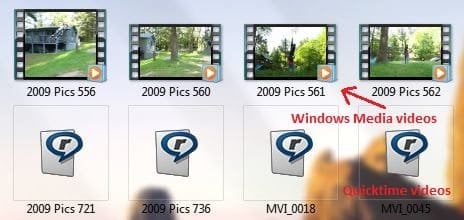
Suddenly I have video previews for everything except Quicktime video. (Quicktime also used to show previews.) I didn't change any settings, so I don't know what happened. Here is a screenshot of what is happening now.
 

Attachments

  • explorer screenshot.JPG
    explorer screenshot.JPG
    27.5 KB · Views: 27

My Computer

Computer Manufacturer/Model Number
HP G72 Notebook
OS
Windows 7 Professional 64-Bit
CPU
Intel Penitum inside 2.3 GHZ
Motherboard
Not sure
Memory
4 GB
Graphics Card(s)
Intel Mobile Express 400 Chipset (Unfortunately)
Screen Resolution
1600x900
Internet Speed
between 100 bytes/second (Not kidding! BYTES!!!) and 512 k
That's great news. I guess the default settings for WMP finally kicked in for you for this.

I'm afraid that I do not use Quicktime, so I'm not sure that I can help with that.
 

My Computer

Computer type
PC/Desktop
Computer Manufacturer/Model Number
Self built custom
OS
64-bit Windows 11 Pro for Workstations
CPU
Intel i7-8700K OC'd to 5 GHz
Motherboard
ASUS ROG Maximus XI Formula Z390
Memory
64 GB (4x16GB) G.SKILL TridentZ RGB DDR4 3600 MHz
Graphics Card(s)
ASUS ROG-STRIX-GTX1080TI-O11G-GAMING
Sound Card
Integrated
Monitor(s) Displays
2 x Samsung Odyssey G7 27"
Screen Resolution
2560x1440
Hard Drives
1TB Samsung 990 PRO M.2,
4TB Samsung 990 PRO PRO M.2,
TerraMaster F8 SSD Plus NAS
PSU
Seasonic Prime Titanium 850W
Case
Thermaltake Core P3
Cooling
Corsair Hydro H115i
Keyboard
Logitech wireless K800
Mouse
Logitech MX Master 4
Internet Speed
2 Gb/s Download and 100 Mb/s Upload
Antivirus
Malwarebyte Anti-Malware Premium
Browser
Google Chrome
Other Info
Logitech Z625 speaker system,
Logitech BRIO 4K Pro webcam,
HP Color LaserJet Pro MFP M477fdn,
APC SMART-UPS RT 1000 XL - SURT1000XLI,
Galaxy S23 Plus phone
MPEG is also not showing previews. I set the default player to Windows Media player so I'll see what happrns now.
 

My Computer

Computer Manufacturer/Model Number
HP G72 Notebook
OS
Windows 7 Professional 64-Bit
CPU
Intel Penitum inside 2.3 GHZ
Motherboard
Not sure
Memory
4 GB
Graphics Card(s)
Intel Mobile Express 400 Chipset (Unfortunately)
Screen Resolution
1600x900
Internet Speed
between 100 bytes/second (Not kidding! BYTES!!!) and 512 k
Back
Top