Video Size Cropping?

Brian6121990

Black Ops
Power User
VIP
Local time
10:48 PM
Messages
319
Location
san diego, ca
im sorry if this is a bit off topic from windows 7 but i was wondering if there is a program where i can create a custom size of a video? for example, i record my gaming of my ps3 (call of duty modern warfare 2) by using a....digital camera LOL (im planning to get easycap once i get the money) but for now i use a digital camera to record my gaming and i play in 16:9 1080p hd widescreen but the camera records everything in 4:3 (everything on sight in 4:3) and m ytv is widescreen. i see black bars at the top and bottom (since my room was dark) and i was wondering if there is an actual legit software that can allow me to do that. just think of it this way, i have a picture and i can just use snipping tool form win7/vista and crop size the photo to view it in a custom size i want but only in this time, i want it to crop the video size, not photo. (im not saying that if i can crop an picture image of a video, im asking to crop the video to video to actually view it on just the tv size itself).

thanks
 

My Computer

Computer type
PC/Desktop
Computer Manufacturer/Model Number
Macbook Pro Retina
OS
Mac OS X Yosemite
CPU
2.4 GHz Intel Core i7
Memory
8 GB 1600 MHz DDR3
Graphics Card(s)
NVIDIA GeForce GT 650M
Monitor(s) Displays
Retina
Screen Resolution
Retina
Hard Drives
250GB SSD
Other Info
Macbook Pro Retina (2013)

My Computer

Computer Manufacturer/Model Number
Homebrew PC - "Alpha_Dawg"
OS
Windows 7 Ultimate 64 bit Steve Ballmer Signature Edition
CPU
Intel Core 2 Quad - Q9550 - 2.83GHz stock - OC'd to 3.6GHz
Motherboard
Gigabyte EP45-UD3P
Memory
4GB DDR2 800MHz (PC6400) OCZ Reaper
Graphics Card(s)
Nvidia GE Force 8800 GTS
Sound Card
Asus Xonar DX
Monitor(s) Displays
Samsung SyncMaster 2333HD
Screen Resolution
1920 x 1080
Hard Drives
WD Caviar Black 750GB - 7200RPM - 32MB cache
WD Caviar Green 1.5TB - 5400RPM - 64MB cache
WD Caviar Green 2.0TB - 5400RPM - 64MB cache
PSU
PC Power & Cooling Silencer 750
Case
Gigabyte 3D Aurora
Cooling
Case is Air - 5ea. 120mm fans (mix of Arctic and Xigmatec)
Keyboard
MS Natural Wireless KB
Mouse
MS Wireless Mouse
Internet Speed
50 mbps down/5 mbps up
Other Info
AVerMedia - AVerTVHD G2 Dual Tuner Card
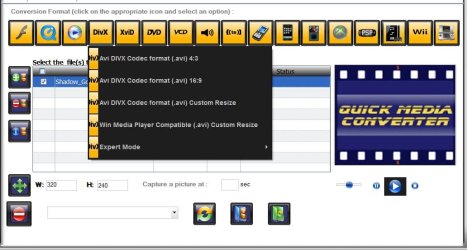
ima try it out and see what this software is about..there is a gui and a cli version.....?
 

My Computer

Computer type
PC/Desktop
Computer Manufacturer/Model Number
Macbook Pro Retina
OS
Mac OS X Yosemite
CPU
2.4 GHz Intel Core i7
Memory
8 GB 1600 MHz DDR3
Graphics Card(s)
NVIDIA GeForce GT 650M
Monitor(s) Displays
Retina
Screen Resolution
Retina
Hard Drives
250GB SSD
Other Info
Macbook Pro Retina (2013)
Give it a try... I know I have changed video formats with it for devices such as Ipods, etc... No where near as drastic as what you are attempting. Not sure if it can go from 4:3 to 16:9... if it does you will probably have black bars at left and right instead of top and bottom.

Or, since they are such different formats... if it converts without black bars at sides everything will appear stretched... short and chubby people, etc! LOL!
 

My Computer

Computer Manufacturer/Model Number
Homebrew PC - "Alpha_Dawg"
OS
Windows 7 Ultimate 64 bit Steve Ballmer Signature Edition
CPU
Intel Core 2 Quad - Q9550 - 2.83GHz stock - OC'd to 3.6GHz
Motherboard
Gigabyte EP45-UD3P
Memory
4GB DDR2 800MHz (PC6400) OCZ Reaper
Graphics Card(s)
Nvidia GE Force 8800 GTS
Sound Card
Asus Xonar DX
Monitor(s) Displays
Samsung SyncMaster 2333HD
Screen Resolution
1920 x 1080
Hard Drives
WD Caviar Black 750GB - 7200RPM - 32MB cache
WD Caviar Green 1.5TB - 5400RPM - 64MB cache
WD Caviar Green 2.0TB - 5400RPM - 64MB cache
PSU
PC Power & Cooling Silencer 750
Case
Gigabyte 3D Aurora
Cooling
Case is Air - 5ea. 120mm fans (mix of Arctic and Xigmatec)
Keyboard
MS Natural Wireless KB
Mouse
MS Wireless Mouse
Internet Speed
50 mbps down/5 mbps up
Other Info
AVerMedia - AVerTVHD G2 Dual Tuner Card
Is there a setting in the recorder itself you can change? Be easier than recoding.

But most any video editing software will allow cropping black bars.
Nero, MeGUI, Handbrake ...

MeGUI one of the best IMO,
You can crop, resize (choose different filters for resizing) through AVISynth scripts. Lots of options for just about anything you want to do.
Even cut & splice video & audio sections.
 

My Computer

Computer Manufacturer/Model Number
Custom (Self Build)
OS
Windows 7 Home Premium 64bit
CPU
Intel Core i7 2700k
Motherboard
eVGA P67 SLI
Memory
8GB Mushkin Redline Ridgebacks @1866
Graphics Card(s)
EVGA GTX570 SC
Sound Card
XiFi Titanium HD
Monitor(s) Displays
LG W2453V
Screen Resolution
1920x1080
Hard Drives
Intel 320 80GB -- Intel X25-V 40GB --WD Black 1TB x2 -- WD Blue 640GB
PSU
Seasonic x750
Case
Corsair 600T SE White
Cooling
eVGA Superclocked CPU Cooler
Keyboard
Saitek Cyborg
Antivirus
Kaspersky
Browser
IE
Other Info
LG BD/DVD
Give it a try... I know I have changed video formats with it for devices such as Ipods, etc... No where near as drastic as what you are attempting. Not sure if it can go from 4:3 to 16:9... if it does you will probably have black bars at left and right instead of top and bottom.

Or, since they are such different formats... if it converts without black bars at sides everything will appear stretched... short and chubby people, etc! LOL!

it keeps giving me error when editing the video size crop. ima just keep size as is untill i get dazzle dvd recorder or easycap to record my gameplay...thanks anyways though;)
 

My Computer

Computer type
PC/Desktop
Computer Manufacturer/Model Number
Macbook Pro Retina
OS
Mac OS X Yosemite
CPU
2.4 GHz Intel Core i7
Memory
8 GB 1600 MHz DDR3
Graphics Card(s)
NVIDIA GeForce GT 650M
Monitor(s) Displays
Retina
Screen Resolution
Retina
Hard Drives
250GB SSD
Other Info
Macbook Pro Retina (2013)

My Computer

Computer Manufacturer/Model Number
Micro-Star International/MS-7529
OS
Windows 7 Ultimate x32
CPU
DualCore Intel Pentium E2200, 2218 MHz (11 x 202)
Motherboard
MSI G31M3 V2 (MS-7529) (2 PCI, 1 PCI-E x16,2 DDR2 DIMM)
Memory
2 GB DDR2-800 DDR2 SDRAM
Graphics Card(s)
nVIDIA GeForce 9500GT 1GB
Sound Card
Realtek ALC888/1200 @ Intel 82801GB ICH7
Monitor(s) Displays
Samsung SyncMaster 2253BW (Digital) 22'' LCD
Screen Resolution
1680x1050
Hard Drives
SAMSUNG HD322IJ ATA Device (298 GB , IDE)

My Computer

Computer Manufacturer/Model Number
Homebrew PC - "Alpha_Dawg"
OS
Windows 7 Ultimate 64 bit Steve Ballmer Signature Edition
CPU
Intel Core 2 Quad - Q9550 - 2.83GHz stock - OC'd to 3.6GHz
Motherboard
Gigabyte EP45-UD3P
Memory
4GB DDR2 800MHz (PC6400) OCZ Reaper
Graphics Card(s)
Nvidia GE Force 8800 GTS
Sound Card
Asus Xonar DX
Monitor(s) Displays
Samsung SyncMaster 2333HD
Screen Resolution
1920 x 1080
Hard Drives
WD Caviar Black 750GB - 7200RPM - 32MB cache
WD Caviar Green 1.5TB - 5400RPM - 64MB cache
WD Caviar Green 2.0TB - 5400RPM - 64MB cache
PSU
PC Power & Cooling Silencer 750
Case
Gigabyte 3D Aurora
Cooling
Case is Air - 5ea. 120mm fans (mix of Arctic and Xigmatec)
Keyboard
MS Natural Wireless KB
Mouse
MS Wireless Mouse
Internet Speed
50 mbps down/5 mbps up
Other Info
AVerMedia - AVerTVHD G2 Dual Tuner Card
try VisiCrop.
very easy to use and no problems.

I already have found one. I am currently using Sony Vegas Pro 9. But thanks for the extra program info. I might try that one out just in case.
 

My Computer

Computer type
PC/Desktop
Computer Manufacturer/Model Number
Macbook Pro Retina
OS
Mac OS X Yosemite
CPU
2.4 GHz Intel Core i7
Memory
8 GB 1600 MHz DDR3
Graphics Card(s)
NVIDIA GeForce GT 650M
Monitor(s) Displays
Retina
Screen Resolution
Retina
Hard Drives
250GB SSD
Other Info
Macbook Pro Retina (2013)
I use too Vid Crop PRO, it's very simple tool for me.
Try use the this program.
 

My Computer

OS
Windows 7

My Computer

Computer Manufacturer/Model Number
HP dv6519tx
OS
Windows 7 Ultimate x64
CPU
1.80 GHz Intel Core 2 Duo processor T7100
Memory
3 gig ddr2
Graphics Card(s)
NVIDIA GeForce 8400M GS
Sound Card
Realtek High Definition Audio
Monitor(s) Displays
15.4” WXGA High Definition BrightView Widescreen
Screen Resolution
1280 x 800
Hard Drives
Hitachi 320 GB (5400 rpm)
PSU
90 W AC Power Adapter
Cooling
Kitchen plate under the lappy
Keyboard
101 key compatible
Mouse
Touch Pad with On/Off button and dedicated vertical Scroll
Internet Speed
Three Wireless internet prepaid using E160G USB dongle
Back
Top