JavaScript is disabled. For a better experience, please enable JavaScript in your browser before proceeding.
You are using an out of date browser. It may not display this or other websites correctly.
You should upgrade or use an
alternative browser .
Video Thumbnails not appreaing
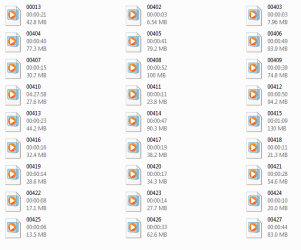
I noticed recently that most video thumbnails are just the windows media player generic file. I haven't done anything different or uninstalled anything lately, how can I fix this?
Capture.PNG
15.5 KB
· Views: 14
Computer Manufacturer/Model Number Dell XPS 8100 OS Windows 7 Home Premium 64-bit CPU Intel Core i7 860 @ 2.80GHz Motherboard Dell Inc. 0T568R Memory 8.0GB Dual-Channel DDR3 @ 529MHz 4-7-7-20 Graphics Card(s) ATI Radeon HD 5770 Sound Card Realtek High Definition Audio Monitor(s) Displays 3 Widescreen HD Monitors Screen Resolution 1600x800 Hard Drives 1000GB Seagate ST31000528AS (SCSI) PSU 750W Case - Cooling Fans Keyboard Logitech Illuminated Keyboard Mouse Logitech MX Internet Speed 6MBS-15MBS Upload Other Info Laptop (Dell Studio 1537)
What format are these videos?
OS Windows 7 Ultimate x64 SP1 CPU Intel Core i3 530 2.93 Ghz Clarkdale Motherboard ASRock P55 PRO/USB3 LGA 1156 Memory 4 GB OCZ DDR3 1600 (PC12800) Low Voltage Desktop Memory Graphics Card(s) Nvidia GeForce GTX 550 Ti with 1 GB of RAM Sound Card Realtek HD ALC892 Monitor(s) Displays 20'' eMachines E202HDbmd Glare Panel Widescreen Screen Resolution 1600 x 900 Hard Drives Western Digital 1 TB Caviar Black Edition (7200 RPM) SATA PSU Rosewill Xtreme Series RX750-D-B ATX12V v2.2 & EPS12V (750W) Case Cooler Master Centurion 534 RC-534-KKN2-GP Mid-Tower Cooling Standard Case Fans and Stock CPU Heatsink Keyboard Microsoft Wireless Optical Desktop Elite Mouse Microsoft Wireless Optical Desktop Elite Internet Speed 7.1 Mbps Verizon DSL
Student IT
Power User
Thread Starter
What format are these videos?
Every format, wmv, mpeg, avchd, mts, etc.
Computer Manufacturer/Model Number Dell XPS 8100 OS Windows 7 Home Premium 64-bit CPU Intel Core i7 860 @ 2.80GHz Motherboard Dell Inc. 0T568R Memory 8.0GB Dual-Channel DDR3 @ 529MHz 4-7-7-20 Graphics Card(s) ATI Radeon HD 5770 Sound Card Realtek High Definition Audio Monitor(s) Displays 3 Widescreen HD Monitors Screen Resolution 1600x800 Hard Drives 1000GB Seagate ST31000528AS (SCSI) PSU 750W Case - Cooling Fans Keyboard Logitech Illuminated Keyboard Mouse Logitech MX Internet Speed 6MBS-15MBS Upload Other Info Laptop (Dell Studio 1537)
New member
Guru
Gold Member
VIP
AVCHD should be a folder structure, like a BD format. Not a File type
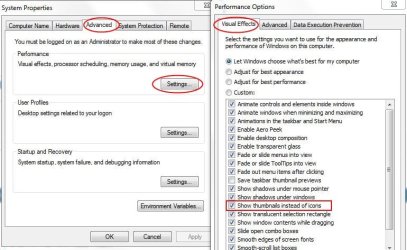
Try this:
From Start
rb:
1) Right Click "
My Computer " and Choose Properties.
2) Click "
Advanced System Settings "
3) Advanced Tab --> Settings
4) Visual Effects tab
Make sure "Show thumbnails instead of icons" is checked.
Capture.JPG
64.2 KB
· Views: 30
Computer Manufacturer/Model Number Custom (Self Build) OS Windows 7 Home Premium 64bit CPU Intel Core i7 2700k Motherboard eVGA P67 SLI Memory 8GB Mushkin Redline Ridgebacks @1866 Graphics Card(s) EVGA GTX570 SC Sound Card XiFi Titanium HD Monitor(s) Displays LG W2453V Screen Resolution 1920x1080 Hard Drives Intel 320 80GB -- Intel X25-V 40GB --WD Black 1TB x2 -- WD Blue 640GB PSU Seasonic x750 Case Corsair 600T SE White Cooling eVGA Superclocked CPU Cooler Keyboard Saitek Cyborg Antivirus Kaspersky Browser IE Other Info LG BD/DVD
New member
Guru
Gold Member
VIP
Also go to the video folder > Organize > Folder and search options > View tab > uncheck the first box "Always show Icons, never Thumbnails"
Computer Manufacturer/Model Number HP, Dell, Gateway, Toshiba - 4 laptops and 2 desktops OS Vista, Windows7, Mint Mate, Zorin, Windows 8 CPU from 1.6GHz Duo to i7 Monitor(s) Displays 2x HP w2207 Hard Drives 5x HDD, 7x SSD, 12x Externals Keyboard with trackball - no mices Mouse Trackball mice Internet Speed DSL 6000
Student IT
Power User
Thread Starter
Wishmaster: whs:
Computer Manufacturer/Model Number Dell XPS 8100 OS Windows 7 Home Premium 64-bit CPU Intel Core i7 860 @ 2.80GHz Motherboard Dell Inc. 0T568R Memory 8.0GB Dual-Channel DDR3 @ 529MHz 4-7-7-20 Graphics Card(s) ATI Radeon HD 5770 Sound Card Realtek High Definition Audio Monitor(s) Displays 3 Widescreen HD Monitors Screen Resolution 1600x800 Hard Drives 1000GB Seagate ST31000528AS (SCSI) PSU 750W Case - Cooling Fans Keyboard Logitech Illuminated Keyboard Mouse Logitech MX Internet Speed 6MBS-15MBS Upload Other Info Laptop (Dell Studio 1537)
New member
Guru
Gold Member
VIP
Hmm, now I am at a loss. What is actually the file format of those videos?
Computer Manufacturer/Model Number HP, Dell, Gateway, Toshiba - 4 laptops and 2 desktops OS Vista, Windows7, Mint Mate, Zorin, Windows 8 CPU from 1.6GHz Duo to i7 Monitor(s) Displays 2x HP w2207 Hard Drives 5x HDD, 7x SSD, 12x Externals Keyboard with trackball - no mices Mouse Trackball mice Internet Speed DSL 6000
Student IT
Power User
Thread Starter
Hmm, now I am at a loss. What is actually the file format of those videos?
Every format, such as .WMV .AVI .MPG .MTS and others.
Computer Manufacturer/Model Number Dell XPS 8100 OS Windows 7 Home Premium 64-bit CPU Intel Core i7 860 @ 2.80GHz Motherboard Dell Inc. 0T568R Memory 8.0GB Dual-Channel DDR3 @ 529MHz 4-7-7-20 Graphics Card(s) ATI Radeon HD 5770 Sound Card Realtek High Definition Audio Monitor(s) Displays 3 Widescreen HD Monitors Screen Resolution 1600x800 Hard Drives 1000GB Seagate ST31000528AS (SCSI) PSU 750W Case - Cooling Fans Keyboard Logitech Illuminated Keyboard Mouse Logitech MX Internet Speed 6MBS-15MBS Upload Other Info Laptop (Dell Studio 1537)
Additionally, if you haven't already tried it, do an "sfc /scannow" in the command prompt and try installing Shark's 007 Codecs.
OS Windows 7 Ultimate x64 SP1 CPU Intel Core i3 530 2.93 Ghz Clarkdale Motherboard ASRock P55 PRO/USB3 LGA 1156 Memory 4 GB OCZ DDR3 1600 (PC12800) Low Voltage Desktop Memory Graphics Card(s) Nvidia GeForce GTX 550 Ti with 1 GB of RAM Sound Card Realtek HD ALC892 Monitor(s) Displays 20'' eMachines E202HDbmd Glare Panel Widescreen Screen Resolution 1600 x 900 Hard Drives Western Digital 1 TB Caviar Black Edition (7200 RPM) SATA PSU Rosewill Xtreme Series RX750-D-B ATX12V v2.2 & EPS12V (750W) Case Cooler Master Centurion 534 RC-534-KKN2-GP Mid-Tower Cooling Standard Case Fans and Stock CPU Heatsink Keyboard Microsoft Wireless Optical Desktop Elite Mouse Microsoft Wireless Optical Desktop Elite Internet Speed 7.1 Mbps Verizon DSL
Student IT
Power User
Thread Starter
Have you cleared your thumbnails cache through the
Disk Clean Up?
Yes, and with Ccleaner.
Computer Manufacturer/Model Number Dell XPS 8100 OS Windows 7 Home Premium 64-bit CPU Intel Core i7 860 @ 2.80GHz Motherboard Dell Inc. 0T568R Memory 8.0GB Dual-Channel DDR3 @ 529MHz 4-7-7-20 Graphics Card(s) ATI Radeon HD 5770 Sound Card Realtek High Definition Audio Monitor(s) Displays 3 Widescreen HD Monitors Screen Resolution 1600x800 Hard Drives 1000GB Seagate ST31000528AS (SCSI) PSU 750W Case - Cooling Fans Keyboard Logitech Illuminated Keyboard Mouse Logitech MX Internet Speed 6MBS-15MBS Upload Other Info Laptop (Dell Studio 1537)
Student IT
Power User
Thread Starter
Additionally, if you haven't already tried it, do an "sfc /scannow" in the command prompt and try installing Shark's 007 Codecs.
I've scanned that sfc thing before and I have topic that none answered asking what to do because Windows found errors that could not be fixed.
Computer Manufacturer/Model Number Dell XPS 8100 OS Windows 7 Home Premium 64-bit CPU Intel Core i7 860 @ 2.80GHz Motherboard Dell Inc. 0T568R Memory 8.0GB Dual-Channel DDR3 @ 529MHz 4-7-7-20 Graphics Card(s) ATI Radeon HD 5770 Sound Card Realtek High Definition Audio Monitor(s) Displays 3 Widescreen HD Monitors Screen Resolution 1600x800 Hard Drives 1000GB Seagate ST31000528AS (SCSI) PSU 750W Case - Cooling Fans Keyboard Logitech Illuminated Keyboard Mouse Logitech MX Internet Speed 6MBS-15MBS Upload Other Info Laptop (Dell Studio 1537)
Hmm, now I am at a loss. What is actually the file format of those videos?
I'm with you now. I don't use WMP so I'm not sure of its subtleties!
I noticed recently that most video thumbnails are just the windows media player generic file. I haven't done anything different or uninstalled anything lately, how can I fix this?
If you even used a player called 'Splayer' it is known to destroy the native registry keys concerning these formats.
Computer Manufacturer/Model Number Selfbuilt OS Windows 7 Ultimate 64bit CPU i7 2600k Motherboard asus P8Z68-V LE Memory 16GB (4x4) corsair vengeance Graphics Card(s) Intel HD3000 iGPU / AMD HD6870 1024MB Sound Card bitstreamed to an Onkyo 609 Monitor(s) Displays Asus VE278 27" LED / Bravia EX7 60" LED Screen Resolution native 1080p x2 Hard Drives 4x 2TB int. + 2x 2TB external and a SSD for the boot drive. PSU 650w Antec Case NZXT tempest evo Cooling air/stock Keyboard Dell Mouse logitech m505 Internet Speed dual: cable/blackberry tether for travel use Other Info BD re-writer //
Student IT
Power User
Thread Starter
Does anyone have any suggestions on how to fix this? It's really annoying!
Computer Manufacturer/Model Number Dell XPS 8100 OS Windows 7 Home Premium 64-bit CPU Intel Core i7 860 @ 2.80GHz Motherboard Dell Inc. 0T568R Memory 8.0GB Dual-Channel DDR3 @ 529MHz 4-7-7-20 Graphics Card(s) ATI Radeon HD 5770 Sound Card Realtek High Definition Audio Monitor(s) Displays 3 Widescreen HD Monitors Screen Resolution 1600x800 Hard Drives 1000GB Seagate ST31000528AS (SCSI) PSU 750W Case - Cooling Fans Keyboard Logitech Illuminated Keyboard Mouse Logitech MX Internet Speed 6MBS-15MBS Upload Other Info Laptop (Dell Studio 1537)
Student IT
Power User
Thread Starter
I noticed recently that most video thumbnails are just the windows media player generic file. I haven't done anything different or uninstalled anything lately, how can I fix this?
If you even used a player called 'Splayer' it is known to destroy the native registry keys concerning these formats.
I downloaded your software in your signature and got 10 TROJANS - WTF!?
Computer Manufacturer/Model Number Dell XPS 8100 OS Windows 7 Home Premium 64-bit CPU Intel Core i7 860 @ 2.80GHz Motherboard Dell Inc. 0T568R Memory 8.0GB Dual-Channel DDR3 @ 529MHz 4-7-7-20 Graphics Card(s) ATI Radeon HD 5770 Sound Card Realtek High Definition Audio Monitor(s) Displays 3 Widescreen HD Monitors Screen Resolution 1600x800 Hard Drives 1000GB Seagate ST31000528AS (SCSI) PSU 750W Case - Cooling Fans Keyboard Logitech Illuminated Keyboard Mouse Logitech MX Internet Speed 6MBS-15MBS Upload Other Info Laptop (Dell Studio 1537)




 rb:
rb: