Videos keep stuttering/freezing no matter what media player used

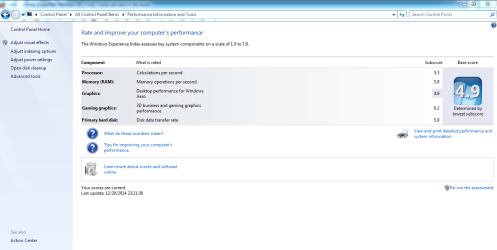
I use CCCP for a codec pack, and I last updated it maybe Augustish. A few months before the problem started. Here is my WEI. It is a 4.9 right now. It was a 7.x before I downgraded to Windows 7.
 

Attachments

  • Capture.PNG
    Capture.PNG
    52.5 KB · Views: 9

My Computer My Computer

At a glance

Microsoft Windows 7 Ultimate 64-bit 7601 Mult...AMD A4-4300M APU with Radeon(tm) HD Graphics4.00 GBAMD Radeon HD 7420G
Computer type
Laptop
Computer Manufacturer/Model Number
HP ENVY dv6-7213nr Notebook PC
OS
Microsoft Windows 7 Ultimate 64-bit 7601 Multiprocessor Free Service Pack 1
CPU
AMD A4-4300M APU with Radeon(tm) HD Graphics
Motherboard
Hewlett-Packard 182D
Memory
4.00 GB
Graphics Card(s)
AMD Radeon HD 7420G
Sound Card
(1) AMD High Definition Audio Device (2) IDT High Definiti
Screen Resolution
1366 x 768 x 32 bits (4294967296 colors) @ 60 Hz
Hard Drives
ST9500325AS ATA Device
Internet Speed
8.32 Mbps Download, 4.78 Mbps Upload
Antivirus
Avast, Malware Bytes
Browser
Chrome, Firefox

My Computer My Computer

At a glance

Win-7-Pro64bit 7-H-Prem-64biti7-5930K 2nd i9-9940x both water blocked VRM'...Trident-z 3200C14 2nd Trident-z 3600C16EVGA 1080ti ftw3 2nd Titan Xp both water blocked
Computer type
PC/Desktop
Computer Manufacturer/Model Number
Custom assembled by me :}
OS
Win-7-Pro64bit 7-H-Prem-64bit
CPU
i7-5930K 2nd i9-9940x both water blocked VRM's too
Motherboard
ASUS SABERTOOTH X99 2nd ASUS x299 Apex
Memory
Trident-z 3200C14 2nd Trident-z 3600C16
Graphics Card(s)
EVGA 1080ti ftw3 2nd Titan Xp both water blocked
Sound Card
Built-in Realtek
Monitor(s) Displays
1-AOC G2460PG 24"G-Sync 144Hz/ 2nd 1-ASUS VG248QE 24" 144Hz
Screen Resolution
1920 x 1080 144Hz
Hard Drives
2-Samsung M.2 Evo & Evo Plus
2-Samsung 850 EVO 500GB SSD's/ 3-2.5 W.D. Black 1tb-&3-1tb/3-3.5 WD Black 1tb hdd's
PSU
EVGA SuperNOVA 1000-P2 2nd 1200-P2
Case
2-Corsair Obsidian Series 450D Black ATX Mid Tower
Cooling
Custom water loops
Keyboard
Logitech G710+/ 2nd Logitech G910
Mouse
2-RedDragon M901 Perdition 16400 dpi Gaming mouse = wired
Internet Speed
Comcast Ping 19ms 89.31mbps download speed 6.12mbps upload
Antivirus
Malwarebytes Pro/ Superantispyware Pro
Browser
FireFox & Pale moon
Other Info
2nd ASUS X299 Apex/Intel i9-9940x with Custom water loop/7H-Prem-x64/Corsair 450D case/Ram Trident-z 3600C16 4x8gb / Samsung970Evo plus 500gb SSD/Dual ssd EZ swap evo/PSU EVGA SuperNova 1200w-P2 80+Platinum/GPU Titan Xp /8-ML-140 on push-pull on 2-280GTX rads
CCCP - Combined Community Codec Pack is the CCCP website. Windows 8 definitely has WEI. Before I chose this one, I made sure it had the highest WEI out of all of them. Normally I would have gone by specs, but I got it from Aaron's, and they didn't have the specs available. So it was the quickest way I chose by.
 

My Computer My Computer

At a glance

Microsoft Windows 7 Ultimate 64-bit 7601 Mult...AMD A4-4300M APU with Radeon(tm) HD Graphics4.00 GBAMD Radeon HD 7420G
Computer type
Laptop
Computer Manufacturer/Model Number
HP ENVY dv6-7213nr Notebook PC
OS
Microsoft Windows 7 Ultimate 64-bit 7601 Multiprocessor Free Service Pack 1
CPU
AMD A4-4300M APU with Radeon(tm) HD Graphics
Motherboard
Hewlett-Packard 182D
Memory
4.00 GB
Graphics Card(s)
AMD Radeon HD 7420G
Sound Card
(1) AMD High Definition Audio Device (2) IDT High Definiti
Screen Resolution
1366 x 768 x 32 bits (4294967296 colors) @ 60 Hz
Hard Drives
ST9500325AS ATA Device
Internet Speed
8.32 Mbps Download, 4.78 Mbps Upload
Antivirus
Avast, Malware Bytes
Browser
Chrome, Firefox
Okay I asked others to look in here,
Until someone has something to offer please see if you can post this info and try this,
Use Clean boot,
http://www.sevenforums.com/tutorials/179159-troubleshoot-application-conflicts-performing-clean-startup.html
Click Start and type in the search box,
msconfig
Click on the suggestion on top or hit the Enter key,
Go to the Startup section and take some screen shots for a complete list,
Go to the Services section and on the bottom left Check the box to Hide All Microsoft services,
Repeat the screen shots,

See the links above my signature on how to take and upload screen shots here,
Cheers.
 

My Computer My Computer

At a glance

Win-7-Pro64bit 7-H-Prem-64biti7-5930K 2nd i9-9940x both water blocked VRM'...Trident-z 3200C14 2nd Trident-z 3600C16EVGA 1080ti ftw3 2nd Titan Xp both water blocked
Computer type
PC/Desktop
Computer Manufacturer/Model Number
Custom assembled by me :}
OS
Win-7-Pro64bit 7-H-Prem-64bit
CPU
i7-5930K 2nd i9-9940x both water blocked VRM's too
Motherboard
ASUS SABERTOOTH X99 2nd ASUS x299 Apex
Memory
Trident-z 3200C14 2nd Trident-z 3600C16
Graphics Card(s)
EVGA 1080ti ftw3 2nd Titan Xp both water blocked
Sound Card
Built-in Realtek
Monitor(s) Displays
1-AOC G2460PG 24"G-Sync 144Hz/ 2nd 1-ASUS VG248QE 24" 144Hz
Screen Resolution
1920 x 1080 144Hz
Hard Drives
2-Samsung M.2 Evo & Evo Plus
2-Samsung 850 EVO 500GB SSD's/ 3-2.5 W.D. Black 1tb-&3-1tb/3-3.5 WD Black 1tb hdd's
PSU
EVGA SuperNOVA 1000-P2 2nd 1200-P2
Case
2-Corsair Obsidian Series 450D Black ATX Mid Tower
Cooling
Custom water loops
Keyboard
Logitech G710+/ 2nd Logitech G910
Mouse
2-RedDragon M901 Perdition 16400 dpi Gaming mouse = wired
Internet Speed
Comcast Ping 19ms 89.31mbps download speed 6.12mbps upload
Antivirus
Malwarebytes Pro/ Superantispyware Pro
Browser
FireFox & Pale moon
Other Info
2nd ASUS X299 Apex/Intel i9-9940x with Custom water loop/7H-Prem-x64/Corsair 450D case/Ram Trident-z 3600C16 4x8gb / Samsung970Evo plus 500gb SSD/Dual ssd EZ swap evo/PSU EVGA SuperNova 1200w-P2 80+Platinum/GPU Titan Xp /8-ML-140 on push-pull on 2-280GTX rads
Hi Timewalker, I'm one of the other members.....

My thoughts on your situation are; Even though you have stuttering with saved videos, an incorrect driver can still cause latency. Anything above the 500μs line is suspect.

This deals with Win8, but is applicable to 7 also. Don't forget, you may have downgraded to 7 from 8, but you still have a machine that was setup for 8, and I have noticed you only have 4MB of RAM installed, that could also be part of the problem.

DPC latency, which (for the uninitiated) basically is how fast the "needs to be processed as fast as possible" tasks in a PC are run. Deferred procedure calls (DPCs) allow programs to "queue" actions to be done quickly in the processor scheduler, and they hang the whole computer until they get processed.

Source: https://social.technet.microsoft.co...ormance-and-driver-issues?forum=W8ITProPreRel
Further on down in this quoted link are two tools you may want to run:
One tool is the Intel chipset update utility, but since you have AMD use this: AMD Driver Autodetect Even if you've used this before we may be able to find the proper driver(s) for you.

The other is: Installing the Windows ADK this is more complicated and the CMDs that are there won't run on my machine because, I believe, I don't have the performance-toolkit-xperf installed: http://blogs.msdn.com/b/ntdebugging/archive/2008/04/03/windows-performance-toolkit-xperf.asp, but if you want to try it following either the D/L or the blog link that gives a better explanation, it should on yours.

Set the features you want to use just as shown in the screenshot. After you install the ADK or the separate xperf toolkit, follow the instructions to run the two CMDs and post the DPC.txt and or ETL files here, it may help find the offending driver(s).

If the DPC.txt or ETL files are too big, zip them using Windows in-house zipper found in the files context menu; Send To >Compressed (zipped) Folder, you will see a zipped replica on your desktop send that.
There is an 8MB limitation on zipped files.


Related Links:
DPC Latency Checker Read and understand the documentation.

Using Network Monitor to View ETL Files (Windows)

Installing the Windows ADK


EDIT:
Something that I forgot to mention; You may want to try VLC If you do make sure you remove any other codec's you may have installed, see if VLC improves matters for you, trying this would be easier than searching for incompatible drivers..

 
Last edited:

My Computer My Computer

At a glance

Originally Win 7 Hm Prem x64 Ver 6.1.7600 Bui...Intel i3 530 2.93GHz, 2933MHz 2 Cores 4 Logic...6GB of 1,333MHz DDR3 SDRAM32MB Intel Graphics Media Accelerator HD IGChip
Computer type
PC/Desktop
Computer Manufacturer/Model Number
Gateway DX4831-01e (Mid-Tower Desktop)
OS
Originally Win 7 Hm Prem x64 Ver 6.1.7600 Build 7601-SP1 | Upgraded to Windows 10 December 14, 2019
CPU
Intel i3 530 2.93GHz, 2933MHz 2 Cores 4 Logical Processors
Motherboard
Gateway H57M01 133 megahertz
Memory
6GB of 1,333MHz DDR3 SDRAM
Graphics Card(s)
32MB Intel Graphics Media Accelerator HD IGChip
Sound Card
Realtek High Definition Audio
Monitor(s) Displays
Gateway HX2000 20inch TFT active matrix TN
Screen Resolution
1600 x 900 x 59 hertz
Hard Drives
WDC WD10EADS-00M2B0 [HDD] (1000.20 GB) -- drive 0,
HL-DT-ST DVDRAM GH41N [CD-ROM dr]
Four card readers, and Four USB 2.0
PSU
300watts.
Case
Mid-Tower Desktop
Cooling
Stock from Gateway
Keyboard
Natural Ergonomic Keyboard 4000, see Other Info
Mouse
Orig. Gateway wore out now using Insignia USB wired optical
Internet Speed
Vz FIOS 10ms png 57.64Mbps down 65.53Mbps up Speedtest.org
Antivirus
Zamana Anti-logger with Anti-malware, MSE, Windows Firewall,
Browser
IE11.0.9600.19399-Upd ver11.0.135, Firefox 68.0.1 x64
Other Info
System Specs by Belarc.

BIOS: American Megatrends Inc. P01-A0 11/17/2009

Replaced the MS 'Natural' Standard PS/2 Enhanced 101-102 Keyboard with a new Natural Ergonomic Keyboard 4000 on August 1st 2014.

Canon Pixma MG3222 Printer.

Updated to IE11 on 12102015 | Fios Quantum Router g1100

Additional AV: SpywareBlaster, manual Mbam, SAS
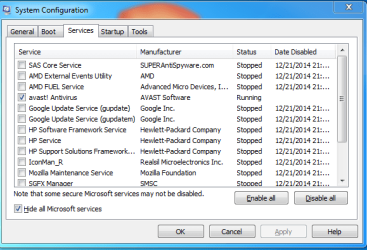
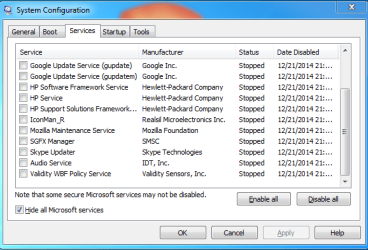
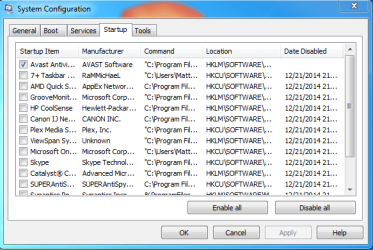
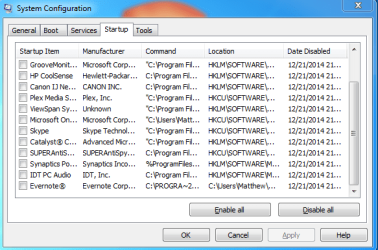
I've tried VLC in the past (note, this was several years ago, so I'll give it another shot after I post this) and had problems with it. If it wasn't the main focus (even if I had two things on the screen), it would stutter. I've used the AMD Auto Detect when I installed Windows 7, but I just used it again and it said I had the newest driver available. I'll also download the ADK, though it did confuse me a bit when I looked through the blog. Also, here are the screenshots of my services and startup after doing a Clean Boot. Oddly enough, my system is a lot laggier after doing the clean boot, Chrome gave me quite a bit of trouble to attach the shots.
 

Attachments

  • Services 1.PNG
    Services 1.PNG
    16.5 KB · Views: 7
  • Services 2.PNG
    Services 2.PNG
    15.7 KB · Views: 7
  • Startup 1.PNG
    Startup 1.PNG
    17.1 KB · Views: 7
  • Startup 2.PNG
    Startup 2.PNG
    16.2 KB · Views: 7

My Computer My Computer

At a glance

Microsoft Windows 7 Ultimate 64-bit 7601 Mult...AMD A4-4300M APU with Radeon(tm) HD Graphics4.00 GBAMD Radeon HD 7420G
Computer type
Laptop
Computer Manufacturer/Model Number
HP ENVY dv6-7213nr Notebook PC
OS
Microsoft Windows 7 Ultimate 64-bit 7601 Multiprocessor Free Service Pack 1
CPU
AMD A4-4300M APU with Radeon(tm) HD Graphics
Motherboard
Hewlett-Packard 182D
Memory
4.00 GB
Graphics Card(s)
AMD Radeon HD 7420G
Sound Card
(1) AMD High Definition Audio Device (2) IDT High Definiti
Screen Resolution
1366 x 768 x 32 bits (4294967296 colors) @ 60 Hz
Hard Drives
ST9500325AS ATA Device
Internet Speed
8.32 Mbps Download, 4.78 Mbps Upload
Antivirus
Avast, Malware Bytes
Browser
Chrome, Firefox
When you tried VLC last, was it on this same machine?

If you have any problems with the ADK I'll try to help explain it.

Its not surprising it lagged even worse with a clean boot, a lot of functionality is lost by not including certain Services.
We are talking clean boot instead of Safe Mode, aren't we? There is a difference.

And leave everything off but Avast in Startups.
 

My Computer My Computer

At a glance

Originally Win 7 Hm Prem x64 Ver 6.1.7600 Bui...Intel i3 530 2.93GHz, 2933MHz 2 Cores 4 Logic...6GB of 1,333MHz DDR3 SDRAM32MB Intel Graphics Media Accelerator HD IGChip
Computer type
PC/Desktop
Computer Manufacturer/Model Number
Gateway DX4831-01e (Mid-Tower Desktop)
OS
Originally Win 7 Hm Prem x64 Ver 6.1.7600 Build 7601-SP1 | Upgraded to Windows 10 December 14, 2019
CPU
Intel i3 530 2.93GHz, 2933MHz 2 Cores 4 Logical Processors
Motherboard
Gateway H57M01 133 megahertz
Memory
6GB of 1,333MHz DDR3 SDRAM
Graphics Card(s)
32MB Intel Graphics Media Accelerator HD IGChip
Sound Card
Realtek High Definition Audio
Monitor(s) Displays
Gateway HX2000 20inch TFT active matrix TN
Screen Resolution
1600 x 900 x 59 hertz
Hard Drives
WDC WD10EADS-00M2B0 [HDD] (1000.20 GB) -- drive 0,
HL-DT-ST DVDRAM GH41N [CD-ROM dr]
Four card readers, and Four USB 2.0
PSU
300watts.
Case
Mid-Tower Desktop
Cooling
Stock from Gateway
Keyboard
Natural Ergonomic Keyboard 4000, see Other Info
Mouse
Orig. Gateway wore out now using Insignia USB wired optical
Internet Speed
Vz FIOS 10ms png 57.64Mbps down 65.53Mbps up Speedtest.org
Antivirus
Zamana Anti-logger with Anti-malware, MSE, Windows Firewall,
Browser
IE11.0.9600.19399-Upd ver11.0.135, Firefox 68.0.1 x64
Other Info
System Specs by Belarc.

BIOS: American Megatrends Inc. P01-A0 11/17/2009

Replaced the MS 'Natural' Standard PS/2 Enhanced 101-102 Keyboard with a new Natural Ergonomic Keyboard 4000 on August 1st 2014.

Canon Pixma MG3222 Printer.

Updated to IE11 on 12102015 | Fios Quantum Router g1100

Additional AV: SpywareBlaster, manual Mbam, SAS
No. It was a desktop I had years ago. Yea, I did do the clean boot as posted in the link Thrash posted. The Windows ADK just finished downloading, so I am going to test that out now.

Edit: Yea, I am completely lost on XPerf, so I think I'll try VLC first.

Edit Edit: Not only did it freeze on VLC, it also distorted the picture and froze my entire computer. Had to restart it.
 
Last edited:

My Computer My Computer

At a glance

Microsoft Windows 7 Ultimate 64-bit 7601 Mult...AMD A4-4300M APU with Radeon(tm) HD Graphics4.00 GBAMD Radeon HD 7420G
Computer type
Laptop
Computer Manufacturer/Model Number
HP ENVY dv6-7213nr Notebook PC
OS
Microsoft Windows 7 Ultimate 64-bit 7601 Multiprocessor Free Service Pack 1
CPU
AMD A4-4300M APU with Radeon(tm) HD Graphics
Motherboard
Hewlett-Packard 182D
Memory
4.00 GB
Graphics Card(s)
AMD Radeon HD 7420G
Sound Card
(1) AMD High Definition Audio Device (2) IDT High Definiti
Screen Resolution
1366 x 768 x 32 bits (4294967296 colors) @ 60 Hz
Hard Drives
ST9500325AS ATA Device
Internet Speed
8.32 Mbps Download, 4.78 Mbps Upload
Antivirus
Avast, Malware Bytes
Browser
Chrome, Firefox
Damn! I don't know why you should be having so much trouble with VLC. I would remove VLC and put CCCP back on, then read up and install xperf and run it to see if you can generate any logs.

Related links to hopefully make xperf easier to understand:
https://randomascii.wordpress.com/2013/04/20/xperf-basics-recording-a-trace-the-easy-way/ You can skip step 2.

https://xperf123.codeplex.com/

This is a search for youtube videos on xperf, sometimes visuals help make topics easier to understand: https://www.youtube.com/results?search_query=Xperf+for+Windows+

It's getting late for me and I'm calling it a night. Lets see if ThrashZone (TZ) has any ideas until I get back tomorrow, until then I'm going to think this one over.
 

My Computer My Computer

At a glance

Originally Win 7 Hm Prem x64 Ver 6.1.7600 Bui...Intel i3 530 2.93GHz, 2933MHz 2 Cores 4 Logic...6GB of 1,333MHz DDR3 SDRAM32MB Intel Graphics Media Accelerator HD IGChip
Computer type
PC/Desktop
Computer Manufacturer/Model Number
Gateway DX4831-01e (Mid-Tower Desktop)
OS
Originally Win 7 Hm Prem x64 Ver 6.1.7600 Build 7601-SP1 | Upgraded to Windows 10 December 14, 2019
CPU
Intel i3 530 2.93GHz, 2933MHz 2 Cores 4 Logical Processors
Motherboard
Gateway H57M01 133 megahertz
Memory
6GB of 1,333MHz DDR3 SDRAM
Graphics Card(s)
32MB Intel Graphics Media Accelerator HD IGChip
Sound Card
Realtek High Definition Audio
Monitor(s) Displays
Gateway HX2000 20inch TFT active matrix TN
Screen Resolution
1600 x 900 x 59 hertz
Hard Drives
WDC WD10EADS-00M2B0 [HDD] (1000.20 GB) -- drive 0,
HL-DT-ST DVDRAM GH41N [CD-ROM dr]
Four card readers, and Four USB 2.0
PSU
300watts.
Case
Mid-Tower Desktop
Cooling
Stock from Gateway
Keyboard
Natural Ergonomic Keyboard 4000, see Other Info
Mouse
Orig. Gateway wore out now using Insignia USB wired optical
Internet Speed
Vz FIOS 10ms png 57.64Mbps down 65.53Mbps up Speedtest.org
Antivirus
Zamana Anti-logger with Anti-malware, MSE, Windows Firewall,
Browser
IE11.0.9600.19399-Upd ver11.0.135, Firefox 68.0.1 x64
Other Info
System Specs by Belarc.

BIOS: American Megatrends Inc. P01-A0 11/17/2009

Replaced the MS 'Natural' Standard PS/2 Enhanced 101-102 Keyboard with a new Natural Ergonomic Keyboard 4000 on August 1st 2014.

Canon Pixma MG3222 Printer.

Updated to IE11 on 12102015 | Fios Quantum Router g1100

Additional AV: SpywareBlaster, manual Mbam, SAS
I used the first link to find WPAUI, and managed a trace. I didn't know what to look for, so I turned all the options on. It won't let me post it, though. I go to attach it, and all I get is "404 - File or directory not found. The resource you are looking for might have been removed, had its name changed, or is temporarily unavailable."
 

My Computer My Computer

At a glance

Microsoft Windows 7 Ultimate 64-bit 7601 Mult...AMD A4-4300M APU with Radeon(tm) HD Graphics4.00 GBAMD Radeon HD 7420G
Computer type
Laptop
Computer Manufacturer/Model Number
HP ENVY dv6-7213nr Notebook PC
OS
Microsoft Windows 7 Ultimate 64-bit 7601 Multiprocessor Free Service Pack 1
CPU
AMD A4-4300M APU with Radeon(tm) HD Graphics
Motherboard
Hewlett-Packard 182D
Memory
4.00 GB
Graphics Card(s)
AMD Radeon HD 7420G
Sound Card
(1) AMD High Definition Audio Device (2) IDT High Definiti
Screen Resolution
1366 x 768 x 32 bits (4294967296 colors) @ 60 Hz
Hard Drives
ST9500325AS ATA Device
Internet Speed
8.32 Mbps Download, 4.78 Mbps Upload
Antivirus
Avast, Malware Bytes
Browser
Chrome, Firefox

My Computer My Computer

At a glance

Win-7-Pro64bit 7-H-Prem-64biti7-5930K 2nd i9-9940x both water blocked VRM'...Trident-z 3200C14 2nd Trident-z 3600C16EVGA 1080ti ftw3 2nd Titan Xp both water blocked
Computer type
PC/Desktop
Computer Manufacturer/Model Number
Custom assembled by me :}
OS
Win-7-Pro64bit 7-H-Prem-64bit
CPU
i7-5930K 2nd i9-9940x both water blocked VRM's too
Motherboard
ASUS SABERTOOTH X99 2nd ASUS x299 Apex
Memory
Trident-z 3200C14 2nd Trident-z 3600C16
Graphics Card(s)
EVGA 1080ti ftw3 2nd Titan Xp both water blocked
Sound Card
Built-in Realtek
Monitor(s) Displays
1-AOC G2460PG 24"G-Sync 144Hz/ 2nd 1-ASUS VG248QE 24" 144Hz
Screen Resolution
1920 x 1080 144Hz
Hard Drives
2-Samsung M.2 Evo & Evo Plus
2-Samsung 850 EVO 500GB SSD's/ 3-2.5 W.D. Black 1tb-&3-1tb/3-3.5 WD Black 1tb hdd's
PSU
EVGA SuperNOVA 1000-P2 2nd 1200-P2
Case
2-Corsair Obsidian Series 450D Black ATX Mid Tower
Cooling
Custom water loops
Keyboard
Logitech G710+/ 2nd Logitech G910
Mouse
2-RedDragon M901 Perdition 16400 dpi Gaming mouse = wired
Internet Speed
Comcast Ping 19ms 89.31mbps download speed 6.12mbps upload
Antivirus
Malwarebytes Pro/ Superantispyware Pro
Browser
FireFox & Pale moon
Other Info
2nd ASUS X299 Apex/Intel i9-9940x with Custom water loop/7H-Prem-x64/Corsair 450D case/Ram Trident-z 3600C16 4x8gb / Samsung970Evo plus 500gb SSD/Dual ssd EZ swap evo/PSU EVGA SuperNova 1200w-P2 80+Platinum/GPU Titan Xp /8-ML-140 on push-pull on 2-280GTX rads
I go to attach it, and all I get is "404 - File or directory not found. The resource you are looking for might have been removed, had its name changed, or is temporarily unavailable."
After you ran the trace do you remember any action by you or xperf to save the trace?
 

My Computer My Computer

At a glance

Originally Win 7 Hm Prem x64 Ver 6.1.7600 Bui...Intel i3 530 2.93GHz, 2933MHz 2 Cores 4 Logic...6GB of 1,333MHz DDR3 SDRAM32MB Intel Graphics Media Accelerator HD IGChip
Computer type
PC/Desktop
Computer Manufacturer/Model Number
Gateway DX4831-01e (Mid-Tower Desktop)
OS
Originally Win 7 Hm Prem x64 Ver 6.1.7600 Build 7601-SP1 | Upgraded to Windows 10 December 14, 2019
CPU
Intel i3 530 2.93GHz, 2933MHz 2 Cores 4 Logical Processors
Motherboard
Gateway H57M01 133 megahertz
Memory
6GB of 1,333MHz DDR3 SDRAM
Graphics Card(s)
32MB Intel Graphics Media Accelerator HD IGChip
Sound Card
Realtek High Definition Audio
Monitor(s) Displays
Gateway HX2000 20inch TFT active matrix TN
Screen Resolution
1600 x 900 x 59 hertz
Hard Drives
WDC WD10EADS-00M2B0 [HDD] (1000.20 GB) -- drive 0,
HL-DT-ST DVDRAM GH41N [CD-ROM dr]
Four card readers, and Four USB 2.0
PSU
300watts.
Case
Mid-Tower Desktop
Cooling
Stock from Gateway
Keyboard
Natural Ergonomic Keyboard 4000, see Other Info
Mouse
Orig. Gateway wore out now using Insignia USB wired optical
Internet Speed
Vz FIOS 10ms png 57.64Mbps down 65.53Mbps up Speedtest.org
Antivirus
Zamana Anti-logger with Anti-malware, MSE, Windows Firewall,
Browser
IE11.0.9600.19399-Upd ver11.0.135, Firefox 68.0.1 x64
Other Info
System Specs by Belarc.

BIOS: American Megatrends Inc. P01-A0 11/17/2009

Replaced the MS 'Natural' Standard PS/2 Enhanced 101-102 Keyboard with a new Natural Ergonomic Keyboard 4000 on August 1st 2014.

Canon Pixma MG3222 Printer.

Updated to IE11 on 12102015 | Fios Quantum Router g1100

Additional AV: SpywareBlaster, manual Mbam, SAS
Odd, I never got an email saying there was an update. Anyways, WPAUI (basically, the GUI version of XPerf) did have me save the file to my computer. I just tried uploading it again. It got to 99% before I got the upload error. It's a .zip of the file, at 52.5 MB.

Edit: I uploaded it to 4Shared. http://www.************/zip/Pq7IHZIPce/TIMEWALKER12-22-201409-32-53.html

Edit 2: Which...seems to be blocked on this website.
 

My Computer My Computer

At a glance

Microsoft Windows 7 Ultimate 64-bit 7601 Mult...AMD A4-4300M APU with Radeon(tm) HD Graphics4.00 GBAMD Radeon HD 7420G
Computer type
Laptop
Computer Manufacturer/Model Number
HP ENVY dv6-7213nr Notebook PC
OS
Microsoft Windows 7 Ultimate 64-bit 7601 Multiprocessor Free Service Pack 1
CPU
AMD A4-4300M APU with Radeon(tm) HD Graphics
Motherboard
Hewlett-Packard 182D
Memory
4.00 GB
Graphics Card(s)
AMD Radeon HD 7420G
Sound Card
(1) AMD High Definition Audio Device (2) IDT High Definiti
Screen Resolution
1366 x 768 x 32 bits (4294967296 colors) @ 60 Hz
Hard Drives
ST9500325AS ATA Device
Internet Speed
8.32 Mbps Download, 4.78 Mbps Upload
Antivirus
Avast, Malware Bytes
Browser
Chrome, Firefox
Back
Top