
Videos Suddenly Stopping

Captain Panda

New member
Local time
6:08 AM
Messages
6
Hey all. I just got this brand spankin' new laptop today. I jumped online to watch some House and ran into some difficulty. No matter where I go, no matter what website I use, it will play for a minute or two and then suddenly stop. Not pause, not freeze, but stop. It's as if I've reached the end of the video altogether. Pressing play again does absolutely nothing. Refreshing the page is equally useless, as the video will again play for a little bit and then stop. I am quite frustrated.

Does anyone have any clue why this is happening? Here are the specs that matter on this new computer. If there's any more information you need, let me know.

HP Pavilion dv6 running Windows 7 Home Premium
CPU: AMD Phenom II N260 Dual Core 2.8 GHz
Graphics Card: AMD M880G with ATI Mobility Radeon HD 4250

Thanks, everybody.
 

My Computer My Computer

Computer Manufacturer/Model Number
HP
OS
Windows 7 Home Premium 64bit
CPU
AMD Phenom II N620 Dual Core Processor 2.8GHz
Graphics Card(s)
AMD M880G with ATI Mobility Radeon HD 4250
Could be several things

Internet speed
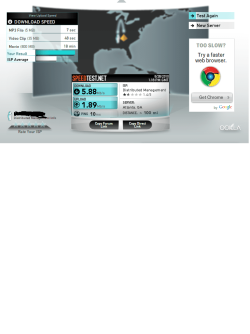
Take the speed test and the ping test and give us a screen shot of the results
Speedtest.net - The Global Broadband Speed Test

Could be a graphics driver
Go to device manager and look for any yellow markers that show a card or driver is defective
Type device manager in search

How much ram do you have?
 

My Computer My Computer

Computer type
PC/Desktop
Computer Manufacturer/Model Number
Dell XPS 420
OS
Windows 10, Home Clean Install
CPU
Intel Core2 processsor Q8200(2.33Ghz 1333FSB) Quad Core Tech
Motherboard
Dell
Memory
6 gb
Graphics Card(s)
ATI Radeon 256MB HD3650
Sound Card
Intergrated 7.1 Channel Audio
Monitor(s) Displays
Dell SP2009W 20"
Hard Drives
640 GB Serial ATA Hard drive
Cooling
Fan
Keyboard
Dell USB Keyboard
Mouse
Dell Premium Optical USB
Internet Speed
DSL 2.85
Screencap attached.

I'm running on 4 GB of RAM. I checked in the Device Manager, but found no yellow markers indicating any problem. Is there another way to check?

Diagnosis?
 

Attachments

  • test1.png
    test1.png
    62.6 KB · Views: 12

My Computer My Computer

Computer Manufacturer/Model Number
HP
OS
Windows 7 Home Premium 64bit
CPU
AMD Phenom II N620 Dual Core Processor 2.8GHz
Graphics Card(s)
AMD M880G with ATI Mobility Radeon HD 4250
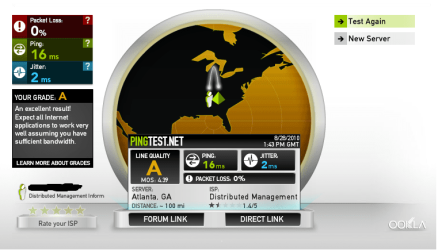
There is also a ping test, it shows near the bottom of the page shown. Can you take that please?
 

My Computer My Computer

Computer type
PC/Desktop
Computer Manufacturer/Model Number
Dell XPS 420
OS
Windows 10, Home Clean Install
CPU
Intel Core2 processsor Q8200(2.33Ghz 1333FSB) Quad Core Tech
Motherboard
Dell
Memory
6 gb
Graphics Card(s)
ATI Radeon 256MB HD3650
Sound Card
Intergrated 7.1 Channel Audio
Monitor(s) Displays
Dell SP2009W 20"
Hard Drives
640 GB Serial ATA Hard drive
Cooling
Fan
Keyboard
Dell USB Keyboard
Mouse
Dell Premium Optical USB
Internet Speed
DSL 2.85
Do forgive me. Here we are.
 

Attachments

  • test2.png
    test2.png
    50.8 KB · Views: 6

My Computer My Computer

Computer Manufacturer/Model Number
HP
OS
Windows 7 Home Premium 64bit
CPU
AMD Phenom II N620 Dual Core Processor 2.8GHz
Graphics Card(s)
AMD M880G with ATI Mobility Radeon HD 4250
Well, you have good connectiions, its not the internet speed. Try going to search.
Type default programs. Go to set default programs. Change your default media player to another selection. If no other choices, you can use this list.
You probably have Windows Media Center (player)

Comparison of video player software - Wikipedia, the free encyclopedia

Before downloading make a system restore point, in the event that it does not help and you want to remove it.
 

My Computer My Computer

Computer type
PC/Desktop
Computer Manufacturer/Model Number
Dell XPS 420
OS
Windows 10, Home Clean Install
CPU
Intel Core2 processsor Q8200(2.33Ghz 1333FSB) Quad Core Tech
Motherboard
Dell
Memory
6 gb
Graphics Card(s)
ATI Radeon 256MB HD3650
Sound Card
Intergrated 7.1 Channel Audio
Monitor(s) Displays
Dell SP2009W 20"
Hard Drives
640 GB Serial ATA Hard drive
Cooling
Fan
Keyboard
Dell USB Keyboard
Mouse
Dell Premium Optical USB
Internet Speed
DSL 2.85
Will that help with videos embedded into webpages (Hulu, Vureel, Youtube et. al)?
 

My Computer My Computer

Computer Manufacturer/Model Number
HP
OS
Windows 7 Home Premium 64bit
CPU
AMD Phenom II N620 Dual Core Processor 2.8GHz
Graphics Card(s)
AMD M880G with ATI Mobility Radeon HD 4250
No, unfortunately it would not. You probably have adobe flash player, the only real substitue is Macromedia Flash Player

But this is a good point. Is the problem only when you watch at the sites that you mentioned or also when you use Media Player?
 

My Computer My Computer

Computer type
PC/Desktop
Computer Manufacturer/Model Number
Dell XPS 420
OS
Windows 10, Home Clean Install
CPU
Intel Core2 processsor Q8200(2.33Ghz 1333FSB) Quad Core Tech
Motherboard
Dell
Memory
6 gb
Graphics Card(s)
ATI Radeon 256MB HD3650
Sound Card
Intergrated 7.1 Channel Audio
Monitor(s) Displays
Dell SP2009W 20"
Hard Drives
640 GB Serial ATA Hard drive
Cooling
Fan
Keyboard
Dell USB Keyboard
Mouse
Dell Premium Optical USB
Internet Speed
DSL 2.85
Rich, that sounds to me like a buffering problem. The Radeon HD 4250 is a very low end graphics device and that may not be able to keep up with the flow.
The technique I use in those cases is to stop the video at the beginning for a minute and then restart after the buffering has had a chance to keep up.
 

My Computer My Computer

Computer Manufacturer/Model Number
HP, Dell, Gateway, Toshiba - 4 laptops and 2 desktops
OS
Vista, Windows7, Mint Mate, Zorin, Windows 8
CPU
from 1.6GHz Duo to i7
Monitor(s) Displays
2x HP w2207
Hard Drives
5x HDD, 7x SSD, 12x Externals
Keyboard
with trackball - no mices
Mouse
Trackball mice
Internet Speed
DSL 6000
Rich, that sounds to me like a buffering problem. The Radeon HD 4250 is a very low end graphics device and that may not be able to keep up with the flow.
The technique I use in those cases is to stop the video at the beginning for a minute and then restart after the buffering has had a chance to keep up.

Thanks Wolfgang, you may be correct and the OP should heed your advice. What threw me off track is that with my Windows 98, I would try to watch a video etc, but it would stop for 5 seconds, and then contiune and do this for the entire video. The poster has it completely frozen. Your point, is a good one.
 

My Computer My Computer

Computer type
PC/Desktop
Computer Manufacturer/Model Number
Dell XPS 420
OS
Windows 10, Home Clean Install
CPU
Intel Core2 processsor Q8200(2.33Ghz 1333FSB) Quad Core Tech
Motherboard
Dell
Memory
6 gb
Graphics Card(s)
ATI Radeon 256MB HD3650
Sound Card
Intergrated 7.1 Channel Audio
Monitor(s) Displays
Dell SP2009W 20"
Hard Drives
640 GB Serial ATA Hard drive
Cooling
Fan
Keyboard
Dell USB Keyboard
Mouse
Dell Premium Optical USB
Internet Speed
DSL 2.85
No, actually, the poster doesn't have it completely frozen. Waiting for it to buffer has no effect. Regardless of if I do or not, the video always stops after a few minutes and treats it like I've watched the whole video. This happens for every single site I visit. I have no videos to test this on in media player, but I will attempt to find some.

The Radeon in this thing is a low end graphics card? Well, don't I feel gyped. I asked the fine people at Geek Squad if the graphics card was a crappy one and was assured it wasn't. Any clue if this thing will be able to run Diablo 3?
 

My Computer My Computer

Computer Manufacturer/Model Number
HP
OS
Windows 7 Home Premium 64bit
CPU
AMD Phenom II N620 Dual Core Processor 2.8GHz
Graphics Card(s)
AMD M880G with ATI Mobility Radeon HD 4250
I have no experience with Diablo 3.
Make sure that you have all the updates for the card and the most current driver.
 

My Computer My Computer

Computer type
PC/Desktop
Computer Manufacturer/Model Number
Dell XPS 420
OS
Windows 10, Home Clean Install
CPU
Intel Core2 processsor Q8200(2.33Ghz 1333FSB) Quad Core Tech
Motherboard
Dell
Memory
6 gb
Graphics Card(s)
ATI Radeon 256MB HD3650
Sound Card
Intergrated 7.1 Channel Audio
Monitor(s) Displays
Dell SP2009W 20"
Hard Drives
640 GB Serial ATA Hard drive
Cooling
Fan
Keyboard
Dell USB Keyboard
Mouse
Dell Premium Optical USB
Internet Speed
DSL 2.85
The Radeon in this thing is a low end graphics card? Well, don't I feel gyped. I asked the fine people at Geek Squad if the graphics card was a crappy one and was assured it wasn't. Any clue if this thing will be able to run Diablo 3?
I am like Rich and have no experience with Diablo. I suggest you read the reviews of your Radeon - the ones I read suggested that the graphics is no good for games.
Since you have no videos, try some of the ones I have on my Vimeo site: W.H.Schroeder's videos on Vimeo
 

My Computer My Computer

Computer Manufacturer/Model Number
HP, Dell, Gateway, Toshiba - 4 laptops and 2 desktops
OS
Vista, Windows7, Mint Mate, Zorin, Windows 8
CPU
from 1.6GHz Duo to i7
Monitor(s) Displays
2x HP w2207
Hard Drives
5x HDD, 7x SSD, 12x Externals
Keyboard
with trackball - no mices
Mouse
Trackball mice
Internet Speed
DSL 6000
Back
Top