Hi everybody!
I've just re-converted back to a PC after having had a macbook for the last few years.
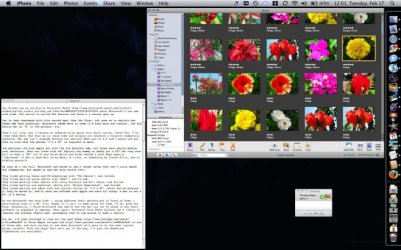
The only thing I'm missing from my Macbook is a way to view all open windows/running programs spread across the screen and pick the one I want to come to the front (see attachment). Pressing the button, or in my case clicking the middle mouse button, darkened the background and spread every window out in a zoomed out way so you could pick whick one you want to come to the front. Clicking on that window brought it to the front, re-brightened the background and all other windows went back to their original location, order and size. It was awesome and I want it back! Is there a way to do this in Windows 7?!
Preferably I'd still like to bind this to a mouse button if possible?
Also, I don't mind if this will require [reliable/tested] third party software.
Thanks so much!
Last edited by a moderator:
My Computer
At a glance
Windows 7 Home PremiumIntel Core 2 Duo 3Ghz4GbATI Radeon HD 5700
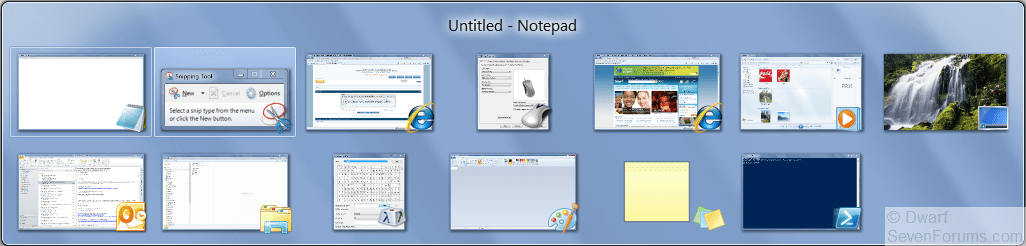
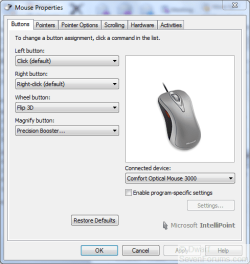
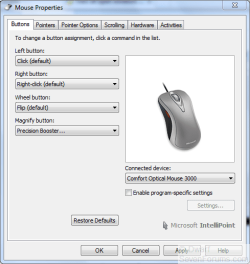
That's one way of doing it, but in order to see all open windows simultaneously (except for IE8, where it will be the current active tab that is shown), you need to use Alt + Tab. Alternatively, set your middle mouse button to Flip (as opposed to Flip 3D). This only shows thumbnails of active windows, but you can see at a glance which one you want.
My Computer
At a glance
Windows 8.1 Pro RTM x64Intel Core-i5-3570K 4-core @ 3.4GHz (Ivy Brid...4 x 4GB DDR3-1600 Corsair Vengeance CMZ8GX3M2...MSI GeForce GTX770 Gaming OC 2GB
4 x 4GB DDR3-1600 Corsair Vengeance CMZ8GX3M2A1600C9B (16GB)
Graphics Card(s)
MSI GeForce GTX770 Gaming OC 2GB
Sound Card
Realtek High Definition on board solution (ALC 898)
Monitor(s) Displays
ViewSonic VA1912w Widescreen (VGA)
Screen Resolution
1440x900
Hard Drives
OCZ Agility 3 SSD 120GB SATA III x2 (RAID 0)
Samsung HD501LJ 500GB SATA II x2
Hitachi HDS721010CLA332 1TB SATA II
Iomega 1.5TB Ext USB 2.0
WD 2.0TB Ext USB 3.0
You can do this in Mouse Properties. The middle mouse button is referred to here as Wheel Button. Note that the following is for my mouse, yours might be slightly different, but the same principle will apply.
My Computer
At a glance
Windows 8.1 Pro RTM x64Intel Core-i5-3570K 4-core @ 3.4GHz (Ivy Brid...4 x 4GB DDR3-1600 Corsair Vengeance CMZ8GX3M2...MSI GeForce GTX770 Gaming OC 2GB
4 x 4GB DDR3-1600 Corsair Vengeance CMZ8GX3M2A1600C9B (16GB)
Graphics Card(s)
MSI GeForce GTX770 Gaming OC 2GB
Sound Card
Realtek High Definition on board solution (ALC 898)
Monitor(s) Displays
ViewSonic VA1912w Widescreen (VGA)
Screen Resolution
1440x900
Hard Drives
OCZ Agility 3 SSD 120GB SATA III x2 (RAID 0)
Samsung HD501LJ 500GB SATA II x2
Hitachi HDS721010CLA332 1TB SATA II
Iomega 1.5TB Ext USB 2.0
WD 2.0TB Ext USB 3.0
In mouse properties for my mouse there was no option to change button assignments, I was using a Saitek GM 1600 which has no official drivers or software and shows up as a generic mouse. However I noticed you're using a MS Intellipoint mouse which I remembered having one from an old PC. Dug it out and d/led the software off MS's site and now I get exactly the same options screen as you showed, Dwarf.
Thanks for the help Dwarf and Brink. Shame I can't use my new mouse but at least I'mn set up now! =]
My Computer
At a glance
Windows 7 Home PremiumIntel Core 2 Duo 3Ghz4GbATI Radeon HD 5700
4 x 4GB DDR3-1600 Corsair Vengeance CMZ8GX3M2A1600C9B (16GB)
Graphics Card(s)
MSI GeForce GTX770 Gaming OC 2GB
Sound Card
Realtek High Definition on board solution (ALC 898)
Monitor(s) Displays
ViewSonic VA1912w Widescreen (VGA)
Screen Resolution
1440x900
Hard Drives
OCZ Agility 3 SSD 120GB SATA III x2 (RAID 0)
Samsung HD501LJ 500GB SATA II x2
Hitachi HDS721010CLA332 1TB SATA II
Iomega 1.5TB Ext USB 2.0
WD 2.0TB Ext USB 3.0