view PDF on the web

Clark Kent

New member
Member
Local time
5:42 PM
Messages
48
I just cannot view PDF docs online. I have saved ones on my pc I can open and view fine. I've tried a repair install of adobe reader, uninstalled it thru programs and features, deleted the entries in regedit, and even used on of their tools to clean up remnants. I restarted after each action, then downloaded a fresh copy, and STILL cannot view them on websites, only saved ones on my pc.
Windows 7 64 bit
Home Premium
IE10 for Windows 7

My temp files and all that stuff are routinely cleaned out.
 

My Computer

OS
Windows 7 Home Premium

Attachments

  • Capture.JPG
    Capture.JPG
    19.7 KB · Views: 14

My Computer

Computer type
PC/Desktop
Computer Manufacturer/Model Number
Self Built
OS
Win 10 Pro x64
CPU
Intel I5-2500K @3.3GHz
Motherboard
Asrock P67 Extreme4
Memory
16GB G.Skill Ripjaws X (4x4GB)
Graphics Card(s)
EVGA GeForce 750 Ti SC 2GB
Sound Card
ASUS Xonar DG 5.1 Channels 24-bit 96KHz PCI Interface Sound
Monitor(s) Displays
auria eq2367
Screen Resolution
1920 x 1080
Hard Drives
250GB Samsung 850 EVO SSD
1TB WD Blue
1TB Hitachi
PSU
SeaSonic X 650W 80 Plus Gold
Case
Corsair Obsidian 750D
Cooling
Corsair H60, Three 140mm case fans
Keyboard
Logitech Wireless Keyboard K520
Mouse
Logitech Wireless Mouse M310
Internet Speed
Wave Broadband ~ 100 dn 5 up
Antivirus
Windows Defender, Malwarebytes Premium
Browser
Edge, IE11, Chrome
Other Info
Laptop specs: HP g7-1365dx /
CPU: AMD A6-3420M APU with Radeon(tm) HD Graphics /
RAM: Crucial 8Gb (2x4Gb) /
SSD: Crucial M4-CT128M4SSD2 ATA Device/ FW 000F /
GFX: AMD Radeon HD 6520G /
OS: Windows 10 Pro x64
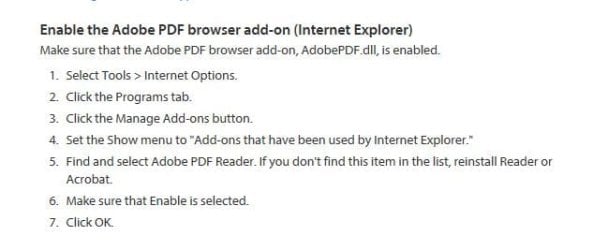
It is enabled in manage ad-ons
 

My Computer

OS
Windows 7 Home Premium
From an adobe help page

   Note
Reset the Display PDF In Browser preference

In Reader or Acrobat, right-click the document window, and select Page Display Preferences.

From the list at left, select Internet.

Deselect Display PDF In Browser, and then click OK.

Choose Edit > Preferences > Internet, select Display PDF In Browser, and then click OK.


Try to open the PDF again from the website.


I believe if you deselect it and leave it that way, it will open the pdf in acrobat itself. I use Sumatra and cannot confirm.

A Guy
 

My Computer

Computer type
PC/Desktop
OS
Windows 10 Home x64
CPU
INTEL Core i5-750 Quad-Core 3.37GHz
Motherboard
ASUS P7P55D
Memory
HyperX Fury Black Series 8GB (2 x 4GB) 1866Mhz
Graphics Card(s)
EVGA GeForce GTX 750 Superclocked 1GB 128-Bit GDDR5
Monitor(s) Displays
LG 32MA68HY 32" IPS
Screen Resolution
1920 x 1080
Hard Drives
Samsung 840 Evo 120GB, SEAGATE 500GB Barracuda® 7200.12, SATA 3 Gb/s, 7200 RPM, 16MB cache
PSU
ANTEC TruePower New TP-550, 80 PLUS, 550W
Case
ANTEC Three Hundred Illusion
Cooling
COOLER MASTER Hyper 212 Plus, 4 x 120mm 1 x 140mm Noctua's
Internet Speed
85 + Mbps
Antivirus
Avast
Browser
Vivaldi

My Computer

Computer Manufacturer/Model Number
CCL Online OEM
OS
Windows 7 Home Premium 32bit
CPU
Intel Core 2 2.4GHz
Motherboard
Foxconn 946GZ7MA
Memory
4GB
Graphics Card(s)
ATI Radeon 4850
Sound Card
Realtek HD Audio
Monitor(s) Displays
Prolite E2407HDS
Screen Resolution
1920x1080
Hard Drives
2 x WDC 500 GB
Cooling
Fan
Keyboard
Microsoft Digital Media
Mouse
Optical Wheel Mouse
Internet Speed
14Mb/sec
Other Info
Internet ISP: Plusnet
Reset the Display PDF In Browser preference- I cannot do this. I have Adobe Reader Xl installed. Upon opening the reader, there is no option I can see for resetting this.
 

My Computer

OS
Windows 7 Home Premium
You could locate the install files in C:\Program Files (x86)\Adobe\Reader 11.0\Setup Files\ and right click the MSI file and select Repair to make sure Reader is installed properly.

Also, open IE, select Tools, Manage Add-ons and make sure that the activex object called 'Adobe PDF Link Helper' is enabled. The activex files lives in
C:\Program Files (x86)\Common Files\Adobe\Acrobat\ActiveX\AcroIEHelperShim.dll
 

My Computer

Computer Manufacturer/Model Number
CCL Online OEM
OS
Windows 7 Home Premium 32bit
CPU
Intel Core 2 2.4GHz
Motherboard
Foxconn 946GZ7MA
Memory
4GB
Graphics Card(s)
ATI Radeon 4850
Sound Card
Realtek HD Audio
Monitor(s) Displays
Prolite E2407HDS
Screen Resolution
1920x1080
Hard Drives
2 x WDC 500 GB
Cooling
Fan
Keyboard
Microsoft Digital Media
Mouse
Optical Wheel Mouse
Internet Speed
14Mb/sec
Other Info
Internet ISP: Plusnet
I ended up rolling back from IE10 to IE9 and it works fine now. The issue is in IE10 for windows 7. my pc is 64bit, not sure that that part matters.
 

My Computer

OS
Windows 7 Home Premium
Thanks for the added info, and glad it is working again. Even though I rarely use IE, I have yet to update from IE9 as I still see too many issues with IE10. Not that they would likely impact me, but I am in no hurry. A Guy
 

My Computer

Computer type
PC/Desktop
OS
Windows 10 Home x64
CPU
INTEL Core i5-750 Quad-Core 3.37GHz
Motherboard
ASUS P7P55D
Memory
HyperX Fury Black Series 8GB (2 x 4GB) 1866Mhz
Graphics Card(s)
EVGA GeForce GTX 750 Superclocked 1GB 128-Bit GDDR5
Monitor(s) Displays
LG 32MA68HY 32" IPS
Screen Resolution
1920 x 1080
Hard Drives
Samsung 840 Evo 120GB, SEAGATE 500GB Barracuda® 7200.12, SATA 3 Gb/s, 7200 RPM, 16MB cache
PSU
ANTEC TruePower New TP-550, 80 PLUS, 550W
Case
ANTEC Three Hundred Illusion
Cooling
COOLER MASTER Hyper 212 Plus, 4 x 120mm 1 x 140mm Noctua's
Internet Speed
85 + Mbps
Antivirus
Avast
Browser
Vivaldi
Back
Top