View pictures or images in date order

Jam44

New member
Local time
8:54 PM
Messages
2
Hi, sorry if this has been addressed already, new here and can't find the answer I'm looking for.

1800+ holiday photos from 3 different cameras so 3 different file numbering structures but all .jpegs and copied into 1 folder, sorted into "date" order.
Plan is to click though them and copy out the best pictures taken from each day.
However regardless of how the files are sorted the viewer always shows them in alphabetical name order only. Example - the first 3 images are IMG-file numbers but after opening the first IMG file the next click the viewer reverts to the first DCS-file number then will click through all the DCS files then IMG files then finish on the P files. Definitely not following the date sort order...

First question - Is there a way to set up the sort by to allow me to click through in date order...like you could do on XP ?

Using MSO picture manager or Windows photo viewer as they are already installed, have also tried Irfan but all do the same thing click though following the name column order, windows obviously controls the file order for the viewer program.
Looked at the options on the "Choose Details" but nothing complicated there, only that you can't deselect the "Name" option... This is obviously what windows is locked to for the image viewer programs.

Second question - Is there a way to make the "Date" option the default that windows uses for the image viewer programs.

Seems kind of daft having all those column sort options but the view display order can only be by the file name...

Any help appreciated,

J
 

My Computer My Computer

At a glance

Windows 7 Pro 64biti7-3720 2.60Ghz8Gb
Computer type
PC/Desktop
Computer Manufacturer/Model Number
Dell E6530
OS
Windows 7 Pro 64bit
CPU
i7-3720 2.60Ghz
Memory
8Gb
Hard Drives
256Gb SSD
Antivirus
NIS
Browser
IE11 & Firefox
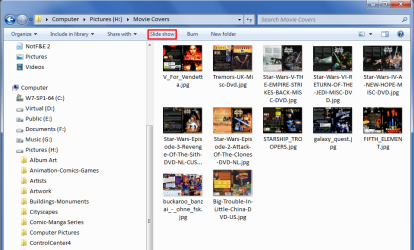
Windows Explorer Slideshow

If you use the "Slideshow" button, Windows will show the files by sort order in Windows Explorer (at least it does on my PC).
WE - Slideshow.png
I'm not sure how helpful that will be for your issue though. :(

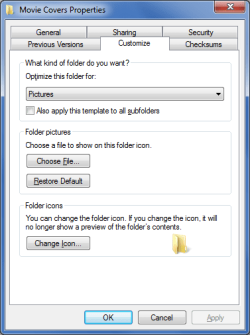
Note:
The folder with the pictures in it needs to have its Folder Template ("Optimize this folder for:") set to "Pictures" to make the "Slideshow" button appear.
WE - Picture Template Setting.png
 
Last edited:

My Computer My Computer

At a glance

W7 Ultimate SP1, LM19.2 MATE, W10 Home 1703, ...AMD Phenom II x6 1100T, 3.3 GHz12GB DDR3 1333 G-Skill (4GB x 2), G-Skill (2G...NVIDIA GeForce GTX 660
Computer type
PC/Desktop
Computer Manufacturer/Model Number
n/a
OS
W7 Ultimate SP1, LM19.2 MATE, W10 Home 1703, W10 Pro 1703 VM, #All 64 bit
CPU
AMD Phenom II x6 1100T, 3.3 GHz
Motherboard
ASUS M4A88T-M/USB3 (AM3)
Memory
12GB DDR3 1333 G-Skill (4GB x 2), G-Skill (2GB x 2)
Graphics Card(s)
NVIDIA GeForce GTX 660
Sound Card
Realtek?
Monitor(s) Displays
Samsung S23B350
Screen Resolution
1920x1080
Hard Drives
WD Green 2TB (SATA), WD Green 3TB (SATA), WD Blue 4TB (SATA), WD Blue 6TB (SATA)
PSU
Cooler Master
Case
Antec GX300 Tower
Cooling
3x Antec TRICOOL 120mm Fans
Mouse
Wired Optical
Internet Speed
DSL
Antivirus
Avast
Browser
Pale Moon (64 bit)
Other Info
2018-12-27 Upgraded HDDs
2015-12-10 Upgraded case, graphics card, storage
2015-08-15 Upgraded motherboard & RAM
2015-07-15 Upgraded LM17.1 to LM17.2
Why don't you give non-free ACDSee Photo Studio Standard 2018 a free trial. Cost you nothing to try it.

And it's on sale until Jan 17 at a $39.95 price (which is certainly a reasonable price for a sophisticated commercial retail product).

I've been using ACDSee as my image viewer for probably 20 years or more, through umpteen editions and versions and from all versions of Windows going back to Win95.

I'll help you get started using it, providing my customizations and presentation user interface setup, which I'm sure you'll appreciate.
 

My Computer My Computer

At a glance

Windows 7 Pro x64 (1), Win7 Pro X64 (2)i5-3350p 3.1Ghz/6MB-cache (1); E8400 3.0Ghz/6...8GB PC3-12800 DDR3 (1); 4GB PC3-10600 DDR3 (2)ATI HD7750 (1), (see TV cards); ATI R7 250 (2)
Computer type
PC/Desktop
Computer Manufacturer/Model Number
Home-built, two systems (1) and (2)
OS
Windows 7 Pro x64 (1), Win7 Pro X64 (2)
CPU
i5-3350p 3.1Ghz/6MB-cache (1); E8400 3.0Ghz/6MB-cache (2)
Motherboard
ASUS P8Z77-V Pro (1); ASUS P5Q3 (2)
Memory
8GB PC3-12800 DDR3 (1); 4GB PC3-10600 DDR3 (2)
Graphics Card(s)
ATI HD7750 (1), (see TV cards); ATI R7 250 (2)
Sound Card
Realtek ALC892 HD Audio (1); Realtek ALC1200 HD Audio (2)
Monitor(s) Displays
Eizo HD2441W LCD, Eizo S2433W (1); Eizo 24" S2433W (2)
Screen Resolution
1920x1200, 1920x1200 (1); 1920x1200 (2)
Hard Drives
(1) 1TB SATA-II (7200RPM), 2x2TB SATA-III (7200RPM), 250GB SATA-III (10000RPM) for OS; 2x2TB external USB 3.0

(2) 320GB SATA-II (7200RPM), 750GB SATA-II (7200RPM), 150GB SATA-II (10000RPM) for OS; 2TB external USB 3.0
PSU
Nesteq ECS-6001 600W (1); Nesteq ECS-5001 500W (2)
Case
Acousti-Case 360 (1) and (2)
Cooling
Noctua NH-U12P SE2 for CPU, 2x120mm case fans (1) and (2)
Keyboard
IBM PS/2 (1) and (2)
Mouse
Logitech MX Revolution wireless (1); Microsoft wired (2)
Internet Speed
100mbps down / 10mbps up
Antivirus
Microsoft Security Essentials; Malwarebyte Anti-Malware Pro
Browser
Firefox
Other Info
Ceton InfiniTV 4-tuner cablecard-enabled TV card as well as Hauppauge HVR-2250 OTA/ATSC 2-tuner TV card in (1), running under Win7 WMC

My Computers My Computers

  • At a glance

    Windows 11 Pro x64 [Latest Release and Releas...Ryzen 9 5950X, 3.8 - 5.2 MHz64GB [2 x 32GB] DDR4 3200MHz4GB NVIDIA GEFORCE GTX 1650 Ti
    Computer type
    PC/Desktop
    Computer Manufacturer/Model Number
    ChillBlast - Custom to my design
    OS
    Windows 11 Pro x64 [Latest Release and Release Preview]
    CPU
    Ryzen 9 5950X, 3.8 - 5.2 MHz
    Motherboard
    Asus Prime X570-Pro
    Memory
    64GB [2 x 32GB] DDR4 3200MHz
    Graphics Card(s)
    4GB NVIDIA GEFORCE GTX 1650 Ti
    Sound Card
    On-board SPDIF to 5.1 System + HDMI [5.1 system]
    Monitor(s) Displays
    32" UHD 32 Bit HDR Monitor + 43" UHD 4K 32Bit HDR TV
    Screen Resolution
    2 x 3840 x 2160 @60Hz
    Hard Drives
    1TB M2 SSD OS, 500GB Fast Access SSD, 2 x 8TB Data + Various Externals from 1TB to 4TB, 10TB NAS
    PSU
    NZXT C750 80 PLUS Gold 750W Modular PSU
    Case
    Workstation Case [Matt Black]
    Cooling
    NZXT Kraken X63 280mm CPU Cooler +2x Quiet Case fans
    Keyboard
    Logitech Wireless MX Keys & K400 + others
    Mouse
    Logitech Wireless MX Master 3S
    Internet Speed
    920 MB Down 50 MB Up
    Antivirus
    BitDefender Total Security Pro
    Browser
    Chrome (always run latest Non-Beta)
    Other Info
    Also run ...
    Laptop - Quad 8GB - Windows 10 Pro x64
    Nexus 7 Android tablet x2
    Samsung 10.2" tablet
    Blackview TAB 8 4G Android Tablet c/w Keyboard
    Wacom Intuos Pro Medium Pen Pad
    Wacom Intuos Pro Small Pen Pad
    Wacom Expresskeys Remote
    Loopdeck+ Graphics Controller
    Shuttle Pro v2 Control
  • At a glance

    Windows 11 Pro x64 Latest RPIntel I7 10750H 5.0GHz32GB [2x16GB] DDR4 2933 MHznVidia GTX1650Ti 4 GB GDDR6
    Computer type
    Laptop
    System Manufacturer/Model Number
    Dell XPS 17 10750H
    OS
    Windows 11 Pro x64 Latest RP
    CPU
    Intel I7 10750H 5.0GHz
    Motherboard
    Dell XPS
    Memory
    32GB [2x16GB] DDR4 2933 MHz
    Graphics Card(s)
    nVidia GTX1650Ti 4 GB GDDR6
    Sound Card
    Stock [Realtek] 4 Speaker
    Monitor(s) Displays
    17" IPS UHD+ Infinity Edge Touchscreen
    Screen Resolution
    3840 x 2400
    Hard Drives
    2TB M2 NVMe, 4TB External + various 500GB & 1TB External NVMe (also have access to spinner HDD from
    PSU
    Stock
    Case
    Stock XPS Aluminium & Carbon Fibre
    Cooling
    Stock - Active Fan Control
    Keyboard
    Backlit + Various Logitech
    Mouse
    Stock Track Pad + Logitech MX Trackball
    Internet Speed
    72 MB Down 18MB Up
    Browser
    Chrome
    Other Info
    Also run ...
    Laptop - Quad 8GB - Windows 10 Pro x64
    Nexus 7 Android tablet x2
    10.2" tablet
    Sony Z3 Android Smartphone
    Wacom Intuos Pro Medium Pen Pad
    Wacom Intuos Pro Small Pen Pad
    Wacom Expresskeys Remote
    Loopdeck+ Graphics Controller
    Shuttle Pro v2 Control Pad
    10TB NAS
IrfanView Display Order

You can change the display order in IrfanView by using "IrfanView Thumbnails".

Try this method:

  • Open a file in Irfanview (in the source folder)
  • Choose "File > Thumbnails"
  • In "IrfanView Thumbnails":
    • Choose "Options > Sort thumbnails"
    • Select the sort you require
  • Hide or Minimize "IrfanView Thumbnails"
Irfanview should present the photos as you've just sorted them.

It seems to work on my PC. :)
Change Image Display Order.jpg
Notice:

  • "Big Trouble in Little China" is the 1st file in Windows Explorer
  • It is the 2nd file in "IrfanView Thumbnails" (when sorted by Date)
  • It is the 2nd file in IrfanView
 

My Computer My Computer

At a glance

W7 Ultimate SP1, LM19.2 MATE, W10 Home 1703, ...AMD Phenom II x6 1100T, 3.3 GHz12GB DDR3 1333 G-Skill (4GB x 2), G-Skill (2G...NVIDIA GeForce GTX 660
Computer type
PC/Desktop
Computer Manufacturer/Model Number
n/a
OS
W7 Ultimate SP1, LM19.2 MATE, W10 Home 1703, W10 Pro 1703 VM, #All 64 bit
CPU
AMD Phenom II x6 1100T, 3.3 GHz
Motherboard
ASUS M4A88T-M/USB3 (AM3)
Memory
12GB DDR3 1333 G-Skill (4GB x 2), G-Skill (2GB x 2)
Graphics Card(s)
NVIDIA GeForce GTX 660
Sound Card
Realtek?
Monitor(s) Displays
Samsung S23B350
Screen Resolution
1920x1080
Hard Drives
WD Green 2TB (SATA), WD Green 3TB (SATA), WD Blue 4TB (SATA), WD Blue 6TB (SATA)
PSU
Cooler Master
Case
Antec GX300 Tower
Cooling
3x Antec TRICOOL 120mm Fans
Mouse
Wired Optical
Internet Speed
DSL
Antivirus
Avast
Browser
Pale Moon (64 bit)
Other Info
2018-12-27 Upgraded HDDs
2015-12-10 Upgraded case, graphics card, storage
2015-08-15 Upgraded motherboard & RAM
2015-07-15 Upgraded LM17.1 to LM17.2
If you use the "Slideshow" button, Windows will show the files by sort order in Windows Explorer (at least it does on my PC).
yes, mine too. this is the solution without additional s/w.

Second question - Is there a way to make the "Date" option the default ...
try setting the 'folder template' for that folder.
 

My Computer My Computer

At a glance

Microsoft Windows 7 Home Premium 64-bit 7601 ...Pentium(R) Dual-Core CPU E5300 @ 2.60GHz6.00 GBIntel(R) G33/G31 Express Chipset Family
Computer type
PC/Desktop
Computer Manufacturer/Model Number
HP (HP-P6212F)
OS
Microsoft Windows 7 Home Premium 64-bit 7601 Multiprocessor Free Service Pack 1
CPU
Pentium(R) Dual-Core CPU E5300 @ 2.60GHz
Motherboard
PEGATRON CORPORATION Benicia
Memory
6.00 GB
Graphics Card(s)
Intel(R) G33/G31 Express Chipset Family
Sound Card
Realtek High Definition Audio
Monitor(s) Displays
24'' HP WS LCD
Screen Resolution
1920 x 1080 x 32 bits (4294967296 colors) @ 60 Hz
Hard Drives
(1) ATA Hitachi HDT72106 SCSI Disk Device (2) Generic- Compact Flash USB Device (3) Generic- MS/MS-Pro USB Device (4) Generic- SD/MMC USB Device (5) Generic- SM/xD-Picture USB Device (6) Verbatim STORE N GO USB Device
Keyboard
Logitech G510s
Mouse
Logitech Trackball M570
Antivirus
Microsoft Security Essentials / Malwarebytes
Browser
IE / Firefox / Chrome
Thanks for the helpfull replies, apologies for me not getting back sooner been laid up with some flu bug...

Lehnerus - tried the slide show option already it works in the right order but I really need to see the file names as I step through them to quickly identify whats worth keeping or deleateing, with the slideshow you have to keep reverting back to the thumbnail images to check the file name, but least I can use this to show off the final selection, once I get them all sorted...

But did try the InfranView Thumbnail viewer again, worked this time, and with the thumbnail folder open the picture viewer seems to allow me to step through photos and be able to identify the file info at same time. Found the bit where you can rearrange the thumb images into groups etc. and the images will setp through in that order, like you could do in XP... Shame the windows team couldnt see any value in this function for W7 or 10...

Thanks again,

J
 

My Computer My Computer

At a glance

Windows 7 Pro 64biti7-3720 2.60Ghz8Gb
Computer type
PC/Desktop
Computer Manufacturer/Model Number
Dell E6530
OS
Windows 7 Pro 64bit
CPU
i7-3720 2.60Ghz
Memory
8Gb
Hard Drives
256Gb SSD
Antivirus
NIS
Browser
IE11 & Firefox
Well, this is a complicated issue:o
 

My Computer My Computer

At a glance

Windows 7 Home Premium 32bit
Computer type
PC/Desktop
Computer Manufacturer/Model Number
Dell
OS
Windows 7 Home Premium 32bit
Motherboard
China
Back
Top