View source opens behind browser

cv7713

New member
Local time
5:34 PM
Messages
6
Hey all, first post. I've seen a few posts regarding windows opening in the background but nothing as specific.

I have one PC and one Server. PC is running 7 Pro and the server is 2008 R2. The PC has several other programs installed however the server is a fresh install with no other programs except Office 2007.

My problem: On both machines, when I go to "View Source" in IE8, the source displays for a split second and then goes behind the main IE8 window. Is this default behavior? Anyway to change it? This does not happen when I view "Page Source" in Firefox on the PC.

Any suggestions are appreciated!

-CV
 

My Computer

OS
Windows 7 Pro
"Page/View Source" stays in front for me unless I click on part of the IE8 window, which makes the source code go in back.
 

My Computer

Computer type
PC/Desktop
Computer Manufacturer/Model Number
OQO 2+
OS
Windows 8 Pro w/MC 32-bit
CPU
Intel Atom 1.86 GHz
Motherboard
OQO 2+
Memory
2 GB
Graphics Card(s)
Intel GMA 500
Sound Card
IDT
Monitor(s) Displays
LCD
Screen Resolution
800 x 480 (portable) 1280 x 1024 (docked)
Hard Drives
64 GB SSD
PSU
9 Ah Battery (portable) or OQO Brick (docked)
Case
Shirt Pocket Sized
Cooling
Tiny Fan
Keyboard
Slide out (portable) DiNovo Edge (docked)
Mouse
Eraser head (portable) Logitech Bluetooth (docked)
Internet Speed
WWAN or 802.11G (portable) T1 (docked)
Browser
IE 10
Other Info
DVD-RW OQO Docking Station
"Page/View Source" stays in front for me unless I click on part of the IE8 window, which makes the source code go in back.

Not for me. I get what the other person gets. It opens up, sets there for a second or two and then disappears behind the browser.
 

My Computer

Computer Manufacturer/Model Number
Averatec 6130HS-20
OS
Windows 7 Professional 32-bit (6.1, Build 7600)
CPU
Intel(R) Pentium(R) 4 3.00 GHz HT
Memory
2.0 GB
Graphics Card(s)
ATI Mobility Radeon 9600 64MB
Sound Card
Realtek AC'97 Audio
Screen Resolution
1280 x 800
Hard Drives
Seagate 96023A 60GB 7200RPM -
Seagate FreeAgentDesktop 250GB
Cooling
20 Inch Box Fan
Mouse
Targus PAWM10 Wireless Optical Laptop Mouse
Not for me. I get what the other person gets. It opens up, sets there for a second or two and then disappears behind the browser.
I just tried it on 3 of my systems for over an hour. The source code stayed in front the whole time. One system was running Windows 7 Ultimate and the other two were running Vista Ultimate. The only browser installed was IE8 which has been kept up to date with Windows Update. (I'm not using aero-glass.) Is there any chance you may be running one of those 3rd party programs that makes the window the mouse pointer hovers over the one in focus?
 

My Computer

Computer type
PC/Desktop
Computer Manufacturer/Model Number
OQO 2+
OS
Windows 8 Pro w/MC 32-bit
CPU
Intel Atom 1.86 GHz
Motherboard
OQO 2+
Memory
2 GB
Graphics Card(s)
Intel GMA 500
Sound Card
IDT
Monitor(s) Displays
LCD
Screen Resolution
800 x 480 (portable) 1280 x 1024 (docked)
Hard Drives
64 GB SSD
PSU
9 Ah Battery (portable) or OQO Brick (docked)
Case
Shirt Pocket Sized
Cooling
Tiny Fan
Keyboard
Slide out (portable) DiNovo Edge (docked)
Mouse
Eraser head (portable) Logitech Bluetooth (docked)
Internet Speed
WWAN or 802.11G (portable) T1 (docked)
Browser
IE 10
Other Info
DVD-RW OQO Docking Station
Thanks for the responses. The server 2008 is a fresh install without Aero and is up to date with updates. Weird. roncerr, do you have office installed by chance? That's the only program we have there.

Would office change the default window behavior?
 

My Computer

OS
Windows 7 Pro
Would office change the default window behavior?
One of the Vista machines has Office 2007 installed but is rarely used. I noticed the "Source" window opens with the "application" showing only the letter "e" so it looks like it is being seen through IE8 rather than Notepad which is what it mostly resembles except for the grey bar down the left side.
 

My Computer

Computer type
PC/Desktop
Computer Manufacturer/Model Number
OQO 2+
OS
Windows 8 Pro w/MC 32-bit
CPU
Intel Atom 1.86 GHz
Motherboard
OQO 2+
Memory
2 GB
Graphics Card(s)
Intel GMA 500
Sound Card
IDT
Monitor(s) Displays
LCD
Screen Resolution
800 x 480 (portable) 1280 x 1024 (docked)
Hard Drives
64 GB SSD
PSU
9 Ah Battery (portable) or OQO Brick (docked)
Case
Shirt Pocket Sized
Cooling
Tiny Fan
Keyboard
Slide out (portable) DiNovo Edge (docked)
Mouse
Eraser head (portable) Logitech Bluetooth (docked)
Internet Speed
WWAN or 802.11G (portable) T1 (docked)
Browser
IE 10
Other Info
DVD-RW OQO Docking Station
Not for me. I get what the other person gets. It opens up, sets there for a second or two and then disappears behind the browser.
I just tried it on 3 of my systems for over an hour. The source code stayed in front the whole time. One system was running Windows 7 Ultimate and the other two were running Vista Ultimate. The only browser installed was IE8 which has been kept up to date with Windows Update. (I'm not using aero-glass.) Is there any chance you may be running one of those 3rd party programs that makes the window the mouse pointer hovers over the one in focus?

No 3rd party stuff here. I do have tab settings to open everything possible in a new tab. I'm wondering about that. I do not have any Office products here.
 

My Computer

Computer Manufacturer/Model Number
Averatec 6130HS-20
OS
Windows 7 Professional 32-bit (6.1, Build 7600)
CPU
Intel(R) Pentium(R) 4 3.00 GHz HT
Memory
2.0 GB
Graphics Card(s)
ATI Mobility Radeon 9600 64MB
Sound Card
Realtek AC'97 Audio
Screen Resolution
1280 x 800
Hard Drives
Seagate 96023A 60GB 7200RPM -
Seagate FreeAgentDesktop 250GB
Cooling
20 Inch Box Fan
Mouse
Targus PAWM10 Wireless Optical Laptop Mouse
No 3rd party stuff here. I do have tab settings to open everything possible in a new tab. I'm wondering about that. I do not have any Office products here.
I'm using all the New Tab options except the one about switching to the new tab.
 

My Computer

Computer type
PC/Desktop
Computer Manufacturer/Model Number
OQO 2+
OS
Windows 8 Pro w/MC 32-bit
CPU
Intel Atom 1.86 GHz
Motherboard
OQO 2+
Memory
2 GB
Graphics Card(s)
Intel GMA 500
Sound Card
IDT
Monitor(s) Displays
LCD
Screen Resolution
800 x 480 (portable) 1280 x 1024 (docked)
Hard Drives
64 GB SSD
PSU
9 Ah Battery (portable) or OQO Brick (docked)
Case
Shirt Pocket Sized
Cooling
Tiny Fan
Keyboard
Slide out (portable) DiNovo Edge (docked)
Mouse
Eraser head (portable) Logitech Bluetooth (docked)
Internet Speed
WWAN or 802.11G (portable) T1 (docked)
Browser
IE 10
Other Info
DVD-RW OQO Docking Station
No 3rd party stuff here. I do have tab settings to open everything possible in a new tab. I'm wondering about that. I do not have any Office products here.
I'm using all the New Tab options except the one about switching to the new tab.

Yes ron, same here. I'm sure it's something that I and the original poster have running but what, I don't know. Maybe he/she could chime back in with some specs/apps etcc.
 

My Computer

Computer Manufacturer/Model Number
Averatec 6130HS-20
OS
Windows 7 Professional 32-bit (6.1, Build 7600)
CPU
Intel(R) Pentium(R) 4 3.00 GHz HT
Memory
2.0 GB
Graphics Card(s)
ATI Mobility Radeon 9600 64MB
Sound Card
Realtek AC'97 Audio
Screen Resolution
1280 x 800
Hard Drives
Seagate 96023A 60GB 7200RPM -
Seagate FreeAgentDesktop 250GB
Cooling
20 Inch Box Fan
Mouse
Targus PAWM10 Wireless Optical Laptop Mouse
I wonder if it will stay in front if you uncheck all the startup tab items in msconfig and reboot. If it does, you're on your way to narrowing it down.
 

My Computer

Computer type
PC/Desktop
Computer Manufacturer/Model Number
OQO 2+
OS
Windows 8 Pro w/MC 32-bit
CPU
Intel Atom 1.86 GHz
Motherboard
OQO 2+
Memory
2 GB
Graphics Card(s)
Intel GMA 500
Sound Card
IDT
Monitor(s) Displays
LCD
Screen Resolution
800 x 480 (portable) 1280 x 1024 (docked)
Hard Drives
64 GB SSD
PSU
9 Ah Battery (portable) or OQO Brick (docked)
Case
Shirt Pocket Sized
Cooling
Tiny Fan
Keyboard
Slide out (portable) DiNovo Edge (docked)
Mouse
Eraser head (portable) Logitech Bluetooth (docked)
Internet Speed
WWAN or 802.11G (portable) T1 (docked)
Browser
IE 10
Other Info
DVD-RW OQO Docking Station
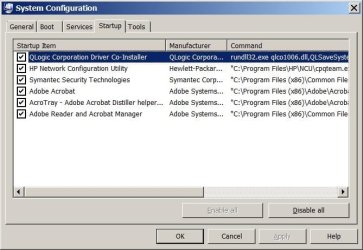
The windows 7 box has all kinds of stuff on it, but the server is a fresh HP Proliant with only Office 2007 and now Adobe 9. Both are 64-bit. I've attached both msconfigs.

I've disabled tabs all together which didn't change anything. I've messed with several taskbar options which did not help either... weird
 

Attachments

  • startup.jpg
    startup.jpg
    44.9 KB · Views: 3
  • startupwin7.jpg
    startupwin7.jpg
    48.6 KB · Views: 4

My Computer

OS
Windows 7 Pro
ron, are you using the default editor for IE8 or notepad? When I chage the editor to notepad (using F12, developer tools), it opens up correctly in front and stays in front. I wonder if the behavior for the default editor can be changed??? Any ideas?
 

My Computer

OS
Windows 7 Pro
ron, are you using the default editor for IE8 or notepad? When I chage the editor to notepad (using F12, developer tools), it opens up correctly in front and stays in front. I wonder if the behavior for the default editor can be changed??? Any ideas?
Ah, excellent find my friend! My notepad when called upon in any fashion is setup to open Notepad2, even the jumplists in the taskbar. I can live with this.
Thanks

The default View Source Editor has changed in Internet Explorer 8 - The Winhelponline Blog
 

My Computer

Computer Manufacturer/Model Number
Averatec 6130HS-20
OS
Windows 7 Professional 32-bit (6.1, Build 7600)
CPU
Intel(R) Pentium(R) 4 3.00 GHz HT
Memory
2.0 GB
Graphics Card(s)
ATI Mobility Radeon 9600 64MB
Sound Card
Realtek AC'97 Audio
Screen Resolution
1280 x 800
Hard Drives
Seagate 96023A 60GB 7200RPM -
Seagate FreeAgentDesktop 250GB
Cooling
20 Inch Box Fan
Mouse
Targus PAWM10 Wireless Optical Laptop Mouse
ron, are you using the default editor for IE8 or notepad? When I chage the editor to notepad (using F12, developer tools), it opens up correctly in front and stays in front. I wonder if the behavior for the default editor can be changed??? Any ideas?
I've got the developer tools set for "View Source = default viewer"; however under the page toolbar item it says "Edit with Notepad".
 

My Computer

Computer type
PC/Desktop
Computer Manufacturer/Model Number
OQO 2+
OS
Windows 8 Pro w/MC 32-bit
CPU
Intel Atom 1.86 GHz
Motherboard
OQO 2+
Memory
2 GB
Graphics Card(s)
Intel GMA 500
Sound Card
IDT
Monitor(s) Displays
LCD
Screen Resolution
800 x 480 (portable) 1280 x 1024 (docked)
Hard Drives
64 GB SSD
PSU
9 Ah Battery (portable) or OQO Brick (docked)
Case
Shirt Pocket Sized
Cooling
Tiny Fan
Keyboard
Slide out (portable) DiNovo Edge (docked)
Mouse
Eraser head (portable) Logitech Bluetooth (docked)
Internet Speed
WWAN or 802.11G (portable) T1 (docked)
Browser
IE 10
Other Info
DVD-RW OQO Docking Station
Ah, excellent find my friend! My notepad when called upon in any fashion is setup to open Notepad2, even the jumplists in the taskbar. I can live with this.
Thanks

yup! I'm using Notepad++ on the Win 7 box... that I can live with as well!

I've got the developer tools set for "View Source = default viewer"; however under the page toolbar item it says "Edit with Notepad".

mine was set to "Edit with Microsoft Word". changed it Notepad and kept the View Source on default viewer. same result, window appears then disappers... when you click view source, is it coming up in notepad???
 

My Computer

OS
Windows 7 Pro
Edit with Notepad = Notepad (written in application space in title bar)
View Source = Original Source (written in application space in title bar)

"Original Source" appears to be a unique viewer for IE8 source; for example:
1) it has a small "e" instead of a notepad icon
2) applcation is called "Original Source" vs. "Notepad"
3) it had a grey bar down the left side
4) the list of options for each menu bar item are slightly different
5) there is no menu bar item called "help"
 

My Computer

Computer type
PC/Desktop
Computer Manufacturer/Model Number
OQO 2+
OS
Windows 8 Pro w/MC 32-bit
CPU
Intel Atom 1.86 GHz
Motherboard
OQO 2+
Memory
2 GB
Graphics Card(s)
Intel GMA 500
Sound Card
IDT
Monitor(s) Displays
LCD
Screen Resolution
800 x 480 (portable) 1280 x 1024 (docked)
Hard Drives
64 GB SSD
PSU
9 Ah Battery (portable) or OQO Brick (docked)
Case
Shirt Pocket Sized
Cooling
Tiny Fan
Keyboard
Slide out (portable) DiNovo Edge (docked)
Mouse
Eraser head (portable) Logitech Bluetooth (docked)
Internet Speed
WWAN or 802.11G (portable) T1 (docked)
Browser
IE 10
Other Info
DVD-RW OQO Docking Station
Back
Top