Virgin dual boot, Win7 Pro + XP Pro

lonny

New member
Member
Local time
6:43 PM
Messages
65
I'm ready to boot up for the first time, after the hardware upgrade, but I can imagine there must be a correct route to follow.
I've been running XP Pro 32 bit w/o any hassles.
Now installed a new mobo plus a 2nd h/d (also SATA).
The aim is to install Win7 Pro 64 bit (already purchased) on the new h/d and use dual boot.
Should I boot up and attempt to install Win7 or should I first disconnect the XP drive?
From which angle should I start?
I expect XP will not accept the new mobo? Before I boot up, any suggestions, or ref sites, that should be followed to reduce the pain?
 

My Computer My Computer

Computer type
PC/Desktop
OS
Win7 Pro x64
CPU
Intel(R) Core(TM) i7-2600 CPU @ 3.40GHz
Motherboard
ASRock H61M-VS4
Graphics Card(s)
ATI Radeon HD 5450
Screen Resolution
2560 x 1440
Hard Drives
WDC WD10EALX-009BA0 ATA x2
Internet Speed
100 Mbps
Browser
Waterfox 64-bit

My Computer My Computer

Computer Manufacturer/Model Number
Custom
OS
Windows 7 Professional x64
CPU
Intel i7 2600K OC'd @ 4620 MHz
Motherboard
Asus P8Z68-V Pro
Memory
16GB GSkill Sniper 2133 Mhz (4x4GB)
Graphics Card(s)
EVGA GeForce GTX 480 SuperClocked+
Sound Card
Realtek High Definition Audio
Monitor(s) Displays
2x Acer S273HLbmii 27"
Screen Resolution
2 x 1920x1080
Hard Drives
64GB Crucial M4 SSD

Storage: Hitachi 1TB 5400RPM, Samsung 1.5TB 5400RPM
PSU
Corsair HW Series 750w (modular)
Case
Cooler Master HAF 932 Advanced Blue Edition
Cooling
CM Hyper 212+ CPU cooler, 3x 230mm + 1x 140mm case fans
Keyboard
Logitech MK320 (wireless)
Mouse
Logitech MK320 (wireless)
Internet Speed
30 Mb/s : 2 Mb/s
Thanks JK but will XP accept the new mobo w/o any complaints or are you saying I must do a repair of some kind which will bring the driver updating in play?
I'm a bit slow here cause I'm worried I may do damage that I cannot fix.
 

My Computer My Computer

Computer type
PC/Desktop
OS
Win7 Pro x64
CPU
Intel(R) Core(TM) i7-2600 CPU @ 3.40GHz
Motherboard
ASRock H61M-VS4
Graphics Card(s)
ATI Radeon HD 5450
Screen Resolution
2560 x 1440
Hard Drives
WDC WD10EALX-009BA0 ATA x2
Internet Speed
100 Mbps
Browser
Waterfox 64-bit
Hopefully, Windows XP will just update its drivers without any action on your part. Depending on what license type you have, it may be deactivated. An OEM license is tied to the MB it is initially installed on.
 

My Computer My Computer

Computer Manufacturer/Model Number
Custom
OS
Windows 7 Professional x64
CPU
Intel i7 2600K OC'd @ 4620 MHz
Motherboard
Asus P8Z68-V Pro
Memory
16GB GSkill Sniper 2133 Mhz (4x4GB)
Graphics Card(s)
EVGA GeForce GTX 480 SuperClocked+
Sound Card
Realtek High Definition Audio
Monitor(s) Displays
2x Acer S273HLbmii 27"
Screen Resolution
2 x 1920x1080
Hard Drives
64GB Crucial M4 SSD

Storage: Hitachi 1TB 5400RPM, Samsung 1.5TB 5400RPM
PSU
Corsair HW Series 750w (modular)
Case
Cooler Master HAF 932 Advanced Blue Edition
Cooling
CM Hyper 212+ CPU cooler, 3x 230mm + 1x 140mm case fans
Keyboard
Logitech MK320 (wireless)
Mouse
Logitech MK320 (wireless)
Internet Speed
30 Mb/s : 2 Mb/s
XP requires a Repair Install on new hardware to acclimate it correctly.

Boot the XP CD, ignoring first R for Repair but continuiing with Setup until it finds the installation, then choosing that "R" for Repair. You'll need to reactivate when finished.

Now unplug XP and try booting Win7. It has started straightaway in about a dozen moves to other hardware I have done, swapping out all Drivers while requesting several restarts.

Shut down, replug XP then either run a http://www.sevenforums.com/tutorials/3413-repair-install.html?ltr=R of Win7 (if it has any kinks to work out) which will reconfigure the dual boot, or install EasyBCD 2.0 after doing quick registration to use beta, add XP on Add/remove tab accepting offered boot files.

If any probs post back a screenshot of full Disk management drive map, using Snipping Tool in start menu, attaching file using paper clip in reply box.
 
We (my friend Murphy) are back and other hassles stepped in.
Thanks for the advice and I followed it by startting with a XP CD boot up.
I immediately noticed that the CD/DVD drive not kicking in, no noise.

The first window that comes up is from the new mobo and mentions that it requires set up. Pressing the delete key brings up the Bios settings. I can see that the prev mobo still shown there and that my CD/DVD drive is listed as 1st boot up. It says it is USB which I find strange, it is connected to the mobo via a 24-pin plug which is shown as IDE.
My guess is that the CD/DVD drive is not actually in the boot up string? It is a Nec ND4570.
After above I get BSOD with 0x0000007E (0x00000065, 0xBA9F8756, 0xBACC342C, 0xBACC3128).
The new mobo is an AsusM4A785TD-M EVO, the cpu is AMD Athlon II X2 and I've installed x4 RAM of 2GB each.
I did not make any changes in the Bios. My topic now drifting away from normal Win7 dual boot, any hope?
 

My Computer My Computer

Computer type
PC/Desktop
OS
Win7 Pro x64
CPU
Intel(R) Core(TM) i7-2600 CPU @ 3.40GHz
Motherboard
ASRock H61M-VS4
Graphics Card(s)
ATI Radeon HD 5450
Screen Resolution
2560 x 1440
Hard Drives
WDC WD10EALX-009BA0 ATA x2
Internet Speed
100 Mbps
Browser
Waterfox 64-bit
Can you manually boot from the CD, using the popup boot menu?
 

My Computer My Computer

Computer Manufacturer/Model Number
Custom
OS
Windows 7 Professional x64
CPU
Intel i7 2600K OC'd @ 4620 MHz
Motherboard
Asus P8Z68-V Pro
Memory
16GB GSkill Sniper 2133 Mhz (4x4GB)
Graphics Card(s)
EVGA GeForce GTX 480 SuperClocked+
Sound Card
Realtek High Definition Audio
Monitor(s) Displays
2x Acer S273HLbmii 27"
Screen Resolution
2 x 1920x1080
Hard Drives
64GB Crucial M4 SSD

Storage: Hitachi 1TB 5400RPM, Samsung 1.5TB 5400RPM
PSU
Corsair HW Series 750w (modular)
Case
Cooler Master HAF 932 Advanced Blue Edition
Cooling
CM Hyper 212+ CPU cooler, 3x 230mm + 1x 140mm case fans
Keyboard
Logitech MK320 (wireless)
Mouse
Logitech MK320 (wireless)
Internet Speed
30 Mb/s : 2 Mb/s
JK - No I do not have any options, only the Delete key to open the Bios setup. The popup is a full color screen showng the Asus mobo trade marks and logo. Once past that I'm back to BSOD with 0x0000007E (0x00000065, 0xBA9F8756, 0xBACC342C, 0xBACC3128).
 

My Computer My Computer

Computer type
PC/Desktop
OS
Win7 Pro x64
CPU
Intel(R) Core(TM) i7-2600 CPU @ 3.40GHz
Motherboard
ASRock H61M-VS4
Graphics Card(s)
ATI Radeon HD 5450
Screen Resolution
2560 x 1440
Hard Drives
WDC WD10EALX-009BA0 ATA x2
Internet Speed
100 Mbps
Browser
Waterfox 64-bit
Make sure the popup menu is enabled in the BIOS. It is often the F12 key, if that helps any.
 

My Computer My Computer

Computer Manufacturer/Model Number
Custom
OS
Windows 7 Professional x64
CPU
Intel i7 2600K OC'd @ 4620 MHz
Motherboard
Asus P8Z68-V Pro
Memory
16GB GSkill Sniper 2133 Mhz (4x4GB)
Graphics Card(s)
EVGA GeForce GTX 480 SuperClocked+
Sound Card
Realtek High Definition Audio
Monitor(s) Displays
2x Acer S273HLbmii 27"
Screen Resolution
2 x 1920x1080
Hard Drives
64GB Crucial M4 SSD

Storage: Hitachi 1TB 5400RPM, Samsung 1.5TB 5400RPM
PSU
Corsair HW Series 750w (modular)
Case
Cooler Master HAF 932 Advanced Blue Edition
Cooling
CM Hyper 212+ CPU cooler, 3x 230mm + 1x 140mm case fans
Keyboard
Logitech MK320 (wireless)
Mouse
Logitech MK320 (wireless)
Internet Speed
30 Mb/s : 2 Mb/s
It seems MS will be winning this round :-)
I cannot boot up with my XP CD - BSOD due to new mobo
I cannot boot up with the new mobo CD because the only option I get is:

"Welcome to ASUS Motherboard Make Disk for DOS Menu"
Within I have two options:
Make ATI XP/XP 64bit AHCI/RAID Driver Disk - I do not have a floppy drive
or
FreeDOS command prompt which gives me a C: prompt and that's it.

Time to give up and forget about dual booot?
 

My Computer My Computer

Computer type
PC/Desktop
OS
Win7 Pro x64
CPU
Intel(R) Core(TM) i7-2600 CPU @ 3.40GHz
Motherboard
ASRock H61M-VS4
Graphics Card(s)
ATI Radeon HD 5450
Screen Resolution
2560 x 1440
Hard Drives
WDC WD10EALX-009BA0 ATA x2
Internet Speed
100 Mbps
Browser
Waterfox 64-bit
As advised earlier, you must run a Repair Install on XP before starting it on new hardware. Details given earlier.

Then boot the Win7 DVD, select target HD for Custom install, format HD first. The drivers for mobo should be in installer.

Contact ASUS if you need support to complete new mobo install.
 
Download the SATA drivers from here:
ASUSTeK Computer Inc.

Unzip file.
Open folder Marvell>Marvell>Driver>Disk>Floppy32 or Floppy64
Copy files to Floppy.
 

Attachments

  • Capture.JPG
    Capture.JPG
    44.1 KB · Views: 6
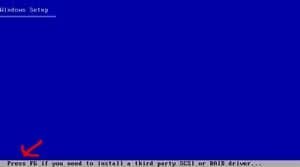
  • F6.jpg
    F6.jpg
    1.8 KB · Views: 98

My Computer My Computer

OS
ME/XP/Vista/Win7
CD/DVD Drive

Thanks for the advice and I followed it by startting with a XP CD boot up.
I immediately noticed that the CD/DVD drive not kicking in, no noise.


I did not make any changes in the Bios. My topic now drifting away from normal Win7 dual boot, any hope?

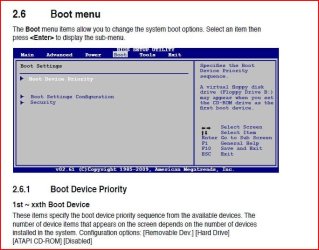
Check in your BIOS for boot order.

You can download manual from link above.
 

Attachments

  • Capture2.JPG
    Capture2.JPG
    60.5 KB · Views: 25

My Computer My Computer

OS
ME/XP/Vista/Win7
Thanks gregrocker but I have followed yr steps but all I get is a BSOD with 0x0000007E (0x00000065, 0xBA9F8756, 0xBACC342C, 0xBACC3128). Just before the BSOD I get an ASUS window with the option to get into the BIOS settings (press delete key). There I can see it is still mentions my prev mobo.

theog - The BIOS boot order seems to be fine now as I can boot from CD/DVD.
I've downloaded the SATA driver but the catch here is that the mobo w/o floppy input, no socket available. Would I be able to use a USB stick?

Rather a circle I'm running because I cannot open the XP CD to do the Repair Install first.
 

My Computer My Computer

Computer type
PC/Desktop
OS
Win7 Pro x64
CPU
Intel(R) Core(TM) i7-2600 CPU @ 3.40GHz
Motherboard
ASRock H61M-VS4
Graphics Card(s)
ATI Radeon HD 5450
Screen Resolution
2560 x 1440
Hard Drives
WDC WD10EALX-009BA0 ATA x2
Internet Speed
100 Mbps
Browser
Waterfox 64-bit
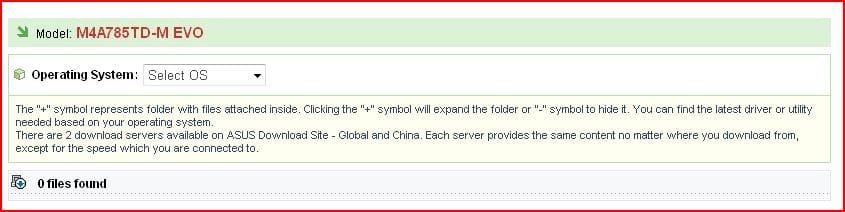
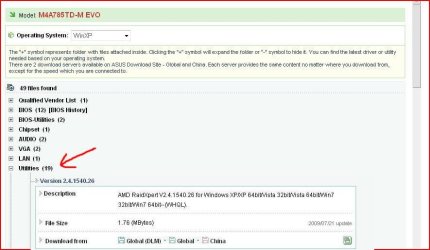
theog - it seems as if I do not require the SATA driver, on the d/l page ASUSTeK Computer Inc. it is not available? I guess the AsusM4A785TD-M EVO ready as is?
 

My Computer My Computer

Computer type
PC/Desktop
OS
Win7 Pro x64
CPU
Intel(R) Core(TM) i7-2600 CPU @ 3.40GHz
Motherboard
ASRock H61M-VS4
Graphics Card(s)
ATI Radeon HD 5450
Screen Resolution
2560 x 1440
Hard Drives
WDC WD10EALX-009BA0 ATA x2
Internet Speed
100 Mbps
Browser
Waterfox 64-bit
theog - it seems as if I do not require the SATA driver, on the d/l page ASUSTeK Computer Inc. it is not available? I guess the AsusM4A785TD-M EVO ready as is?


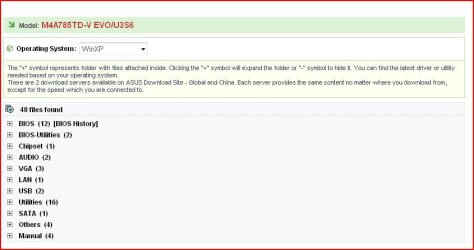
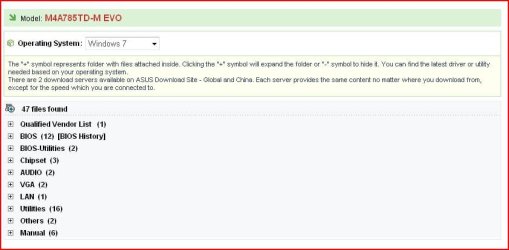
Picture 1 Select OS.
Picture 2 Win 7 selected.
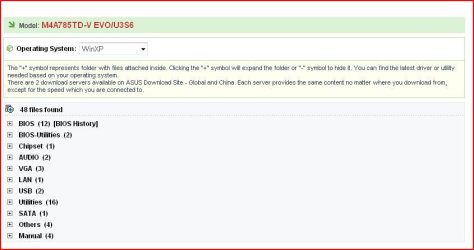
Picture 3 Win XP selected.
 

Attachments

  • Capture3.JPG
    Capture3.JPG
    35.7 KB · Views: 5
  • Capture4.JPG
    Capture4.JPG
    42.3 KB · Views: 4
  • Capture.JPG
    Capture.JPG
    44.1 KB · Views: 4

My Computer My Computer

OS
ME/XP/Vista/Win7
You need to have the new hardware installed before doing the XP repair install. The purpose of it is to acclimate your old XP install to the new hardware.

You may have to slipstream the SATA drivers into the XP installer, or install Win7 first.
 
SATA driver - I can see the original SATA drive (which incl XP) within the BIOS settings, the 2nd (new) SATA is not shown. I have initialized it before I removed the prev MOBO.

Yr link to ASUS is for another model MOBO. On my ASUS link above there is no SATA driver available?
 

My Computer My Computer

Computer type
PC/Desktop
OS
Win7 Pro x64
CPU
Intel(R) Core(TM) i7-2600 CPU @ 3.40GHz
Motherboard
ASRock H61M-VS4
Graphics Card(s)
ATI Radeon HD 5450
Screen Resolution
2560 x 1440
Hard Drives
WDC WD10EALX-009BA0 ATA x2
Internet Speed
100 Mbps
Browser
Waterfox 64-bit
Your link.
Download file
Unzip file
Open folder AMD>AMD>MakeDiisk>x86_x64_XP>AsMakeDisk.exe.
 

Attachments

  • Capture2.JPG
    Capture2.JPG
    57.6 KB · Views: 7

My Computer My Computer

OS
ME/XP/Vista/Win7
Back
Top