Virtual Apps not seen by W7 !!??

Stu49

New member
Local time
2:43 PM
Messages
23
have installed 3 apps in XP virtual m/c !! all work in virtual window, ONLY 2 are seen in W7 XP Mode Apps. (and work ok) !!!!! WHY !!!??? got me beat !?
 

My Computer

Computer Manufacturer/Model Number
Homebrew !!
OS
Ultimate 64 bit
CPU
AMD Athlon II X3 445
Motherboard
BIOSTAR Group GF8100 M2+ SE
Memory
3.0GB Dual-Channel DDR2 @ 400MHz 6-5-5-18
Graphics Card(s)
256MB GeForce 7600 GS
Sound Card
on board
Monitor(s) Displays
SyncMaster + Sony GDM-FW900
Screen Resolution
1600x1000
Hi, this is a common problem and an easy to solve problem too.

Basically the programs you can see in Windows 7 are ones installed for all users and the ones you can't see are only installed for your user account only.

Go into Windows XP Mode and right click on the start button. Click on both 'Open' and Open All Users'.

The Window that opened when you clicked 'Open' is your Start Menu, find whatever you want to appear in Windows 7 and copy that to the corresponding place in the window that opened when you clicked 'Open all Users'.

If you have any questions don't hesitate to ask.

Oli
 

My Computer

Computer Manufacturer/Model Number
Apple MacBook 5,1
OS
Windows 7 Profesional x86, Mac OS X 10.6 Snow Leopard
CPU
Intel Core 2 Duo 2.4Ghz
Memory
4GB DDR3
Graphics Card(s)
Nvidia 9400m
Monitor(s) Displays
13.3" Internal + 22" DVI + 21.5" USB
Screen Resolution
1280x800 + 1920x1080 + 1920x1080
Hard Drives
Internal SATA 2.5" 500GB (395GB Mac HFS+, 105GB Windows NTFS)
2.48TB RAID consisting of 5 disks (HFS+)
Case
Aluminium Unibody
Keyboard
Apple Late 2009 Wireless Keyboard (US)
Mouse
Apple Magic Mouse
Internet Speed
6.33Mb/s up. 0.36Mb/s down.
Other Info
Harman Kardon Soundsticks II Speakers
Brilliant and Obvious !! why didn't I think of that ! tks :)

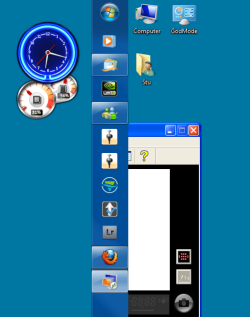
Now we have next problem ! It's in the wrong window (monitor) and I can't drag it across (because it's virtual I assume !?) !!

Also any way to attach USB (my camera!) to it other than manually each time ??

TIA :)
 

My Computer

Computer Manufacturer/Model Number
Homebrew !!
OS
Ultimate 64 bit
CPU
AMD Athlon II X3 445
Motherboard
BIOSTAR Group GF8100 M2+ SE
Memory
3.0GB Dual-Channel DDR2 @ 400MHz 6-5-5-18
Graphics Card(s)
256MB GeForce 7600 GS
Sound Card
on board
Monitor(s) Displays
SyncMaster + Sony GDM-FW900
Screen Resolution
1600x1000
Hi, make sure your Virtual Machine is completely closed and go to Windows Virtual PC in the Windows 7 Start Menu.
Click XP Mode Applications and select the one you would like to open.

Now that program should open with an XP frame opposed to a 7 frame and does not require the Windows XP mode desktop to be open in its own window (you will now notice that your Windows 7 System tray now has a few extra icons in it, these are the ones which you would see if you had Windows XP Mode running in a Window, don't worry about them too much).

Unfortunately there is no way to auto mount your camera into Windows XP Mode when it is plugged in, you have to do it manually, sorry.

Oli
 

My Computer

Computer Manufacturer/Model Number
Apple MacBook 5,1
OS
Windows 7 Profesional x86, Mac OS X 10.6 Snow Leopard
CPU
Intel Core 2 Duo 2.4Ghz
Memory
4GB DDR3
Graphics Card(s)
Nvidia 9400m
Monitor(s) Displays
13.3" Internal + 22" DVI + 21.5" USB
Screen Resolution
1280x800 + 1920x1080 + 1920x1080
Hard Drives
Internal SATA 2.5" 500GB (395GB Mac HFS+, 105GB Windows NTFS)
2.48TB RAID consisting of 5 disks (HFS+)
Case
Aluminium Unibody
Keyboard
Apple Late 2009 Wireless Keyboard (US)
Mouse
Apple Magic Mouse
Internet Speed
6.33Mb/s up. 0.36Mb/s down.
Other Info
Harman Kardon Soundsticks II Speakers
tks ! but u didnt answer my 2nd question ! How do I move the app (in its xp border) to my other monitor/window ???
 

My Computer

Computer Manufacturer/Model Number
Homebrew !!
OS
Ultimate 64 bit
CPU
AMD Athlon II X3 445
Motherboard
BIOSTAR Group GF8100 M2+ SE
Memory
3.0GB Dual-Channel DDR2 @ 400MHz 6-5-5-18
Graphics Card(s)
256MB GeForce 7600 GS
Sound Card
on board
Monitor(s) Displays
SyncMaster + Sony GDM-FW900
Screen Resolution
1600x1000
Ummm, I'm trying it now on my 3 display setup and not having any problems moving the XP mode Windows between displays. Keep trying.

Oli
 

My Computer

Computer Manufacturer/Model Number
Apple MacBook 5,1
OS
Windows 7 Profesional x86, Mac OS X 10.6 Snow Leopard
CPU
Intel Core 2 Duo 2.4Ghz
Memory
4GB DDR3
Graphics Card(s)
Nvidia 9400m
Monitor(s) Displays
13.3" Internal + 22" DVI + 21.5" USB
Screen Resolution
1280x800 + 1920x1080 + 1920x1080
Hard Drives
Internal SATA 2.5" 500GB (395GB Mac HFS+, 105GB Windows NTFS)
2.48TB RAID consisting of 5 disks (HFS+)
Case
Aluminium Unibody
Keyboard
Apple Late 2009 Wireless Keyboard (US)
Mouse
Apple Magic Mouse
Internet Speed
6.33Mb/s up. 0.36Mb/s down.
Other Info
Harman Kardon Soundsticks II Speakers
Ummm, I'm trying it now on my 3 display setup and not having any problems moving the XP mode Windows between displays. Keep trying.

Oli

Like this Oli :

task bar is on right hand edge of left monitor ! Hope u can help :)
 

Attachments

  • Capture.PNG
    Capture.PNG
    31.4 KB · Views: 13

My Computer

Computer Manufacturer/Model Number
Homebrew !!
OS
Ultimate 64 bit
CPU
AMD Athlon II X3 445
Motherboard
BIOSTAR Group GF8100 M2+ SE
Memory
3.0GB Dual-Channel DDR2 @ 400MHz 6-5-5-18
Graphics Card(s)
256MB GeForce 7600 GS
Sound Card
on board
Monitor(s) Displays
SyncMaster + Sony GDM-FW900
Screen Resolution
1600x1000
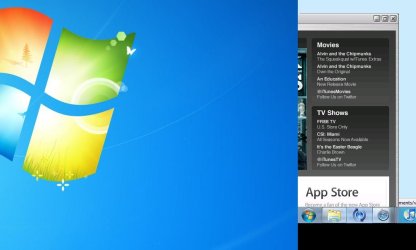
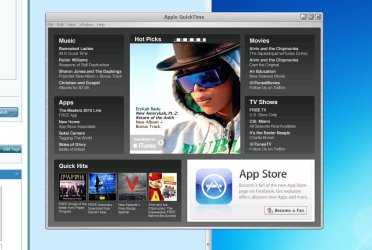
Odd, really rather odd. I did some more testing and found that Windows XP Mode is only allowing me to put XP Mode Windows on Monitor 1 and Monitor 3 but not monitor 2 (as shown in first 2 attached pictures). I dragged Safari onto monitor two and it just turned black (as shown in the third picture below).

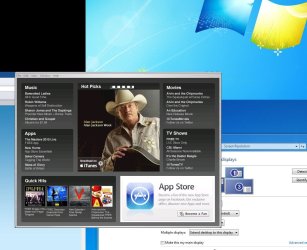
The only possible reason I can see for this is Windows XP mode having a maximum width and height restriction which the last picture backs up (I made it so Windows thinks monitor 2 is above monitor 3. Part of the XP Mode application is on screen 2 but it won't go higher than screen 1).

I can't see a solution to this other than to play about with your monitor configuration in control panel and see if you can get it to move onto the other display.

Sorry for not being able to solve this one, but oh well.

Oli
 

Attachments

  • screen 1 and 2.JPG
    screen 1 and 2.JPG
    52 KB · Views: 6
  • screen 1 and 3.JPG
    screen 1 and 3.JPG
    95.3 KB · Views: 11
  • Full screen Safari on Monitor 2.JPG
    Full screen Safari on Monitor 2.JPG
    18 KB · Views: 5
  • Cut off.JPG
    Cut off.JPG
    110.6 KB · Views: 3

My Computer

Computer Manufacturer/Model Number
Apple MacBook 5,1
OS
Windows 7 Profesional x86, Mac OS X 10.6 Snow Leopard
CPU
Intel Core 2 Duo 2.4Ghz
Memory
4GB DDR3
Graphics Card(s)
Nvidia 9400m
Monitor(s) Displays
13.3" Internal + 22" DVI + 21.5" USB
Screen Resolution
1280x800 + 1920x1080 + 1920x1080
Hard Drives
Internal SATA 2.5" 500GB (395GB Mac HFS+, 105GB Windows NTFS)
2.48TB RAID consisting of 5 disks (HFS+)
Case
Aluminium Unibody
Keyboard
Apple Late 2009 Wireless Keyboard (US)
Mouse
Apple Magic Mouse
Internet Speed
6.33Mb/s up. 0.36Mb/s down.
Other Info
Harman Kardon Soundsticks II Speakers
I did wonder if it was a resolution problem !! will play around 2morrow n see what I can find :) I'll get back with anything interesting ;) tks again !
 

My Computer

Computer Manufacturer/Model Number
Homebrew !!
OS
Ultimate 64 bit
CPU
AMD Athlon II X3 445
Motherboard
BIOSTAR Group GF8100 M2+ SE
Memory
3.0GB Dual-Channel DDR2 @ 400MHz 6-5-5-18
Graphics Card(s)
256MB GeForce 7600 GS
Sound Card
on board
Monitor(s) Displays
SyncMaster + Sony GDM-FW900
Screen Resolution
1600x1000
Update : altered resolution (on both monitors) no improvement !!

Set right monitor as Main, xp app comes up on left now ! AND I can drag it onto right monitor !!!!!!

Work that one out !!?? ;)
 

My Computer

Computer Manufacturer/Model Number
Homebrew !!
OS
Ultimate 64 bit
CPU
AMD Athlon II X3 445
Motherboard
BIOSTAR Group GF8100 M2+ SE
Memory
3.0GB Dual-Channel DDR2 @ 400MHz 6-5-5-18
Graphics Card(s)
256MB GeForce 7600 GS
Sound Card
on board
Monitor(s) Displays
SyncMaster + Sony GDM-FW900
Screen Resolution
1600x1000
Back
Top