
You are using an out of date browser. It may not display this or other websites correctly.
You should upgrade or use an alternative browser.
You should upgrade or use an alternative browser.
Virtual Disk Resizing
- Thread starter Shams1
- Start date

 is full and I I was unable to increase its size. I shall be gratefull if someone could show me how to resize this virtual disk.
Hi Shams1 and welcome to Seven Forums.
If you mean the HP_Tools partition this should only contain the tools that HP supplies with the machine. Nothing much is added to that disk by HP so you need to find what is using that disk and direct it elsewhere.
It would be helpful if you could post a screenshot of what is in the disk. http://www.sevenforums.com/tutorials/9733-screenshots-files-upload-post-seven-forums.html
If you mean the HP_Tools partition this should only contain the tools that HP supplies with the machine. Nothing much is added to that disk by HP so you need to find what is using that disk and direct it elsewhere.
It would be helpful if you could post a screenshot of what is in the disk. http://www.sevenforums.com/tutorials/9733-screenshots-files-upload-post-seven-forums.html
My Computer
- Computer type
- Laptop
- Computer Manufacturer/Model Number
- Hewlett-Packard/G62-107SA Notebook
- OS
- Microsoft Windows 7 Home Premium 64-bit Service Pack 1
- CPU
- Intel(R) Core(TM) i3 CPU M 330 @ 2.13GHz
- Motherboard
- Hewlett-Packard 1425
- Memory
- 8 GB DDR3
- Graphics Card(s)
- Intel(R) HD Graphics
- Sound Card
- Realtek High Definition Audio
- Monitor(s) Displays
- Builtin
- Screen Resolution
- 1366 x 768 x 32 bits (4294967296 colors) @ 60 Hz
- Hard Drives
- 250 GB SATA Hard Disk Drive 7200 rpm
2TB Seagate GoFlex USB 2 Drive
1TB Iomega Prestige USB 2 Drive
1.5TB Iomega Prestige USB 2 Drive (Samsung)
2TB WD MyBook Live NAS.
- Mouse
- Logitech Anywhere MX
- Internet Speed
- 152 Mbs download 10 Mbs upload
- Antivirus
- Norton 360
- Browser
- Chrome
Hi Kado,
Yes, you are right. Strangely, my computer backup was placed in HP-Tools. Although this virtual disk is related to the backup, but the backup file shouldn't have been there. So I called HP and the technician cut the backup file from HP-Tools and placed it in my "Document" directory as a default file and problem is apparently resolved. But I didn't find this backup file in default programs. And I also don't know, for the automatic periodic backups, how HP can find it in my document folder and place the new backups in there. Thanks a lot for your very helpful input and I appreciate if you could comment about the new situation.
Yes, you are right. Strangely, my computer backup was placed in HP-Tools. Although this virtual disk is related to the backup, but the backup file shouldn't have been there. So I called HP and the technician cut the backup file from HP-Tools and placed it in my "Document" directory as a default file and problem is apparently resolved. But I didn't find this backup file in default programs. And I also don't know, for the automatic periodic backups, how HP can find it in my document folder and place the new backups in there. Thanks a lot for your very helpful input and I appreciate if you could comment about the new situation.
My Computer
- OS
- Windows 7 64bit
Hi Shams1.
I assume you are talking about Windows backup.
If you go to the start menu and type backup. Select Backup and Restore from the list and you get the following screen.
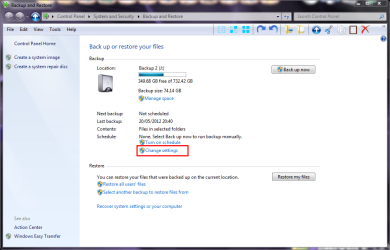
Select Change Settings and it will say backup starting. Don't worry it isn't. It will open this screen where you can chose where to place your backups.

You should ideally chose an external hard disk drive if you have one. You need to follow through the steps in the wizard and save the results.
Alternatively, if you don't want to run backup you can turn it off. There is a link at the top left of the first screen. It's not there on mine because I already have it turned off.
I assume you are talking about Windows backup.
If you go to the start menu and type backup. Select Backup and Restore from the list and you get the following screen.
Select Change Settings and it will say backup starting. Don't worry it isn't. It will open this screen where you can chose where to place your backups.
You should ideally chose an external hard disk drive if you have one. You need to follow through the steps in the wizard and save the results.
Alternatively, if you don't want to run backup you can turn it off. There is a link at the top left of the first screen. It's not there on mine because I already have it turned off.
My Computer
- Computer type
- Laptop
- Computer Manufacturer/Model Number
- Hewlett-Packard/G62-107SA Notebook
- OS
- Microsoft Windows 7 Home Premium 64-bit Service Pack 1
- CPU
- Intel(R) Core(TM) i3 CPU M 330 @ 2.13GHz
- Motherboard
- Hewlett-Packard 1425
- Memory
- 8 GB DDR3
- Graphics Card(s)
- Intel(R) HD Graphics
- Sound Card
- Realtek High Definition Audio
- Monitor(s) Displays
- Builtin
- Screen Resolution
- 1366 x 768 x 32 bits (4294967296 colors) @ 60 Hz
- Hard Drives
- 250 GB SATA Hard Disk Drive 7200 rpm
2TB Seagate GoFlex USB 2 Drive
1TB Iomega Prestige USB 2 Drive
1.5TB Iomega Prestige USB 2 Drive (Samsung)
2TB WD MyBook Live NAS.
- Mouse
- Logitech Anywhere MX
- Internet Speed
- 152 Mbs download 10 Mbs upload
- Antivirus
- Norton 360
- Browser
- Chrome
You are welcome Shams1. Thanks for letting us know.
My Computer
- Computer type
- Laptop
- Computer Manufacturer/Model Number
- Hewlett-Packard/G62-107SA Notebook
- OS
- Microsoft Windows 7 Home Premium 64-bit Service Pack 1
- CPU
- Intel(R) Core(TM) i3 CPU M 330 @ 2.13GHz
- Motherboard
- Hewlett-Packard 1425
- Memory
- 8 GB DDR3
- Graphics Card(s)
- Intel(R) HD Graphics
- Sound Card
- Realtek High Definition Audio
- Monitor(s) Displays
- Builtin
- Screen Resolution
- 1366 x 768 x 32 bits (4294967296 colors) @ 60 Hz
- Hard Drives
- 250 GB SATA Hard Disk Drive 7200 rpm
2TB Seagate GoFlex USB 2 Drive
1TB Iomega Prestige USB 2 Drive
1.5TB Iomega Prestige USB 2 Drive (Samsung)
2TB WD MyBook Live NAS.
- Mouse
- Logitech Anywhere MX
- Internet Speed
- 152 Mbs download 10 Mbs upload
- Antivirus
- Norton 360
- Browser
- Chrome