
You are using an out of date browser. It may not display this or other websites correctly.
You should upgrade or use an alternative browser.
You should upgrade or use an alternative browser.
virtual machine
- Thread starter hashir
- Start date
I have been using Virtualbox. It has worked well.
My Computer
- Computer type
- PC/Desktop
- Computer Manufacturer/Model Number
- Custom Built
- OS
- Windows 10 Pro x64, Windows 8.1 Pro x64, Windows 7 Ultimate x64 SP1,
- CPU
- INTEL i9-7920X LGA 2066
- Motherboard
- Gigabyte X299-WU8 F3
- Memory
- 64 GB (4 X 16 GB) G-Skill V Series DDR4 3200 Quad Channel
- Graphics Card(s)
- EVGA GTX 1060 SC 3 GB
- Sound Card
- Realtek Onboard ALC1220
- Monitor(s) Displays
- 2 x Samsung S27E310
- Screen Resolution
- 1920x1080
- Hard Drives
- Samsung 2 x 970 EVO Plus 500 GB NVMe
1 x 6TB WD 6003FZBX SATA
1 x 6TB WD 60EFRX SATA
12 x 3TB WD 30EFRX SATA
- PSU
- Seasonic X-1050
- Case
- Thermaltake Armor+
- Cooling
- Corsair H80i V2 Liquid AOI Cooler
- Keyboard
- Logitech G510s
- Mouse
- Logitech MX Master 2S
- Internet Speed
- 200 Mb/s
- Antivirus
- ESET NOD32 13.1
- Browser
- EDGE (Dev, Canary, Beta), Chrome
- Other Info
- ASUS RT-AC68U router
Malwarebytes 4.0.4

VMWare is excellent, I've run several VMs in it and currently have two different W10 builds running in it via a Windows 7 host.
VMWare Player
VMWare Player
My Computer
- Computer type
- PC/Desktop
- Computer Manufacturer/Model Number
- Custom Build
- OS
- W7 Pro x64 SP1 | W10 Pro IP x64 | W8.1 Pro x64 VM | Linux Mint VM
- CPU
- i7-4790k @ 4GHz (4.4GHz Boost)
- Motherboard
- ASUS Sabertooth Z87 (BIOS Rev 2004)
- Memory
- 16GB DDR3 Kingston HyperX Fury @ 1600MHz CL 9-9-9-27
- Graphics Card(s)
- EVGA GTX 980 Classified
- Sound Card
- Realtek Onboard
- Monitor(s) Displays
- Samsung S27D390
- Screen Resolution
- 1920 x 1080
- Hard Drives
- 240GB Intel 520 Series SSD |
Samsung 850 EVO 120GB SSD |
2TB WD Caviar Black |
2TB WD Caviar Black |
2TB WD Caviar Green
- PSU
- Corsair HX850-80 Gold Modular
- Case
- Cooler Master Silencio 650
- Cooling
- Corsair H80i w/2 x Corsair SP120 | 2 x 120mm Noctua NF-S12B
- Keyboard
- Microsoft Sidewinder X4
- Mouse
- Gigabyte M6900 optical
- Internet Speed
- 152mb
- Antivirus
- F-Secure
- Browser
- Firefox 38.0
- Other Info
- Backup Rig: Win 7 Pro 64-bit | AMD A10-5800k | ASUS F2A85-V Pro | 8GB Samsung DDR3 @1600MHz | 120GB Toshiba SDD | 2TB Seagate HDD | Cooler Master Silencio 550

VirtualBox has more features than VMWare Player such as snapshots which are very useful on Beta systems which may suddenly go wrong. Its downside is that it is not quite as stable. I an running W10 in both.
My Computer
- Computer type
- Laptop
- Computer Manufacturer/Model Number
- Hewlett-Packard/G62-107SA Notebook
- OS
- Microsoft Windows 7 Home Premium 64-bit Service Pack 1
- CPU
- Intel(R) Core(TM) i3 CPU M 330 @ 2.13GHz
- Motherboard
- Hewlett-Packard 1425
- Memory
- 8 GB DDR3
- Graphics Card(s)
- Intel(R) HD Graphics
- Sound Card
- Realtek High Definition Audio
- Monitor(s) Displays
- Builtin
- Screen Resolution
- 1366 x 768 x 32 bits (4294967296 colors) @ 60 Hz
- Hard Drives
- 250 GB SATA Hard Disk Drive 7200 rpm
2TB Seagate GoFlex USB 2 Drive
1TB Iomega Prestige USB 2 Drive
1.5TB Iomega Prestige USB 2 Drive (Samsung)
2TB WD MyBook Live NAS.
- Mouse
- Logitech Anywhere MX
- Internet Speed
- 152 Mbs download 10 Mbs upload
- Antivirus
- Norton 360
- Browser
- Chrome

Here is my tutorial on how to install and operate Windows 10 in VMware Player.
My Computer
- Computer Manufacturer/Model Number
- HP, Dell, Gateway, Toshiba - 4 laptops and 2 desktops
- OS
- Vista, Windows7, Mint Mate, Zorin, Windows 8
- CPU
- from 1.6GHz Duo to i7
- Monitor(s) Displays
- 2x HP w2207
- Hard Drives
- 5x HDD, 7x SSD, 12x Externals
- Keyboard
- with trackball - no mices
- Mouse
- Trackball mice
- Internet Speed
- DSL 6000
Excellent tutorial Wolfgang. What windows program do you use to record this with. Tx
My Computer
- Computer type
- PC/Desktop
- Computer Manufacturer/Model Number
- Self Build
- OS
- Windows 7 Professional X64 Service Pack 1
- CPU
- AMD Phenom II X4 955 3.20GHz
- Motherboard
- Gigabyte GA-MA790X-UD4P
- Memory
- 8G
- Graphics Card(s)
- GX550 Ti
- Sound Card
- On board
- Monitor(s) Displays
- Asus VW246H & Syncmaster 2243swx
- Screen Resolution
- 1920x1080 & 1920x1080
- Hard Drives
- M4-CT128 SSD2, Samsung 840 256GB, 1 WDC 1TB
- PSU
- Corsair TX750W-V2
- Case
- Antec
- Cooling
- 2 120mm fan
- Keyboard
- Microsoft Wireless 3050
- Mouse
- Microsoft Wireless 5000
- Internet Speed
- 72/6Mbs (Cable)
- Other Info
- Asus AC1900 router, 8 port Trendnet Switch - Logitech Webcam Pro 9000
The recording was done with Camtasia. But that is a bit pricey. I got it for free thru the MVP channels. Another one I use is WMCapture. That is just as good for a small price. And they have a free 4 week trial where you can chack it out.
I have tried many recorders over the years. Those two and the Microsoft Expression Encoder 4 (used to be $199 but is free now) are the only programs that produce good quality. The acid test is always text on the screen. When you record action scenes, you won't see much difference though.
The advantage of WMCapture is that it also works well on a modest CPU. The other two need a LOT of CPU muscle for the encoding. Even my i7 is working very hard and long for the encoding. Another problem is that the upload to YouTube takes a lot of quality away. The originals play a LOT better.
If you are interested I can upload one of the originals for you to compare - probably the third video because that is only 45MB. Will still take a bit but if you are seriously exploring the subject, no problem.
I have tried many recorders over the years. Those two and the Microsoft Expression Encoder 4 (used to be $199 but is free now) are the only programs that produce good quality. The acid test is always text on the screen. When you record action scenes, you won't see much difference though.
The advantage of WMCapture is that it also works well on a modest CPU. The other two need a LOT of CPU muscle for the encoding. Even my i7 is working very hard and long for the encoding. Another problem is that the upload to YouTube takes a lot of quality away. The originals play a LOT better.
If you are interested I can upload one of the originals for you to compare - probably the third video because that is only 45MB. Will still take a bit but if you are seriously exploring the subject, no problem.
Last edited:
My Computer
- Computer Manufacturer/Model Number
- HP, Dell, Gateway, Toshiba - 4 laptops and 2 desktops
- OS
- Vista, Windows7, Mint Mate, Zorin, Windows 8
- CPU
- from 1.6GHz Duo to i7
- Monitor(s) Displays
- 2x HP w2207
- Hard Drives
- 5x HDD, 7x SSD, 12x Externals
- Keyboard
- with trackball - no mices
- Mouse
- Trackball mice
- Internet Speed
- DSL 6000
I have used CamStudio in the past. It is completely free. CamStudio - Free Screen Recording Software
My Computer
- Computer type
- Laptop
- Computer Manufacturer/Model Number
- Hewlett-Packard/G62-107SA Notebook
- OS
- Microsoft Windows 7 Home Premium 64-bit Service Pack 1
- CPU
- Intel(R) Core(TM) i3 CPU M 330 @ 2.13GHz
- Motherboard
- Hewlett-Packard 1425
- Memory
- 8 GB DDR3
- Graphics Card(s)
- Intel(R) HD Graphics
- Sound Card
- Realtek High Definition Audio
- Monitor(s) Displays
- Builtin
- Screen Resolution
- 1366 x 768 x 32 bits (4294967296 colors) @ 60 Hz
- Hard Drives
- 250 GB SATA Hard Disk Drive 7200 rpm
2TB Seagate GoFlex USB 2 Drive
1TB Iomega Prestige USB 2 Drive
1.5TB Iomega Prestige USB 2 Drive (Samsung)
2TB WD MyBook Live NAS.
- Mouse
- Logitech Anywhere MX
- Internet Speed
- 152 Mbs download 10 Mbs upload
- Antivirus
- Norton 360
- Browser
- Chrome

Virtual Machine...
The 2 main ones i know many people use although i'm sure there are many more great solutions out there:
There is also Windows Virtual PC - Used once or twice but i stuck with VirtualBox - http://www.sevenforums.com/tutorials/8254-windows-virtual-pc-create-virtual-machine.html
Overall, Try them and see what you like best i suppose.
If you move onto Windows 8.1 then
Hyper-V - I have just started using this, i really like it and may well replace VirtualBox for me but i'm not sure how to explain why.
Screen Recording...
I 2nd CamStudio, i always turn to this for screen recording, i have only ever done really basic capturing and never needed to edit the video so i'm not sure how feature rich it is compared to others but for my needs it has been great.
Regards,
Jamie
The 2 main ones i know many people use although i'm sure there are many more great solutions out there:
- Oracle VirtualBox - I have used this for many years now and it's never failed me
Download - https://www.virtualbox.org/wiki/Downloads - WMWare Player - Never really used it myself but know other who have and they haven't expressed any issues with it.
There is also Windows Virtual PC - Used once or twice but i stuck with VirtualBox - http://www.sevenforums.com/tutorials/8254-windows-virtual-pc-create-virtual-machine.html
Overall, Try them and see what you like best i suppose.
If you move onto Windows 8.1 then
Hyper-V - I have just started using this, i really like it and may well replace VirtualBox for me but i'm not sure how to explain why.
Screen Recording...
I 2nd CamStudio, i always turn to this for screen recording, i have only ever done really basic capturing and never needed to edit the video so i'm not sure how feature rich it is compared to others but for my needs it has been great.
Regards,
Jamie
My Computer
- Computer type
- PC/Desktop
- Computer Manufacturer/Model Number
- Self Built
- OS
- Windows 8.1 Pro x64
- CPU
- Intel Core i5-2500K @ 3.30GHz - S1155
- Motherboard
- Asus P8P67 LE Rev3, Intel P67, S115
- Memory
- 8GB Corsair DDR3 XMS3, PC3-12800
- Graphics Card(s)
- NVIDIA GeForce GTX 650
- Sound Card
- On-Board
- Monitor(s) Displays
- 3 x 24" {Extended Display}
- Screen Resolution
- 1920 x 1080
- Hard Drives
- 300GB Seagate Barracuda 7200
- PSU
- 550W Coolermaster GX550
- Case
- Silverstone Precision PS04B
- Cooling
- Stock
- Keyboard
- Logitech K120
- Mouse
- World of Warcraft Cataclysm MMO Gaming Mouse
- Internet Speed
- 80 MB
- Antivirus
- MSE / Windows Defender
- Browser
- Chrome

I have tried many recorders over the years. Those two and the Microsoft Expression Encoder 4 ($199 for the full version) are the only programs that produce good quality.
Microsoft Expression Encoder is discontinued, full version can no longer be bought as it is no longer in production. The latest version with SP 2 is free to use: Download Microsoft Expression Encoder 4 with Service Pack 2 (SP2) from Official Microsoft Download Center
My Computer
- Computer type
- Laptop
- Computer Manufacturer/Model Number
- HP ENVY 17-1150eg
- OS
- Windows 10 Pro x64 EN-GB
- CPU
- 1.6 GHz Intel Core i7-720QM Processor
- Memory
- 6 GB
- Graphics Card(s)
- ATI Mobility Radeon HD 5850 Graphics
- Sound Card
- Beats sound system with integrated subwoofer
- Monitor(s) Displays
- 17" laptop display, 22" LED and 32" Full HD TV through HDMI
- Screen Resolution
- 1600*900 (1), 1920*1080 (2&3)
- Hard Drives
- Internal: 2 x 500 GB SATA Hard Disk Drive 7200 rpm
External: 2TB for backups, 3TB USB3 network drive for media
- Cooling
- As Envy runs a bit warm, I have it on a Cooler Master pad
- Keyboard
- Logitech diNovo Media Desktop Laser (bluetooth)
- Mouse
- Logitech Performance Mouse MX
- Internet Speed
- 50/10 Mbps VDSL
- Antivirus
- Windows Defender 4.3.9431.0
- Browser
- Maxthon 3.5.2., IE11
Thanks Kari. That's good to know. I had not looked for a while since I got Camtasia. I updated my posting accordingly. For those that like to use the Expression Encoder, here is a little tutorial I made a long time ago.
http://www.sevenforums.com/tutorials/149154-screen-capture-video-editing-high-quality.html
http://www.sevenforums.com/tutorials/149154-screen-capture-video-editing-high-quality.html
My Computer
- Computer Manufacturer/Model Number
- HP, Dell, Gateway, Toshiba - 4 laptops and 2 desktops
- OS
- Vista, Windows7, Mint Mate, Zorin, Windows 8
- CPU
- from 1.6GHz Duo to i7
- Monitor(s) Displays
- 2x HP w2207
- Hard Drives
- 5x HDD, 7x SSD, 12x Externals
- Keyboard
- with trackball - no mices
- Mouse
- Trackball mice
- Internet Speed
- DSL 6000
I have tried many recorders over the years. Those two and the Microsoft Expression Encoder 4 ($199 for the full version) are the only programs that produce good quality.
Microsoft Expression Encoder is discontinued, full version can no longer be bought as it is no longer in production. The latest version with SP 2 is free to use: Download Microsoft Expression Encoder 4 with Service Pack 2 (SP2) from Official Microsoft Download Center
I looked at the requirements, does not include W8, 8.1 and of course W10. (yet??)
My Computer
- Computer type
- PC/Desktop
- Computer Manufacturer/Model Number
- Self Build
- OS
- Windows 7 Professional X64 Service Pack 1
- CPU
- AMD Phenom II X4 955 3.20GHz
- Motherboard
- Gigabyte GA-MA790X-UD4P
- Memory
- 8G
- Graphics Card(s)
- GX550 Ti
- Sound Card
- On board
- Monitor(s) Displays
- Asus VW246H & Syncmaster 2243swx
- Screen Resolution
- 1920x1080 & 1920x1080
- Hard Drives
- M4-CT128 SSD2, Samsung 840 256GB, 1 WDC 1TB
- PSU
- Corsair TX750W-V2
- Case
- Antec
- Cooling
- 2 120mm fan
- Keyboard
- Microsoft Wireless 3050
- Mouse
- Microsoft Wireless 5000
- Internet Speed
- 72/6Mbs (Cable)
- Other Info
- Asus AC1900 router, 8 port Trendnet Switch - Logitech Webcam Pro 9000
I've run it on Windows 8 and 8.1 since the day I installed those operating systems, and again it was the first software I installed after clean install of the latest Windows 10, the build 10041.
Absolutely no issues.
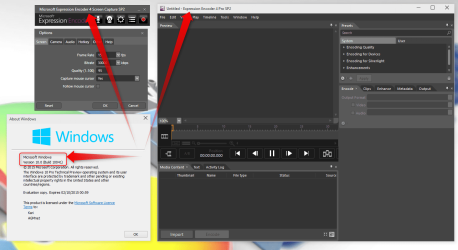
Absolutely no issues.
My Computer
- Computer type
- Laptop
- Computer Manufacturer/Model Number
- HP ENVY 17-1150eg
- OS
- Windows 10 Pro x64 EN-GB
- CPU
- 1.6 GHz Intel Core i7-720QM Processor
- Memory
- 6 GB
- Graphics Card(s)
- ATI Mobility Radeon HD 5850 Graphics
- Sound Card
- Beats sound system with integrated subwoofer
- Monitor(s) Displays
- 17" laptop display, 22" LED and 32" Full HD TV through HDMI
- Screen Resolution
- 1600*900 (1), 1920*1080 (2&3)
- Hard Drives
- Internal: 2 x 500 GB SATA Hard Disk Drive 7200 rpm
External: 2TB for backups, 3TB USB3 network drive for media
- Cooling
- As Envy runs a bit warm, I have it on a Cooler Master pad
- Keyboard
- Logitech diNovo Media Desktop Laser (bluetooth)
- Mouse
- Logitech Performance Mouse MX
- Internet Speed
- 50/10 Mbps VDSL
- Antivirus
- Windows Defender 4.3.9431.0
- Browser
- Maxthon 3.5.2., IE11
Thanks, that is good to know. Going to put it on my W10 system now.
My Computer
- Computer type
- PC/Desktop
- Computer Manufacturer/Model Number
- Self Build
- OS
- Windows 7 Professional X64 Service Pack 1
- CPU
- AMD Phenom II X4 955 3.20GHz
- Motherboard
- Gigabyte GA-MA790X-UD4P
- Memory
- 8G
- Graphics Card(s)
- GX550 Ti
- Sound Card
- On board
- Monitor(s) Displays
- Asus VW246H & Syncmaster 2243swx
- Screen Resolution
- 1920x1080 & 1920x1080
- Hard Drives
- M4-CT128 SSD2, Samsung 840 256GB, 1 WDC 1TB
- PSU
- Corsair TX750W-V2
- Case
- Antec
- Cooling
- 2 120mm fan
- Keyboard
- Microsoft Wireless 3050
- Mouse
- Microsoft Wireless 5000
- Internet Speed
- 72/6Mbs (Cable)
- Other Info
- Asus AC1900 router, 8 port Trendnet Switch - Logitech Webcam Pro 9000