Virtual Machines and GUIDs / Licensing

powder21

New member
Hi. I am not finding a definite answer to this question in my google and microsoft searches. I was hoping somebody here could help me out.

I am trying to figure out if I will be able to install and activate Windows 7 on multiple VMs using the same product key on the same physical machine.

I am able to install, activate, and run multiple copies of Windows 7 on separate physical partitions with the same product key due to the fact that they all share the same GUID and thus, from Microsoft's perspective, they are all the same exact copy. Or at least this is how I understand it.

So, if each VM shares the same GUID, it would stand to reason that I would not need a different product key for each Windows 7 VM that I am running. However, I don't know that much about virtualization, so I am unsure as to whether a VM created with the new Windows Virtual PC will have a GUID different from that which is stored in my BIOS.

If somebody could please help clarify this, I would greatly appreciate it, as I do not want to get my product key "black-listed" and I need to get several Windows 7 VM's installed as soon as possible. Thanks.

Just FYI: This is for testing purposes. I can assure you that I have purchased a separate license for every PHYSICAL MACHINE that I own. I am not trying to screw Microsoft here :)
 
Last edited:

My Computer

Computer type
PC/Desktop
OS
Windows
If you install Seven on a virtual machine using the key which is already activated on another machine, you get an error message telling this key is already been used. I have tested it, did not work.

If you install Seven on a virtual machine using non-activated key, it should logically work. Another question is then if it is completely legal, at least it is against EULA (one install, one activation per key).

Kari
 

My Computer

Computer type
Laptop
Computer Manufacturer/Model Number
HP ENVY 17-1150eg
OS
Windows 10 Pro x64 EN-GB
CPU
1.6 GHz Intel Core i7-720QM Processor
Memory
6 GB
Graphics Card(s)
ATI Mobility Radeon HD 5850 Graphics
Sound Card
Beats sound system with integrated subwoofer
Monitor(s) Displays
17" laptop display, 22" LED and 32" Full HD TV through HDMI
Screen Resolution
1600*900 (1), 1920*1080 (2&3)
Hard Drives
Internal: 2 x 500 GB SATA Hard Disk Drive 7200 rpm
External: 2TB for backups, 3TB USB3 network drive for media
Cooling
As Envy runs a bit warm, I have it on a Cooler Master pad
Keyboard
Logitech diNovo Media Desktop Laser (bluetooth)
Mouse
Logitech Performance Mouse MX
Internet Speed
50/10 Mbps VDSL
Antivirus
Windows Defender 4.3.9431.0
Browser
Maxthon 3.5.2., IE11
If you install Seven on a virtual machine using the key which is already activated on another machine, you get an error message telling this key is already been used. I have tested it, did not work.

If you install Seven on a virtual machine using non-activated key, it should logically work. Another question is then if it is completely legal, at least it is against EULA (one install, one activation per key).

Kari


Hi there

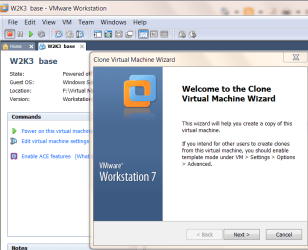
while this IS "technically" correct you can certainly CLONE a Virtual Machine - and unless you SIGNIFICANTLY change the "Virtual Hardware" such as radically increasing "Virtual RAM size" you won't be asked to re-activate the product since it is in essence an "Identical Machine".

Now the whole licensing issue of VM's is very vague but if you've got an Identical Machine (Virtual) I can't see any problem with firing / powering up any of them on your physical hardware even if you only use one at a time.

A Virtual Machine is just a set of disk files which can be moved between PHYSICAL HARDWARE whilst the Virtual Machine stays 100% INTACT.

So having say created an XP system just clone it to test new applications -- you should only need to activate Windows ONCE.

I use the clone feature (using Vmware workstation) quite frequently on W2K3/XP/W7 Virtual Machines and have not had to re-activate any of the clones.

I suspect just copying the files with windows explorer would probably work as well.


Cheers
jimbo
 

Attachments

  • clonevm.png
    clonevm.png
    98.5 KB · Views: 46

My Computer

Computer type
PC/Desktop
Computer Manufacturer/Model Number
Custom built, several laptops HP/ASUS
OS
Linux CENTOS 7 / various Windows OS'es and servers
CPU
Intel i7 Intel i5
Memory
8GB, 16GB
Graphics Card(s)
On Motherboard
Sound Card
Realtek HD audio
Monitor(s) Displays
Apple Cinema display, Samsung LCD
Screen Resolution
1920 X 1080
Hard Drives
4 X 1TB SATA
Mouse
Toshiba wireless laser
Internet Speed
> 20MB up
Thanks for your replies.

UPDATE: I contacted Microsoft who told me definitively that each VM requires a separate license. However, I'm still interested in possibly using only one additional license and just copying the VM once activated. I'm just still wondering if running the separate copies simultaneously might do something that would cause the license used for the VM to be lost (black-listed). Please let me know. Thanks again.
 
Last edited:

My Computer

Computer type
PC/Desktop
OS
Windows
You could try it easily by copying the vhd as told in this tutorial. The tutorial is about copying the XP mode vhd but the principle is the same when copying any vhd.

Kari
 

My Computer

Computer type
Laptop
Computer Manufacturer/Model Number
HP ENVY 17-1150eg
OS
Windows 10 Pro x64 EN-GB
CPU
1.6 GHz Intel Core i7-720QM Processor
Memory
6 GB
Graphics Card(s)
ATI Mobility Radeon HD 5850 Graphics
Sound Card
Beats sound system with integrated subwoofer
Monitor(s) Displays
17" laptop display, 22" LED and 32" Full HD TV through HDMI
Screen Resolution
1600*900 (1), 1920*1080 (2&3)
Hard Drives
Internal: 2 x 500 GB SATA Hard Disk Drive 7200 rpm
External: 2TB for backups, 3TB USB3 network drive for media
Cooling
As Envy runs a bit warm, I have it on a Cooler Master pad
Keyboard
Logitech diNovo Media Desktop Laser (bluetooth)
Mouse
Logitech Performance Mouse MX
Internet Speed
50/10 Mbps VDSL
Antivirus
Windows Defender 4.3.9431.0
Browser
Maxthon 3.5.2., IE11
I'd certainly give it a shot, but I'm worried trying it might cause me to lose my license. Do you know if copying the vhd (as per the tutorial) will retain the same GUID? Meaning would MS see it as the exact same VM or could they tell that it is in fact a copied VM? If you don't know the answer, then I'll simply have to use trial and error so just let me know so I don't keep bugging you guys. However, if you've done this before and know how a copied VM is viewed by MS then I'd love to know that before trying. Thanks again for your help.
 

My Computer

Computer type
PC/Desktop
OS
Windows
I'm using three XP Modes to different purposes. I installed Virtual PC and XP Mode, installed the basic applications to XP Mode and then made two copies of it.

Now I have three different XP Modes, depending on what I'm doing I'm using one of them.

GUID is the same, license OK. You do not break EULA when using copies of XP Mode, as long as they run on the same machine and your Win7 is OK, genuine and licensed.

Kari
 

My Computer

Computer type
Laptop
Computer Manufacturer/Model Number
HP ENVY 17-1150eg
OS
Windows 10 Pro x64 EN-GB
CPU
1.6 GHz Intel Core i7-720QM Processor
Memory
6 GB
Graphics Card(s)
ATI Mobility Radeon HD 5850 Graphics
Sound Card
Beats sound system with integrated subwoofer
Monitor(s) Displays
17" laptop display, 22" LED and 32" Full HD TV through HDMI
Screen Resolution
1600*900 (1), 1920*1080 (2&3)
Hard Drives
Internal: 2 x 500 GB SATA Hard Disk Drive 7200 rpm
External: 2TB for backups, 3TB USB3 network drive for media
Cooling
As Envy runs a bit warm, I have it on a Cooler Master pad
Keyboard
Logitech diNovo Media Desktop Laser (bluetooth)
Mouse
Logitech Performance Mouse MX
Internet Speed
50/10 Mbps VDSL
Antivirus
Windows Defender 4.3.9431.0
Browser
Maxthon 3.5.2., IE11
Awesome. Thanks. Hopefully this holds true with Windows 7 VMs. I'll give it a shot and post back.
 

My Computer

Computer type
PC/Desktop
OS
Windows
I've tested with XP and Vista, have had no problems.
 

My Computer

Computer type
Laptop
Computer Manufacturer/Model Number
HP ENVY 17-1150eg
OS
Windows 10 Pro x64 EN-GB
CPU
1.6 GHz Intel Core i7-720QM Processor
Memory
6 GB
Graphics Card(s)
ATI Mobility Radeon HD 5850 Graphics
Sound Card
Beats sound system with integrated subwoofer
Monitor(s) Displays
17" laptop display, 22" LED and 32" Full HD TV through HDMI
Screen Resolution
1600*900 (1), 1920*1080 (2&3)
Hard Drives
Internal: 2 x 500 GB SATA Hard Disk Drive 7200 rpm
External: 2TB for backups, 3TB USB3 network drive for media
Cooling
As Envy runs a bit warm, I have it on a Cooler Master pad
Keyboard
Logitech diNovo Media Desktop Laser (bluetooth)
Mouse
Logitech Performance Mouse MX
Internet Speed
50/10 Mbps VDSL
Antivirus
Windows Defender 4.3.9431.0
Browser
Maxthon 3.5.2., IE11
Hi there
with vmware workstation works fine - XP / W2L3 Server and W7 vm's all copy with Windows explorer (or by using the Clone facility)

Also works with vmware server.

Cheers
jimbo
 

My Computer

Computer type
PC/Desktop
Computer Manufacturer/Model Number
Custom built, several laptops HP/ASUS
OS
Linux CENTOS 7 / various Windows OS'es and servers
CPU
Intel i7 Intel i5
Memory
8GB, 16GB
Graphics Card(s)
On Motherboard
Sound Card
Realtek HD audio
Monitor(s) Displays
Apple Cinema display, Samsung LCD
Screen Resolution
1920 X 1080
Hard Drives
4 X 1TB SATA
Mouse
Toshiba wireless laser
Internet Speed
> 20MB up
Back
Top