Virtual Memory

ark1227

New member
Local time
9:01 AM
Messages
50
Hey guys,
ok so i have 3gb ram, 250gb hdd, intel core 2 duo p8400 @ 2.26ghz

so i was wondering about my virtual memory

how much do you suggest that i set it to?
what different will it make?

THANKS IN ADVANCE!
 

My Computer

Computer Manufacturer/Model Number
Hewlett-Packard HP 6730s Business Notebook
OS
Windows 7 Ultimate x86 & x64
CPU
Intel Centrino 2 with Intel Core 2 Duo
Memory
3GB
Graphics Card(s)
ATI Radeon Premium Graphics HD
Hard Drives
250GB HDD
5400 RPM
Case
Laptop
Cooling
Fan
Mouse
Microsoft Mouse 5000 BlueTrack Technology
Internet Speed
12Mb/s
Uh-oh. Let the games begin. Put on your sheepskin chaps and take a deep seat.

You may as well have asked about Intel/AMD, Apple/Microsoft, single or multiple partitions, or infidel/believer.

I have seen threads on this run to hundreds of posts, without a single mind being changed.

Do what you want, but don't explain it publicly--you'd only be begging for it.
 

My Computer

Computer type
PC/Desktop
Computer Manufacturer/Model Number
Ignatz Special; 4 speed manual gearbox; factory air conditioning; one of one
OS
Windows 7 Home Premium SP1, 64-bit
CPU
Intel Skylake i5-6600K, not overclocked
Motherboard
AsRock Z170M Extreme 4, micro ATX
Memory
8 GB HyperX DDR4-2666 (2 x 4 GB)
Graphics Card(s)
none; graphics are integrated on CPU
Sound Card
onboard: Realtek ALC1150; external: USB Behringer UF0-202
Monitor(s) Displays
Dell S2340M 23 inch IPS
Screen Resolution
1600 x 900
Hard Drives
System: Crucial MX100 series SSD, 128 GB;
Data: Samsung Spinpoint 103SJ, 1 TB;
Backup: WD Caviar Green WD30EZRX-00D8PB0, 3 TB
PSU
Rosewill SilentNight 500 watt fanless, semi-modular
Case
Antec Solo II
Cooling
Noctua NH-U12S; Noctua F12 intake, Noctua S12A exhaust
Keyboard
Microsoft 200 6JH-00001 USB
Mouse
Dell or Microsoft optical wired; USB
Antivirus
Microsoft Security Essentials and Malwarebytes Premium
Browser
Pale Moon
Other Info
All fans PWM; speeds at idle: CPU circa 500 rpm; intake circa 600 rpm; exhaust circa 600 rpm; CPU temps 27 idle and 47 C load in a warm room (27 C/81 F) when running Intel Extreme Tuning Utility stress test.
Set it to automatic allocate space for Virtual Memory.
 

My Computer

OS
Windows 7 Ultimate x64 Service Pack 1 (Build 6.1.7601)
CPU
Intel Core 2 Quad Q6600 (G0 Kentsfield) LGA775 (FC-LGA6)
Motherboard
GIGABYTE GA-EP35C-DS3R (Rev. 2.1)
Memory
Corsair TW3X4G1333C9A 4GB PC-10600 (2x XMS3 2GB)
Graphics Card(s)
ASUS nVIDIA GeForce 560
Sound Card
RealTek ALC885/889A/890
Monitor(s) Displays
ChiMei CMV CT-730D 17inch (LCD Monitor)
Screen Resolution
1280-1024 60Hertz (Ture Colour 32bit)
Hard Drives
2x Barracuda 7200.10 SATA 3.0Gb/s 160-GB Hard Drive ST3160815AS (AHCI)
PSU
ANTEC 750w Earthwatts
Case
Thermaltake Shark (VA7000SWA ATX) Full Tower
Cooling
Front 120mm fan (1400 RPM) /Rear 120mm (1400 RPM) blue LED
Keyboard
Labtec Media Desktop Y-SAD65
Mouse
Razer DeathAdder 3G Infrared Sensor (1800DPI)
Internet Speed
Telstra BigPond Elite Liberty ADSL2+ 24Mbps/256kbps
Other Info
ASUS PCE-N13 802.11n Wireless LAN card
Uh-oh. Let the games begin. Put on your sheepskin chaps and take a deep seat.

You may as well have asked about Intel/AMD, Apple/Microsoft, single or multiple partitions, or infidel/believer.

I have seen threads on this run to hundreds of posts, without a single mind being changed.

Do what you want, but don't explain it publicly--you'd only be begging for it.
lol thats pretty true. you will hear a lot of answers, i say either leave it alone or set it it 2xram, unless you shrink it significantly your not going to have a noticeable penalty, and if you make it to large it's not going to take advantage of the extra space.
 

My Computer

Computer Manufacturer/Model Number
Custom
OS
Windows 7 Ultimate Signature Edition
CPU
Intel Core i7 Extreme 3.33GHz
Motherboard
EVGA X-58 SLI Classified
Memory
12GB DDR3
Graphics Card(s)
2x EVGA 285 2GB in SLI
Sound Card
Creative Labs X-Fi ExtremeGamer
Monitor(s) Displays
30" Viewsonic
Hard Drives
2x1TB Western Digital 7200RPM in RAID 0/1TB WD My Book External HDD
PSU
Thermaltake 1000w supporting quad SLI
Case
Thermaltake Armor Full Tower
Cooling
Thermaltake V1 CPU+DIY Liquid cooling
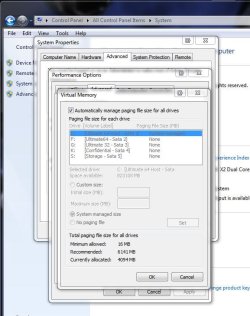
That will depend mainly on what you are doing. Some will disable that entirely for gaming purposes while others will set it up for seeing the paging file on a separate partition or drive. For the novice or basic setup the "Let Windows manage" option is default.

Typically a paging file is custom set to 1 1/2 times the amount of physical memory installed on the system itself for the 64bit Windows while the 32bit will likely see a higher recommendation right in the Virtual Memory properties screen there. That can be upto 2 1/2 times with the 32bit Windows.
 

Attachments

  • Customize Virtual Memory.jpg
    Customize Virtual Memory.jpg
    65 KB · Views: 82

My Computers

System One System Two

  • Computer type
    PC/Desktop
    Computer Manufacturer/Model Number
    Custom builds = 2
    OS
    W7 Ultimate x64/W10 Pro x64/W11 Pro Triple Boot - Main PC W7 Remote PC Micro ATX W7 Pro x64/W11 Pro
    CPU
    AMD Phenom II X4 975 Deneb 3.6ghz - 965 2nd remote pc
    Motherboard
    Gigabyte GA-790XTA-UD4-Gigabyte GA-880GM-D2H remote pc
    Memory
    Kingston Hyper X DDR3 1600 1.5v 16gb - Hyper X Fury 8gb 2nd
    Graphics Card(s)
    MSI HD Radeon 5750 1gb - MSI HD Radeon 6450 on mini tower
    Sound Card
    Creative Labs X-Fi Xtreme Audio P - Realtek onooard 2nd case
    Monitor(s) Displays
    ASUS VW199T-P 19" HP 2082a Main-HP 2082a 20" remote pc
    Screen Resolution
    Asus 1440x900 - HP 1600x900
    Hard Drives
    WD Black 1TB HD per OS W7, W10, and pending W11 presently on 500gb OS Drive - Pending Triple 1TB HDs for Spanned Storage/backup volume
    Single 2TB external USB enclosure, single 1TB System 7 Host/Boot drive, Pending 8TB external HD for system image b
    PSU
    Corsair 750TX - primary / Corsair CX600 - second
    Case
    Antec 900-2 - SSD compatible / NZXT Vulcan mini tower
    Cooling
    Zalman CNPS9900A
    Keyboard
    AZIO L70 Backlit Letters Gaming - ONN Cordless/USB
    Mouse
    MSI DS200 Programmable, Logitech Cordless
    Internet Speed
    30mbps upgrade - primary hard wired - mini tower usb WiFi
    Antivirus
    GFI VIPRE Internet Security 2014 on W7 2016 beta on W10,
    Browser
    Cyberfox, WaterFox 64bit FF variants, FireFox x64, Pale Moon
    Other Info
    Accomdata fan cooled usb 2.0 PIDE/Sata II, III external enclosure.
    Sambient usb/eSata PATA/Sata II, III external enclosure.
  • Computer type
    PC/Desktop
    System Manufacturer/Model Number
    CUSTOM ASSEMBLY
    OS
    W7 Pro x64/W11 Pro
    CPU
    AMD Deneb 3.6ghz - 965
    Motherboard
    Gigabyte GA-880GM-D2H remote pc
    Memory
    Kingston Hyper X Fury 8gb
    Graphics Card(s)
    MSI HD Radeon 6450 DVI Output
    Sound Card
    Realtek onooard Creative or Other separate PENDING
    Monitor(s) Displays
    VIZIO 32" LCD TV Separate LCD Pending
    Screen Resolution
    1600x1080
    Hard Drives
    WD 500GB OS Host/Boot WD Green 1TB Storage/Backup
    PSU
    Corsair 600W - THERMALTAKE 600W spare case
    Case
    NZXT Vulcan mini tower
    Cooling
    Twin 120mm Top Fans - 240mm Side Cover
    Keyboard
    ONN Cordless/USB Logitech Cordless
    Mouse
    ONN USB/Cordless - Logitech Cordless
    Internet Speed
    DSL 5G
    Browser
    MS Edge, FireFox, WaterFox x64, FireFox Nightly
    Other Info
    OS Testing-Remote Access to Main TeamViewer
Agreed. Set it to "system managed".

If you want to see the real virtual memory usage figures, download the attached zip file, extract the batch script and save to Desktop. RIGHT-click on batch file icon, select "Run as Administrator". An IE8 screen will open with results.

Look at 2nd row "current usage" & "peak usage" - the figures are in MB and represent actual virtual memory usage. Keep in mind that some apps like SysInternals ProcMon write to the page file, so peak usage would appear extremely high if such an app utilized.

Regards. . .

jcgriff2

.
 
Last edited:

My Computer

OS
Windows 7 - Vista
+ 1 for "System Managed"
Although my page file is set to a separate drive, it is set to system managed.
I've seen too many pc's that have had "low system memory" errors from people setting unnecessary values
 

My Computer

OS
XP Pro/Vista Ultimate (64)/Windows 7 Ultimate Signature Edition(64)
CPU
Core 2 Duo E8500 @ stock
Motherboard
Gigabyte EP45-UD3R
Memory
8Gb (4 X 2Gb) Corsair Dominator 1066Mhz DDR2
Graphics Card(s)
XFX ATI Radeon 4870 1Gb
Sound Card
Onboard 7.1
Monitor(s) Displays
BenQ E2200Hd, Asus VW161D, HP L1506
Screen Resolution
1920 X 1080
Hard Drives
Seagate 7200.12 500Gb
2 X Hitachi 1Tb
PSU
CoolerMaster 650 EPD
Case
Thermaltake
Cooling
2 X Noctua 120mm's, Stock Intel
Keyboard
Logitech
Mouse
Logitech
Just leave it alone. Why do people always want to outsmart the thousands of MS developers that have been pondering about those problems for years. Only chaps that know more than e.g. Mark Russinovich would qualify.
 

My Computer

Computer Manufacturer/Model Number
HP, Dell, Gateway, Toshiba - 4 laptops and 2 desktops
OS
Vista, Windows7, Mint Mate, Zorin, Windows 8
CPU
from 1.6GHz Duo to i7
Monitor(s) Displays
2x HP w2207
Hard Drives
5x HDD, 7x SSD, 12x Externals
Keyboard
with trackball - no mices
Mouse
Trackball mice
Internet Speed
DSL 6000
+ 1 for "System Managed"
Although my page file is set to a separate drive, it is set to system managed.
I've seen too many pc's that have had "low system memory" errors from people setting unnecessary values

A page file on a seperate drive/ partition will prevent BSODs from producing kernel (full or mini) memory dumps.


Just leave it alone. Why do people always want to outsmart the thousands of MS developers that have been pondering about those problems for years. Only chaps that know more than e.g. Mark Russinovich would qualify.

I don't believe there is or could be any such person!

I think Mark Russinovich will be the CEO of Microsoft in the near future.

.
 

My Computer

OS
Windows 7 - Vista
+ 1 for "System Managed"
Although my page file is set to a separate drive, it is set to system managed.
I've seen too many pc's that have had "low system memory" errors from people setting unnecessary values

A page file on a seperate drive/ partition will prevent BSODs from producing kernel (full or mini) memory dumps.


Just leave it alone. Why do people always want to outsmart the thousands of MS developers that have been pondering about those problems for years. Only chaps that know more than e.g. Mark Russinovich would qualify.

I don't believe there is or could be any such person!

I think Mark Russinovich will be the CEO of Microsoft in the near future.

.
Hey, thanks for that info! I guess I've been pretty lucky so far (touch wood), the only BSOD I've had on our home pc's in the last 2 or 3 years was yesterday, while installing a tv tuner card... new drivers fixed the problem in about 10 minutes.
I'll be changing page file location back to default on the 2 that have been changed though, just to be safe.
 

My Computer

OS
XP Pro/Vista Ultimate (64)/Windows 7 Ultimate Signature Edition(64)
CPU
Core 2 Duo E8500 @ stock
Motherboard
Gigabyte EP45-UD3R
Memory
8Gb (4 X 2Gb) Corsair Dominator 1066Mhz DDR2
Graphics Card(s)
XFX ATI Radeon 4870 1Gb
Sound Card
Onboard 7.1
Monitor(s) Displays
BenQ E2200Hd, Asus VW161D, HP L1506
Screen Resolution
1920 X 1080
Hard Drives
Seagate 7200.12 500Gb
2 X Hitachi 1Tb
PSU
CoolerMaster 650 EPD
Case
Thermaltake
Cooling
2 X Noctua 120mm's, Stock Intel
Keyboard
Logitech
Mouse
Logitech
Hi -

Glad to hear that you were able to easily solve your BSOD.

Windows 7 & Vista systems by default set the crash dump settings to "Kernel Memory Dump" - which will produce a full kernel memory dump as well as a mini kernel dump.

Full Kernel Dump --> \windows\memory.dmp (overwritten by each BSOD)
Mini kernel Dumps --> \windows\minidump (new one created each BSOD)


Per kb254649 -
Kernel memory dump
A kernel memory dump records only the kernel memory... Depending on the RAM in your computer, you must have between 150MB and up to 2GB of pagefile space ... on the boot volume.

Small memory dump
... This option requires a paging file of at least 2 MB on the boot volume. . .


Full Kernel can be 250MB - 2GB or more; avg ~ 600MB
Mini Kernel = avg ~ 275kb Vista; Windows 7 ~ 325kb (I've seen some recently ~ 900kb)

The "allocated base size" (ABS) of the page file on the OS drive is another reason that no dump may be produced by a BSOD. The ABS = the size of the initial page file size allocation which usually occurs during OS installation. The ABS must be > installed physical RAM. If one were to upgrade RAM from 2 to 4 GB, the page file would increase in size for mapping physical and virtual memory addresses, but the initial allocation size would remain at the original size - just over 2GB if system managed. So, if upgrading RAM, it is important to delete the page file and allow the system to re-allocate it. It is very simple to do -

- turn the page file OFF; re-boot into SAFEMODE
- change file attributes for c:\pagefile.sys
- change file permission settings for c:\pagefile.sys (via takeown & icacls commands)
- delete c:\pagefile.sys - via "hard delete" - hold SHIFT key down when clicking "Delete" (it's too big for recycle bin) or use line command del
- re-boot
- turn page file ON - system managed
- re-boot

Check ABS and page file status/ location with the WMI script from my previous post.

"Recoveros/ page file" script --> WMIC_Recoveros_Pagefile_01-2010_jcgriff2_html_.bat.zip

I hope you continue to have a BSOD-free day !

Regards. . .

jcgriff2

.

 

My Computer

OS
Windows 7 - Vista
The only problem of not seeing a BSOD or forcing one by disabling the automatic restart when a program or something else causes a system crash is the error information that will be displayed. Generally that will pinpoint the actual problem once looked up.

In the 64bit Windows more data is placed in the active ram there with less swapping out to the paging file on the drive. That's why you only see the recommened in the screenshot earlier for only 1 1/2 times while the 32bit Windows on the other hand relies more heavily on the paging file to suppliment the physical with the virtual memory there.

As for addon devices like tv tuner cards, devices like those can be notorious for blue screens depending on type.

One tip is if the software requires that software version's tuner driver be installed as part of the process and you have the latest or last here for the model don't check off the latest in the optional updates since that will knock things out. For Media Center where only the driver is used that shouldn't become a problem since only the driver is being downloaded and installed.

Now for upgrading 4gb to 8gb that will be seen on a new build being planned to start off with 8gb there. The "automatically manage paging file size for all drives..." option there helps as well as having the paging file on the same drive when you have more then one OS drive to consider. BSODs are actually rather rare here even when working with a few older programs that simply love crashing! :D
 

My Computers

System One System Two

  • Computer type
    PC/Desktop
    Computer Manufacturer/Model Number
    Custom builds = 2
    OS
    W7 Ultimate x64/W10 Pro x64/W11 Pro Triple Boot - Main PC W7 Remote PC Micro ATX W7 Pro x64/W11 Pro
    CPU
    AMD Phenom II X4 975 Deneb 3.6ghz - 965 2nd remote pc
    Motherboard
    Gigabyte GA-790XTA-UD4-Gigabyte GA-880GM-D2H remote pc
    Memory
    Kingston Hyper X DDR3 1600 1.5v 16gb - Hyper X Fury 8gb 2nd
    Graphics Card(s)
    MSI HD Radeon 5750 1gb - MSI HD Radeon 6450 on mini tower
    Sound Card
    Creative Labs X-Fi Xtreme Audio P - Realtek onooard 2nd case
    Monitor(s) Displays
    ASUS VW199T-P 19" HP 2082a Main-HP 2082a 20" remote pc
    Screen Resolution
    Asus 1440x900 - HP 1600x900
    Hard Drives
    WD Black 1TB HD per OS W7, W10, and pending W11 presently on 500gb OS Drive - Pending Triple 1TB HDs for Spanned Storage/backup volume
    Single 2TB external USB enclosure, single 1TB System 7 Host/Boot drive, Pending 8TB external HD for system image b
    PSU
    Corsair 750TX - primary / Corsair CX600 - second
    Case
    Antec 900-2 - SSD compatible / NZXT Vulcan mini tower
    Cooling
    Zalman CNPS9900A
    Keyboard
    AZIO L70 Backlit Letters Gaming - ONN Cordless/USB
    Mouse
    MSI DS200 Programmable, Logitech Cordless
    Internet Speed
    30mbps upgrade - primary hard wired - mini tower usb WiFi
    Antivirus
    GFI VIPRE Internet Security 2014 on W7 2016 beta on W10,
    Browser
    Cyberfox, WaterFox 64bit FF variants, FireFox x64, Pale Moon
    Other Info
    Accomdata fan cooled usb 2.0 PIDE/Sata II, III external enclosure.
    Sambient usb/eSata PATA/Sata II, III external enclosure.
  • Computer type
    PC/Desktop
    System Manufacturer/Model Number
    CUSTOM ASSEMBLY
    OS
    W7 Pro x64/W11 Pro
    CPU
    AMD Deneb 3.6ghz - 965
    Motherboard
    Gigabyte GA-880GM-D2H remote pc
    Memory
    Kingston Hyper X Fury 8gb
    Graphics Card(s)
    MSI HD Radeon 6450 DVI Output
    Sound Card
    Realtek onooard Creative or Other separate PENDING
    Monitor(s) Displays
    VIZIO 32" LCD TV Separate LCD Pending
    Screen Resolution
    1600x1080
    Hard Drives
    WD 500GB OS Host/Boot WD Green 1TB Storage/Backup
    PSU
    Corsair 600W - THERMALTAKE 600W spare case
    Case
    NZXT Vulcan mini tower
    Cooling
    Twin 120mm Top Fans - 240mm Side Cover
    Keyboard
    ONN Cordless/USB Logitech Cordless
    Mouse
    ONN USB/Cordless - Logitech Cordless
    Internet Speed
    DSL 5G
    Browser
    MS Edge, FireFox, WaterFox x64, FireFox Nightly
    Other Info
    OS Testing-Remote Access to Main TeamViewer
You are right - TV tuners do tend to wreak havoc. Good point on memory utilization - SuperFetch at its finest.

BSODs are a rare event? Well, if you are someday bored or find yourself in need of additional kernel dumps for a late night party, you can crash your system - Blue Screen and all - with a registry change and pressing a few keys -

Windows feature lets you generate a memory dump file by using the keyboard

Forcing a System Crash from the Keyboard

However, the result is always the same - bugcheck 0xe2 - self inflicted crash, i8042prt.sys

Regards. . .

jcgriff2

.
 

My Computer

OS
Windows 7 - Vista
I here quite a few people running into problems with Haugpauge tuner cards with the previous versions of Windows. Pinnacle was XP only seeing not even Vista support for their line. :rolleyes: That's another item for people to contend with as far as that addon type.

When people are afraid they can't run the 64bit Windows on a machine seeing 2gb of ram or why less is seen available in the perfomance monitor they often don't realize why. The utilization of the active ram is simply a more effectient data management process seen with the 64bit kernel there.

Intentional system crash? Gee I'll just load up some old outdated stuff here and watch those crash! :D In fact I ran into just today looking a Flip3D tweak for someone running a Vista laptop.

This runs on both Vista and 7 but has one annoying problem. If you check off the mouse option it takes full control of the mouse meaning you can't even close a window out! Best leaving that to one corner of the screen! The Windows Vista Flip 3D Activator

The real working solution? http://www.sevenforums.com/tutorials/2694-switch-between-windows-flip-3d-shortcut.html?filter[2]=Shortcuts

Actually when compared to that example of what works consider where BSODs are most often seen? Surprizingly the 32bit Windows! With less swapping out to the drive there's less chance of data corruption seen with the 64bit Windows.

At least 7 has seen some improvements in both flavors with fewer even reporting any then seen with previous versions even after this amount of time. I guess I may need to use one of those links there just to see one here! :D
 

My Computers

System One System Two

  • Computer type
    PC/Desktop
    Computer Manufacturer/Model Number
    Custom builds = 2
    OS
    W7 Ultimate x64/W10 Pro x64/W11 Pro Triple Boot - Main PC W7 Remote PC Micro ATX W7 Pro x64/W11 Pro
    CPU
    AMD Phenom II X4 975 Deneb 3.6ghz - 965 2nd remote pc
    Motherboard
    Gigabyte GA-790XTA-UD4-Gigabyte GA-880GM-D2H remote pc
    Memory
    Kingston Hyper X DDR3 1600 1.5v 16gb - Hyper X Fury 8gb 2nd
    Graphics Card(s)
    MSI HD Radeon 5750 1gb - MSI HD Radeon 6450 on mini tower
    Sound Card
    Creative Labs X-Fi Xtreme Audio P - Realtek onooard 2nd case
    Monitor(s) Displays
    ASUS VW199T-P 19" HP 2082a Main-HP 2082a 20" remote pc
    Screen Resolution
    Asus 1440x900 - HP 1600x900
    Hard Drives
    WD Black 1TB HD per OS W7, W10, and pending W11 presently on 500gb OS Drive - Pending Triple 1TB HDs for Spanned Storage/backup volume
    Single 2TB external USB enclosure, single 1TB System 7 Host/Boot drive, Pending 8TB external HD for system image b
    PSU
    Corsair 750TX - primary / Corsair CX600 - second
    Case
    Antec 900-2 - SSD compatible / NZXT Vulcan mini tower
    Cooling
    Zalman CNPS9900A
    Keyboard
    AZIO L70 Backlit Letters Gaming - ONN Cordless/USB
    Mouse
    MSI DS200 Programmable, Logitech Cordless
    Internet Speed
    30mbps upgrade - primary hard wired - mini tower usb WiFi
    Antivirus
    GFI VIPRE Internet Security 2014 on W7 2016 beta on W10,
    Browser
    Cyberfox, WaterFox 64bit FF variants, FireFox x64, Pale Moon
    Other Info
    Accomdata fan cooled usb 2.0 PIDE/Sata II, III external enclosure.
    Sambient usb/eSata PATA/Sata II, III external enclosure.
  • Computer type
    PC/Desktop
    System Manufacturer/Model Number
    CUSTOM ASSEMBLY
    OS
    W7 Pro x64/W11 Pro
    CPU
    AMD Deneb 3.6ghz - 965
    Motherboard
    Gigabyte GA-880GM-D2H remote pc
    Memory
    Kingston Hyper X Fury 8gb
    Graphics Card(s)
    MSI HD Radeon 6450 DVI Output
    Sound Card
    Realtek onooard Creative or Other separate PENDING
    Monitor(s) Displays
    VIZIO 32" LCD TV Separate LCD Pending
    Screen Resolution
    1600x1080
    Hard Drives
    WD 500GB OS Host/Boot WD Green 1TB Storage/Backup
    PSU
    Corsair 600W - THERMALTAKE 600W spare case
    Case
    NZXT Vulcan mini tower
    Cooling
    Twin 120mm Top Fans - 240mm Side Cover
    Keyboard
    ONN Cordless/USB Logitech Cordless
    Mouse
    ONN USB/Cordless - Logitech Cordless
    Internet Speed
    DSL 5G
    Browser
    MS Edge, FireFox, WaterFox x64, FireFox Nightly
    Other Info
    OS Testing-Remote Access to Main TeamViewer
Back
Top