Virtual Memory

mgrove91

New member
Local time
7:43 AM
Messages
2
Hello all,

I'm looking at using a larger flash drive for the ReadyBoost function and wondering what your thoughts are on it. At the moment I have about 4GB of a flash drive ready-boosted and I have noticed a slight increase in performance. Does it really only affect the paging file and such? I'm not very familiar with virtual memory. Could anyone shed some light on this for me?

Thanks all.

W7 32bit OS
2x2GB Patriot Memory
ATI Radeon HD 4890
AMD Athlon 64 X2
 

My Computer

Computer Manufacturer/Model Number
Custom
OS
Windows 7
CPU
AMD Athlon 64 X2
Motherboard
Gigabyte GA-MA69GM-S2H
Memory
2x2GB Patriot
Graphics Card(s)
ATI Radeon HD 4890
Sound Card
On-board
Monitor(s) Displays
Acer 23'' LCD H233H
Hard Drives
Seagate 500GB
With 4GB of RAM (if I read your specs correctly), Ready Boost has zero effect - it may be even negative because of the additional overhead. If you think you saw a performance improvement you bettter check again.
In fact your page file may never be used anyhow. You can check that in Resource Monitor > Memory tab. Look on the top (Hard Faults). If that row is zero, you have no page faults at all.
 

My Computer

Computer Manufacturer/Model Number
HP, Dell, Gateway, Toshiba - 4 laptops and 2 desktops
OS
Vista, Windows7, Mint Mate, Zorin, Windows 8
CPU
from 1.6GHz Duo to i7
Monitor(s) Displays
2x HP w2207
Hard Drives
5x HDD, 7x SSD, 12x Externals
Keyboard
with trackball - no mices
Mouse
Trackball mice
Internet Speed
DSL 6000
Thanks for the quick reply

One or two of the programs has a less-than-ten digit for it but most are zeroes. When exactly would readyboost have an effect then?
 

My Computer

Computer Manufacturer/Model Number
Custom
OS
Windows 7
CPU
AMD Athlon 64 X2
Motherboard
Gigabyte GA-MA69GM-S2H
Memory
2x2GB Patriot
Graphics Card(s)
ATI Radeon HD 4890
Sound Card
On-board
Monitor(s) Displays
Acer 23'' LCD H233H
Hard Drives
Seagate 500GB
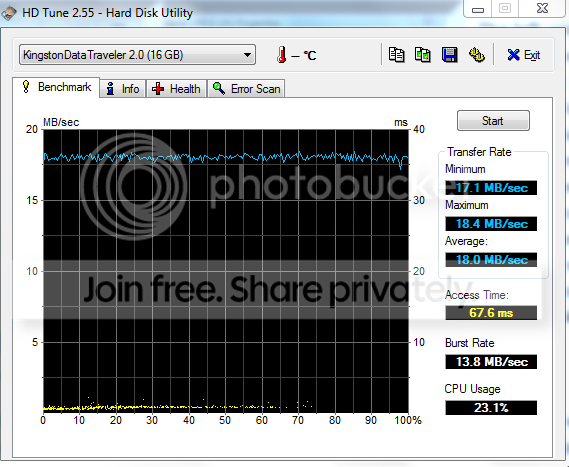
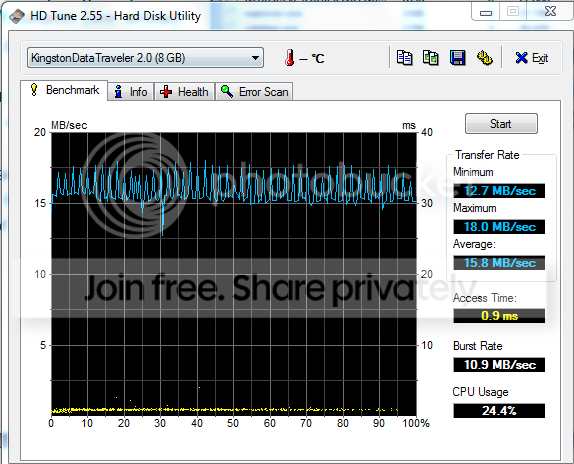
ReadyBoost was a bandaid for the early Vista systems that came from XP with only 512MB ot 1GB of RAM. Thoses systems were suffering from a lot of page thrashing (high paging activity). In those cases a USB stick that had a very good access time (less than 1ms) could help speed up the paging. Problem is that most USB sticks are too slow to make any difference anyhow.
Compare the access time of the 2 sticks below - both Kingston Traveler. You can probably imagine that the first one would be completely counterproductive. A HDD is 4 times faster.

2usb.png

3usb.png
 

My Computer

Computer Manufacturer/Model Number
HP, Dell, Gateway, Toshiba - 4 laptops and 2 desktops
OS
Vista, Windows7, Mint Mate, Zorin, Windows 8
CPU
from 1.6GHz Duo to i7
Monitor(s) Displays
2x HP w2207
Hard Drives
5x HDD, 7x SSD, 12x Externals
Keyboard
with trackball - no mices
Mouse
Trackball mice
Internet Speed
DSL 6000
Back
Top