Virtual PDF Printer , EXE path

bawldiggle

GrayGhost2 ret.
Pro User
VIP
Local time
6:52 AM
Messages
895
Location
Australia
I have PDF24 Creator installed as a virtual printer
I have been experimenting with virtual printers, ie, Bullzip ... BZ has been very disappointing
- in Control Panel > Devices and Printers ... how do I identify the EXE path of any installed (virtual) printer ?
- device Properties dialog -- reveals nothing.
- am I looking in the wrong place ?
- I have searched the registry for (keys) "Devices" ... there are hundreds of "Devices" keys
- I want to check the identity of the PDF printer program to positively separate it from browser addons.

I would appreciate some experienced help ... thank you :)
 

My Computer

Computer type
PC/Desktop
Computer Manufacturer/Model Number
Toshiba, Lenovo (laptops) + 4 rigs
OS
XP Pro (x86) | 7 HP (x86) & (x64) | 7 Pro (x64)
I have 2 virtual printers: PrimoPDF and the one that comes with Nitro Reader.
(Both work very well and I have never had any problems with either, BTW)

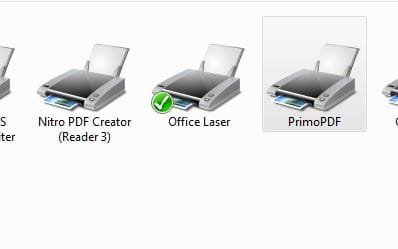
To find the path you go to Devices & Printers >
P1.JPG

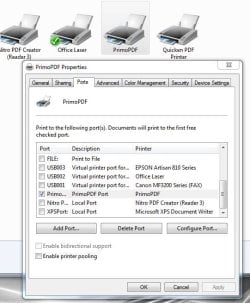
Then right click on the virtual printer (in this case PrimoPDF) > and click on Printer Properties
P2.JPG

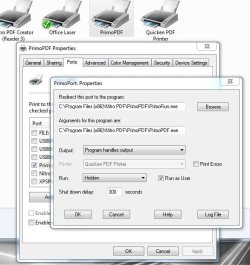
Then go to the PORTS Tab > the port will be selected > and then click on Configure Port
P3.JPG

There is the path!
 

My Computer

Computer type
PC/Desktop
Computer Manufacturer/Model Number
Home Built - Jan 2013
OS
Windows 7 64 Bit Home Premium SP1
CPU
i7-3820
Motherboard
Asus P9X79-PRO - Bios 4608
Memory
GSkill F3-14900CL9Q - 16GB
Graphics Card(s)
EVGA GeForce GTX660 - Driver 352.86
Sound Card
On board Realtek ALC898
Monitor(s) Displays
Acer S271HL
Screen Resolution
1920 x 1080
Hard Drives
#1- Samsung 840 Pro Series
#2- Western Digital WD1002FAEX Sata3 Black
#3- Western Digital WD1002FAEX Sata3 Black
PSU
Corsair CMPSU-850TX-V2 - 850 watt (by Seasonic)
Case
Corsair Obsidian 550D
Cooling
Standard 3 120mm case fans, Cooler Master Hyper 212 EVO
Keyboard
MS KC-0405
Mouse
Intellimouse 5-button
Internet Speed
56 Mbits/Sec (on a good day)
Antivirus
Avast & Malwarebytes
Browser
Firefox
Other Info
Asus DVD - DRW-24B1ST 24X
I have used Bullzip in the past but in recent years have enjoyed PDFCreator. I had never heard of PDF24 before and wonder OP what problem(s) you are trying to solve with this question.

@TVeblen, oddly--clicking on Configure Port with my PDF Creator does not do anything. Have you ever tried PDFCreator, and had you tried others before PrimoPDF?
 

My Computer

Computer type
Laptop
Computer Manufacturer/Model Number
Dell Latitude E6540 Laptop
OS
Windows 7 Professional 64bit
CPU
Intel Core i7 4600M @ 2.90GHz
Motherboard
Dell Inc. 0CYT5F (SOCKET 0)
Memory
16.0GB Dual-Channel DDR3 @ 797MHz (11-11-11-28)
Graphics Card(s)
Intel HD Graphics 4600 (Dell) 2048MB ATI AMD Radeon HD 8790M
Sound Card
Realtek High Definition Audio
Monitor(s) Displays
HP ZR30w (2560x1600@60Hz)
Hard Drives
256GB LITEONIT LMT-256M6M-41 mm SATA (SSD)
1TB Samsung SSD 860 EVO mSATA SATA (SSD)
2TB USB 3.0 USB Device
115GB SanDisk Ultra Fit USB
Other Info
Multiple Dell E-Port Plus II Port Replicator/Docking Stations 0Y72NH USB 3.0 + 130W AC Adapters
I've been using PDF creator for several years. I love it for simple one and two page PDFs that have all pages the same size and orientation, such as receipts for internet purchases. It's much simpler and faster than Adobe Acrobat, which is my go-to for making more complicated PDFs and editing them (also, my ADF scanner uses Distiller from Acrobat to scan to PDF).

Using PDF Creator is simple. PDF Creator installs itself as a printer (hence, the term virtual printer). To use, I just hit the Print button in the program reading my source that will lead me to a print menu (in Word, for example, I hit the Preview and Print button, not Quick Print). I then select PDF Creator in that menu and hit print. After a short lag, PDF Creator pops up a screen. There is some meta data you can fill in on that screen if you want but I just ignore it and hit Save. That brings up one more screen that is used to determine where the PDF is to be saved and what it is to be named. It sounds a bit involved but it took me longer to type this than it actually takes to do it.

PDF Creator can also be used to make other image types.
 

My Computer

Computer type
PC/Desktop
Computer Manufacturer/Model Number
Custom Build
OS
Win 7 Ultimate 64 bit
CPU
Intel i7-3930K
Motherboard
ASUS P9X79 WS
Memory
Kingston HyperX Genesis 32GB Kit (8x4GB Modules) 1600MHz DDR
Graphics Card(s)
MSI R7850 Twin Frozr 2GD5/OC Radeon HD 7850 2GB 256-bit GDDR
Sound Card
Asus Xonar Essence STX
Monitor(s) Displays
3x Asus VG248QE 24", Vizio 32" TV
Screen Resolution
1920 x 1080, ?
Hard Drives
Samsung 128GB 840 Pro SSD (1),
Samsung 4TB 850 EVO SSDs (4)
Samsung 4TB 850 EVO SSDs (16) external backup drives used in 2.5" hot swap bays in the computer.
PSU
Corsair HX750w
Case
Antec Two Hundred v2 (modified)
Cooling
Cooler Master GeminII S524 120mm (fan replaced with a 140mm)
Keyboard
Logitech G510s
Mouse
Logitech M525 (two in use)
Internet Speed
=< 32Mbps down, 8Mbps up
Antivirus
AVAST!, MBAM, SAS, Spybot S&D (all but MBAM free) Glary Util
Browser
IE11
Other Info
LSI 9211-8i HBA card (8 SATA III ports), 2.5" & 3.5" Hot Swap Bays, HooToo HT-CR001 PCI-E to USB 3.0 Internal Hub + 6 Slot Card Reader, and LG Model CH12LS28 BD-ROM Optical Drive. Also, ScanSnap S1500 ADF duplexing scanner, Canon 9000F flat bed scanner, Corsair SP2500 2.1 speakers, Samsung CLP 415nw laser color printer, Cyberpower PP2200SW UPS
@TVeblen, oddly--clicking on Configure Port with my PDF Creator does not do anything. Have you ever tried PDFCreator, and had you tried others before PrimoPDF?

No, I started using PrimoPDF (from Nitro) years ago and never had the need to change. It has always been simple, reliable, and stable. Worked just as well with Windows XP.
 

My Computer

Computer type
PC/Desktop
Computer Manufacturer/Model Number
Home Built - Jan 2013
OS
Windows 7 64 Bit Home Premium SP1
CPU
i7-3820
Motherboard
Asus P9X79-PRO - Bios 4608
Memory
GSkill F3-14900CL9Q - 16GB
Graphics Card(s)
EVGA GeForce GTX660 - Driver 352.86
Sound Card
On board Realtek ALC898
Monitor(s) Displays
Acer S271HL
Screen Resolution
1920 x 1080
Hard Drives
#1- Samsung 840 Pro Series
#2- Western Digital WD1002FAEX Sata3 Black
#3- Western Digital WD1002FAEX Sata3 Black
PSU
Corsair CMPSU-850TX-V2 - 850 watt (by Seasonic)
Case
Corsair Obsidian 550D
Cooling
Standard 3 120mm case fans, Cooler Master Hyper 212 EVO
Keyboard
MS KC-0405
Mouse
Intellimouse 5-button
Internet Speed
56 Mbits/Sec (on a good day)
Antivirus
Avast & Malwarebytes
Browser
Firefox
Other Info
Asus DVD - DRW-24B1ST 24X
@TVeblen, oddly--clicking on Configure Port with my PDF Creator does not do anything.

PrimoPDF sets itself up as a virtual printer - it will show up as a printer option in ANY program I use.
Other virtual printers (like that QuickenPDF Printer) only work in their native program.
I don't know if that explains what you are seeing, but that's my guess.

EDIT: Fascinating captain.
The Quicken PDF Printer is installed on the LPT1 port, Configure Port is no help.
My Nitro PDF Creator is on the "Nitro PDF Port", and if I click Configure Port I get an error message (Operation cannot be completed 0x0000002).
My Microsoft XPS Document Writer device is on an XPS port and all options are greyed out.
 

My Computer

Computer type
PC/Desktop
Computer Manufacturer/Model Number
Home Built - Jan 2013
OS
Windows 7 64 Bit Home Premium SP1
CPU
i7-3820
Motherboard
Asus P9X79-PRO - Bios 4608
Memory
GSkill F3-14900CL9Q - 16GB
Graphics Card(s)
EVGA GeForce GTX660 - Driver 352.86
Sound Card
On board Realtek ALC898
Monitor(s) Displays
Acer S271HL
Screen Resolution
1920 x 1080
Hard Drives
#1- Samsung 840 Pro Series
#2- Western Digital WD1002FAEX Sata3 Black
#3- Western Digital WD1002FAEX Sata3 Black
PSU
Corsair CMPSU-850TX-V2 - 850 watt (by Seasonic)
Case
Corsair Obsidian 550D
Cooling
Standard 3 120mm case fans, Cooler Master Hyper 212 EVO
Keyboard
MS KC-0405
Mouse
Intellimouse 5-button
Internet Speed
56 Mbits/Sec (on a good day)
Antivirus
Avast & Malwarebytes
Browser
Firefox
Other Info
Asus DVD - DRW-24B1ST 24X
I've been using PDF creator... hit print. After a short lag, PDF Creator pops up a screen. There is some meta data you can fill in on that screen if you want but I just ignore it and hit Save. That brings up one more screen that is used to determine where the PDF is to be saved and what it is to be named. It sounds a bit involved but it took me longer to type this than it actually takes to do it.
It can easily be configured to "just hit Print, and it auto-names-and-saves to the same place every time". No other popups to deal with.
 

My Computer

Computer type
Laptop
Computer Manufacturer/Model Number
Dell Latitude E6540 Laptop
OS
Windows 7 Professional 64bit
CPU
Intel Core i7 4600M @ 2.90GHz
Motherboard
Dell Inc. 0CYT5F (SOCKET 0)
Memory
16.0GB Dual-Channel DDR3 @ 797MHz (11-11-11-28)
Graphics Card(s)
Intel HD Graphics 4600 (Dell) 2048MB ATI AMD Radeon HD 8790M
Sound Card
Realtek High Definition Audio
Monitor(s) Displays
HP ZR30w (2560x1600@60Hz)
Hard Drives
256GB LITEONIT LMT-256M6M-41 mm SATA (SSD)
1TB Samsung SSD 860 EVO mSATA SATA (SSD)
2TB USB 3.0 USB Device
115GB SanDisk Ultra Fit USB
Other Info
Multiple Dell E-Port Plus II Port Replicator/Docking Stations 0Y72NH USB 3.0 + 130W AC Adapters
I've been using PDF creator... hit print. After a short lag, PDF Creator pops up a screen. There is some meta data you can fill in on that screen if you want but I just ignore it and hit Save. That brings up one more screen that is used to determine where the PDF is to be saved and what it is to be named. It sounds a bit involved but it took me longer to type this than it actually takes to do it.
It can easily be configured to "just hit Print, and it auto-names-and-saves to the same place every time". No other popups to deal with.

I was not aware of that.

I would prefer not using auto-name since I would have to find it and rename it; it's easier for me to just give it the name I want in the first place. Saving to the same place is easy; it remembers the last place I saved to and I just let it keep doing that. I prefer to file the PDFs later since I often create a bunch at one time and it's easier for me to let them all go the same location (a temporary folder I set up), then sort them out from there. Even though its an extra step, it actually is faster and easier since I can combine operations that way.
 

My Computer

Computer type
PC/Desktop
Computer Manufacturer/Model Number
Custom Build
OS
Win 7 Ultimate 64 bit
CPU
Intel i7-3930K
Motherboard
ASUS P9X79 WS
Memory
Kingston HyperX Genesis 32GB Kit (8x4GB Modules) 1600MHz DDR
Graphics Card(s)
MSI R7850 Twin Frozr 2GD5/OC Radeon HD 7850 2GB 256-bit GDDR
Sound Card
Asus Xonar Essence STX
Monitor(s) Displays
3x Asus VG248QE 24", Vizio 32" TV
Screen Resolution
1920 x 1080, ?
Hard Drives
Samsung 128GB 840 Pro SSD (1),
Samsung 4TB 850 EVO SSDs (4)
Samsung 4TB 850 EVO SSDs (16) external backup drives used in 2.5" hot swap bays in the computer.
PSU
Corsair HX750w
Case
Antec Two Hundred v2 (modified)
Cooling
Cooler Master GeminII S524 120mm (fan replaced with a 140mm)
Keyboard
Logitech G510s
Mouse
Logitech M525 (two in use)
Internet Speed
=< 32Mbps down, 8Mbps up
Antivirus
AVAST!, MBAM, SAS, Spybot S&D (all but MBAM free) Glary Util
Browser
IE11
Other Info
LSI 9211-8i HBA card (8 SATA III ports), 2.5" & 3.5" Hot Swap Bays, HooToo HT-CR001 PCI-E to USB 3.0 Internal Hub + 6 Slot Card Reader, and LG Model CH12LS28 BD-ROM Optical Drive. Also, ScanSnap S1500 ADF duplexing scanner, Canon 9000F flat bed scanner, Corsair SP2500 2.1 speakers, Samsung CLP 415nw laser color printer, Cyberpower PP2200SW UPS
@ TVeblen
Something has gone wrong with my "Devices and Printers" window
- due to my lack of being attentive I opened "Properties" instead of "Printer Properties" :o
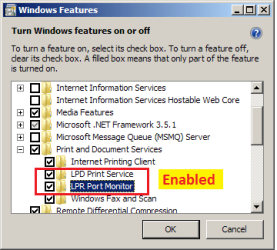
- and looked in "Windows Features" for a possible cause of missing tabs :o
- my Toshiba is loaded with 20 Toshiba extras, and assumed Toshiba OEM might have turned some features OFF.

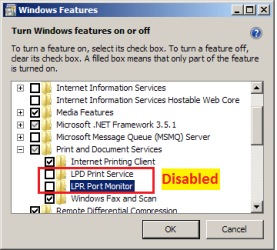
Found these disabled ...
Win_features OFF.png

So enabled these ...
Win_features_ON.png

Rebooted PC
When "Properties" window was still the same as at start ... re-read your instructions properly and realised my mistake.
(my stupidity would be an understatement)

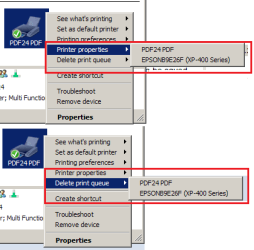
Right clicked "PDF24 PDF" context menu showed these ...
- before I fiddled neither Printer Properties nor Delete Printer queue were menus
02_PDF24 PDF.png

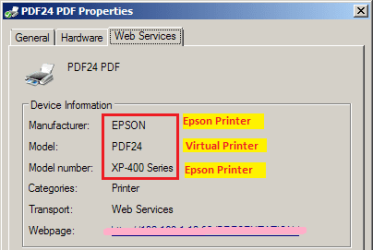
03_pdf24-pdf-properties.png

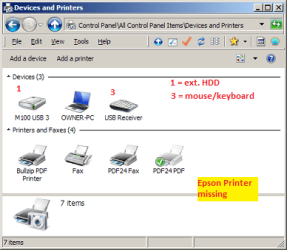
It finally dawned on me (I am in very foreign territory) that EPSON printer icon is not on the "Devices and Printers" window.
01_D & P, no Epson.png

I feel like the original village idiot :o:o

The Epson printer is used by 3 PCs --- all WiFi.
- when the printer was powered up it started spitting out reams of gobbldy-gook headed Adobe
runaway adobe.PNG

Late yesterday I ...
1.manually installed IE Flash on Toshiba PC
2. clean installed Flash (IE activeX + mozilla Plugin) on another rig

Now I am lost :(
- if it helps I have a TXT file of every step I made in the "fiddling" process

I deserve to be flogged -- for fiddling before checking with sevenforums.com first

How do I unravel my massive foul-up ?:o:

Thank you for eveyone's help ... My stupid act for the week :o
 
Last edited:

My Computer

Computer type
PC/Desktop
Computer Manufacturer/Model Number
Toshiba, Lenovo (laptops) + 4 rigs
OS
XP Pro (x86) | 7 HP (x86) & (x64) | 7 Pro (x64)
Mmmm. I'm a little lost here. Going to need more information I think.

You have an Epson XP-400 series printer - physical printer
And you have PDF24 - virtual printer software.
How long was the Epson connected and working before you installed PDF24? Did your original problem start immediately after installing PDF24?

Does the Epson printer work now? Can you print to it from a Word document?

Did PDF24 ever work? Does it work now?

Back on the Properties window (the first images in your post), what happens if you disable the LPD Print Service and LPR Port Monitor again (as it was originally), Does this free up the Epson?

It would be helpful to know what the original problem was that you were trying to fix when you first posted here, and what any new problems are. Describe what is happening, more than what you think is causing it.
 

My Computer

Computer type
PC/Desktop
Computer Manufacturer/Model Number
Home Built - Jan 2013
OS
Windows 7 64 Bit Home Premium SP1
CPU
i7-3820
Motherboard
Asus P9X79-PRO - Bios 4608
Memory
GSkill F3-14900CL9Q - 16GB
Graphics Card(s)
EVGA GeForce GTX660 - Driver 352.86
Sound Card
On board Realtek ALC898
Monitor(s) Displays
Acer S271HL
Screen Resolution
1920 x 1080
Hard Drives
#1- Samsung 840 Pro Series
#2- Western Digital WD1002FAEX Sata3 Black
#3- Western Digital WD1002FAEX Sata3 Black
PSU
Corsair CMPSU-850TX-V2 - 850 watt (by Seasonic)
Case
Corsair Obsidian 550D
Cooling
Standard 3 120mm case fans, Cooler Master Hyper 212 EVO
Keyboard
MS KC-0405
Mouse
Intellimouse 5-button
Internet Speed
56 Mbits/Sec (on a good day)
Antivirus
Avast & Malwarebytes
Browser
Firefox
Other Info
Asus DVD - DRW-24B1ST 24X
@ TVeblen :)

You have an Epson XP-400 series printer - physical printer
Yes

And you have PDF24 - virtual printer software
Yes

How long was the Epson connected and working before you installed PDF24?
Two years this month

Did your original problem start immediately after installing PDF24?
No the problem started after I fiddled with 'Windows Features settings
PDF24 has been installed for about 18 months.

Does the Epson printer work now? Can you print to it from a Word document?
Epson printer is printing TXT files OK. No Office apps on this laptop.

Did PDF24 ever work? Does it work now?
PDF24::
I have only ever used as virtual printer to PDF.
It was never very satisfactory until 3 (4) days ago when I discoverd there was a GUI.
Historically virtual PDFs of web pages were images (not searchable text)
The latest disappointment is the virtual doc disappears into nowhere.
Cannot locate it with "Everything.exe" ... once there was an intermediate orphan on the GUI which converted into an excellent PDF ... but that was once only. Since then it is a dead loss.
One of its weaknesses was many web-pages resulted as blank PDFs
PDF24 does not have a forum, nor FAQs nor help file, nor support contacts.
Basically a dead loss.

Back on the Properties window (the first images in your post), what happens if you disable the LPD Print Service and LPR Port Monitor again (as it was originally), Does this free up the Epson?
After disabling the two settings and rebooting ...
• No changes to PDF24 PDF context menus.
• Epson is NOT listed (no icon) on the "Devices and Printers" window
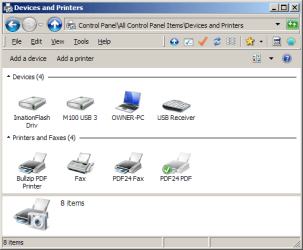
Devices and Printers, no epson.png

• BUT Epson is listed as an option on the "Print" window/dialog, and I can print to Epson actual printer.
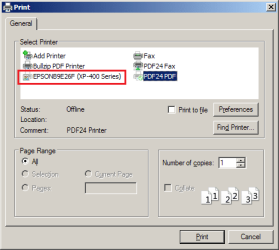
print dlg has epson.png
It would be helpful to know what the original problem was that you were trying to fix when you first posted here, and what any new problems are.
No problem ... as per post #1 ... all I wanted to know was "how to determine the exe path of a virtual printer"

Before things went pear shaped -- PDF24 did not have an exe-path. And that is what I found weird. Other devices showed a path

--------------
Having read "Lady Fitgerald's" success with PDF Creator, I think I best uninstall PDF24, and if necessary clean install the Epson printer.

WE could spend a lot of time back and forth and maybe not resurrect the correct setup.
Its after midnight here and I am struggling to stay awake
- please forgive any typos

Thank you for hanging in there for me, I will report back here tomorrow :)

 

My Computer

Computer type
PC/Desktop
Computer Manufacturer/Model Number
Toshiba, Lenovo (laptops) + 4 rigs
OS
XP Pro (x86) | 7 HP (x86) & (x64) | 7 Pro (x64)
@ Lady Fitzgerald :)

I am going to give PDF Creator PRO a try. Free version is/was full of crapware.
 

My Computer

Computer type
PC/Desktop
Computer Manufacturer/Model Number
Toshiba, Lenovo (laptops) + 4 rigs
OS
XP Pro (x86) | 7 HP (x86) & (x64) | 7 Pro (x64)
Back
Top