Virtual Private Network (VPN) - Enable Incoming VPN Connections

How to Allow Incoming VPN Connections in Windows 7 and Windows 8

   Information
This will show you how to configure your computer to accept VPN connection and router settings to allow Point-to-Point Tunneling Protocol (PPTP) on your Network in Windows 7 and Windows 8.


Here’s How:

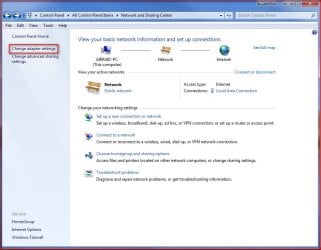
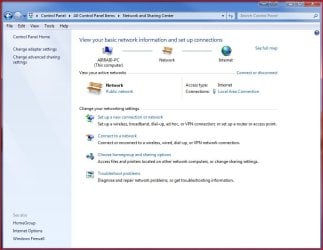
1. Go to Control Panel and open Network and Sharing Center.
1.jpg
2. Click on Change adapter settings.
2.jpg
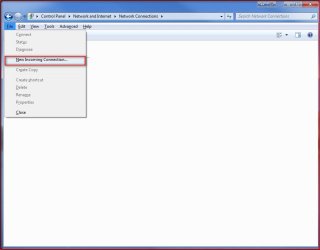
3. Press Alt+F and select New Incoming connection
3.jpg
4. Put a check on who you’d like to give access to this computer or you can configure a new account by clicking on Add someone… Click on Next.

4.jpg
5. Put a check mark on Through the Internet. Click on Next.

5.jpg
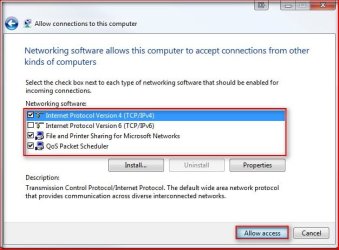
6. Select the protocols you want to enable for this connection. Click on Allow access.
6.jpg
Tip: Default selections (Recommended): Internet Protocol Version 4 (TCP/IPv4), File and Printer Sharing for Microsoft Networks and QoS Packet Scheduler. You should have at least TCP/IPv4 selected to successfully accept connections. Highlight the protocols for their descriptions.
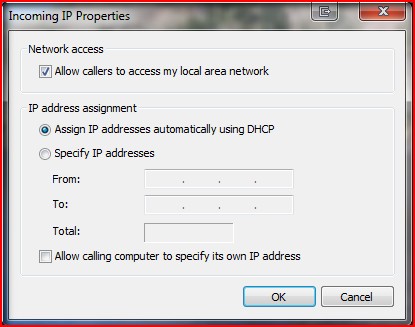
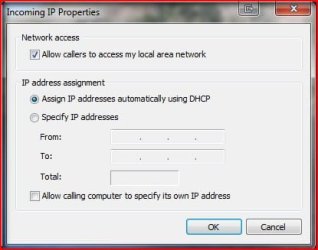
A) To allow the client access your LAN resources, highlight Internet Protocol Version 4 (TCP/IPv4) and click on Properties. Put a check mark on Allow all callers to access my local area network. Here you can have the IP assigned automatically, assign IPs following your LAN segment format or let the client assign its own IP address.
7.jpg
7. Take note of the Computer name as this will be used by the client to connect to this computer. Click on Close.
8.jpg
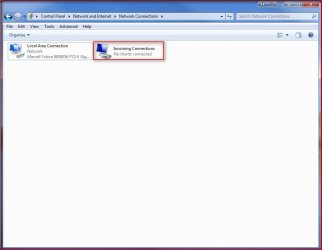
8. You will now have the Incoming Connections icon in Network Connections. Your computer is now ready to accept incoming VPN connections.
9.jpg
Important: Configure your firewall to allow access to TCP port 1723 to allow incoming Point-to-Point Tunneling Protocol (PPTP) connection for VPN.

Router Configuration: Enable PPTP and Generic Route Encapsulation (GRE) on the Router. Depending on the type of router, you need to either enable PPTP or create a port forward to port 1723. If you’re router has an additional setting for PPTP or VPN, make sure it’s enabled. It’s usually called a “pass-through” setting (i.e. PPTP pass-through or VPN pass-through)
You're done,

Nos

 
Last edited by a moderator:
Great tutorial!
 

My Computer My Computer

At a glance

Windows Premium x64
OS
Windows Premium x64
In http://www.sevenforums.com/attachme...ork-vpn-enable-incoming-vpn-connections-7.jpg I checked "allow callers to access my local network". I checked "specify ip addresses" as well. But what to fill in at "From:" and "To:" ? It must be possible that 10 vpn-clients connect simultaniously

My home lan has IP-addresses 192.168.10.1 (router), 192.168.10.2 (ftp server with static ip address), 3 computers in dhcp-range (192.168.10.100-192.168.10.200). subnetmask=255.255.255.0
 

My Computer My Computer

At a glance

Microsoft Windows 7 Home Premium 64-bits 7601...Intel(R) Core(TM) i3 CPU M 370 @ 2.40GHz4,00 GBATI Mobility Radeon HD 5400 Series
Computer type
Laptop
Computer Manufacturer/Model Number
ACER ASPIRE 5742G
OS
Microsoft Windows 7 Home Premium 64-bits 7601 Multiprocessor Free Service Pack 1
CPU
Intel(R) Core(TM) i3 CPU M 370 @ 2.40GHz
Motherboard
Acer Aspire 5742G
Memory
4,00 GB
Graphics Card(s)
ATI Mobility Radeon HD 5400 Series
Sound Card
(1) AMD High Definition Audio Device (2) Realtek High Defi
Screen Resolution
1366 x 768 x 32 bits (4294967296 colors) @ 60 Hz
Hard Drives
WDC WD5000BEVT-22ZAT0
Hi, I did this and I can connect only once to my Win 7 Ultimate machine, is there a way to allow multiple PPTP connections?

Thanks!
 

My Computer My Computer

At a glance

Windows 7 x64
OS
Windows 7 x64
Since Win7 only allows 1 connection I am using OpenVPN and so far I have 3 PC's, 1 Mac, 1 Linux and 2 Android phones connected and working fine. Only thing im missing is the iPad2 which there is no OpemVPN on Apple AppStore for it.. And I cant use both Win7 and OpenVPN at the same time since I have to ICS the local nic to one of the VPN adapters.. :(
 

My Computer My Computer

At a glance

Windows 7 x64
OS
Windows 7 x64
Error message "Windows could not detect any devices"

When I try to configure my VPN, I get an message when I am setting up a new incoming connection that says
Windows could not detect any devices".

Okay.. I am stumped.. How do I get around this?

Thanks in advance for your help
:)
 

My Computer My Computer

At a glance

Windows 7 64
OS
Windows 7 64
I am now using a pfSense firewall that has IPSec, L2TP, PPTP and OpenVPN :) Only using the later 2 at the moment.. MS should not cripple their software to make you buy an upgrade...that's just...wrong.
 

My Computer My Computer

At a glance

Windows 7 x64
OS
Windows 7 x64
Hi there,
What I need and been trying to setup somehow with a script I found over the net, is a DRC on windows 7 start. But I need to conect to this windows 7 start PC. But according to MS it can only be a client. Does anybody have any ideas ?
Take care.
 

My Computer My Computer

At a glance

Windows 7 Ultimate 32bit
OS
Windows 7 Ultimate 32bit
Hi there,
What I need and been trying to setup somehow with a script I found over the net, is a DRC on windows 7 start. But I need to conect to this windows 7 start PC. But according to MS it can only be a client. Does anybody have any ideas ?
Take care.
you mean RDC (remoet desktop connection) instead of DRC?
What doesn't work?
  • setting up win7 as a terminal server?
  • Connect to that terminal server?
 

My Computer My Computer

At a glance

Microsoft Windows 7 Home Premium 64-bits 7601...Intel(R) Core(TM) i3 CPU M 370 @ 2.40GHz4,00 GBATI Mobility Radeon HD 5400 Series
Computer type
Laptop
Computer Manufacturer/Model Number
ACER ASPIRE 5742G
OS
Microsoft Windows 7 Home Premium 64-bits 7601 Multiprocessor Free Service Pack 1
CPU
Intel(R) Core(TM) i3 CPU M 370 @ 2.40GHz
Motherboard
Acer Aspire 5742G
Memory
4,00 GB
Graphics Card(s)
ATI Mobility Radeon HD 5400 Series
Sound Card
(1) AMD High Definition Audio Device (2) Realtek High Defi
Screen Resolution
1366 x 768 x 32 bits (4294967296 colors) @ 60 Hz
Hard Drives
WDC WD5000BEVT-22ZAT0
Hi there,
What I need and been trying to setup somehow with a script I found over the net, is a DRC on windows 7 start. But I need to conect to this windows 7 start PC. But according to MS it can only be a client. Does anybody have any ideas ?
Take care.
you mean RDC (remoet desktop connection) instead of DRC?
What doesn't work?
  • setting up win7 as a terminal server?
  • Connect to that terminal server?

Yes, that what I meant, RDC. Well what I am trying to do is to have my windows XP PC conects to my windows 7 start PC using RDC>
 

My Computer My Computer

At a glance

Windows 7 Ultimate 32bit
OS
Windows 7 Ultimate 32bit
What doen't work?
is win7 terminal server running fine? let another computer in house try to connect to it. First terminal server has to be up and running succesful.
 

My Computer My Computer

At a glance

Microsoft Windows 7 Home Premium 64-bits 7601...Intel(R) Core(TM) i3 CPU M 370 @ 2.40GHz4,00 GBATI Mobility Radeon HD 5400 Series
Computer type
Laptop
Computer Manufacturer/Model Number
ACER ASPIRE 5742G
OS
Microsoft Windows 7 Home Premium 64-bits 7601 Multiprocessor Free Service Pack 1
CPU
Intel(R) Core(TM) i3 CPU M 370 @ 2.40GHz
Motherboard
Acer Aspire 5742G
Memory
4,00 GB
Graphics Card(s)
ATI Mobility Radeon HD 5400 Series
Sound Card
(1) AMD High Definition Audio Device (2) Realtek High Defi
Screen Resolution
1366 x 768 x 32 bits (4294967296 colors) @ 60 Hz
Hard Drives
WDC WD5000BEVT-22ZAT0
What doen't work?
is win7 terminal server running fine? let another computer in house try to connect to it. First terminal server has to be up and running succesful.


That´s my scenario.
3 -PCs running Windows XP
1 - PC running Windows 7 Start ( role as "Server" )
I need to use RDC to conect to this Windows 7 Starter.

Do you understand now ?
 

My Computer My Computer

At a glance

Windows 7 Ultimate 32bit
OS
Windows 7 Ultimate 32bit
none of the winxp clients can connect to win7 server?
What doe you mean by "Windows 7 Starter"?
how did you start terminal server on win7?
 

My Computer My Computer

At a glance

Microsoft Windows 7 Home Premium 64-bits 7601...Intel(R) Core(TM) i3 CPU M 370 @ 2.40GHz4,00 GBATI Mobility Radeon HD 5400 Series
Computer type
Laptop
Computer Manufacturer/Model Number
ACER ASPIRE 5742G
OS
Microsoft Windows 7 Home Premium 64-bits 7601 Multiprocessor Free Service Pack 1
CPU
Intel(R) Core(TM) i3 CPU M 370 @ 2.40GHz
Motherboard
Acer Aspire 5742G
Memory
4,00 GB
Graphics Card(s)
ATI Mobility Radeon HD 5400 Series
Sound Card
(1) AMD High Definition Audio Device (2) Realtek High Defi
Screen Resolution
1366 x 768 x 32 bits (4294967296 colors) @ 60 Hz
Hard Drives
WDC WD5000BEVT-22ZAT0
I am from Brazil, and here we have these versions of windows :
Windows 7 Starter Edition
Windows 7 Home Edition
Windows 7 Home Preminum Edition
Windows 7 Professional Edition
Windows 7 Ultimate Edition
In one of my PC I have Windows 7 Starter Edition. So, I am trying to conect my WinXP PC to this PC using RDC.
 

My Computer My Computer

At a glance

Windows 7 Ultimate 32bit
OS
Windows 7 Ultimate 32bit
Use VNC or (behind FW) TeamViewer, there is also logmein...
 

My Computer My Computer

At a glance

Windows 7 x64
OS
Windows 7 x64

My Computer My Computer

At a glance

Windows 7 Ultimate 32bit
OS
Windows 7 Ultimate 32bit
That I know, but I want to use RDC.
Thanks.

Unfortunately what we are trying to say here is RDP server is win7pro and up. Either accept one of those alternatives or give up.

I came across a script I found on the net. I tried it, but it didin´t work.
please run in command prompt:
Code:
REG QUERY "HKLM\SOFTWARE\Microsoft\Windows NT\CurrentVersion" /v "ProductName"

And post ouput

what script and from where?
 
Last edited by a moderator:

My Computer My Computer

At a glance

Microsoft Windows 7 Home Premium 64-bits 7601...Intel(R) Core(TM) i3 CPU M 370 @ 2.40GHz4,00 GBATI Mobility Radeon HD 5400 Series
Computer type
Laptop
Computer Manufacturer/Model Number
ACER ASPIRE 5742G
OS
Microsoft Windows 7 Home Premium 64-bits 7601 Multiprocessor Free Service Pack 1
CPU
Intel(R) Core(TM) i3 CPU M 370 @ 2.40GHz
Motherboard
Acer Aspire 5742G
Memory
4,00 GB
Graphics Card(s)
ATI Mobility Radeon HD 5400 Series
Sound Card
(1) AMD High Definition Audio Device (2) Realtek High Defi
Screen Resolution
1366 x 768 x 32 bits (4294967296 colors) @ 60 Hz
Hard Drives
WDC WD5000BEVT-22ZAT0
hi, sorry for posting the same thing into multiple threads, but is it possible to set the Windows VPN Server to allow the connected devices to access the internet via the VPN tunnel? (e.g. "share" the server's Internet connection with the connected hosts)
I need to set the server like this because when I connect my Android phone to VPN it looses the Internet connection and can access only the LAN. The VPN server (W7 Ultimate x64) doesn't let it go beyond the LAN (--> to the Internet).
 

My Computer My Computer

At a glance

Windows 7 Ultimate 64-bitIntel Core i5-7502x2GB DDR3-1333MSI NGTX260OC
OS
Windows 7 Ultimate 64-bit
CPU
Intel Core i5-750
Motherboard
MSI P55M-GD45
Memory
2x2GB DDR3-1333
Graphics Card(s)
MSI NGTX260OC
Sound Card
on board
Monitor(s) Displays
BENQ G2020HD + Philips 150S4
Screen Resolution
1600x900 + 1024x768
Hard Drives
Seagate Baracuda 7200.12 500GB
Samsung Spinpoint F3 1000GB
PSU
Chieftec 550W
Case
APEVIA X-Jupiter Jr. G Type Case-Black
Cooling
AC Freezer 7 Pro rev.2, Noctua NF-B9-1600
Mouse
A4Tech XL-750BK
Internet Speed
10/1 Mbps
Hi all. I've been trying to work it out a lot since my Win2003 Served died of old age - so I had to reuse my Router in order to access my old desktop - running Windows 7. Now that RDP works because I have port forwarded in the router, I need VPN also.

I have done everything as it should. I even kicked off my Firewall in order to be sure I was not doing smth wrong. But still:

Event ID's: 4648, 4624, 4672, 4634 on every failed attempt to remotely log in and of course Error 720 , 800 even 647 - ( account disabled ) on the client.

WHAT IS WRONG?
 

My Computer My Computer

At a glance

Windows 7 RC build 7100Intel PIV2GBGigabyte ATI Radeon HD4350 Silent 512MB DDR2 ...
Computer Manufacturer/Model Number
home made
OS
Windows 7 RC build 7100
CPU
Intel PIV
Motherboard
Tyan S5120/Tomcat i915
Memory
2GB
Graphics Card(s)
Gigabyte ATI Radeon HD4350 Silent 512MB DDR2 64-bit
Sound Card
Integrated HD realteck
Monitor(s) Displays
37 inch PHILIPS Full HD TV 37PFL5603D
Hard Drives
Seagate 250 GB SATA-II 7200RPM 8MB Barracuda
PSU
ATX 500W
Case
Delux MT801
Back
Top