VirtualBox 4 Beta Released

Airbot

----------------------
December 6, 2010

VirtualBox 4.0.0 Beta 1 is available. First beta of major release. Changelog below.


   Information


Note: As of version 4.0, VirtualBox introduces the Extension Pack mechanism which allows Oracle and 3rd parties to deliver additional functionality on top of the standard Open Source product. The Oracle VM VirtualBox Extension Pack, adds support for USB 2.0, RDP server and the PXE bootloader with E1000 support.
You can download this Pack from the same location and install it via the VirtualBox Global Settings using the Extensions pane.

Version 4.0.0 will be new major release. The following major new features were added:

  • New settings/disk file layout for VM portability; see the manual for more information.
  • Open Virtualization Format Archive (OVA) support; see the manual for more information.
  • VMM: support more than 1.5/2 GB guest RAM on 32-bit hosts
  • Language bindings: uniform Java bindings for both local (COM/XPCOM) and remote (SOAP) invocation APIs
  • Chipset: added support for the Intel ICH9 chipset with 3 PCI buses, PCI express and Message Signaled Interrupts (MSI)
  • Audio: Intel HD Audio is now available as guest hardware, for better support with modern guest operating systems (e.g. 64-bit Windows; bug #2785).
  • GUI: redesigned user interface with guest window preview
  • GUI: new display mode with downscaled guest display
  • Resource control: added support for limiting a VM's CPU time and IO bandwidth.
  • Storage: support asynchronous I/O for iSCSI, VMDK, VHD and Parallels images
  • Storage: support for resizing VDI and VHD images
  • Windows Additions: support for automatically updating the Guest Additions (requires installed Windows Guest Additions 4.0 or later)
  • Guest Additions: support for copying files into the guest file system
In addition, the following items were fixed and/or added:

  • VMM: Enable large page support by default on 64-bit hosts (applies to nested paging only)
  • VMM: fixed guru meditation when running Minix (VT-x only; bug #6557)
  • GUI: the guest VM list is now sortable
  • GUI: add the possibility to delete all harddisk attached to an VM, when this VM is deleted (bug #5511)
  • GUI: built-in creation of desktop file shortcuts to start VMs on double click (bug #2322)
  • GUI: add configuration dialog for port forwarding in NAT mode (bug #1657)
  • GUI: show the guest window content on save and restore
  • GUI: certain GUI warnings don't stop the VM output anymore
  • Settings: deleting a machine now automatically deletes all snapshots and saved states as well, it is no longer necessary to manually delete snapshots first; VBoxManage unregistervm --delete can do the same now
  • Snapshots: added screenshots
  • 3D support: allow use of CR_SYSTEM_GL_PATH again (bug #6864)
  • 3D support: fixed various clipping/visibility issues (bugs #5659, #5794, #5848, #6018, #6187, #6570)
  • 3D support: guest application stack corruption when using glGetVertexAttrib[ifd]v (bug #7395)
  • 2D Video acceleration: multimonitor support
  • VRDP: fixed rare crash in multimonitor configuration
  • Display: fixed occasional guest resize crash
  • NAT: port forwarding rules can be applied at runtime
  • SATA: allow to attach CD/DVD-ROM drives including passthrough (bug #7058)
  • Floppy: support readonly image files, taking this as the criteria for making the medium readonly (bug #5651)
  • Audio: the DirectSound backend now allows VMs to be audible when another DirectSound application is active, including another VM (bug #5578)
  • EFI: support for SATA disks and CDROMs
  • BIOS: reduce the stack usage of the VESA BIOS function #4F01 (Quake fix)
  • OVF/OVA: significant performance improvements during export and import
  • OVF/OVA: creation of the manifest file on export is optional now
  • OVF/OVA: allow overwriting the target disk format on import
  • OVF/OVA: fixed export of VMs with iSCSI disks
  • Storage: Apple DMG image support for the virtual CD/DVD (bug #6760)
  • Linux host USB support: introduced a less invasive way of accessing raw USB devices (bugs #1093, #5345, #7759)
  • Guest Additions: Shared Folders now can be marked as being auto-mounted on Windows, Linux and Solaris guests
  • Linux Additions: Shared Folders now support symbolic links (bug #818)
  • Linux Additions: combined 32-bit and 64-bit additions into one file
  • Windows Additions: automatic logon on Windows Vista/Windows 7 is now able to handle renamed user accounts; added various bugfixes


Download:
VirtualBox 4.0.0 Beta 1
Known Issues
 

My Computer

Computer type
PC/Desktop
Computer Manufacturer/Model Number
Airbot 2.0
OS
Windows 7 Ultimate x64 SP1
CPU
Core i7 920 (D0) @ 4Ghz, *26c idle *65c full load on air
Motherboard
Asus P6X58D Premium - Sata 6Gb/s - USB 3.0
Memory
12GB DDR3 Corsair Dominator -CMD12GX3M6A1600C8 at 1600MHz
Graphics Card(s)
Zotac Geforce GTX 770
Sound Card
ASUS Xonar D2X
Monitor(s) Displays
1 LG 24" Flatron W2453V-PF 1 Samsung 24" P2450H both 2ms RT
Screen Resolution
1920x1080@60hz
Hard Drives
1 Samsung 250GB 840 Evo SSD
1 OCZ Vertex2 180GB SSD
1 TB Samsung Spinpoint F1 7200RPM 32MB cache
2 500GB WD Caviar Blacks 7200RPM 32MB cache (WD5001AALS)

Pioneer DVD Burner DVR-S18M
PSU
Corsair HX1000W
Case
Cooler Master HAF 932
Cooling
Case Fans *3 230mm, *1 140mm/CPU - *Tuniq Tower 120 Extreme
Keyboard
Logitech Wireless MK700
Mouse
Logitech Wireless MK700
Internet Speed
DL 15 Mbps UL 0.98 Mbps
Antivirus
None
Browser
Firefox Nightly
Other Info
Processor-7.7 *RAM- 7.9 *Graphics-7.9 *Gaming Graphics- 7.9 *SSD- 7.8 W.E.I final score= 7.7
*Phone- LG Nexus 5
December 9, 2010

Beta 2 released.

   Information

This is the second beta of the upcoming 4.0 release. The following items were added/fixed since VirtualBox 4.0.0 Beta 1:

  • ExtPacks: show a confirmation dialog before installing an extpack
  • ICH9 chipset: fix Windows detection of the 82801IB host bridge
  • Linux hosts: fixed a wrong dependency to libstdc++5 in the Oracle ExtPack for 32-bit Linux which prevented to install that package on recent Linux distributions
  • Solaris hosts: fixed a bug which prevented to install ExtPacks at all
  • Linux/Solaris hosts: fixed the changelog in VirtualBox.chm (4.0 Beta 1 regression)
  • Audio/HDA: fixed issue with Ubuntu 10.10 guests and OpenSolaris guests
  • Audio/HDA: fixed choppy sound of Windows guests
  • GUI: fixed display of the file shortcuts on some older Window Manager on X11
  • Mouse: fixed mouse reporting which was not working for X11 guests with pre-4.0 Additions (4.0 Beta 1 regression)
  • Settings: use forward slashes in paths to make settings files more portable between Windows & other platforms
  • VBoxManage: show exact image format variant with VBoxManage showhdinfo
  • VBoxHeadless: detect VBoxSVC crash and terminate the VM cleanly
  • SATA: fixed DVD detection with Solaris guests
  • Linux Additions: fixed compilation of the kernel modules with DKMS (4.0 Beta 1 regression)
  • VMDK: fixed image corruption with async I/O (4.0 Beta 1 regression)
  • VBoxManage: fixed image resizing and the associated help text
  • OVA: fix wrong size writing for individual files greater 4GB (max. 8GB now)
  • X11 guests: multi-monitor support for X.Org Server 1.3+


VirtualBox 4.0.0 Beta 2
 

My Computer

Computer type
PC/Desktop
Computer Manufacturer/Model Number
Airbot 2.0
OS
Windows 7 Ultimate x64 SP1
CPU
Core i7 920 (D0) @ 4Ghz, *26c idle *65c full load on air
Motherboard
Asus P6X58D Premium - Sata 6Gb/s - USB 3.0
Memory
12GB DDR3 Corsair Dominator -CMD12GX3M6A1600C8 at 1600MHz
Graphics Card(s)
Zotac Geforce GTX 770
Sound Card
ASUS Xonar D2X
Monitor(s) Displays
1 LG 24" Flatron W2453V-PF 1 Samsung 24" P2450H both 2ms RT
Screen Resolution
1920x1080@60hz
Hard Drives
1 Samsung 250GB 840 Evo SSD
1 OCZ Vertex2 180GB SSD
1 TB Samsung Spinpoint F1 7200RPM 32MB cache
2 500GB WD Caviar Blacks 7200RPM 32MB cache (WD5001AALS)

Pioneer DVD Burner DVR-S18M
PSU
Corsair HX1000W
Case
Cooler Master HAF 932
Cooling
Case Fans *3 230mm, *1 140mm/CPU - *Tuniq Tower 120 Extreme
Keyboard
Logitech Wireless MK700
Mouse
Logitech Wireless MK700
Internet Speed
DL 15 Mbps UL 0.98 Mbps
Antivirus
None
Browser
Firefox Nightly
Other Info
Processor-7.7 *RAM- 7.9 *Graphics-7.9 *Gaming Graphics- 7.9 *SSD- 7.8 W.E.I final score= 7.7
*Phone- LG Nexus 5
Hi there
Thanks for the info

I'm going to try this in a Virtual Machine -- Won't be efficient but it will be interesting to see if I can create a VM in Virtual Box (2nd level Virtual Machine) . I won't of course be able to test 3D out but I can test out a lot of other stuff.

I have it on "the grapevine" that this release is a real "killer" -- it's the first time that I've even contemplated moving away from vmware --- they are going "too corporate" these days so individual / small company users are just left behind.

Cheers
jimbo
 

My Computer

Computer type
PC/Desktop
Computer Manufacturer/Model Number
Custom built, several laptops HP/ASUS
OS
Linux CENTOS 7 / various Windows OS'es and servers
CPU
Intel i7 Intel i5
Memory
8GB, 16GB
Graphics Card(s)
On Motherboard
Sound Card
Realtek HD audio
Monitor(s) Displays
Apple Cinema display, Samsung LCD
Screen Resolution
1920 X 1080
Hard Drives
4 X 1TB SATA
Mouse
Toshiba wireless laser
Internet Speed
> 20MB up
First impressions:

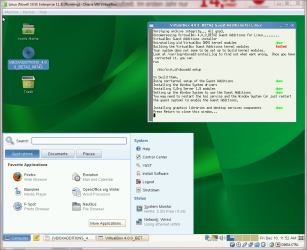
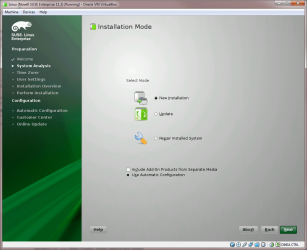
Looks and behaves very nice. USB ports on vm's not working before updating Guest Additions. First run of VirtualBox 3.12.12 vm SUSE Enterprise 11.3 crashed the vm and made VDI image unreadable. Reinstallling:

VBox_4_Beta2_First_try_1.PNG

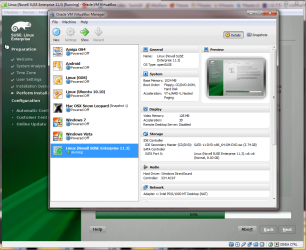
I like the new Preview available on VirtualBox main window, showing "live" preview of selected vm:

VBox_4_Beta2_First_try_2.PNG

Building the VirtualBox Guest Additions kernel modules failed, but that's because of SUSE, not VBox:

VBox_4_Beta2_First_try_3.PNG

But, unpleasant surprise, Guest Additions service fails to start:

VBox_4_Beta2_First_try_4.PNG

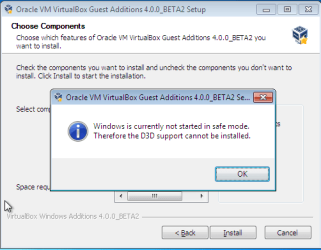
In Windows 7 and Vista vm's appears a comical error. I couldn't no longer boot in safe mode, whatever I tried. Installing Direct 3D support therefore impossible:

VBox_4_Beta2_First_try_5.PNG

Other than that, Windows, Mac OSX and android vm's boot clearly faster and work without problems.

Kari
 

My Computer

Computer type
Laptop
Computer Manufacturer/Model Number
HP ENVY 17-1150eg
OS
Windows 10 Pro x64 EN-GB
CPU
1.6 GHz Intel Core i7-720QM Processor
Memory
6 GB
Graphics Card(s)
ATI Mobility Radeon HD 5850 Graphics
Sound Card
Beats sound system with integrated subwoofer
Monitor(s) Displays
17" laptop display, 22" LED and 32" Full HD TV through HDMI
Screen Resolution
1600*900 (1), 1920*1080 (2&3)
Hard Drives
Internal: 2 x 500 GB SATA Hard Disk Drive 7200 rpm
External: 2TB for backups, 3TB USB3 network drive for media
Cooling
As Envy runs a bit warm, I have it on a Cooler Master pad
Keyboard
Logitech diNovo Media Desktop Laser (bluetooth)
Mouse
Logitech Performance Mouse MX
Internet Speed
50/10 Mbps VDSL
Antivirus
Windows Defender 4.3.9431.0
Browser
Maxthon 3.5.2., IE11
December 14, 2010

VirtualBox 4 Beta 3
released.


   Information

This is the third beta of the upcoming 4.0 release. The following items were added/fixed since VirtualBox 4.0.0 Beta 2:

  • Solaris hosts: another fix for installing ExtPacks on Solaris
  • Solaris hosts: properly register mime types
  • GUI: fixed a crash if maximizing a guest window is not allowed
  • GUI: remember recent mounted mediums
  • GUI: fixed additions mounting
  • GUI: added hint how to get out of the scale mode
  • GUI: fixed black fullscreen minitoolbar on KDE4 hosts (bug #5449)
  • GUI: allow to update / downgrade / reinstall ExtPacks
  • 3D support: fixed incorrect rendering for some d3d8/9 apps
  • 3D support: fixed OpenGL support for 32bit apps on 64bit Windows XP SP2
  • 3D support: fixed installation on Linux without DKMS
  • 3D support: fixed OpenGL support for libMesa 7.9
  • VGA: fixed crash when booting VMs with older additions
  • OVA: allow individual files greater 8GB
  • Storage: performance optimization by not using our own block cache for read-only mediums
  • BIOS: implemented multi-sector reading, speeds up booting of certain guests (e.g. Solaris)
  • VMM: fixed FreeBSD 8.1 boot hang for unrestricted guest execution with VT-x
  • VMM: fixed performance regression for 32-bit SMP guests (VT-x + nested paging)
  • VMM: fixed performance regression (VT-x with preemption timer only)
  • VMM: improved fix for blocking NMIs triggered by active performance counters (Linux hosts in non-VT-x/AMD-V mode only; bug #7819)
  • User Manual: Windows help file (.chm) is searchable again
  • Windows Additions: fixed Windows 2000 guests (4.0.0 Beta 1 regression)
  • Solaris Additions: fixed guest X11 drivers
  • Solaris Additions: fixed unexpected termination of VBoxService
  • Linux Additions: fixed xorg.conf patching for older Linux (3.2.12 regression)

VirtualBox 4.0.0 Beta 3
 

My Computer

Computer type
PC/Desktop
Computer Manufacturer/Model Number
Airbot 2.0
OS
Windows 7 Ultimate x64 SP1
CPU
Core i7 920 (D0) @ 4Ghz, *26c idle *65c full load on air
Motherboard
Asus P6X58D Premium - Sata 6Gb/s - USB 3.0
Memory
12GB DDR3 Corsair Dominator -CMD12GX3M6A1600C8 at 1600MHz
Graphics Card(s)
Zotac Geforce GTX 770
Sound Card
ASUS Xonar D2X
Monitor(s) Displays
1 LG 24" Flatron W2453V-PF 1 Samsung 24" P2450H both 2ms RT
Screen Resolution
1920x1080@60hz
Hard Drives
1 Samsung 250GB 840 Evo SSD
1 OCZ Vertex2 180GB SSD
1 TB Samsung Spinpoint F1 7200RPM 32MB cache
2 500GB WD Caviar Blacks 7200RPM 32MB cache (WD5001AALS)

Pioneer DVD Burner DVR-S18M
PSU
Corsair HX1000W
Case
Cooler Master HAF 932
Cooling
Case Fans *3 230mm, *1 140mm/CPU - *Tuniq Tower 120 Extreme
Keyboard
Logitech Wireless MK700
Mouse
Logitech Wireless MK700
Internet Speed
DL 15 Mbps UL 0.98 Mbps
Antivirus
None
Browser
Firefox Nightly
Other Info
Processor-7.7 *RAM- 7.9 *Graphics-7.9 *Gaming Graphics- 7.9 *SSD- 7.8 W.E.I final score= 7.7
*Phone- LG Nexus 5
Updated, Thanks for the info :)
 

My Computer

Computer type
PC/Desktop
Computer Manufacturer/Model Number
Custom Build
OS
Windows 10 Pro x64, Arch Linux
CPU
Intel Core 2 Quad Q8200 OC'd 3.08GHz
Motherboard
Asus Rampage formula LGA775
Memory
8GB DDR2 900Mhz
Graphics Card(s)
MSI GT730 2GB GDDR5 (Kepler)
Sound Card
Supreme FX2
Monitor(s) Displays
Samsung LS22F350 LED
Screen Resolution
1080P
Hard Drives
Kingston SSDNow UV400 120GB, 500GB Hitachi, 2TB Samsung, 500GB Seagate FreeAgent, 640GB Samsung, 160GB Toshiba (Arch)
PSU
AeroCool 500W Bronze
Cooling
Cooler Master V6 + 3X fans
Keyboard
Prolink keyboard
Mouse
Logitech M705
Internet Speed
1MiB/s
Browser
Chrome Beta
As with Beta 1 and 2, also with Beta 3 all my Linux machines crash and refuse to boot if Guest Additions are installed.
 

My Computer

Computer type
Laptop
Computer Manufacturer/Model Number
HP ENVY 17-1150eg
OS
Windows 10 Pro x64 EN-GB
CPU
1.6 GHz Intel Core i7-720QM Processor
Memory
6 GB
Graphics Card(s)
ATI Mobility Radeon HD 5850 Graphics
Sound Card
Beats sound system with integrated subwoofer
Monitor(s) Displays
17" laptop display, 22" LED and 32" Full HD TV through HDMI
Screen Resolution
1600*900 (1), 1920*1080 (2&3)
Hard Drives
Internal: 2 x 500 GB SATA Hard Disk Drive 7200 rpm
External: 2TB for backups, 3TB USB3 network drive for media
Cooling
As Envy runs a bit warm, I have it on a Cooler Master pad
Keyboard
Logitech diNovo Media Desktop Laser (bluetooth)
Mouse
Logitech Performance Mouse MX
Internet Speed
50/10 Mbps VDSL
Antivirus
Windows Defender 4.3.9431.0
Browser
Maxthon 3.5.2., IE11
Good stuff, thanks Airbot.

Kari, I see you run Snow Leopard in vBox. How well does that run (before I spend $29 + tax, I would like to know - LOL).
 

My Computer

Computer Manufacturer/Model Number
HP, Dell, Gateway, Toshiba - 4 laptops and 2 desktops
OS
Vista, Windows7, Mint Mate, Zorin, Windows 8
CPU
from 1.6GHz Duo to i7
Monitor(s) Displays
2x HP w2207
Hard Drives
5x HDD, 7x SSD, 12x Externals
Keyboard
with trackball - no mices
Mouse
Trackball mice
Internet Speed
DSL 6000
As with Beta 1 and 2, also with Beta 3 all my Linux machines crash and refuse to boot if Guest Additions are installed.


Be sure to check out the Beta version known issue threads, and you could give them feedback on it there also.

VirtualBox Beta Feedback
 

My Computer

Computer type
PC/Desktop
Computer Manufacturer/Model Number
Airbot 2.0
OS
Windows 7 Ultimate x64 SP1
CPU
Core i7 920 (D0) @ 4Ghz, *26c idle *65c full load on air
Motherboard
Asus P6X58D Premium - Sata 6Gb/s - USB 3.0
Memory
12GB DDR3 Corsair Dominator -CMD12GX3M6A1600C8 at 1600MHz
Graphics Card(s)
Zotac Geforce GTX 770
Sound Card
ASUS Xonar D2X
Monitor(s) Displays
1 LG 24" Flatron W2453V-PF 1 Samsung 24" P2450H both 2ms RT
Screen Resolution
1920x1080@60hz
Hard Drives
1 Samsung 250GB 840 Evo SSD
1 OCZ Vertex2 180GB SSD
1 TB Samsung Spinpoint F1 7200RPM 32MB cache
2 500GB WD Caviar Blacks 7200RPM 32MB cache (WD5001AALS)

Pioneer DVD Burner DVR-S18M
PSU
Corsair HX1000W
Case
Cooler Master HAF 932
Cooling
Case Fans *3 230mm, *1 140mm/CPU - *Tuniq Tower 120 Extreme
Keyboard
Logitech Wireless MK700
Mouse
Logitech Wireless MK700
Internet Speed
DL 15 Mbps UL 0.98 Mbps
Antivirus
None
Browser
Firefox Nightly
Other Info
Processor-7.7 *RAM- 7.9 *Graphics-7.9 *Gaming Graphics- 7.9 *SSD- 7.8 W.E.I final score= 7.7
*Phone- LG Nexus 5

My Computer

Computer type
Laptop
Computer Manufacturer/Model Number
HP ENVY 17-1150eg
OS
Windows 10 Pro x64 EN-GB
CPU
1.6 GHz Intel Core i7-720QM Processor
Memory
6 GB
Graphics Card(s)
ATI Mobility Radeon HD 5850 Graphics
Sound Card
Beats sound system with integrated subwoofer
Monitor(s) Displays
17" laptop display, 22" LED and 32" Full HD TV through HDMI
Screen Resolution
1600*900 (1), 1920*1080 (2&3)
Hard Drives
Internal: 2 x 500 GB SATA Hard Disk Drive 7200 rpm
External: 2TB for backups, 3TB USB3 network drive for media
Cooling
As Envy runs a bit warm, I have it on a Cooler Master pad
Keyboard
Logitech diNovo Media Desktop Laser (bluetooth)
Mouse
Logitech Performance Mouse MX
Internet Speed
50/10 Mbps VDSL
Antivirus
Windows Defender 4.3.9431.0
Browser
Maxthon 3.5.2., IE11
December 17, 2010

VirtualBox 4 Beta 4
available. Changelog below.


   Information

This is the fourth beta of the upcoming 4.0 release. The following items were added/fixed since VirtualBox 4.0.0 Beta 3:

  • Audio: fixed memory corruption under certain circumstances
  • 3D support: fixed OpenGL support for Windows 2000 guests
  • Settings: modifying VM session could lose disk attachments (4.0 Beta 3 regression)
  • OVA: fixed crash during import
  • GUI: better OS type string matching
  • GUI: fixed redraw problem on X11 guests with multiple monitors attached (Mac OS X hosts only)
  • GUI: remember last directory in file dialogs
  • Settings: fixed .vbox file format portability issue with snapshots (backslashes)
  • ExtPacks: fixed installation on certain Linux hosts (e.g. openSUSE)
  • ExtPacks: require sudo for installation on Linux and Solaris hosts
  • Storage: fixed possible crash during suspend
  • Storage: fixed raw disk access on OS X
  • Storage: lower the CPU usage for low disk I/O bandwidth limits
  • Storage: added multi-attachment image mode for shared disk clusters
  • Storage: fixed SATA activity LED handling
  • 2D: fixed seamless mode when 2D is on for Mac hosts
  • Additions: fixed incompatibility with SLED 11

VirtualBox 4.0.0 Beta 4
 

My Computer

Computer type
PC/Desktop
Computer Manufacturer/Model Number
Airbot 2.0
OS
Windows 7 Ultimate x64 SP1
CPU
Core i7 920 (D0) @ 4Ghz, *26c idle *65c full load on air
Motherboard
Asus P6X58D Premium - Sata 6Gb/s - USB 3.0
Memory
12GB DDR3 Corsair Dominator -CMD12GX3M6A1600C8 at 1600MHz
Graphics Card(s)
Zotac Geforce GTX 770
Sound Card
ASUS Xonar D2X
Monitor(s) Displays
1 LG 24" Flatron W2453V-PF 1 Samsung 24" P2450H both 2ms RT
Screen Resolution
1920x1080@60hz
Hard Drives
1 Samsung 250GB 840 Evo SSD
1 OCZ Vertex2 180GB SSD
1 TB Samsung Spinpoint F1 7200RPM 32MB cache
2 500GB WD Caviar Blacks 7200RPM 32MB cache (WD5001AALS)

Pioneer DVD Burner DVR-S18M
PSU
Corsair HX1000W
Case
Cooler Master HAF 932
Cooling
Case Fans *3 230mm, *1 140mm/CPU - *Tuniq Tower 120 Extreme
Keyboard
Logitech Wireless MK700
Mouse
Logitech Wireless MK700
Internet Speed
DL 15 Mbps UL 0.98 Mbps
Antivirus
None
Browser
Firefox Nightly
Other Info
Processor-7.7 *RAM- 7.9 *Graphics-7.9 *Gaming Graphics- 7.9 *SSD- 7.8 W.E.I final score= 7.7
*Phone- LG Nexus 5
Kari, I see you run Snow Leopard in vBox. How well does that run (before I spend $29 + tax, I would like to know - LOL).

2 words. Abysmally slow

it's the first time that I've even contemplated moving away from vmware --- they are going "too corporate" these days so individual / small company users are just left behind.
How so...the vmware player 3.x product is great for home users and 100% free. I'm not even close to giving up on vmware player 3.x....but will of course look at vbox. I've got tons of ESX and ESXi at work...so sticking with VMware is a no brainer for me.
 

My Computer

Computer Manufacturer/Model Number
Self-Built in July 2009
OS
Windows 7 Ultimate x64
CPU
Intel Q9550 2.83Ghz OC'd to 3.40Ghz
Motherboard
Gigabyte GA-EP45-UD3R rev. 1.1, F12 BIOS
Memory
8GB G.Skill PI DDR2-800, 4-4-4-12 timings
Graphics Card(s)
EVGA 1280MB Nvidia GeForce GTX570
Sound Card
Realtek ALC899A 8 channel onboard audio
Monitor(s) Displays
23" Acer x233H
Screen Resolution
1920x1080
Hard Drives
Intel X25-M 80GB Gen 2 SSD
Western Digital 1TB Caviar Black, 32MB cache. WD1001FALS
PSU
Corsair 620HX modular
Case
Antec P182
Cooling
stock
Keyboard
ABS M1 Mechanical
Mouse
Logitech G9 Laser Mouse
Internet Speed
15/2 cable modem
Other Info
Windows and Linux enthusiast. Logitech G35 Headset.

My Computer

Computer type
PC/Desktop
Computer Manufacturer/Model Number
Airbot 2.0
OS
Windows 7 Ultimate x64 SP1
CPU
Core i7 920 (D0) @ 4Ghz, *26c idle *65c full load on air
Motherboard
Asus P6X58D Premium - Sata 6Gb/s - USB 3.0
Memory
12GB DDR3 Corsair Dominator -CMD12GX3M6A1600C8 at 1600MHz
Graphics Card(s)
Zotac Geforce GTX 770
Sound Card
ASUS Xonar D2X
Monitor(s) Displays
1 LG 24" Flatron W2453V-PF 1 Samsung 24" P2450H both 2ms RT
Screen Resolution
1920x1080@60hz
Hard Drives
1 Samsung 250GB 840 Evo SSD
1 OCZ Vertex2 180GB SSD
1 TB Samsung Spinpoint F1 7200RPM 32MB cache
2 500GB WD Caviar Blacks 7200RPM 32MB cache (WD5001AALS)

Pioneer DVD Burner DVR-S18M
PSU
Corsair HX1000W
Case
Cooler Master HAF 932
Cooling
Case Fans *3 230mm, *1 140mm/CPU - *Tuniq Tower 120 Extreme
Keyboard
Logitech Wireless MK700
Mouse
Logitech Wireless MK700
Internet Speed
DL 15 Mbps UL 0.98 Mbps
Antivirus
None
Browser
Firefox Nightly
Other Info
Processor-7.7 *RAM- 7.9 *Graphics-7.9 *Gaming Graphics- 7.9 *SSD- 7.8 W.E.I final score= 7.7
*Phone- LG Nexus 5
I was suspicious when Oracle took over VirtualBox. But this look good now, it seems they really are developing it.
 

My Computer

Computer type
Laptop
Computer Manufacturer/Model Number
HP ENVY 17-1150eg
OS
Windows 10 Pro x64 EN-GB
CPU
1.6 GHz Intel Core i7-720QM Processor
Memory
6 GB
Graphics Card(s)
ATI Mobility Radeon HD 5850 Graphics
Sound Card
Beats sound system with integrated subwoofer
Monitor(s) Displays
17" laptop display, 22" LED and 32" Full HD TV through HDMI
Screen Resolution
1600*900 (1), 1920*1080 (2&3)
Hard Drives
Internal: 2 x 500 GB SATA Hard Disk Drive 7200 rpm
External: 2TB for backups, 3TB USB3 network drive for media
Cooling
As Envy runs a bit warm, I have it on a Cooler Master pad
Keyboard
Logitech diNovo Media Desktop Laser (bluetooth)
Mouse
Logitech Performance Mouse MX
Internet Speed
50/10 Mbps VDSL
Antivirus
Windows Defender 4.3.9431.0
Browser
Maxthon 3.5.2., IE11
I was suspicious when Oracle took over VirtualBox.

So was I - but it was the harbinger of doom I thought it was going to be.


From the screens / bugfixes it's looking good.


(says the person who will just wait till final version is released)
 

My Computer

Computer type
PC/Desktop
Computer Manufacturer/Model Number
Systems by SmartEyeball
OS
8 Pro x64
CPU
i7 3770K 4.6GHz
Motherboard
ASUS P8Z77 WS
Memory
16GB G.Skill Trident X 2666mhz
Graphics Card(s)
x2 EVGA 780 Ti Superclocked SLI
Sound Card
SB X-FI Surround 5.1 PRO USB / ATH-AD900 Headphones
Monitor(s) Displays
x3 Dell U2410 / 58" Samsung
Screen Resolution
5760*1200/ 1920*1200
Hard Drives
2x Intel 520 240GB (RAID 0) * 2x WD Caviar Blacks 2TB (RAID 0) * 2TB WD Caviar Black * Sony Optirac DVD
PSU
Silverstone Strider Evolution 1200W
Case
Thermaltake Level 10 GT Snow Edition
Cooling
Noctua NH-D14
Keyboard
Topre Realforce // Ducky Shine MX Black // Filco Ninja TKL
Mouse
Thermaltake Theron (Highly Recommended) + Razer Imperator
Antivirus
MSE
Browser
IE, FF, WaterFox
Other Info
GT Extreme V2 Sim Racing Cockpit + 40" LCD and K/B Mouse stand ▼
Fanatec CSR Elite Wheel + Clubsport V1 Pedals + CSR shifter/7G-H ▼Saitek X52 Pro ▼ TrackIR 5 Pro
Buttkicker v2 Seat Rumbler with Dedicated 5.1 and Sub Woofer attached to frame ▼
=
Bloody Big Grin

My Computer

Computer type
Laptop
Computer Manufacturer/Model Number
HP ENVY 17-1150eg
OS
Windows 10 Pro x64 EN-GB
CPU
1.6 GHz Intel Core i7-720QM Processor
Memory
6 GB
Graphics Card(s)
ATI Mobility Radeon HD 5850 Graphics
Sound Card
Beats sound system with integrated subwoofer
Monitor(s) Displays
17" laptop display, 22" LED and 32" Full HD TV through HDMI
Screen Resolution
1600*900 (1), 1920*1080 (2&3)
Hard Drives
Internal: 2 x 500 GB SATA Hard Disk Drive 7200 rpm
External: 2TB for backups, 3TB USB3 network drive for media
Cooling
As Envy runs a bit warm, I have it on a Cooler Master pad
Keyboard
Logitech diNovo Media Desktop Laser (bluetooth)
Mouse
Logitech Performance Mouse MX
Internet Speed
50/10 Mbps VDSL
Antivirus
Windows Defender 4.3.9431.0
Browser
Maxthon 3.5.2., IE11
Oracle VM VirtualBox 4.0 Released

Can you install version 4 over the current version and does it keep the installation running - or does one have to restart from square 1.
 

My Computer

Computer Manufacturer/Model Number
HP, Dell, Gateway, Toshiba - 4 laptops and 2 desktops
OS
Vista, Windows7, Mint Mate, Zorin, Windows 8
CPU
from 1.6GHz Duo to i7
Monitor(s) Displays
2x HP w2207
Hard Drives
5x HDD, 7x SSD, 12x Externals
Keyboard
with trackball - no mices
Mouse
Trackball mice
Internet Speed
DSL 6000
You can install it on top of an older version, replacing it. All virtual machines are kept and can be directly launched. Guest Additions should then be updated inside every vm you have.

Don't forget to download and install VBox 4 extension pack, too.

I still have some problems to get Linux Guest Additions v.4 to work, as well as Solaris, but I'll bet it's a "personal problem" ;) rather than a bug. Testing as we speak, have now restored Linux VM's from backup a couple of times, after unsuccessful GA upgrade, trying to find a solution.
 

My Computer

Computer type
Laptop
Computer Manufacturer/Model Number
HP ENVY 17-1150eg
OS
Windows 10 Pro x64 EN-GB
CPU
1.6 GHz Intel Core i7-720QM Processor
Memory
6 GB
Graphics Card(s)
ATI Mobility Radeon HD 5850 Graphics
Sound Card
Beats sound system with integrated subwoofer
Monitor(s) Displays
17" laptop display, 22" LED and 32" Full HD TV through HDMI
Screen Resolution
1600*900 (1), 1920*1080 (2&3)
Hard Drives
Internal: 2 x 500 GB SATA Hard Disk Drive 7200 rpm
External: 2TB for backups, 3TB USB3 network drive for media
Cooling
As Envy runs a bit warm, I have it on a Cooler Master pad
Keyboard
Logitech diNovo Media Desktop Laser (bluetooth)
Mouse
Logitech Performance Mouse MX
Internet Speed
50/10 Mbps VDSL
Antivirus
Windows Defender 4.3.9431.0
Browser
Maxthon 3.5.2., IE11
Thanks kari. I guess I wait for you "total success" report.
 

My Computer

Computer Manufacturer/Model Number
HP, Dell, Gateway, Toshiba - 4 laptops and 2 desktops
OS
Vista, Windows7, Mint Mate, Zorin, Windows 8
CPU
from 1.6GHz Duo to i7
Monitor(s) Displays
2x HP w2207
Hard Drives
5x HDD, 7x SSD, 12x Externals
Keyboard
with trackball - no mices
Mouse
Trackball mice
Internet Speed
DSL 6000
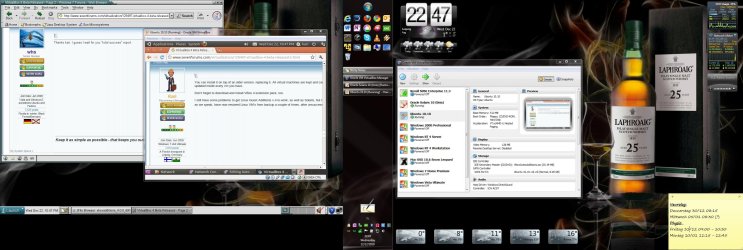
I do not know or understand why, but finally I got also the problematic Linux and Unix distros to accept Guest Additions. All except Novell SUSE Enterprise; it shows GA as installed but integration works only partly, for instance no seamless mode and mouse integration is not working as it should, plus resolution can not be changed by resizing Windows Explorer window.

But other Linux vm's (Ubuntu, Mandriva, Fedora) all working well, as well as all Windows vm's. In screenshot below only 25% of host CPU resources used when Solaris Unix running on left display in seamless mode and Ubuntu in windowed mode.

Kari

VBox4.jpg
 

My Computer

Computer type
Laptop
Computer Manufacturer/Model Number
HP ENVY 17-1150eg
OS
Windows 10 Pro x64 EN-GB
CPU
1.6 GHz Intel Core i7-720QM Processor
Memory
6 GB
Graphics Card(s)
ATI Mobility Radeon HD 5850 Graphics
Sound Card
Beats sound system with integrated subwoofer
Monitor(s) Displays
17" laptop display, 22" LED and 32" Full HD TV through HDMI
Screen Resolution
1600*900 (1), 1920*1080 (2&3)
Hard Drives
Internal: 2 x 500 GB SATA Hard Disk Drive 7200 rpm
External: 2TB for backups, 3TB USB3 network drive for media
Cooling
As Envy runs a bit warm, I have it on a Cooler Master pad
Keyboard
Logitech diNovo Media Desktop Laser (bluetooth)
Mouse
Logitech Performance Mouse MX
Internet Speed
50/10 Mbps VDSL
Antivirus
Windows Defender 4.3.9431.0
Browser
Maxthon 3.5.2., IE11
Back
Top