

- Local time
- 6:12 PM
- Messages
- 66
Hi guys,
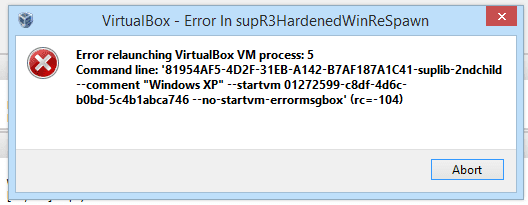
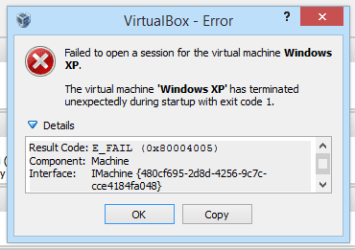
I recently installed VirtualBox on my new laptop, only to find that when I launch a VM I see two error messages (in attachments), one after the other.
Here is what VirtualBox provided for the clipboard:
Failed to open a session for the virtual machine Windows XP.
The virtual machine 'Windows XP' has terminated unexpectedly during startup with exit code 1.
Result Code: E_FAIL (0x80004005)
Component: Machine
Interface: IMachine {480cf695-2d8d-4256-9c7c-cce4184fa048}
I've uninstalled, reinstalled, changed settings in VirtualBox, turned off VT-x in the BIOS and back on again, and tried multiple older versions of VirtualBox. Nothing worked. Please help!
If you need them, here are the laptop's specs:
Manufacturer: HP
Model: Pavilion 15-N214TX
CPU: Dual-core Intel Core i7 4500u @ 1.8GHz - 3.0GHz
GPU: Intel HD Grahpics 4400 (integrated), nVIDIA GeForce GT 740M with 2GB GDDR3 memory (separate)
RAM: 8GB DDR3
OS: Windows 8.1 Update 1
-techhead287
I recently installed VirtualBox on my new laptop, only to find that when I launch a VM I see two error messages (in attachments), one after the other.
Here is what VirtualBox provided for the clipboard:
Failed to open a session for the virtual machine Windows XP.
The virtual machine 'Windows XP' has terminated unexpectedly during startup with exit code 1.
Result Code: E_FAIL (0x80004005)
Component: Machine
Interface: IMachine {480cf695-2d8d-4256-9c7c-cce4184fa048}
I've uninstalled, reinstalled, changed settings in VirtualBox, turned off VT-x in the BIOS and back on again, and tried multiple older versions of VirtualBox. Nothing worked. Please help!
If you need them, here are the laptop's specs:
Manufacturer: HP
Model: Pavilion 15-N214TX
CPU: Dual-core Intel Core i7 4500u @ 1.8GHz - 3.0GHz
GPU: Intel HD Grahpics 4400 (integrated), nVIDIA GeForce GT 740M with 2GB GDDR3 memory (separate)
RAM: 8GB DDR3
OS: Windows 8.1 Update 1
-techhead287
Attachments
My Computer
At a glance
Windows 7 Ultimate 64-bitIntel Core i732GB RAM
- Computer type
- PC/Desktop
- Computer Manufacturer/Model Number
- Custom Build
- OS
- Windows 7 Ultimate 64-bit
- CPU
- Intel Core i7
- Motherboard
- ASUS
- Memory
- 32GB RAM
- Monitor(s) Displays
- 2
- Hard Drives
- 1TB HDD
160GB SSD
2TB HDD
- Cooling
- 3 Fans, water cooling
- Keyboard
- Microsoft
- Mouse
- Microsoft
- Internet Speed
- Around 70mbps
- Antivirus
- AVG Internet Security 2014
- Browser
- IE11, Google Chrome (default browser is Chrome)


