
Virtualbox quit working after installing microsoft updates (12-9-2014)

chuckfrasher

New member
Local time
10:00 PM
Messages
19
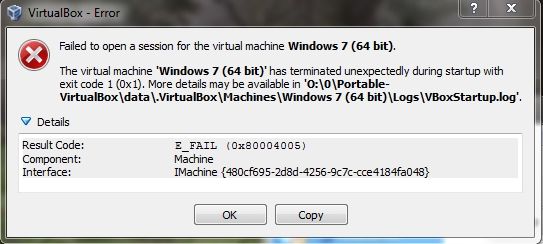
I have been using portable virtualbox for some time now. Never had a problem. But immediately after installing updates today (12-9-2014) I can no longer start a VM. I get an error. I even tried reinstalling virtual box and creating another machine. But I cannot create one. I hope this can be resolved.
HBf6quV.jpg
 

My Computer My Computer

OS
Vista and XP
This is also true for me. I run VirtualBox everyday, and after applying the Win7 updates today, it never starts the VM anymore. Same error as OP.

I think it must have been one of the 6 optional updates I installed.

EDIT: It doesn't even work with trusty 4.3.12, which worked perfectly when 4.3.14 was released and had quite a few problems.

EDIT2: fix: https://forums.virtualbox.org/viewtopic.php?f=6&t=64777&start=45
 
Last edited:

My Computer My Computer

Computer type
PC/Desktop
OS
Windows 7 Professional x64
This is also true for me. I run VirtualBox everyday, and after applying the Win7 updates today, it never starts the VM anymore. Same error as OP.

I think it must have been one of the 6 optional updates I installed.

EDIT: It doesn't even work with trusty 4.3.12, which worked perfectly when 4.3.14 was released and had quite a few problems.

EDIT2: fix: https://forums.virtualbox.org/viewtopic.php?f=6&t=64777&start=45

Thanks buddy. It worked! It was the update KB3004394.

For anyone who is a beginner like me, just follow the instructions to uninstall the update KB3004394.

Remove an update - Windows Help

And when KB3004394 rears it's ugly head again, just right click on it and choose "hide update".
 

My Computer My Computer

OS
Vista and XP
I half-expected my VirtualBox to not work as well, but, it apparently still does, even after yesterdays Win7 updates....perhaps because my version of Oracle VB was a little older? (4.3.20)
 

My Computer My Computer

Computer type
PC/Desktop
Computer Manufacturer/Model Number
HP
OS
Windows 7 Home Premium 64 bit
CPU
AMD A4
Memory
5 GB
Graphics Card(s)
Integrated Radeon
Hard Drives
500 gb WD
Antivirus
360 TS
Browser
IE
Hi there

I'd suggest looking at VMWARE's FREE VMPLAYER --this IMO invariably seems to work much better than VBOX -- of course YMMV but I've tried all sorts of virtualisation methods over the years (Including HYPER-V on W8/W10) and still think that overall --especially for most non seriously technical people VMWARE works the best.

Converter tools are available so you don't have to re-build your VM's from scratch.

Cheers
jimbo
 

My Computer My Computer

Computer type
PC/Desktop
Computer Manufacturer/Model Number
Custom built, several laptops HP/ASUS
OS
Linux CENTOS 7 / various Windows OS'es and servers
CPU
Intel i7 Intel i5
Memory
8GB, 16GB
Graphics Card(s)
On Motherboard
Sound Card
Realtek HD audio
Monitor(s) Displays
Apple Cinema display, Samsung LCD
Screen Resolution
1920 X 1080
Hard Drives
4 X 1TB SATA
Mouse
Toshiba wireless laser
Internet Speed
> 20MB up
Back
Top