
Virtualbox >> XP Mode

copernicus

New member
Power User
VIP
Local time
11:52 PM
Messages
620
The only thing XP mode has on virtualbox is the free license.

Seamless mode on Virtualbox:
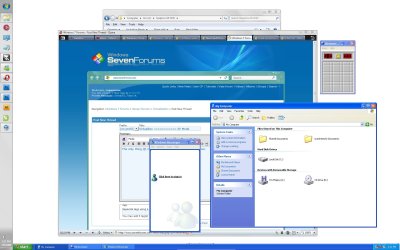
seamless.jpg

This thing is blazing fast compared to XP mode, comes out of saved state in like...10 secs compared to xp mode that would take up to five minutes to load up an xp mode program.
 

My Computer

OS
7264x64/7260x86
I love Virtualbox.
 

My Computer

OS
Windows 7 x64 Pro
CPU
Intel 990X
Motherboard
Asus P6T Deluxe V2
Memory
CORSAIR XMS3 6GB SDRAM DDR3 1600 (7-7-7-20)
Graphics Card(s)
2 x BFG 285 GTX OCXs in SLI
Sound Card
X-fi Elite Pro
Monitor(s) Displays
HP LP 3065
Screen Resolution
2560 x 1600
Hard Drives
2 x 150 gb Velociraptors RAID 0
PSU
PC Power & Cooling 750W
Case
CM Stacker 832
Cooling
Stock cooler
Keyboard
Saitek Eclipse II
Mouse
Logitech MX Revolution
VirtualBox VirtualRocks! And I qualify for the free license.
 
VirtualBox VirtualRocks! And I qualify for the free license.


I prefer VMware by a lot. Definitely more than VirtualPC as VMware can virtualize a 64bit OS.
 

My Computer

Computer Manufacturer/Model Number
HP dv7-3080us
OS
Microsoft Windows 7 x64 Ultimate
CPU
Intel Core i7 720M 1.6-2.8GHz
Motherboard
HP dv7-3080us
Memory
6GB DDR3 1066MHz RAM
Graphics Card(s)
NVIDIA GeForce 230M
Sound Card
HP dv7-3080us
Monitor(s) Displays
17.3" BrightView LED/LCD (1650x900) ViewSonic 22" LCD 1080p
Screen Resolution
17.3" BrightView LED/LCD (1650x900) ViewSonic 22" LCD 1080p
Hard Drives
500GB OS Drive
100GB OS Partition
400GB Media Partition

640GB Secondary Drive for Movies
PSU
HP dv7-3080us
Case
HP dv7-3080us
Cooling
HP dv7-3080us
Keyboard
HP dv7-3080us - Microsoft Wireless Keyboard 6000 v3.0
Mouse
Logitech G7
I prefer VMware by a lot. Definitely more than VirtualPC as VMware can virtualize a 64bit OS.

I also prefer the VMWare Workstation, especially the Easy Install feature (it automagically corrected "errors" in a slipstream CD that included instructions for a second volume that did not exist as a VHD).

VMWare Workstation was smooth, superfast and sweet. And $189 taxable.

VBox is free. And supports 64-bit guest OS.

VMWare is sweet. VBox rox!
 
I also prefer the VMWare Workstation, especially the Easy Install feature (it automagically corrected "errors" in a slipstream CD that included instructions for a second volume that did not exist as a VHD).

VMWare Workstation was smooth, superfast and sweet. And $189 taxable.

VBox is free. And supports 64-bit guest OS.

VMWare is sweet. VBox rox!


I already have VMWare so I'm not worried about the $180 lol
 

My Computer

Computer Manufacturer/Model Number
HP dv7-3080us
OS
Microsoft Windows 7 x64 Ultimate
CPU
Intel Core i7 720M 1.6-2.8GHz
Motherboard
HP dv7-3080us
Memory
6GB DDR3 1066MHz RAM
Graphics Card(s)
NVIDIA GeForce 230M
Sound Card
HP dv7-3080us
Monitor(s) Displays
17.3" BrightView LED/LCD (1650x900) ViewSonic 22" LCD 1080p
Screen Resolution
17.3" BrightView LED/LCD (1650x900) ViewSonic 22" LCD 1080p
Hard Drives
500GB OS Drive
100GB OS Partition
400GB Media Partition

640GB Secondary Drive for Movies
PSU
HP dv7-3080us
Case
HP dv7-3080us
Cooling
HP dv7-3080us
Keyboard
HP dv7-3080us - Microsoft Wireless Keyboard 6000 v3.0
Mouse
Logitech G7
what about application integration like XPM? does VMware or Virtual box do these?
 

My Computer

Computer Manufacturer/Model Number
HP XW6600
OS
Windows 7 X64 Build 7100
CPU
Intel Xeon E5410 @ 22333MHz
Motherboard
HP 0A9Ch
Memory
10GB DDR2 PC2-5300
Graphics Card(s)
Nvidia GeForce 9600 GSO 384MB
Sound Card
OnBoard Sound
Monitor(s) Displays
Dell E248WFP & Dell E228WFP
Screen Resolution
1900x1200 & 1620x1200
Hard Drives
Seagate Barracuda 7200.10 - 250GB
Western Digital Caviar 2nd Gen - 250GB
PSU
STOCK HP
Case
STOCK HP Workstation Case
Cooling
STOCK HP
Keyboard
Saitek Gamer Backlit K/B
Mouse
Logitech G5
Internet Speed
11.21Mb/s Download - 2.17Mb/s Upload
No, but XP mode is so laggy it's really not worth it for my applications.

Virtualbox has seamless mode(see screenshot) which is essentially the same thing, except it loads up faster.

Since I'm bored, three taskbars!
three.jpg
 

My Computer

OS
7264x64/7260x86
Seamless mode feature of VBox should suit your needs. I can only say good things about VBox. Do not post questions at their support site unless you read every FAQ and thread before asking a question. They bite over there.
 
I like VirtualBox but it can't recognise my Intel 945GM internal graphics, just 'Standard VGA Adapter' with astrisk. Yes, tried uninstalling & letting Windows Update take care of it, no luck. Yes, downloaded & installed from Intel website, 'System requirements no met' :sarc: Yes, extracted files & 'Add New Hardware', no luck. It just don't want to play :p
 

My Computer

Computer Manufacturer/Model Number
Compaq Desktop
OS
Windows 7 Ultimate x64
CPU
AMD Sempron Dual Core
Memory
3GB
Graphics Card(s)
NVIDIA GeForce 6150SE nForce 430
Screen Resolution
1024x768
Hard Drives
150GB Sata
I don't think virtual machines are supposed to recognize hardware directly, Have you installed the Guest addons that allow you to resize the window? Those will install Sun drivers that should give you higher resolution(if that's your problem). What guest OS are you talking about btw.
 

My Computer

OS
7264x64/7260x86
I like VirtualBox but it can't recognise my Intel 945GM internal graphics, just 'Standard VGA Adapter' with astrisk. Yes, tried uninstalling & letting Windows Update take care of it, no luck. Yes, downloaded & installed from Intel website, 'System requirements no met' :sarc: Yes, extracted files & 'Add New Hardware', no luck. It just don't want to play :p


kewl sig
 

My Computer

Computer Manufacturer/Model Number
Gateway/NV7923u & NV79C52u Laptops
OS
windows 7 professional & ultimate 64bit laptops
CPU
2.27 boost to 2.53 & 2.53 boost to 2.80
Motherboard
Mobile Intel® HM55 Express Chipset ???
Memory
4GB
Graphics Card(s)
Intel® Graphics Media Accelerator HD
Sound Card
realtek High-definition audio support
Monitor(s) Displays
17.3 " HD 1600 x 900
Hard Drives
hatachi Travelstar 5400 500GB & west digital 500GB
Internet Speed
35MB fios
I like VirtualBox but it can't recognise my Intel 945GM internal graphics, just 'Standard VGA Adapter' with astrisk. Yes, tried uninstalling & letting Windows Update take care of it, no luck. Yes, downloaded & installed from Intel website, 'System requirements no met' :sarc: Yes, extracted files & 'Add New Hardware', no luck. It just don't want to play :p

VB and pretty much every Virtualization Technology emulates a computer with a sort of exception on the CPU department

so as you see the video adapter is also emulated
what i love about vb though is that it offers a OpenGL acceleration mode and Vmware does D3D accelaration....;)
although its a young technology, its getting there....;)
 

My Computer

Computer Manufacturer/Model Number
Tx2500z Tablet Pc/Homemade Server
OS
Windows 7 Ult x64(x2), HomePrem x32(x4), Server 08 (+VM), 08 R2 (VM) , SuSe 11.2 (VM), XP 32 (VM)
CPU
Turion X2 ultra (oh well came with laptop)/P4 @3.2 (yes P4)
Motherboard
IDK HP Motherboard / Intel DG965SS
Memory
OCZ Dual Channel 4GB kit/ 1gb Dual Channel
Graphics Card(s)
HD 3200 graphics /GMA x3100 (yay for intergrated!!)
Sound Card
Realtek HD Audio(mic working, well sort of)/Siig IC-70012
Monitor(s) Displays
built-in Hp 12" laptop screen/ Acer 19"
Screen Resolution
1280x800 /1440x900
Cooling
All Air Cooled
Mouse
Logi MX Rev. /MS Wheel Optical 1.1A /Logitech Optical Mouse
Internet Speed
College baby but its still routed through vpn to 1536k...
Other Info
love my wacom pen and pressure sensitivity...
wished it worked in 7, SUSE for that matter though
You can not load your native video drivers in any Virtual Machine.
They all use a virtual video adapter with 3D Hardware Acceleration, to try and take advantage of what it can. But you can not (at this time) use your Video Card in a VPC as you can on your native/guest PC.

One day, we may have full blown hardware virtualization.
But by then, we won't be using the same type OS or PC technology.
 

My Computer

Computer Manufacturer/Model Number
Self Built
OS
Win 7 Ultimate 32bit
CPU
C2D E6600 2.4Ghz
Motherboard
Intel D965WH
Memory
4G Kingston KHX5400D2
Graphics Card(s)
EVGA GTX 570 HD SC (012-P3-1573-KR)
Sound Card
On-Board
Monitor(s) Displays
Samsung 226BW
Screen Resolution
1680 x 1050
Hard Drives
2 x 250 Seagate Barracuda
2 x 500 Seagate Barracuda (Raid1)
PSU
Corsair TX750W
Case
In-Win C589
Cooling
Stock Intel Cooling
Has anybody tried to load the XP mode vhd into virtualbox? - is this possible?
 

My Computers

System One System Two

  • Computer type
    PC/Desktop
    Computer Manufacturer/Model Number
    ChillBlast - Custom to my design
    OS
    Windows 11 Pro x64 [Latest Release and Release Preview]
    CPU
    Ryzen 9 5950X, 3.8 - 5.2 MHz
    Motherboard
    Asus Prime X570-Pro
    Memory
    64GB [2 x 32GB] DDR4 3200MHz
    Graphics Card(s)
    4GB NVIDIA GEFORCE GTX 1650 Ti
    Sound Card
    On-board SPDIF to 5.1 System + HDMI [5.1 system]
    Monitor(s) Displays
    32" UHD 32 Bit HDR Monitor + 43" UHD 4K 32Bit HDR TV
    Screen Resolution
    2 x 3840 x 2160 @60Hz
    Hard Drives
    1TB M2 SSD OS, 500GB Fast Access SSD, 2 x 8TB Data + Various Externals from 1TB to 4TB, 10TB NAS
    PSU
    NZXT C750 80 PLUS Gold 750W Modular PSU
    Case
    Workstation Case [Matt Black]
    Cooling
    NZXT Kraken X63 280mm CPU Cooler +2x Quiet Case fans
    Keyboard
    Logitech Wireless MX Keys & K400 + others
    Mouse
    Logitech Wireless MX Master 3S
    Internet Speed
    920 MB Down 50 MB Up
    Antivirus
    BitDefender Total Security Pro
    Browser
    Chrome (always run latest Non-Beta)
    Other Info
    Also run ...
    Laptop - Quad 8GB - Windows 10 Pro x64
    Nexus 7 Android tablet x2
    Samsung 10.2" tablet
    Blackview TAB 8 4G Android Tablet c/w Keyboard
    Wacom Intuos Pro Medium Pen Pad
    Wacom Intuos Pro Small Pen Pad
    Wacom Expresskeys Remote
    Loopdeck+ Graphics Controller
    Shuttle Pro v2 Control
  • Computer type
    Laptop
    System Manufacturer/Model Number
    Dell XPS 17 10750H
    OS
    Windows 11 Pro x64 Latest RP
    CPU
    Intel I7 10750H 5.0GHz
    Motherboard
    Dell XPS
    Memory
    32GB [2x16GB] DDR4 2933 MHz
    Graphics Card(s)
    nVidia GTX1650Ti 4 GB GDDR6
    Sound Card
    Stock [Realtek] 4 Speaker
    Monitor(s) Displays
    17" IPS UHD+ Infinity Edge Touchscreen
    Screen Resolution
    3840 x 2400
    Hard Drives
    2TB M2 NVMe, 4TB External + various 500GB & 1TB External NVMe (also have access to spinner HDD from
    PSU
    Stock
    Case
    Stock XPS Aluminium & Carbon Fibre
    Cooling
    Stock - Active Fan Control
    Keyboard
    Backlit + Various Logitech
    Mouse
    Stock Track Pad + Logitech MX Trackball
    Internet Speed
    72 MB Down 18MB Up
    Browser
    Chrome
    Other Info
    Also run ...
    Laptop - Quad 8GB - Windows 10 Pro x64
    Nexus 7 Android tablet x2
    10.2" tablet
    Sony Z3 Android Smartphone
    Wacom Intuos Pro Medium Pen Pad
    Wacom Intuos Pro Small Pen Pad
    Wacom Expresskeys Remote
    Loopdeck+ Graphics Controller
    Shuttle Pro v2 Control Pad
    10TB NAS
It should work, I've loaded a 98 vhd I had before into VB.

It's not gonna run the xp mode through VB though, if that's what you're expecting.
 

My Computer

OS
7264x64/7260x86
Was just thinking of saving space and use a single vhd for both apps but is no issue to dig out an old xp disk and set that up
 

My Computers

System One System Two

  • Computer type
    PC/Desktop
    Computer Manufacturer/Model Number
    ChillBlast - Custom to my design
    OS
    Windows 11 Pro x64 [Latest Release and Release Preview]
    CPU
    Ryzen 9 5950X, 3.8 - 5.2 MHz
    Motherboard
    Asus Prime X570-Pro
    Memory
    64GB [2 x 32GB] DDR4 3200MHz
    Graphics Card(s)
    4GB NVIDIA GEFORCE GTX 1650 Ti
    Sound Card
    On-board SPDIF to 5.1 System + HDMI [5.1 system]
    Monitor(s) Displays
    32" UHD 32 Bit HDR Monitor + 43" UHD 4K 32Bit HDR TV
    Screen Resolution
    2 x 3840 x 2160 @60Hz
    Hard Drives
    1TB M2 SSD OS, 500GB Fast Access SSD, 2 x 8TB Data + Various Externals from 1TB to 4TB, 10TB NAS
    PSU
    NZXT C750 80 PLUS Gold 750W Modular PSU
    Case
    Workstation Case [Matt Black]
    Cooling
    NZXT Kraken X63 280mm CPU Cooler +2x Quiet Case fans
    Keyboard
    Logitech Wireless MX Keys & K400 + others
    Mouse
    Logitech Wireless MX Master 3S
    Internet Speed
    920 MB Down 50 MB Up
    Antivirus
    BitDefender Total Security Pro
    Browser
    Chrome (always run latest Non-Beta)
    Other Info
    Also run ...
    Laptop - Quad 8GB - Windows 10 Pro x64
    Nexus 7 Android tablet x2
    Samsung 10.2" tablet
    Blackview TAB 8 4G Android Tablet c/w Keyboard
    Wacom Intuos Pro Medium Pen Pad
    Wacom Intuos Pro Small Pen Pad
    Wacom Expresskeys Remote
    Loopdeck+ Graphics Controller
    Shuttle Pro v2 Control
  • Computer type
    Laptop
    System Manufacturer/Model Number
    Dell XPS 17 10750H
    OS
    Windows 11 Pro x64 Latest RP
    CPU
    Intel I7 10750H 5.0GHz
    Motherboard
    Dell XPS
    Memory
    32GB [2x16GB] DDR4 2933 MHz
    Graphics Card(s)
    nVidia GTX1650Ti 4 GB GDDR6
    Sound Card
    Stock [Realtek] 4 Speaker
    Monitor(s) Displays
    17" IPS UHD+ Infinity Edge Touchscreen
    Screen Resolution
    3840 x 2400
    Hard Drives
    2TB M2 NVMe, 4TB External + various 500GB & 1TB External NVMe (also have access to spinner HDD from
    PSU
    Stock
    Case
    Stock XPS Aluminium & Carbon Fibre
    Cooling
    Stock - Active Fan Control
    Keyboard
    Backlit + Various Logitech
    Mouse
    Stock Track Pad + Logitech MX Trackball
    Internet Speed
    72 MB Down 18MB Up
    Browser
    Chrome
    Other Info
    Also run ...
    Laptop - Quad 8GB - Windows 10 Pro x64
    Nexus 7 Android tablet x2
    10.2" tablet
    Sony Z3 Android Smartphone
    Wacom Intuos Pro Medium Pen Pad
    Wacom Intuos Pro Small Pen Pad
    Wacom Expresskeys Remote
    Loopdeck+ Graphics Controller
    Shuttle Pro v2 Control Pad
    10TB NAS
Back
Top