virtualbox

80yearold

New member
Local time
3:53 PM
Messages
13
After a rather lengthly discussion about my HD confifuration on new Toshiba under title "where to go from here" virtualbox seemed to be logical course of action. Before I go any further I downloaded 4.0 and accepted configuration in snippet. Please advise before I get too far inti this if I should have done it differently
Thank you
 

Attachments

  • virtualbox.JPG
    virtualbox.JPG
    18.4 KB · Views: 181

My Computer My Computer

At a glance

Win 7 64 bitP520 2.30 GHz4 MB RAM
Computer Manufacturer/Model Number
PSK3JV-01D001
OS
Win 7 64 bit
CPU
P520 2.30 GHz
Motherboard
?
Memory
4 MB RAM
Monitor(s) Displays
17.3
Hard Drives
320 GB
That's correct. Install everything, as you have chosen here.

Before creating your first virtual machines, do not forget to download and install the VirtualBox 4.0 Oracle VM VirtualBox Extension Pack, from the same download page in Downloads - VirtualBox

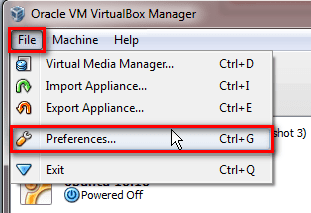
To install Extension Pack, launch VirtualBox and open Preferences:

VBox_extension_pack_1.png

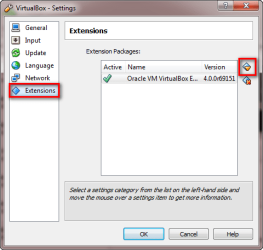
Select Extensions from the right pane, use the small Add Package button to browse to Extension Pack which you downloaded, select it and click OK to close preferences.

Now you can start setting up virtual machines.

On your other thread you mentioned you know yourself around Linux. Here's a tutorial for you to start playing with VirtualBox: http://www.sevenforums.com/tutorial...ndows-7-virtual-machine-using-virtualbox.html

Although explaining how to install Ubuntu Linux in VirtualBox, you can install whatever distro you'd like to following the tutorial.

Kari
 

Attachments

  • VBox_extension_pack_2.png
    VBox_extension_pack_2.png
    14.8 KB · Views: 2

My Computer My Computer

At a glance

Windows 10 Pro x64 EN-GB1.6 GHz Intel Core i7-720QM Processor6 GBATI Mobility Radeon HD 5850 Graphics
Computer type
Laptop
Computer Manufacturer/Model Number
HP ENVY 17-1150eg
OS
Windows 10 Pro x64 EN-GB
CPU
1.6 GHz Intel Core i7-720QM Processor
Memory
6 GB
Graphics Card(s)
ATI Mobility Radeon HD 5850 Graphics
Sound Card
Beats sound system with integrated subwoofer
Monitor(s) Displays
17" laptop display, 22" LED and 32" Full HD TV through HDMI
Screen Resolution
1600*900 (1), 1920*1080 (2&3)
Hard Drives
Internal: 2 x 500 GB SATA Hard Disk Drive 7200 rpm
External: 2TB for backups, 3TB USB3 network drive for media
Cooling
As Envy runs a bit warm, I have it on a Cooler Master pad
Keyboard
Logitech diNovo Media Desktop Laser (bluetooth)
Mouse
Logitech Performance Mouse MX
Internet Speed
50/10 Mbps VDSL
Antivirus
Windows Defender 4.3.9431.0
Browser
Maxthon 3.5.2., IE11
Back
Top