

Over at "eightforums.com" How to Install Windows 8 and 8.1 on VMware Player -- post #113 ... "ThrashZone" used Microsoft® Hardware-Assisted Virtualization Detection Tool to determine if his "computer processor" supports Hardware-assisted virtualisation (HAV).
I have no intention of using Win8 in any form.
I have not used any virtualisation (yet) choosing to subscribe to various "virtualisation" threads here at "sevenforums.com" to build on my homework before making the leap.
- I have only just successfully partitioned an external HDD ... a slow learner!
- so virtualisation is some way off for me yet, hopefully only weeks
Q1: Would I use the Microsoft® Hardware-Assisted Virtualization Detection Tool to evaluate any of my laptops or desktop PCs. ?
Q2:This is my Toshiba laptop processor but I would appreciate some help to interpret the Intel specs
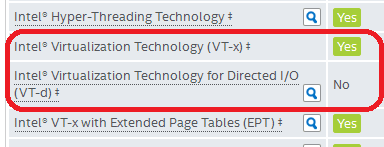
Q3: Would it be more efficient to use the "Intel" site search rather than (what looks cumbersome) Microsoft® Hardware-Assisted Virtualization Detection Tool if I know the PCs Intel CPU model ID ?
I have several other rigs available, and I am considering (maybe) upgrading an XP machine (rig built 2012) to Win7 and plan for virtualisation on that machine ... maybe !
Thank you
I have no intention of using Win8 in any form.
I have not used any virtualisation (yet) choosing to subscribe to various "virtualisation" threads here at "sevenforums.com" to build on my homework before making the leap.
- I have only just successfully partitioned an external HDD ... a slow learner!
- so virtualisation is some way off for me yet, hopefully only weeks
Q1: Would I use the Microsoft® Hardware-Assisted Virtualization Detection Tool to evaluate any of my laptops or desktop PCs. ?
Q2:This is my Toshiba laptop processor but I would appreciate some help to interpret the Intel specs
Q3: Would it be more efficient to use the "Intel" site search rather than (what looks cumbersome) Microsoft® Hardware-Assisted Virtualization Detection Tool if I know the PCs Intel CPU model ID ?
I have several other rigs available, and I am considering (maybe) upgrading an XP machine (rig built 2012) to Win7 and plan for virtualisation on that machine ... maybe !
Thank you
Last edited:
My Computer
At a glance
XP Pro (x86) | 7 HP (x86) & (x64) | 7 Pro (x64)
- Computer type
- PC/Desktop
- Computer Manufacturer/Model Number
- Toshiba, Lenovo (laptops) + 4 rigs
- OS
- XP Pro (x86) | 7 HP (x86) & (x64) | 7 Pro (x64)
