virtualization for windows 7

lipun4u

New member
Local time
5:19 AM
Messages
23
Location
Mumbai
I have windows & home edition and I want to use virtualization to run Linux in windows 7.

Please suggest me any virtalization software(VMWare Workstation or Virtual Box) which is compartable with windows 7.
 

My Computer

Computer Manufacturer/Model Number
hp
OS
Windows 7 Home
CPU
core 2 duo
why ???
 

My Computer

Computer Manufacturer/Model Number
hp
OS
Windows 7 Home
CPU
core 2 duo
both vmware and virtualbox will run linux as a guest os happily.
 

My Computer

Computer Manufacturer/Model Number
self built
OS
Windows 7 Professional 64-bit
CPU
Intel E8400 3GHz
Motherboard
Intel DX48BT2
Memory
Kingston PC3-10700H 4Gb
Graphics Card(s)
XFX Radeon HD 5850 BlackEd.
Sound Card
Asus Xonar DG
Monitor(s) Displays
2x Samsung SM-T220HD 22"
Screen Resolution
1680x1050 on two monitors
Hard Drives
OCZ Vertex 2 120gb 3.5" (OS)
Seagate Momentus XT 500gb
Samsung F3 1Tb (games)
2x Samsung F1 1Tb
PSU
Thermaltake ToughPower 850w
Case
Thermaltake Armor
Cooling
Scythe Mugen II
Keyboard
Microsoft Comfort Curve USB
Mouse
Razer Diamondback 3G
Internet Speed
8128/443
Which one will be better..Virtual PC or VMware Workstation ?
 

My Computer

Computer Manufacturer/Model Number
hp
OS
Windows 7 Home
CPU
core 2 duo

My Computer

Computer Manufacturer/Model Number
Custom | Whitebox
OS
Windows 7 Ultimate, OS X 10.7, Ubuntu 11.04
CPU
Intel E6750 @ 3.80GHz
Motherboard
Gigabyte GA-EP45-UD3L (Revision 1.1)
Memory
2x2GB & 2x1GB (6GB) OCZ Reaper 1066MHz @ 1080MHz
Graphics Card(s)
EVGA nVidia GTX 260 896mb (216 Core) FTW Edition
Sound Card
Realtek ALC888
Monitor(s) Displays
21" VIZIO TV
Screen Resolution
1680x1050 @ 60Hz
Hard Drives
Western Digital WD6401AALS - 640GB
Hitachi HDP725016GLA380 - 160GB
PSU
Corsair 750W
Case
NZXT Nemesis Elite
Cooling
Thermaltake SpinQ
Keyboard
Logitech Wireless S520
Mouse
Logitech Wireless S520 - Microsoft Wireless Arc Mouse
Internet Speed
Download: 20mbps, Upload: 3mbps
VMware Workstation is the pay for version of their software. I think it's about $180 a license.

Instead, try out VMWare Player 3.0. It's a freebie version of the software, which allows you to create VM's, including Linux and it's got an automatic installer feature which will automatically install and deploy the VMWare Tools on the Linux machine. This can be great if you are brand new to Linux.
 

My Computer

Computer Manufacturer/Model Number
Self-Built in July 2009
OS
Windows 7 Ultimate x64
CPU
Intel Q9550 2.83Ghz OC'd to 3.40Ghz
Motherboard
Gigabyte GA-EP45-UD3R rev. 1.1, F12 BIOS
Memory
8GB G.Skill PI DDR2-800, 4-4-4-12 timings
Graphics Card(s)
EVGA 1280MB Nvidia GeForce GTX570
Sound Card
Realtek ALC899A 8 channel onboard audio
Monitor(s) Displays
23" Acer x233H
Screen Resolution
1920x1080
Hard Drives
Intel X25-M 80GB Gen 2 SSD
Western Digital 1TB Caviar Black, 32MB cache. WD1001FALS
PSU
Corsair 620HX modular
Case
Antec P182
Cooling
stock
Keyboard
ABS M1 Mechanical
Mouse
Logitech G9 Laser Mouse
Internet Speed
15/2 cable modem
Other Info
Windows and Linux enthusiast. Logitech G35 Headset.
Which one will be better..Virtual PC or VMware Workstation ?

Personally I'd say use VirtualBox.

+1

Nothing against VMware products, it's just that I find VirtualBox extremely easy to use and configure.

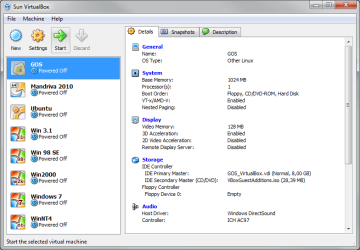
Three different Linux distros running fine and well in my VirtualBox:

VB_machines.PNG

GOS and Ubuntu are for fun, Mandriva to work with.

Kari
 

My Computer

Computer type
Laptop
Computer Manufacturer/Model Number
HP ENVY 17-1150eg
OS
Windows 10 Pro x64 EN-GB
CPU
1.6 GHz Intel Core i7-720QM Processor
Memory
6 GB
Graphics Card(s)
ATI Mobility Radeon HD 5850 Graphics
Sound Card
Beats sound system with integrated subwoofer
Monitor(s) Displays
17" laptop display, 22" LED and 32" Full HD TV through HDMI
Screen Resolution
1600*900 (1), 1920*1080 (2&3)
Hard Drives
Internal: 2 x 500 GB SATA Hard Disk Drive 7200 rpm
External: 2TB for backups, 3TB USB3 network drive for media
Cooling
As Envy runs a bit warm, I have it on a Cooler Master pad
Keyboard
Logitech diNovo Media Desktop Laser (bluetooth)
Mouse
Logitech Performance Mouse MX
Internet Speed
50/10 Mbps VDSL
Antivirus
Windows Defender 4.3.9431.0
Browser
Maxthon 3.5.2., IE11
Kari,

Have you tried VMWare Player 3.0? It can detect from the ISO or the DVD which software you are installing and can actually preinstall things like the VMWare tools and what not and perform the OS installation without prompting you for anything (partitioning, usernames, timezones, and the like).

I don't have any problems with VirtualBox myself...and was the product that I used to use at home until VMWare Player 3.0 came out and could now make VM's as well as play them back.
 

My Computer

Computer Manufacturer/Model Number
Self-Built in July 2009
OS
Windows 7 Ultimate x64
CPU
Intel Q9550 2.83Ghz OC'd to 3.40Ghz
Motherboard
Gigabyte GA-EP45-UD3R rev. 1.1, F12 BIOS
Memory
8GB G.Skill PI DDR2-800, 4-4-4-12 timings
Graphics Card(s)
EVGA 1280MB Nvidia GeForce GTX570
Sound Card
Realtek ALC899A 8 channel onboard audio
Monitor(s) Displays
23" Acer x233H
Screen Resolution
1920x1080
Hard Drives
Intel X25-M 80GB Gen 2 SSD
Western Digital 1TB Caviar Black, 32MB cache. WD1001FALS
PSU
Corsair 620HX modular
Case
Antec P182
Cooling
stock
Keyboard
ABS M1 Mechanical
Mouse
Logitech G9 Laser Mouse
Internet Speed
15/2 cable modem
Other Info
Windows and Linux enthusiast. Logitech G35 Headset.
running Linux guests on a Windows 7 host

I would like to run Windows 7 and Linux concurrently on my work
laptop. Has anybody done this? If so, how?

I'd prefer to avoid support issues, so I'm thinking the best
approach might be to run Windows 7 as the host OS, with Linux as
a guest OS, rather than running a hypervisor.

Below are some options I found via web searching. If anyone has
any experience with these or recommendations, I'd like to hear
[FONT=&quot][/FONT]about it:
coLinux
Cooperative Linux

"... port of the Linux kernel that allows it to run cooperatively
alongside another operating system on a single machine ...
special driver software on the host operating system is used to
execute the coLinux kernel in a privileged mode (known as ring 0
or supervisor mode) ... by constantly switching the machine's
state between the host OS state and and the coLinux kernel state,
coLinux is given full control of the physical machine's MMU (i.e,
paging and protection) in its own specially allocated address
space, and is able to act just like a native kernel ..."
· This looks pretty raw. My gut says don't trust it yet.
Sorry, coLinux.

Windows Virtual PC 7
Windows Virtual PC: Home Page
"... can be used for minimally functional concurrent Linux
hosting. The only interaction you’ll get between Windows 7 and
any Linux version using VPC7 is at the file level."
· I tried loading Ubuntu 10.04 desktop 32-bit on a Windows 7
Professional 64-bit Virtual PC, and it repeatedly died without
any error message. I saw one post which said it might work with
a text-based installer and different graphics options, but
haven't tried it.

VirtualBox
VirtualBox
"VirtualBox is a general-purpose full virtualizer for x86
hardware, targeted at server, desktop and embedded use ... runs
on Windows, Linux, Macintosh, and Solaris hosts and supports a
large number of guest operating systems including but not
limited to Windows (NT 4.0, 2000, XP, Server 2003, Vista, Windows
7), DOS/Windows 3.x, Linux (2.4 and 2.6), Solaris and
OpenSolaris, OS/2, and OpenBSD."
· Has available pre-built developer VMs, all of which seem to
run Oracle Linux 5, Oracle Solaris 11 Express, or Oracle Solaris
10.

Parallels Desktop 4 for Windows & Linux ($79.99)
Overview - Parallels Desktop 4 for Windows & Linux
· Windows 7 64-bit is listed as a "supported host operating
system". Ubuntu 9.04 and versions of Debian, Fedora, Mandriva,
OpenSUSE, RHEL and SLES are listed as "supported guest operating
systems".

VMPlayer
VMware Player: Run Windows 7, Chrome OS - Free Download for a Virtual PC
"VMware Player installs like a standard desktop application.
Once installed, VMware Player runs virtual machines in a separate
window. VMware Player includes features that enable users to
create and configure their own virtual machines for optimal
performance and access any devices connected to their PC."

VMware Workstation 7.1 ($189.00)
VMware Workstation: Run Multiple OS Including Linux & Windows7, on Virtual Machines
"VMware Workstation installs onto the host operating system and
provides broad hardware support by inheriting device support from
the host."

Thank you,
Jerry J. Anderson
CCIE R&S #5000
 

My Computer

Computer Manufacturer/Model Number
Dell Latitude E6500
OS
Windows 7 Professional 64-bit
Memory
4GB (2x2GB) DDR2 PC2-6400, (non-ECC)
Hi Jerry, welcome to the Seven Forums.

Linux on a vm on Seven host, or vice versa is easy to setup, easy to maintain and easy to use. Personally I prefer having Linux guest running on Windows host; generally speaking it's easier to setup a fully working Linux vm on a Windows host, than fully working Windows Seven on Linux host.

You can forget Virtual PC. Although it can run a Linux vm, the integration between host and guest is problematic (more). VMware Player and VirtualBox (both free) have no problems with Windows host / Linux guest integration.

So, my recommendation is to install either VirtualBox or VMware Player, select the right Linux distro and install it on a virtual machine.

This tutorial might give you some ideas: http://www.sevenforums.com/tutorial...ndows-7-virtual-machine-using-virtualbox.html

Kari
 

My Computer

Computer type
Laptop
Computer Manufacturer/Model Number
HP ENVY 17-1150eg
OS
Windows 10 Pro x64 EN-GB
CPU
1.6 GHz Intel Core i7-720QM Processor
Memory
6 GB
Graphics Card(s)
ATI Mobility Radeon HD 5850 Graphics
Sound Card
Beats sound system with integrated subwoofer
Monitor(s) Displays
17" laptop display, 22" LED and 32" Full HD TV through HDMI
Screen Resolution
1600*900 (1), 1920*1080 (2&3)
Hard Drives
Internal: 2 x 500 GB SATA Hard Disk Drive 7200 rpm
External: 2TB for backups, 3TB USB3 network drive for media
Cooling
As Envy runs a bit warm, I have it on a Cooler Master pad
Keyboard
Logitech diNovo Media Desktop Laser (bluetooth)
Mouse
Logitech Performance Mouse MX
Internet Speed
50/10 Mbps VDSL
Antivirus
Windows Defender 4.3.9431.0
Browser
Maxthon 3.5.2., IE11
Your plan is spot on. Either virtualbox or vmware player will work just fine. I prefer VMware Player, but have used virtualbox before without issue.
 

My Computer

Computer Manufacturer/Model Number
Self-Built in July 2009
OS
Windows 7 Ultimate x64
CPU
Intel Q9550 2.83Ghz OC'd to 3.40Ghz
Motherboard
Gigabyte GA-EP45-UD3R rev. 1.1, F12 BIOS
Memory
8GB G.Skill PI DDR2-800, 4-4-4-12 timings
Graphics Card(s)
EVGA 1280MB Nvidia GeForce GTX570
Sound Card
Realtek ALC899A 8 channel onboard audio
Monitor(s) Displays
23" Acer x233H
Screen Resolution
1920x1080
Hard Drives
Intel X25-M 80GB Gen 2 SSD
Western Digital 1TB Caviar Black, 32MB cache. WD1001FALS
PSU
Corsair 620HX modular
Case
Antec P182
Cooling
stock
Keyboard
ABS M1 Mechanical
Mouse
Logitech G9 Laser Mouse
Internet Speed
15/2 cable modem
Other Info
Windows and Linux enthusiast. Logitech G35 Headset.
I thought it might be useful to share what I've heard so far re: an application which will run under Windows 7 Professional 64-bit, and support Linux VMs. The rough consensus seems to be:
If you don't mind paying $170 (newegg price), use VMware Workstation. This is probably a pretty good solution for me, since I need to learn virtualization, and VMware is the leader.

If you don't want the cost of running VMware Workstation, run VMware Player or Oracle VirtualBox.
If you go with VMware Player, load the optional VMware Tools for Linux.

If you go with Oracle (originally Sun Microsystems) VirtualBox, use the free, but not open-source version with good USB support.
CoLinux works, but not many people use it.

Nobody said anything about Parallels Desktop for Windows & Linux. I emailed the company and found out 6.0 is in "short, private beta". You can probably get in on the beta test if you're interested. The guy at Parallels also said I'm looking for a "Type 2 hypervisor", which is an application that runs under a host OS, and supports VMs.

Windows Virtual PC does not support Linux well. I tried to use it, and it consistently dies without any error message when I try to load an Ubuntu 10.10 Desktop 32-bit CD. Supposedly it can be loaded if you run a text-based installer and change the graphics options, but life is too short.
There are other options, such as VMware Server, dual-booting, or booting from live media (CD or USB stick). I didn't list them because they didn't seem to meet my goal of a Type 2 hypervisor which will run under Windows 7 Professional 64-bit (i.e. my work laptop) and support Linux VMs.

Thank you,
Jerry J. Anderson
CCIE R&S #5000
 

My Computer

Computer Manufacturer/Model Number
Dell Latitude E6500
OS
Windows 7 Professional 64-bit
Memory
4GB (2x2GB) DDR2 PC2-6400, (non-ECC)
Jerry,

If you want to learn virtualization, i strongly suggest that you not spend money on VMWare workstation, but instead use VMWare Vsphere ESXi (Free Hypervisor). ESXi is a Type 1 hypervisor (bare metal) and it's what enterprise organizations use. You get 60 days in eval mode when you first install ESXi and that gives you all features. If you want to play longer than 60 days, simply reinstall the product.

To come up to speed quickly with vSphere, I would suggest the following book
http://www.amazon.com/Mastering-VMw...=sr_1_1?ie=UTF8&s=books&qid=1303369164&sr=8-1
These Scott Lowe books are very solid and even though I am proficient and have used vmware for years, I'm in the process of reading that book myself and have picked up several new things that I wasn't knowledgeable before.

BTW, congrats on the CCIE. It's an impressive accomplishment.
 

My Computer

Computer Manufacturer/Model Number
Self-Built in July 2009
OS
Windows 7 Ultimate x64
CPU
Intel Q9550 2.83Ghz OC'd to 3.40Ghz
Motherboard
Gigabyte GA-EP45-UD3R rev. 1.1, F12 BIOS
Memory
8GB G.Skill PI DDR2-800, 4-4-4-12 timings
Graphics Card(s)
EVGA 1280MB Nvidia GeForce GTX570
Sound Card
Realtek ALC899A 8 channel onboard audio
Monitor(s) Displays
23" Acer x233H
Screen Resolution
1920x1080
Hard Drives
Intel X25-M 80GB Gen 2 SSD
Western Digital 1TB Caviar Black, 32MB cache. WD1001FALS
PSU
Corsair 620HX modular
Case
Antec P182
Cooling
stock
Keyboard
ABS M1 Mechanical
Mouse
Logitech G9 Laser Mouse
Internet Speed
15/2 cable modem
Other Info
Windows and Linux enthusiast. Logitech G35 Headset.
I completely agree with Pparks above. Start with free virtualization platforms, or if willing to spend some money, test the Vsphere ESXi.

Pparks and me have been quite a many times in a same thread, he recommending WMvare Player and me VirtualBox. Both are excellent free alternatives, both are fully capable to do what you want to achieve, to run Linux on a virtual machine. Both are easy to install, easy to setup a guest system. I use both, can not decide which one is better; I just prefer to use VirtualBox for Linux guests, and VMware Player for pre-XP Windows guests.

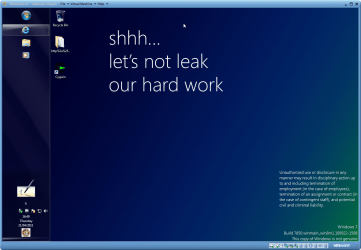
Interesting enough, testing the new Windows 8 Milestone 1, it did not work on Virtual PC or VirtualBox, but had absolutely no problems in running on VMware Player, showing once again that different virtualization apps behave differently.

Windows 8 - VMware Player.png

I can not see any reasons why you should pay for a virtualization solution at this point. Go for VMware Player or VirtualBox.

Kari
 
Last edited:

My Computer

Computer type
Laptop
Computer Manufacturer/Model Number
HP ENVY 17-1150eg
OS
Windows 10 Pro x64 EN-GB
CPU
1.6 GHz Intel Core i7-720QM Processor
Memory
6 GB
Graphics Card(s)
ATI Mobility Radeon HD 5850 Graphics
Sound Card
Beats sound system with integrated subwoofer
Monitor(s) Displays
17" laptop display, 22" LED and 32" Full HD TV through HDMI
Screen Resolution
1600*900 (1), 1920*1080 (2&3)
Hard Drives
Internal: 2 x 500 GB SATA Hard Disk Drive 7200 rpm
External: 2TB for backups, 3TB USB3 network drive for media
Cooling
As Envy runs a bit warm, I have it on a Cooler Master pad
Keyboard
Logitech diNovo Media Desktop Laser (bluetooth)
Mouse
Logitech Performance Mouse MX
Internet Speed
50/10 Mbps VDSL
Antivirus
Windows Defender 4.3.9431.0
Browser
Maxthon 3.5.2., IE11
Type 1 vs. Type 2

Pparks1/Kari,

Thank you both for the help.

I think I need to stick with a Type 2 hypervisor for now. What I'm trying to do is run Win7Pro64 and Linux concurrently on my work laptop, without losing IT support. Support is the tricky part. If I go with a Type 1 hypervisor like VMware vSphere ESXi it will probably work wonderfully, but when the day comes that I need internal IT support, it might not be provided for a non-standard build.

It might be a very good idea to load ESXi on my personal laptop, but I think I'll wait until I get some VM experience on my work laptop.

Also, thank you for the reference to "Mastering VMware vSphere 4" - I'll pick it up.

Thank you,
Jerry J. Anderson
CCIE R&S #5000
 

My Computer

Computer Manufacturer/Model Number
Dell Latitude E6500
OS
Windows 7 Professional 64-bit
Memory
4GB (2x2GB) DDR2 PC2-6400, (non-ECC)
Yeah, you don't want to try running a type 1 hypervisor on a work laptop or desktop. And if you decide to play around with ESXi, look for the ESXi whitebox websites...these will show you which motherboards, sata chipsets and NIC's work with this product. It's a bit particular about hardware. Nothing that a genuine server wouldn't have....but many times a desktop might not have. For example, unless you go with an Intel mobo, it's rare that the onboard NIC would work. But the easy fix, is to slap in 10/100/1000 Intel GT NIC. They are about $30 and work great.
 

My Computer

Computer Manufacturer/Model Number
Self-Built in July 2009
OS
Windows 7 Ultimate x64
CPU
Intel Q9550 2.83Ghz OC'd to 3.40Ghz
Motherboard
Gigabyte GA-EP45-UD3R rev. 1.1, F12 BIOS
Memory
8GB G.Skill PI DDR2-800, 4-4-4-12 timings
Graphics Card(s)
EVGA 1280MB Nvidia GeForce GTX570
Sound Card
Realtek ALC899A 8 channel onboard audio
Monitor(s) Displays
23" Acer x233H
Screen Resolution
1920x1080
Hard Drives
Intel X25-M 80GB Gen 2 SSD
Western Digital 1TB Caviar Black, 32MB cache. WD1001FALS
PSU
Corsair 620HX modular
Case
Antec P182
Cooling
stock
Keyboard
ABS M1 Mechanical
Mouse
Logitech G9 Laser Mouse
Internet Speed
15/2 cable modem
Other Info
Windows and Linux enthusiast. Logitech G35 Headset.
Back
Top