Solved Virus Deletion Now Makes Internet Access Impossible

Ah, it's wiM, not wiN as I had it. Sorry.
 

Attachments

  • Kaktus WIM Files.jpg
    Kaktus WIM Files.jpg
    68 KB · Views: 0

My Computer My Computer

At a glance

Windows 7 643.00 gig AMD Athlon II x4 6406136 Megabytes Installed MemoryNVIDIA GeForce GTS 450
Computer type
PC/Desktop
Computer Manufacturer/Model Number
HP HPE-500Z
OS
Windows 7 64
CPU
3.00 gig AMD Athlon II x4 640
Motherboard
FOXCONN 2A92 1.01, BIOS: American Megatrends 6.09
Memory
6136 Megabytes Installed Memory
Graphics Card(s)
NVIDIA GeForce GTS 450
Sound Card
Realtek HD Audio & NVIDIA HD Audio 4x
Monitor(s) Displays
Twin Dell 2405FPW 24.2
Screen Resolution
1920 x 1200
Hard Drives
Hitachi HDS721010CLA332 SCSI 1000.20 GB;
Seagate ST31000528AS SCSI 1000.20 GB
Keyboard
IBM KB8923
Mouse
HP MODGUO
Antivirus
AVG
Browser
Firefox 26.0 + IE-11 + Chrome

My Computer My Computer

At a glance

Microsoft Windows 7 Home Premium 64-bits 7601...Intel(R) Core(TM) i3 CPU M 370 @ 2.40GHz4,00 GBATI Mobility Radeon HD 5400 Series
Computer type
Laptop
Computer Manufacturer/Model Number
ACER ASPIRE 5742G
OS
Microsoft Windows 7 Home Premium 64-bits 7601 Multiprocessor Free Service Pack 1
CPU
Intel(R) Core(TM) i3 CPU M 370 @ 2.40GHz
Motherboard
Acer Aspire 5742G
Memory
4,00 GB
Graphics Card(s)
ATI Mobility Radeon HD 5400 Series
Sound Card
(1) AMD High Definition Audio Device (2) Realtek High Defi
Screen Resolution
1366 x 768 x 32 bits (4294967296 colors) @ 60 Hz
Hard Drives
WDC WD5000BEVT-22ZAT0
How important is the "Repair Your Computer" addition to the F8 menu. =>Not that important. But why isn't it in the menu?

Not being a pro like you, I haven't got the slightest idea.

If you can fix it easily, without forcing me to reinstall my software, then we could try it.

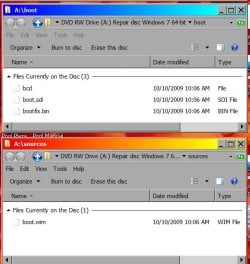
The Bootable Repair Disk was created burned from a Microsoft site. Here's what's on it:
 

Attachments

  • Bootable Root Dir.jpg
    Bootable Root Dir.jpg
    39.6 KB · Views: 0
  • Bootable Files.jpg
    Bootable Files.jpg
    56.4 KB · Views: 34

My Computer My Computer

At a glance

Windows 7 643.00 gig AMD Athlon II x4 6406136 Megabytes Installed MemoryNVIDIA GeForce GTS 450
Computer type
PC/Desktop
Computer Manufacturer/Model Number
HP HPE-500Z
OS
Windows 7 64
CPU
3.00 gig AMD Athlon II x4 640
Motherboard
FOXCONN 2A92 1.01, BIOS: American Megatrends 6.09
Memory
6136 Megabytes Installed Memory
Graphics Card(s)
NVIDIA GeForce GTS 450
Sound Card
Realtek HD Audio & NVIDIA HD Audio 4x
Monitor(s) Displays
Twin Dell 2405FPW 24.2
Screen Resolution
1920 x 1200
Hard Drives
Hitachi HDS721010CLA332 SCSI 1000.20 GB;
Seagate ST31000528AS SCSI 1000.20 GB
Keyboard
IBM KB8923
Mouse
HP MODGUO
Antivirus
AVG
Browser
Firefox 26.0 + IE-11 + Chrome
In elevated command prompt:
Code:
reagentc  /setreimage  /path  c:\windows\system32\recovery

succesfull? If successfull:
Code:
reagentc/enable
successfully? Anyway do:
Code:
reagentc/info

Post results
 

My Computer My Computer

At a glance

Microsoft Windows 7 Home Premium 64-bits 7601...Intel(R) Core(TM) i3 CPU M 370 @ 2.40GHz4,00 GBATI Mobility Radeon HD 5400 Series
Computer type
Laptop
Computer Manufacturer/Model Number
ACER ASPIRE 5742G
OS
Microsoft Windows 7 Home Premium 64-bits 7601 Multiprocessor Free Service Pack 1
CPU
Intel(R) Core(TM) i3 CPU M 370 @ 2.40GHz
Motherboard
Acer Aspire 5742G
Memory
4,00 GB
Graphics Card(s)
ATI Mobility Radeon HD 5400 Series
Sound Card
(1) AMD High Definition Audio Device (2) Realtek High Defi
Screen Resolution
1366 x 768 x 32 bits (4294967296 colors) @ 60 Hz
Hard Drives
WDC WD5000BEVT-22ZAT0
How important is the "Repair Your Computer" addition to the F8 menu. =>Not that important. But why isn't it in the menu?

Not being a pro like you, I haven't got the slightest idea.

If you can fix it easily, without forcing me to reinstall my software, then we could try it.

The Bootable Repair Disk was created burned from a Microsoft site. Here's what's on it:
That's a win7 system repair disc. http://www.sevenforums.com/tutorials/2083-system-repair-disc-create.html So no need to download.... you can create it yourself. But NOT you now .... you don't have the "recovery" option on your computer boot menu.... so cannot create a copy to dvd.

You can boot from the dvd and do http://www.sevenforums.com/tutorials/681-startup-repair.html especially this: Sometimes it may take running a startup repair (3) separate times with restarting the computer after each time before it fully fixes the startup issue. This will fix the missing boot entry
 

My Computer My Computer

At a glance

Microsoft Windows 7 Home Premium 64-bits 7601...Intel(R) Core(TM) i3 CPU M 370 @ 2.40GHz4,00 GBATI Mobility Radeon HD 5400 Series
Computer type
Laptop
Computer Manufacturer/Model Number
ACER ASPIRE 5742G
OS
Microsoft Windows 7 Home Premium 64-bits 7601 Multiprocessor Free Service Pack 1
CPU
Intel(R) Core(TM) i3 CPU M 370 @ 2.40GHz
Motherboard
Acer Aspire 5742G
Memory
4,00 GB
Graphics Card(s)
ATI Mobility Radeon HD 5400 Series
Sound Card
(1) AMD High Definition Audio Device (2) Realtek High Defi
Screen Resolution
1366 x 768 x 32 bits (4294967296 colors) @ 60 Hz
Hard Drives
WDC WD5000BEVT-22ZAT0
In elevated command prompt:
Code:
reagentc  /setreimage  /path  c:\windows\system32\recovery

succesfull? If successfull:
Code:
reagentc/enable
successfully? Anyway do:
Code:
reagentc/info

Post results

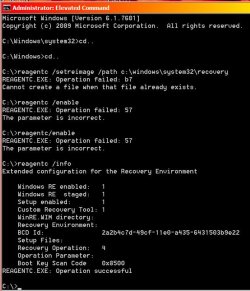
Here is what happened:
 

Attachments

  • Reagentc 12-27-2013 1-57-02 PM.jpg
    Reagentc 12-27-2013 1-57-02 PM.jpg
    62.4 KB · Views: 0

My Computer My Computer

At a glance

Windows 7 643.00 gig AMD Athlon II x4 6406136 Megabytes Installed MemoryNVIDIA GeForce GTS 450
Computer type
PC/Desktop
Computer Manufacturer/Model Number
HP HPE-500Z
OS
Windows 7 64
CPU
3.00 gig AMD Athlon II x4 640
Motherboard
FOXCONN 2A92 1.01, BIOS: American Megatrends 6.09
Memory
6136 Megabytes Installed Memory
Graphics Card(s)
NVIDIA GeForce GTS 450
Sound Card
Realtek HD Audio & NVIDIA HD Audio 4x
Monitor(s) Displays
Twin Dell 2405FPW 24.2
Screen Resolution
1920 x 1200
Hard Drives
Hitachi HDS721010CLA332 SCSI 1000.20 GB;
Seagate ST31000528AS SCSI 1000.20 GB
Keyboard
IBM KB8923
Mouse
HP MODGUO
Antivirus
AVG
Browser
Firefox 26.0 + IE-11 + Chrome
How important is the "Repair Your Computer" addition to the F8 menu. =>Not that important. But why isn't it in the menu?

Not being a pro like you, I haven't got the slightest idea.

If you can fix it easily, without forcing me to reinstall my software, then we could try it.

The Bootable Repair Disk was created burned from a Microsoft site. Here's what's on it:
That's a win7 system repair disc. http://www.sevenforums.com/tutorials/2083-system-repair-disc-create.html So no need to download.... you can create it yourself. But NOT you now .... you don't have the "recovery" option on your computer boot menu.... so cannot create a copy to dvd.

You can boot from the dvd and do http://www.sevenforums.com/tutorials/681-startup-repair.html especially this: Sometimes it may take running a startup repair (3) separate times with restarting the computer after each time before it fully fixes the startup issue. This will fix the missing boot entry

And what about my first two questions:
  1. Does using it force me to reinstall my software?
  2. Will you be able to instruct me to instruct the disk to only change selected windows processing?
 

My Computer My Computer

At a glance

Windows 7 643.00 gig AMD Athlon II x4 6406136 Megabytes Installed MemoryNVIDIA GeForce GTS 450
Computer type
PC/Desktop
Computer Manufacturer/Model Number
HP HPE-500Z
OS
Windows 7 64
CPU
3.00 gig AMD Athlon II x4 640
Motherboard
FOXCONN 2A92 1.01, BIOS: American Megatrends 6.09
Memory
6136 Megabytes Installed Memory
Graphics Card(s)
NVIDIA GeForce GTS 450
Sound Card
Realtek HD Audio & NVIDIA HD Audio 4x
Monitor(s) Displays
Twin Dell 2405FPW 24.2
Screen Resolution
1920 x 1200
Hard Drives
Hitachi HDS721010CLA332 SCSI 1000.20 GB;
Seagate ST31000528AS SCSI 1000.20 GB
Keyboard
IBM KB8923
Mouse
HP MODGUO
Antivirus
AVG
Browser
Firefox 26.0 + IE-11 + Chrome

My Computer My Computer

At a glance

Microsoft Windows 7 Home Premium 64-bits 7601...Intel(R) Core(TM) i3 CPU M 370 @ 2.40GHz4,00 GBATI Mobility Radeon HD 5400 Series
Computer type
Laptop
Computer Manufacturer/Model Number
ACER ASPIRE 5742G
OS
Microsoft Windows 7 Home Premium 64-bits 7601 Multiprocessor Free Service Pack 1
CPU
Intel(R) Core(TM) i3 CPU M 370 @ 2.40GHz
Motherboard
Acer Aspire 5742G
Memory
4,00 GB
Graphics Card(s)
ATI Mobility Radeon HD 5400 Series
Sound Card
(1) AMD High Definition Audio Device (2) Realtek High Defi
Screen Resolution
1366 x 768 x 32 bits (4294967296 colors) @ 60 Hz
Hard Drives
WDC WD5000BEVT-22ZAT0
Have seen where some proprietary computers do not have the Repair your computer option. I have a laptop that does not. These systems are developed by a corporation that has its very own specifications, etc.


On ScorpionSaver...

Glad all is going well so far!! :)

Would like for you to use SystemLook once again, and use the info below. Trying to see if any files with an .msi extention show, that may lead to the reinstall of SS. The .msi file extension is an installer package file format.


:info: Please double-click on SystemLook.exe to run the program.
At the SystemLook program console, copy the content inside the following quote box into the main text field (do not include the word Quote):

:filefind
*adpeak*
Adpeak.*
*Scorpion*
Scorpion.*
Scorpion Saver
Installer\*.msi
ScorpionSaver.msi
Temp\*.msi
:folderfind
*Scorpion*
Scorpion Saver
*adpeak*
Adpeak.*
Installer\*.msi
ScorpionSaver.msi
Temp\*.msi
:regfind
*Scorpion*
Scorpion
Scorpion Saver
*adpeak*
adpeak
Installer\*.msi
ScorpionSaver.msi
Temp\*.msi

Click the Look button to start the scan.
When finished, a notepad window opens on the Desktop with the results.
:ar: Please post the new SystemLook.txt in your reply.


:info: Please run ESET when you can. If nothing else, we will know if we really hammered the last nail on the coffin...

For alternate browsers: (not for Internet Explorer)
Download the ESET Smart Installer > http://download.eset.com/special/eos/esetsmartinstaller_enu.exe
Save to your Desktop.
Double click on the esetsmartinstaller_enu.exe icon on your Desktop.
Accept the Terms of Use, etc.

:warn: Also, did you, at some point, create a Restore Point on the problem computer, and labelled it: ScorpionSaver?
 

My Computer My Computer

At a glance

Windows 7 Home Premium
Computer type
PC/Desktop
Computer Manufacturer/Model Number
An ol' eMachines
OS
Windows 7 Home Premium
Internet Speed
Fine for me...I'm retired!
Have seen where some proprietary computers do not have the Repair your computer option. I have a laptop that does not. These systems are developed by a corporation that has its very own specifications, etc.

Yes, HP has a batch of seldom-seen pre-loaded stuff, some of which I deleted like games. Other HP stuff apparently is in conflict with built-in MS routines. But it appears that with your help, and of course others on this Forum, we have been able to resolve most problems without the missing F8 function, so I'm not going to fret over it.

I think Kaktus and others are right about running a Repair from the cd, but I've not done that yet since I don't feel comfortable with my skills at it and don't want to risk creating any new problems. IOW, since we have work-arounds, I think I'll avoid messing with it for now, and perhaps try it after the holidays when all the grandchildren are gone.

On ScorpionSaver...

Glad all is going well so far!! :)

Would like for you to use SystemLook once again, and use the info below. Trying to see if any files with an .msi extention show, that may lead to the reinstall of SS. The .msi file extension is an installer package file format.

:ar: Please post the new SystemLook.txt in your reply.

This appears to be an important step. Attached is the new txt file and I think SystemLook has found some unwanted stuff. I'll look forward to your comments.
:info: Please run ESET when you can. If nothing else, we will know if we really hammered the last nail on the coffin...

For alternate browsers: (not for Internet Explorer)
Download the ESET Smart Installer > http://download.eset.com/special/eos/esetsmartinstaller_enu.exe
Save to your Desktop.
Double click on the esetsmartinstaller_enu.exe icon on your Desktop.
Accept the Terms of Use, etc.

It's running now. I'll report on it later as it looks like a long haul.

:warn: Also, did you, at some point, create a Restore Point on the problem computer, and labelled it: ScorpionSaver?

Yes, 3 times, and again today!

Again, thanks a ton!
 

Attachments

My Computer My Computer

At a glance

Windows 7 643.00 gig AMD Athlon II x4 6406136 Megabytes Installed MemoryNVIDIA GeForce GTS 450
Computer type
PC/Desktop
Computer Manufacturer/Model Number
HP HPE-500Z
OS
Windows 7 64
CPU
3.00 gig AMD Athlon II x4 640
Motherboard
FOXCONN 2A92 1.01, BIOS: American Megatrends 6.09
Memory
6136 Megabytes Installed Memory
Graphics Card(s)
NVIDIA GeForce GTS 450
Sound Card
Realtek HD Audio & NVIDIA HD Audio 4x
Monitor(s) Displays
Twin Dell 2405FPW 24.2
Screen Resolution
1920 x 1200
Hard Drives
Hitachi HDS721010CLA332 SCSI 1000.20 GB;
Seagate ST31000528AS SCSI 1000.20 GB
Keyboard
IBM KB8923
Mouse
HP MODGUO
Antivirus
AVG
Browser
Firefox 26.0 + IE-11 + Chrome
i would try and help some more but it looks as if you got this problem licked thanks to the other experts(yes even more than i am probably and I am a computer geek I can safely say that for sure). But if you encounter any other issues just post back. We are here and ready to help. :)
 

My Computer My Computer

At a glance

Windows 7 ultimate 64-bitIntel I7 2600K 3.4ghzCorsair 16gb ddr3 1600mhzNvidia Geforce gt 430
Computer type
PC/Desktop
Computer Manufacturer/Model Number
custom built
OS
Windows 7 ultimate 64-bit
CPU
Intel I7 2600K 3.4ghz
Motherboard
Asus Evo P8P67
Memory
Corsair 16gb ddr3 1600mhz
Graphics Card(s)
Nvidia Geforce gt 430
Sound Card
Sound Blaster Titanium x-fi pci express
Monitor(s) Displays
Dell E198WFP
Hard Drives
1 western digital 2TB drive.
PSU
Antec 1200 watt
Case
Inwin Dragon Rider
Cooling
6 case supplied cooling fans
Keyboard
logitech mk700
Mouse
logitech m705
Internet Speed
25-50mbps download; 10mbps upload(i think)
Antivirus
avg free 2014
Browser
mozilla firefox
Other Info
Also have a pretty bad speaker setup which is a klipsch promedia 5.1 surround speaker setup with huge subwoofer and lg blu ray player/writer. Also a hp officejet pro 8600 plus wireless all in one and a logitech s7500 webcam.
Thank you, Matt. I've found a lot of helpful, sharing folks here. Neat place. Great people.

As you've noted, we're close to resolving the idiocy. It's clean up and testing time tonight and tomorrow, and then perhaps I'll be able to "Mark as Solved".

But not until Cottonball is satisfied with the current hunts for lurking mischief.
 

My Computer My Computer

At a glance

Windows 7 643.00 gig AMD Athlon II x4 6406136 Megabytes Installed MemoryNVIDIA GeForce GTS 450
Computer type
PC/Desktop
Computer Manufacturer/Model Number
HP HPE-500Z
OS
Windows 7 64
CPU
3.00 gig AMD Athlon II x4 640
Motherboard
FOXCONN 2A92 1.01, BIOS: American Megatrends 6.09
Memory
6136 Megabytes Installed Memory
Graphics Card(s)
NVIDIA GeForce GTS 450
Sound Card
Realtek HD Audio & NVIDIA HD Audio 4x
Monitor(s) Displays
Twin Dell 2405FPW 24.2
Screen Resolution
1920 x 1200
Hard Drives
Hitachi HDS721010CLA332 SCSI 1000.20 GB;
Seagate ST31000528AS SCSI 1000.20 GB
Keyboard
IBM KB8923
Mouse
HP MODGUO
Antivirus
AVG
Browser
Firefox 26.0 + IE-11 + Chrome
Was looking for an installer, such as:
C:\Windows\Installer\92968b.msi which belongs to Adpeak/ScorpionSaver

However what is shown is not it. Those fies are different, and go back to 2012.


Apparently, at some point you ran the Program Install and Uninstall Troubleshooting Tool
It stores information in the Registry about actions taken. This information can be found at the following location:
HKEY_LOCAL_MACHINE\SOFTWARE\Microsoft\MATS\WindowsInstaller\<ProductCode>\<DateTime>

At this location in the Registry is the return value received when MATS attempted to run msiexec /x to
uninstall the product:
Uninstaller: MsiExec.exe /X{9B65F9A3-9D24-452A-B6EF-1457D65E4259}

Since those entries are not needed any longer, please do the following...


:info: Download OTM > http://oldtimer.geekstogo.com/OTM.exe
Save to the Desktop
Right-click on the file and select: Run As Administrator
(If your AntiVirus alerts about OTM, either accept for OTM to run, or temporarily disable your AV program.)

Be aware that all processes are stopped during OTM's run, and the Desktop also disappears. This is normal, and will come back to normal on completion.

Now, please copy all the text from the code box below (include the colon before :reg)

Code:
:reg
[-HKEY_LOCAL_MACHINE\SOFTWARE\Microsoft\MATS\WindowsInstaller\{9B65F9A3-9D24-452A-B6EF-1457D65E4259}]
[HKEY_LOCAL_MACHINE\SOFTWARE\Microsoft\Windows\CurrentVersion\Installer\Folders]
c:\Program Files (x86)\ScorpionSaver\"=-
:files
c:\Program Files (x86)\ScorpionSaver
C:\FRST\Quarantine\ScorpionSaver
:commands
[emptytemp]
[emptyflash]

Return to OTM, right click in the Paste Instructions for Items to be Moved window (under the yellow bar) and select: Paste

Click the red Moveit! button.

When the program presents its results, copy everything in the Results window (under the green bar) to the clipboard, by highlighting ALL the text, and selecting: copy

:ar: Next, please paste the OTM results in your reply.
Close: OTM

Note: If a file or folder cannot be moved immediately, you may be asked to reboot the machine to finish the moving process.
If you are asked to reboot the machine select: Yes

In this case, navigate to the C:\_OTMoveIt\MovedFiles folder, and open the newest .log file present.
Please provide the contents of the OTM .log in your reply.


:warn: BTW, don't forget to post the ESET results! :D
 

My Computer My Computer

At a glance

Windows 7 Home Premium
Computer type
PC/Desktop
Computer Manufacturer/Model Number
An ol' eMachines
OS
Windows 7 Home Premium
Internet Speed
Fine for me...I'm retired!
Geezer Report...

Green Bean Espresso Coffee and Homemade Pumpkin & Dates Bread
with a smear of good ol' cream cheese!

Yum! Eat your heart out!

Thanks for everything, Cottonball.

ESET overnight scan: Drive C:\ and Partitions D, E, F, G all clear...no threats found.
MBAM report this morning: No threats found with Quick Scan of C:\
SAS report this morning: 1 cookie removed, see text file.

I believe you are right about deleting 2012 barf. Will get to it later today and report.

After it's done, I'll do some more Internet Access testing (going great so far since your helpfulness) and then run ESET again for all drives. Setting another Restore Point now.

Later...
 

Attachments

My Computer My Computer

At a glance

Windows 7 643.00 gig AMD Athlon II x4 6406136 Megabytes Installed MemoryNVIDIA GeForce GTS 450
Computer type
PC/Desktop
Computer Manufacturer/Model Number
HP HPE-500Z
OS
Windows 7 64
CPU
3.00 gig AMD Athlon II x4 640
Motherboard
FOXCONN 2A92 1.01, BIOS: American Megatrends 6.09
Memory
6136 Megabytes Installed Memory
Graphics Card(s)
NVIDIA GeForce GTS 450
Sound Card
Realtek HD Audio & NVIDIA HD Audio 4x
Monitor(s) Displays
Twin Dell 2405FPW 24.2
Screen Resolution
1920 x 1200
Hard Drives
Hitachi HDS721010CLA332 SCSI 1000.20 GB;
Seagate ST31000528AS SCSI 1000.20 GB
Keyboard
IBM KB8923
Mouse
HP MODGUO
Antivirus
AVG
Browser
Firefox 26.0 + IE-11 + Chrome
On these:

Those fies are different, and go back to 2012.

^^^^^^Just let them be...


Homemade Pumpkin & Dates Bread with a smear of good ol' cream cheese!

I'll check on the next flight from St. Louis to Florida!!!
 

My Computer My Computer

At a glance

Windows 7 Home Premium
Computer type
PC/Desktop
Computer Manufacturer/Model Number
An ol' eMachines
OS
Windows 7 Home Premium
Internet Speed
Fine for me...I'm retired!
On these:

Those fies are different, and go back to 2012.

^^^^^^Just let them be...


Homemade Pumpkin & Dates Bread with a smear of good ol' cream cheese!

I'll check on the next flight from St. Louis to Florida!!!

Let me know arrival time so I can meet you at the gate! Tampa International Airport.

Okay, I'll forget the 2012 files.

Running an ESET scan now on all drives to make sure stuff I saved from one drive to another doesn't contain a remnant that might cause distress. I shall report back many hours from now.

Many, many thanks for all your help. Internet access has worked just fine since these virus scrubbers and the removal of infected Chrome. I'll reinstall it cleanly someday. For now, just FF and IE.
 

My Computer My Computer

At a glance

Windows 7 643.00 gig AMD Athlon II x4 6406136 Megabytes Installed MemoryNVIDIA GeForce GTS 450
Computer type
PC/Desktop
Computer Manufacturer/Model Number
HP HPE-500Z
OS
Windows 7 64
CPU
3.00 gig AMD Athlon II x4 640
Motherboard
FOXCONN 2A92 1.01, BIOS: American Megatrends 6.09
Memory
6136 Megabytes Installed Memory
Graphics Card(s)
NVIDIA GeForce GTS 450
Sound Card
Realtek HD Audio & NVIDIA HD Audio 4x
Monitor(s) Displays
Twin Dell 2405FPW 24.2
Screen Resolution
1920 x 1200
Hard Drives
Hitachi HDS721010CLA332 SCSI 1000.20 GB;
Seagate ST31000528AS SCSI 1000.20 GB
Keyboard
IBM KB8923
Mouse
HP MODGUO
Antivirus
AVG
Browser
Firefox 26.0 + IE-11 + Chrome
Before we wrap up, would like for you to use the following...

:info: Please download Security Check:
http://screen317.spywareinfoforum.org/
Save to your Desktop.
Double-click: SecurityCheck.exe
Follow the onscreen instructions inside the black box.

When done, a Notepad report opens automatically, called: checkup.txt

Please post the checkup.txt in your reply.
(Please do not take any corrective actions!)


:info: Also, did you run OTM and get its results?
http://www.sevenforums.com/system-s...nternet-access-impossible-18.html#post2637716
 
Last edited:

My Computer My Computer

At a glance

Windows 7 Home Premium
Computer type
PC/Desktop
Computer Manufacturer/Model Number
An ol' eMachines
OS
Windows 7 Home Premium
Internet Speed
Fine for me...I'm retired!
I'm back!

Hello again, Cottonball. Sorry for the hiatus. Holidays are for the grandkids! Thank you for your patience.

ESET: No threats. All appears clean.

SECURITY CHECK: Attached as txt file.

AVG: No threats.

MBAM: No threats.

OTM: No, I didn't run it yet. Too much holiday confusion led me to confuse OTM with this message:

On these:

Quote:
Those fies are different, and go back to 2012.


^^^^^^Just let them be...
Do you advise that I run OTM now?

Again, sorry for the delay in responding. I really DO appreciate all your help. BTW, I am now reporting back to you using the previously-infected machine. Progress!

HAPPY NEW YEAR!
 

Attachments

My Computer My Computer

At a glance

Windows 7 643.00 gig AMD Athlon II x4 6406136 Megabytes Installed MemoryNVIDIA GeForce GTS 450
Computer type
PC/Desktop
Computer Manufacturer/Model Number
HP HPE-500Z
OS
Windows 7 64
CPU
3.00 gig AMD Athlon II x4 640
Motherboard
FOXCONN 2A92 1.01, BIOS: American Megatrends 6.09
Memory
6136 Megabytes Installed Memory
Graphics Card(s)
NVIDIA GeForce GTS 450
Sound Card
Realtek HD Audio & NVIDIA HD Audio 4x
Monitor(s) Displays
Twin Dell 2405FPW 24.2
Screen Resolution
1920 x 1200
Hard Drives
Hitachi HDS721010CLA332 SCSI 1000.20 GB;
Seagate ST31000528AS SCSI 1000.20 GB
Keyboard
IBM KB8923
Mouse
HP MODGUO
Antivirus
AVG
Browser
Firefox 26.0 + IE-11 + Chrome


Yeo, run OTM, let's get it out of the way, and then we will wrap up.
 

My Computer My Computer

At a glance

Windows 7 Home Premium
Computer type
PC/Desktop
Computer Manufacturer/Model Number
An ol' eMachines
OS
Windows 7 Home Premium
Internet Speed
Fine for me...I'm retired!
:info: Download OTM > http://oldtimer.geekstogo.com/OTM.exe
Save to the Desktop
Right-click on the file and select: Run As Administrator
(If your AntiVirus alerts about OTM, either accept for OTM to run, or temporarily disable your AV program.)

Be aware that all processes are stopped during OTM's run, and the Desktop also disappears. This is normal, and will come back to normal on completion.

Now, please copy all the text from the code box below (include the colon before :reg)

Code:
:reg
[-HKEY_LOCAL_MACHINE\SOFTWARE\Microsoft\MATS\WindowsInstaller\{9B65F9A3-9D24-452A-B6EF-1457D65E4259}]
[HKEY_LOCAL_MACHINE\SOFTWARE\Microsoft\Windows\CurrentVersion\Installer\Folders]
c:\Program Files (x86)\ScorpionSaver\"=-
:files
c:\Program Files (x86)\ScorpionSaver
C:\FRST\Quarantine\ScorpionSaver
:commands
[emptytemp]
[emptyflash]
Return to OTM, right click in the Paste Instructions for Items to be Moved window (under the yellow bar) and select: Paste

Click the red Moveit! button.

When the program presents its results, copy everything in the Results window (under the green bar) to the clipboard, by highlighting ALL the text, and selecting: copy

:ar: Next, please paste the OTM results in your reply.
Close: OTM

Note: If a file or folder cannot be moved immediately, you may be asked to reboot the machine to finish the moving process.
If you are asked to reboot the machine select: Yes

In this case, navigate to the C:\_OTMoveIt\MovedFiles folder, and open the newest .log file present.
Please provide the contents of the OTM .log in your reply.


:warn: BTW, don't forget to post the ESET results! :D

Good Morning...and...HAPPY NEW YEAR Cottonball.

I ran OTM this morning and got all the way to MOVEIT. Program took a while, but came up with a listing in the right column. When it stopped the listing work, the REBOOT instructions came up. I could not copy the listing as it didn't permit a cursor in the right column.

Tried to reboot as it directed. Didn't work. Tried a few times, but it appeared that OTM was frozen. Waited 20 mins. No luck with OTM reboot. Couldn't restart or shut down normally. Had to do a reset.

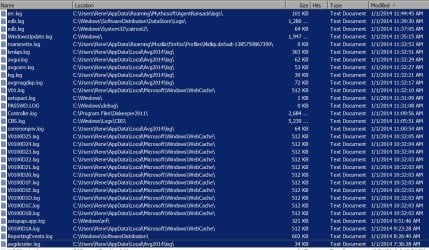
Via F8 Normally, got back into operation. Nothing on the screen from OTM. No _OTMoveit folder in C:\ dir. Ran Ransack looking for all log files generated today. JPG attached shows them. I can't see anything looking like an OTM generation.

Puzzled!
 

Attachments

  • 1-1-2014 LOG Files.jpg
    1-1-2014 LOG Files.jpg
    205.7 KB · Views: 3

My Computer My Computer

At a glance

Windows 7 643.00 gig AMD Athlon II x4 6406136 Megabytes Installed MemoryNVIDIA GeForce GTS 450
Computer type
PC/Desktop
Computer Manufacturer/Model Number
HP HPE-500Z
OS
Windows 7 64
CPU
3.00 gig AMD Athlon II x4 640
Motherboard
FOXCONN 2A92 1.01, BIOS: American Megatrends 6.09
Memory
6136 Megabytes Installed Memory
Graphics Card(s)
NVIDIA GeForce GTS 450
Sound Card
Realtek HD Audio & NVIDIA HD Audio 4x
Monitor(s) Displays
Twin Dell 2405FPW 24.2
Screen Resolution
1920 x 1200
Hard Drives
Hitachi HDS721010CLA332 SCSI 1000.20 GB;
Seagate ST31000528AS SCSI 1000.20 GB
Keyboard
IBM KB8923
Mouse
HP MODGUO
Antivirus
AVG
Browser
Firefox 26.0 + IE-11 + Chrome
Back
Top