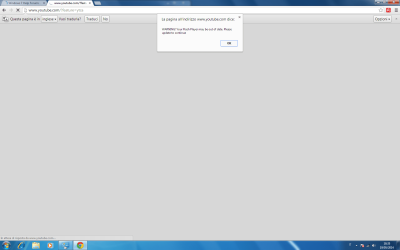
Solved Virus "Please update your internet explorer" even after formatting

i thought i solved the problem by downloading and installing a clean image of windows
but i just encountered the problem again
in the first minutes everything was normal i could surf the internet(using explorer) but then again the page(this time it says"update adobe flash..." )appeared and i think that explorer is infected
for now chrome works normally
anyway i'm downloading the updates via "windows update"
there's nothing else i can do?

EDIT: now explorer works again but i don't know for how long it will work because the "bugged page" already showed up

If you fresh installed windows 7, it will come with Internet explorer 8. Unless you ran all windows updates. So you would be prompted to upgrade your browser. And it will prompt you to install flash since it is a clean install.

Here is a thought: Show us a screenshot of the error message/prompt
 

My Computer My Computer

At a glance

Windows 10 ProAMD Ryzen 5 2400G Processor with Radeon RX Ve...G.SKILL Ripjaws V Series 16GB (2 x 8GB) 288-P...2047MB NVIDIA GeForce GTX 1060 6GB (EVGA)
Computer type
PC/Desktop
Computer Manufacturer/Model Number
Custom Built
OS
Windows 10 Pro
CPU
AMD Ryzen 5 2400G Processor with Radeon RX Vega 11 Graphics
Motherboard
ASRock X470 Master SLI/AC AM4 AMD Promontory X470 SATA 6Gb/s
Memory
G.SKILL Ripjaws V Series 16GB (2 x 8GB) 288-Pin DDR4 SDRAM D
Graphics Card(s)
2047MB NVIDIA GeForce GTX 1060 6GB (EVGA)
Sound Card
Motherboard Built in
Monitor(s) Displays
Acer R240HY bidx 23.8-Inch IPS HDMI DVI VGA (1920 x 1080) Wi
Screen Resolution
1920 x 1080
Hard Drives
1TB Sandisk SSD PLUS (Main drive)
500 GB Seagate 7200 RPM (Games)
500 GB Western Digital 7200 RPM (Virtual Machines)
PSU
CORSAIR TX Series TX650M 650W 80+ Gold Modular Power Supply
Case
CORSAIR CARBIDE SPEC-02 Mid-Tower Gaming Case, Red LED Fan
Cooling
220mm, two 120mm, and four 60mm fans
Keyboard
Wired Dell keyboard
Mouse
Wireless Logitech mouse
Internet Speed
250mb down, 30mb up
Antivirus
Panda Cloud Antivirus
Browser
Chrome-ish x64
Other Info
Your awesome for reading this.
(it just infected chrome again but for now explorer works)

I already installed flash player frow the official site to watch youtube videos
the virus showed later
it's really the same page as it was but now it says "update flash" and not "update internet explorer" but really it's the same
it won't let me search with google etc etc

anyway here is the pics of the message:
 

Attachments

  • First.png
    First.png
    39.3 KB · Views: 8
  • Second.png
    Second.png
    65.7 KB · Views: 6

My Computer My Computer

At a glance

Windows 7 Professional 64bit
Computer type
PC/Desktop
OS
Windows 7 Professional 64bit
That's emanating from the web page. As long as you don't click it you shouldn't be infected. But be sure your Pop Up blocker is on, and check that nothing other than Flash is presently in your Add-On's in browser Tools. You don't want anything more than Flash, a Reader and possibly WMP add-on, then under Searches make sure nothing sneaks in there except Google search.

If you think you might be infected based on the present Add-Ons, check in Control Panel>Programs and then run Malwarebytes and SUPERAntiSpyware - Downloads, declining their Trial, updating to run Full Scans.
 
Chrome has flash built in to the browser, so that is indeed fake.

1.) Download herdprotect: (choose the portable version)

Download herdProtect - Free Anti-Malware Platform

2.) Run the scan.

3.) When the scan finishes, save the results per the screenshot below. Then upload the log here.

DO NOT REMOVE ANYTHING YET. I will advise if anything needs removed when I receive the log.

Attached Images
313957d1397626709-degrading-windows-performance-save-results.png
 

My Computer My Computer

At a glance

Windows 10 ProAMD Ryzen 5 2400G Processor with Radeon RX Ve...G.SKILL Ripjaws V Series 16GB (2 x 8GB) 288-P...2047MB NVIDIA GeForce GTX 1060 6GB (EVGA)
Computer type
PC/Desktop
Computer Manufacturer/Model Number
Custom Built
OS
Windows 10 Pro
CPU
AMD Ryzen 5 2400G Processor with Radeon RX Vega 11 Graphics
Motherboard
ASRock X470 Master SLI/AC AM4 AMD Promontory X470 SATA 6Gb/s
Memory
G.SKILL Ripjaws V Series 16GB (2 x 8GB) 288-Pin DDR4 SDRAM D
Graphics Card(s)
2047MB NVIDIA GeForce GTX 1060 6GB (EVGA)
Sound Card
Motherboard Built in
Monitor(s) Displays
Acer R240HY bidx 23.8-Inch IPS HDMI DVI VGA (1920 x 1080) Wi
Screen Resolution
1920 x 1080
Hard Drives
1TB Sandisk SSD PLUS (Main drive)
500 GB Seagate 7200 RPM (Games)
500 GB Western Digital 7200 RPM (Virtual Machines)
PSU
CORSAIR TX Series TX650M 650W 80+ Gold Modular Power Supply
Case
CORSAIR CARBIDE SPEC-02 Mid-Tower Gaming Case, Red LED Fan
Cooling
220mm, two 120mm, and four 60mm fans
Keyboard
Wired Dell keyboard
Mouse
Wireless Logitech mouse
Internet Speed
250mb down, 30mb up
Antivirus
Panda Cloud Antivirus
Browser
Chrome-ish x64
Other Info
Your awesome for reading this.
i dont have add-ons except for "avira browser safety" (wich i installed) and Docs(to create ,share,read google docs)
now i'll run malwarebytes and superantispyware but they never notified a problem in my pc even before the format so i'm skeptical
 

My Computer My Computer

At a glance

Windows 7 Professional 64bit
Computer type
PC/Desktop
OS
Windows 7 Professional 64bit
Chrome has flash built in to the browser, so that is indeed fake.

1.) Download herdprotect: (choose the portable version)

Download herdProtect - Free Anti-Malware Platform

2.) Run the scan.

3.) When the scan finishes, save the results per the screenshot below. Then upload the log here.

DO NOT REMOVE ANYTHING YET. I will advise if anything needs removed when I receive the log.

Attached Images
313957d1397626709-degrading-windows-performance-save-results.png

i dowloaded flash player from the official site when i was running internet explorer( i don't think it has flash built in)
anyway i'll try to run herdProtect and i'll post the log
 

My Computer My Computer

At a glance

Windows 7 Professional 64bit
Computer type
PC/Desktop
OS
Windows 7 Professional 64bit
the first one is the log of herdProtect(it says it's no infected anyway)

the second one is the log of SUPERantiSpyware(i ahve one threat)

(Malwarebytes told me the pc is not infected but if you want i'll post the log)
 

Attachments

My Computer My Computer

At a glance

Windows 7 Professional 64bit
Computer type
PC/Desktop
OS
Windows 7 Professional 64bit
Logs look fine.

* Download the Farbar Service Scanner.

* Once downloaded, right click the fss.exe file, and choose run as administrator.

*Checkmark the following boxes:

-Internet services
-Windows firewall
-System Restore
-Security center/action center
-Windows Update
-Windows defender

*Click Scan. A notepad window will appear with your log file. Save it to the desktop. Then upload the log here in your next reply using the paperclip on the reply box.
 

My Computer My Computer

At a glance

Windows 10 ProAMD Ryzen 5 2400G Processor with Radeon RX Ve...G.SKILL Ripjaws V Series 16GB (2 x 8GB) 288-P...2047MB NVIDIA GeForce GTX 1060 6GB (EVGA)
Computer type
PC/Desktop
Computer Manufacturer/Model Number
Custom Built
OS
Windows 10 Pro
CPU
AMD Ryzen 5 2400G Processor with Radeon RX Vega 11 Graphics
Motherboard
ASRock X470 Master SLI/AC AM4 AMD Promontory X470 SATA 6Gb/s
Memory
G.SKILL Ripjaws V Series 16GB (2 x 8GB) 288-Pin DDR4 SDRAM D
Graphics Card(s)
2047MB NVIDIA GeForce GTX 1060 6GB (EVGA)
Sound Card
Motherboard Built in
Monitor(s) Displays
Acer R240HY bidx 23.8-Inch IPS HDMI DVI VGA (1920 x 1080) Wi
Screen Resolution
1920 x 1080
Hard Drives
1TB Sandisk SSD PLUS (Main drive)
500 GB Seagate 7200 RPM (Games)
500 GB Western Digital 7200 RPM (Virtual Machines)
PSU
CORSAIR TX Series TX650M 650W 80+ Gold Modular Power Supply
Case
CORSAIR CARBIDE SPEC-02 Mid-Tower Gaming Case, Red LED Fan
Cooling
220mm, two 120mm, and four 60mm fans
Keyboard
Wired Dell keyboard
Mouse
Wireless Logitech mouse
Internet Speed
250mb down, 30mb up
Antivirus
Panda Cloud Antivirus
Browser
Chrome-ish x64
Other Info
Your awesome for reading this.
here it is

thanks for your patience btw
 

Attachments

My Computer My Computer

At a glance

Windows 7 Professional 64bit
Computer type
PC/Desktop
OS
Windows 7 Professional 64bit
1.)Thank you for following directions :) I really appreciate it. And don't hesitate to ask questions.

Herdproptect did not find anything, which honestly is unusual. fss looks okay.

2.) Lets see what this turns up:

---> Download AdwCleaner by Xplode and save to your Desktop.

  • Double click on AdwCleaner.exe to run the tool

  • Vista/Windows 7/8 users right-click and select Run As Administrator.
  • Click on the Scan button.
  • AdwCleaner will begin...be patient as the scan may take some time to complete.
  • After the scan has finished, click on the Report button...a logfile (AdwCleaner[R#].txt) will open in Notepad for review (where the largest value of # represents the most recent report).
  • The contents of the log file may be confusing. Unless you see a program name that you know should not be removed, don't worry about it. If you see an entry you want to keep, let me know about it.
  • Upload the contents of that logfile in your next reply using the paper clip on the reply box.
  • A copy of all logfiles are saved in the C:\AdwCleaner folder which was created when running the tool.

----> Using AdwCleaner v3: Scan & Clean:

Double click on AdwCleaner.exe to run the tool again.
Click on the Scan button.
AdwCleaner will begin to scan your computer like it did before.
After the scan has finished...

This time click on the Clean button.
Press OK when asked to close all programs and follow the onscreen prompts.
Press OK again to allow AdwCleaner to restart the computer and complete the removal process.
After rebooting, a logfile report (AdwCleaner[S#].txt) will open automatically (where the largest value of # represents the most recent report).
Upload the contents of that logfile in your next reply using the paper clip on the reply box.

Junkware Removal tool:


---> Please download Junkware Removal Tool to your desktop.


  • Shutdown your antivirus to avoid any conflicts.
  • Right click over JRT.exe and select Run as administrator on Windows Vista or Windows 7, double-click on XP.
  • The tool will open and start scanning your system.
  • Please be patient as this can take a while to complete.
  • On completion, a log (JRT.txt) is saved to your desktop and will automatically open.
  • Upload the contents of that logfile in your next reply using the paper clip on the reply box.
  • When completed make sure to re-enable your antivirus

3.) Does this problem happen in all browsers of your pc?

You are clean installing using a legit windows disk? Like from here?

http://www.heidoc.net/joomla/technology-science/microsoft/14-windows-7-direct-download-links

And you stated you have clean installed and this still happens correct?

What programs are you reinstalling when the problem exists?

Are you reinstalling programs from a back up of installers on a flash drive, or are you going out to websites and re-downloading everything?

Sorry for all the questions....
 

My Computer My Computer

At a glance

Windows 10 ProAMD Ryzen 5 2400G Processor with Radeon RX Ve...G.SKILL Ripjaws V Series 16GB (2 x 8GB) 288-P...2047MB NVIDIA GeForce GTX 1060 6GB (EVGA)
Computer type
PC/Desktop
Computer Manufacturer/Model Number
Custom Built
OS
Windows 10 Pro
CPU
AMD Ryzen 5 2400G Processor with Radeon RX Vega 11 Graphics
Motherboard
ASRock X470 Master SLI/AC AM4 AMD Promontory X470 SATA 6Gb/s
Memory
G.SKILL Ripjaws V Series 16GB (2 x 8GB) 288-Pin DDR4 SDRAM D
Graphics Card(s)
2047MB NVIDIA GeForce GTX 1060 6GB (EVGA)
Sound Card
Motherboard Built in
Monitor(s) Displays
Acer R240HY bidx 23.8-Inch IPS HDMI DVI VGA (1920 x 1080) Wi
Screen Resolution
1920 x 1080
Hard Drives
1TB Sandisk SSD PLUS (Main drive)
500 GB Seagate 7200 RPM (Games)
500 GB Western Digital 7200 RPM (Virtual Machines)
PSU
CORSAIR TX Series TX650M 650W 80+ Gold Modular Power Supply
Case
CORSAIR CARBIDE SPEC-02 Mid-Tower Gaming Case, Red LED Fan
Cooling
220mm, two 120mm, and four 60mm fans
Keyboard
Wired Dell keyboard
Mouse
Wireless Logitech mouse
Internet Speed
250mb down, 30mb up
Antivirus
Panda Cloud Antivirus
Browser
Chrome-ish x64
Other Info
Your awesome for reading this.
i already used AdwCleaner but i'll use it again and i'll post you the log

3) i used the iso from heidoc
i didn't install nothing from previous back-up or flash disks so i downloaded something only from the websites(chrome,flash,a driver for my audiocard and nothing else)

i know it's really strange i dont know what to do :(
 

My Computer My Computer

At a glance

Windows 7 Professional 64bit
Computer type
PC/Desktop
OS
Windows 7 Professional 64bit
here is the log


edit: some sites work but for example youtube like 3 times every 5 shows the bugged page
 

Attachments

My Computer My Computer

At a glance

Windows 7 Professional 64bit
Computer type
PC/Desktop
OS
Windows 7 Professional 64bit
Ok and all browsers experience the issue? Looks like you tried chrome and internet explorer.

Where are you downloading the driver from? What site?

Are you doing a quick format or full format of your disk when installing windows? I recommended possibly reinstalling windows, but deleting all partitions first and then recreate the partitions and format again.

If you do not mind starting over,

Follow this tutorial by first booting up in command prompt at boot:

http://www.sevenforums.com/tutorials/682-command-prompt-startup.html

Then wipe the disks again:

http://www.sevenforums.com/tutorials/52129-disk-clean-clean-all-diskpart-command.html

Then clean install windows:

http://www.sevenforums.com/tutorials/1649-clean-install-windows-7-a.html
 

My Computer My Computer

At a glance

Windows 10 ProAMD Ryzen 5 2400G Processor with Radeon RX Ve...G.SKILL Ripjaws V Series 16GB (2 x 8GB) 288-P...2047MB NVIDIA GeForce GTX 1060 6GB (EVGA)
Computer type
PC/Desktop
Computer Manufacturer/Model Number
Custom Built
OS
Windows 10 Pro
CPU
AMD Ryzen 5 2400G Processor with Radeon RX Vega 11 Graphics
Motherboard
ASRock X470 Master SLI/AC AM4 AMD Promontory X470 SATA 6Gb/s
Memory
G.SKILL Ripjaws V Series 16GB (2 x 8GB) 288-Pin DDR4 SDRAM D
Graphics Card(s)
2047MB NVIDIA GeForce GTX 1060 6GB (EVGA)
Sound Card
Motherboard Built in
Monitor(s) Displays
Acer R240HY bidx 23.8-Inch IPS HDMI DVI VGA (1920 x 1080) Wi
Screen Resolution
1920 x 1080
Hard Drives
1TB Sandisk SSD PLUS (Main drive)
500 GB Seagate 7200 RPM (Games)
500 GB Western Digital 7200 RPM (Virtual Machines)
PSU
CORSAIR TX Series TX650M 650W 80+ Gold Modular Power Supply
Case
CORSAIR CARBIDE SPEC-02 Mid-Tower Gaming Case, Red LED Fan
Cooling
220mm, two 120mm, and four 60mm fans
Keyboard
Wired Dell keyboard
Mouse
Wireless Logitech mouse
Internet Speed
250mb down, 30mb up
Antivirus
Panda Cloud Antivirus
Browser
Chrome-ish x64
Other Info
Your awesome for reading this.
line6.com (it's a safe site)
yes i tried with explorer and chrome i do not own any other browser
now i'll download mozilla and see if that happens(i think it will)

i did a quick format(with the command "clean" in diskpart at boot in the menu of the installation of the windows dvd)
i didn't have any partition and neither now(i think) so i just formatted the entire disk

i have done all the things you just said me before so i don't know .-. i will do it again anyway

but before i have a suggestion(i think it's a b*ulls*it) but i can try to download and install the exe from the "bugged page" maybe some antivirus or tool can check it and destroy and maybe the page won't show again(i really don't think it will work)
 

My Computer My Computer

At a glance

Windows 7 Professional 64bit
Computer type
PC/Desktop
OS
Windows 7 Professional 64bit
Refresh, I have edited my post above.
 

My Computer My Computer

At a glance

Windows 10 ProAMD Ryzen 5 2400G Processor with Radeon RX Ve...G.SKILL Ripjaws V Series 16GB (2 x 8GB) 288-P...2047MB NVIDIA GeForce GTX 1060 6GB (EVGA)
Computer type
PC/Desktop
Computer Manufacturer/Model Number
Custom Built
OS
Windows 10 Pro
CPU
AMD Ryzen 5 2400G Processor with Radeon RX Vega 11 Graphics
Motherboard
ASRock X470 Master SLI/AC AM4 AMD Promontory X470 SATA 6Gb/s
Memory
G.SKILL Ripjaws V Series 16GB (2 x 8GB) 288-Pin DDR4 SDRAM D
Graphics Card(s)
2047MB NVIDIA GeForce GTX 1060 6GB (EVGA)
Sound Card
Motherboard Built in
Monitor(s) Displays
Acer R240HY bidx 23.8-Inch IPS HDMI DVI VGA (1920 x 1080) Wi
Screen Resolution
1920 x 1080
Hard Drives
1TB Sandisk SSD PLUS (Main drive)
500 GB Seagate 7200 RPM (Games)
500 GB Western Digital 7200 RPM (Virtual Machines)
PSU
CORSAIR TX Series TX650M 650W 80+ Gold Modular Power Supply
Case
CORSAIR CARBIDE SPEC-02 Mid-Tower Gaming Case, Red LED Fan
Cooling
220mm, two 120mm, and four 60mm fans
Keyboard
Wired Dell keyboard
Mouse
Wireless Logitech mouse
Internet Speed
250mb down, 30mb up
Antivirus
Panda Cloud Antivirus
Browser
Chrome-ish x64
Other Info
Your awesome for reading this.
i have edited too refresh:D
 

My Computer My Computer

At a glance

Windows 7 Professional 64bit
Computer type
PC/Desktop
OS
Windows 7 Professional 64bit
Try downloading the driver from the manufacturers site and no where else. Will be interesting to see what happens.
 

My Computer My Computer

At a glance

Windows 10 ProAMD Ryzen 5 2400G Processor with Radeon RX Ve...G.SKILL Ripjaws V Series 16GB (2 x 8GB) 288-P...2047MB NVIDIA GeForce GTX 1060 6GB (EVGA)
Computer type
PC/Desktop
Computer Manufacturer/Model Number
Custom Built
OS
Windows 10 Pro
CPU
AMD Ryzen 5 2400G Processor with Radeon RX Vega 11 Graphics
Motherboard
ASRock X470 Master SLI/AC AM4 AMD Promontory X470 SATA 6Gb/s
Memory
G.SKILL Ripjaws V Series 16GB (2 x 8GB) 288-Pin DDR4 SDRAM D
Graphics Card(s)
2047MB NVIDIA GeForce GTX 1060 6GB (EVGA)
Sound Card
Motherboard Built in
Monitor(s) Displays
Acer R240HY bidx 23.8-Inch IPS HDMI DVI VGA (1920 x 1080) Wi
Screen Resolution
1920 x 1080
Hard Drives
1TB Sandisk SSD PLUS (Main drive)
500 GB Seagate 7200 RPM (Games)
500 GB Western Digital 7200 RPM (Virtual Machines)
PSU
CORSAIR TX Series TX650M 650W 80+ Gold Modular Power Supply
Case
CORSAIR CARBIDE SPEC-02 Mid-Tower Gaming Case, Red LED Fan
Cooling
220mm, two 120mm, and four 60mm fans
Keyboard
Wired Dell keyboard
Mouse
Wireless Logitech mouse
Internet Speed
250mb down, 30mb up
Antivirus
Panda Cloud Antivirus
Browser
Chrome-ish x64
Other Info
Your awesome for reading this.
i didn't download any driver so far
 

My Computer My Computer

At a glance

Windows 7 Professional 64bit
Computer type
PC/Desktop
OS
Windows 7 Professional 64bit
Wintermoon1919,

Please run these two programs, and based on their results, we may be able to find the culprit of the issues you are having:


:info: Please use the Farbar Recovery Scan Tool.
Download: Farbar Recovery Scan Tool Download
Select the version that applies to your system: 64-bit
Save it to your Desktop.
Double-click the downloaded file to run it.

When the tool opens click Yes to the disclaimer.
At the program's console, press the Scan button.

When done, the tool produces a log, FRST.txt, in the same directory from which the tool is run (Desktop).
:ar: Please provide the FRST.txt in your reply.

The first time the tool is run, it also makes another log: Addition.txt
:ar: Also post the Addition.txt in your reply.


:info: Next, please use the tool Zoek.exe:
Download > Download zoek.exe version 5.0.0.0

When the Zoek.exe download appears, save to the Desktop.
On the Desktop, right-click Zoek.exe and select: Run as Administrator
Give it a few seconds to appear.

Please disable your AntiVirus and AntiSpyware programs, so they don't interfere with the running of Zoek.exe.
You can find instructions how to disable your security applications here:
How To Temporarily Disable Your Anti-virus, Firewall And Anti-malware Programs - Security Mini-Guides

At the program console, click the Options button and place a checkmark only on the following options:

Do a Deep Scan
Installed Programs

Now...

Close any open programs.
Click the Run script button, and wait.
It takes a few minutes to run.

When the tool finishes, the zoek-results.log is opened in Notepad.
The log is also found on the systemdrive, normally C:\
If a reboot is needed, the log opens after the reboot.

:ar: Please post the zoek-results.log in your reply
 

My Computer My Computer

At a glance

Windows 7 Home Premium
Computer type
PC/Desktop
Computer Manufacturer/Model Number
An ol' eMachines
OS
Windows 7 Home Premium
Internet Speed
Fine for me...I'm retired!
i just turned on my pc and for now i don't have the problem( i don't know maybe it could give an advice on what's happening)

anyway i'll use those tool and post the log
 

My Computer My Computer

At a glance

Windows 7 Professional 64bit
Computer type
PC/Desktop
OS
Windows 7 Professional 64bit
Back
Top