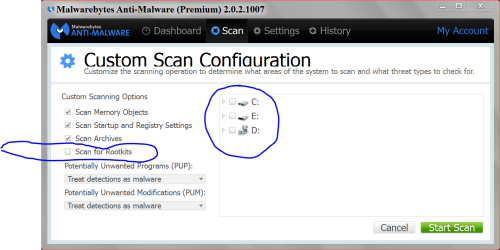
We're obviously on the same wavelength Jack as I just reconnected to copy out the driver location. Google doesn't recognize the driver so it may just be the infection itself.
Can we get some Security specialists on this?

Thanks!
Malwarebytes Anti-Malware
Malwarebytes | Free Anti-Malware & Internet Security Software
Scan Date: 26/05/2014
Scan Time: 19:14:15
Logfile:
Administrator: Yes
Version: 2.00.1.1004
Malware Database: v2014.05.26.03
Rootkit Database: v2014.05.21.01
License: Trial
Malware Protection: Disabled
Malicious Website Protection: Disabled
Chameleon: Disabled
OS: Windows 7 Service Pack 1
CPU: x64
File System: NTFS
User: Wintermoon
Scan Type: Threat Scan
Result: Completed
Objects Scanned: 246339
Time Elapsed: 3 min, 56 sec
Memory: Enabled
Startup: Enabled
Filesystem: Enabled
Archives: Enabled
Rootkits: Disabled
Shuriken: Enabled
PUP: Enabled
PUM: Enabled
Processes: 0
(No malicious items detected)
Modules: 0
(No malicious items detected)
Registry Keys: 1
Trojan.Agent, HKLM\SYSTEM\CURRENTCONTROLSET\SERVICES\SYSHOST32, Quarantined, [f80393c20378e4529d07e1b22bd87a86],
Registry Values: 1
Trojan.Agent, HKLM\SYSTEM\CURRENTCONTROLSET\SERVICES\SYSHOST32|ImagePath, "C:\Windows\Installer\{00D50165-1656-0EEE-8910-812968BC3F0D}\syshost.exe" /service, Quarantined, [f80393c20378e4529d07e1b22bd87a86]
Registry Data: 0
(No malicious items detected)
Folders: 0
(No malicious items detected)
Files: 1
Rootkit.Necurs.GO, c:\Windows\System32\drivers\
9f699c6cf9ca7339.sys, Quarantined, [b8439fb6304b65d1430fb4c458a9be42],
Physical Sectors: 0
(No malicious items detected)
(end)
It is clean now.
My suggestion at this point unless specialists feel it is worth trying to clean up, is to reinstall after wiping with Clean command, don't import anything before checking IE for infection, then if not infected install Chrome to check it. Check these before and after installing all rounds of Windows Updates, then check both again. Likewises check browsers immediately after installing each program and after activity on any other home PC.