
Virus problem

RevCrew1

Kebab Remover
Member
Local time
4:20 PM
Messages
61
Please help,i was downloading a steam hack and now im getting messages like
Instabot out of date please redownload
I used AdwCleaner and it didnt help can u please give me a good and helpfull anti virus program
 

Attachments
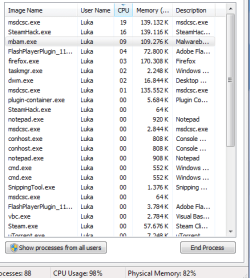
  • Capture.PNG
    Capture.PNG
    13.2 KB · Views: 8
Last edited:

My Computer

Computer type
PC/Desktop
Computer Manufacturer/Model Number
Custom Build
OS
Windows 7 Professional 64 bit
CPU
Intel Pentium Dual Core 2.60 Ghz
Motherboard
Gigabyte
Memory
4 GB
Graphics Card(s)
AMD Radeon R7 250X
Screen Resolution
1280x1024
Cooling
Air Colling
Keyboard
A4 TECH
Mouse
Xwave LM-5
Internet Speed
30 Mb/s
Antivirus
AVG 2014
Browser
Chrome
I'd like you to scan your machine with ESET OnlineScan
  1. Hold down Control and click on the following link to open ESET OnlineScan in a new window.
    ESET OnlineScan
  2. Click the
    esetOnline.png
    button.
  3. For alternate browsers only: (Microsoft Internet Explorer users can skip these steps)
    1. Click on
      esetSmartInstall.png
      to download the ESET Smart Installer. Save it to your desktop.
    2. Double click on the
      esetSmartInstallDesktopIcon.png
      icon on your desktop.
  4. Check
    esetAcceptTerms.png
  5. Click the
    esetStart.png
    button.
  6. Accept any security warnings from your browser.
  7. Check
    esetScanArchives.png
  8. Push the Start button.
  9. ESET will then download updates for itself, install itself, and begin scanning your computer. Please be patient as this can take some time.
  10. When the scan completes, push
    esetListThreats.png
  11. Push
    esetExport.png
    , and save the file to your desktop using a unique name, such as ESETScan. Include the contents of this report in your next reply.
  12. Push the
    esetBack.png
    button.
  13. Push
    esetFinish.png
 

My Computer

Computer type
PC/Desktop
Computer Manufacturer/Model Number
Bruce ... somewhere in his 40's
OS
Windows 7 Ultimate 32bit SP1
CPU
Intel(R) Core(TM)2 Quad CPU @ 2.40GHz, 2400 MHz
Motherboard
INTEL/D975XBX2
Memory
4 GB
Graphics Card(s)
ATI Radeon HD 2600 Pro
Monitor(s) Displays
Samsung SyncMaster 914v
Screen Resolution
1280 x 1024
Hard Drives
2/500GB each ... ST3500630AS ATA Device.
One is not connected
PSU
Rocketfish 700 W
Case
G.Skill Gigabyte Chassis
Keyboard
Standard PS/2 Keyboard
Mouse
Microsoft PS/2 Mouse
Internet Speed
DSL
Antivirus
Avira Internet Security
Browser
IE 11
Other Info
ATI HDMI Audio
BY the way .... "Hacking" a program because you didn't want to pay for it is frowned upon here. You got malware for free tho' :huh:
 

My Computer

Computer type
PC/Desktop
Computer Manufacturer/Model Number
Bruce ... somewhere in his 40's
OS
Windows 7 Ultimate 32bit SP1
CPU
Intel(R) Core(TM)2 Quad CPU @ 2.40GHz, 2400 MHz
Motherboard
INTEL/D975XBX2
Memory
4 GB
Graphics Card(s)
ATI Radeon HD 2600 Pro
Monitor(s) Displays
Samsung SyncMaster 914v
Screen Resolution
1280 x 1024
Hard Drives
2/500GB each ... ST3500630AS ATA Device.
One is not connected
PSU
Rocketfish 700 W
Case
G.Skill Gigabyte Chassis
Keyboard
Standard PS/2 Keyboard
Mouse
Microsoft PS/2 Mouse
Internet Speed
DSL
Antivirus
Avira Internet Security
Browser
IE 11
Other Info
ATI HDMI Audio
Here it is
 

Attachments

My Computer

Computer type
PC/Desktop
Computer Manufacturer/Model Number
Custom Build
OS
Windows 7 Professional 64 bit
CPU
Intel Pentium Dual Core 2.60 Ghz
Motherboard
Gigabyte
Memory
4 GB
Graphics Card(s)
AMD Radeon R7 250X
Screen Resolution
1280x1024
Cooling
Air Colling
Keyboard
A4 TECH
Mouse
Xwave LM-5
Internet Speed
30 Mb/s
Antivirus
AVG 2014
Browser
Chrome
  1. Please download http://go.microsoft.com/fwlink/?linkid=52012 MGADiag and save it to your desktop.
  2. Double click the
    diagicon.png
    icon on your desktop.
  3. Push
    continue.png
  4. Push
    copy.png
  5. Go to Start -> Run and type in "Notepad"
  6. Go to Edit -> Paste in notepad.
  7. x out all of the numbers and letters in the line beginning with "Windows Product Key:"
  8. Copy and paste that log here.
 

My Computer

Computer type
PC/Desktop
Computer Manufacturer/Model Number
Bruce ... somewhere in his 40's
OS
Windows 7 Ultimate 32bit SP1
CPU
Intel(R) Core(TM)2 Quad CPU @ 2.40GHz, 2400 MHz
Motherboard
INTEL/D975XBX2
Memory
4 GB
Graphics Card(s)
ATI Radeon HD 2600 Pro
Monitor(s) Displays
Samsung SyncMaster 914v
Screen Resolution
1280 x 1024
Hard Drives
2/500GB each ... ST3500630AS ATA Device.
One is not connected
PSU
Rocketfish 700 W
Case
G.Skill Gigabyte Chassis
Keyboard
Standard PS/2 Keyboard
Mouse
Microsoft PS/2 Mouse
Internet Speed
DSL
Antivirus
Avira Internet Security
Browser
IE 11
Other Info
ATI HDMI Audio
All thanks to: https://support.kaspersky.com/8093 and, of course, me.
1. Download Kaspersky Rescue Disk 10


Download the Kaspersky Rescue Disk iso image from the Kaspersky Lab server.
If desired (not mandatory) you can compare MD5 hash of the downloaded file with the actual hash:
http://rescuedisk.kaspersky-labs.com/rescuedisk/updatable/kav_rescue_10.md5.txt.
2. Record the Kaspersky Rescue Disk 10 image to a CD/DVD

info113-2722.gif
If Kaspersky Anti-Virus 2012 or Kaspersky Internet Security 2012 is installed on your computer, then you can quickly record Kaspersky Rescue Disk 10 via the application interface. Kaspersky Lab 2012 products have a special tool which allows creating and recording Kapersky Rescue Disk.

If you do not have a Kaspersky Lab 2012 product installed on your computer, then record the Kaspersky Rescue Disk 10 iso image to a CD/DVD using any record program (for example, Nero Burning ROM, ISO Recorder, DeepBurner, Roxio Creator etc.).
warning113-2723.gif
It is strongly recommended to record the disk with minimum available speed. Otherwise, it can cause record errors.


3. Configure the computer to boot from CD/DVD

info113-2722.gif
Use the Delete or F2 keys, to load the BIOS menu. The keys F1, F8, F10, F11, F12 might be used for some motherboards, as well as the following key combinations:

    • Ctrl+Esc
    • Ctrl+Ins
    • Ctrl+Alt
    • Ctrl+Alt+Esc
    • Ctrl+Alt+Enter
    • Ctrl+Alt+Del
    • Ctrl+Alt+Ins
    • Ctrl+Alt+S
Information how to enter the BIOS menu is displayed on the screen at the start of the OS boot:
krd_6813_01_en13-125085.png

  1. In the BIOS settings on the Boot tab, select loading from a Removable Drive (you can find more detailed information in the documentation to the motherboard installed on your computer).
  2. Connect a USB-drive with the recorded image of Kaspersky Rescue Disk 10 to your computer.
Kaspersky USB Rescue Disk 10 is ready for work. You can boot a computer from it and start the system scan.
4. Boot your computer from Kaspersky Rescue Disk 10


  1. Restart your computer. After reboot, a message will appear on the screen: Press any key to enter the menu.
krd_4470_2_en13-125079.png


  1. Press any key.
info113-2722.gif
If you do not press any key in 10 seconds, the computer boots from hard drive automatically.


  1. In the start up wizard window that opens, select the graphic interface language using the cursor moving keys. Press the ENTER key on the keyboard.
home_krd_8095_01_en13-142994.png


  1. Read carefully the license agreement of Kaspersky Rescue Disk. If you agree with all terms, press 1 on the keyboard. To reboot the computer, press 2. To shut down the computer, press 3.
home_krd_8005_01_en13-140848.png


  1. Select one of the following start up methods:
    • Kaspersky Rescue Disk. Graphic Mode loads the graphic subsystem.
    • Kaspersky Rescue Disk. Text Mode loads the text user interface represented by the Midnight Commander (MC) console file manager.
    • Boot from Hard Disk.
  2. Press the ENTER key on the keyboard.
4122%283%29en13-129574.jpg

Once the actions described above have been performed, the operating system starts. It scans your computer for connected devices and searches for file systems of your local and removable disks. Once the operating system has started, you can start work with Kaspersky.
Once you entered in the Graphic/Text mode you need to update the database and then start the scanning.
 

My Computer

Computer type
PC/Desktop
Computer Manufacturer/Model Number
I built it with duct tape, so......
OS
Windows 7 Ultimate x64
CPU
AMD Athlon X4 740
Motherboard
MSI FM2-A55M-E33
Memory
Kingmax Semiconductor 4GB DDR3
Graphics Card(s)
Nvidia GeForce 210 1GB
Sound Card
Integrated
Monitor(s) Displays
Dell P2210
Screen Resolution
1680x1050
Hard Drives
Hitachi HDP725050GLA360 ATA 465GB
PSU
ATX
Cooling
Stock Fans
Keyboard
Serioux Noblesse 9600WR+Mouse
Internet Speed
Slow!
Antivirus
AVG Internet Security 2013
Browser
Mozzila Firefox
Back
Top