
virus question

skostro

New member
Member
VIP
Local time
6:34 PM
Messages
182
jpg.gif
virus pic.jpg (379.2 KB)

Having a little trouble displaying this pic.
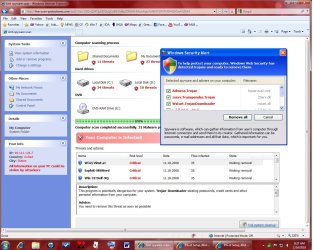
Brand new w7 computer, I run MSE everyday with no problems showing up. Then today, this shows up. (see jpg above).
Computer is still running fine.
Any ideas of what's going on?
When I click on 'remove all', it asks me to d/l and run a spyware program, but nothing happens after that.
 

Attachments
  • virus pic.jpg
    virus pic.jpg
    175.2 KB · Views: 72

My Computer

Computer type
PC/Desktop
Computer Manufacturer/Model Number
hp
OS
windows 7 Home Premium 32bit.
Antivirus
avast
Browser
ie, chrome
Looks to me like another FakeAV virus variant...
The link to download will infect your system further DO NOT CLICK to download!!!
Have you tried running MSE full system scan by opening the program directly, and scanning from there?
 

My Computer

OS
XP Pro/Vista Ultimate (64)/Windows 7 Ultimate Signature Edition(64)
CPU
Core 2 Duo E8500 @ stock
Motherboard
Gigabyte EP45-UD3R
Memory
8Gb (4 X 2Gb) Corsair Dominator 1066Mhz DDR2
Graphics Card(s)
XFX ATI Radeon 4870 1Gb
Sound Card
Onboard 7.1
Monitor(s) Displays
BenQ E2200Hd, Asus VW161D, HP L1506
Screen Resolution
1920 X 1080
Hard Drives
Seagate 7200.12 500Gb
2 X Hitachi 1Tb
PSU
CoolerMaster 650 EPD
Case
Thermaltake
Cooling
2 X Noctua 120mm's, Stock Intel
Keyboard
Logitech
Mouse
Logitech
jpg.gif
virus pic.jpg (379.2 KB)

Having a little trouble displaying this pic.
Brand new w7 computer, I run MSE everyday with no problems showing up. Then today, this shows up. (see jpg above).
Computer is still running fine.
Any ideas of what's going on?
When I click on 'remove all', it asks me to d/l and run a spyware program, but nothing happens after that.

that looks like rogue spyware DO NOT download anything from that page :confused:

close that page in your browser and right click scan with MSE from your taskbar icon, also download , update and then perform a full scan with malwarebytes and let us know how it went ?
 

My Computer

Computer Manufacturer/Model Number
built my own
OS
win7 ultimate / virtual box
CPU
Intel Core i7 3770K,1155, Ivy Bridge
Motherboard
MSI Z77A-G43
Memory
GSkill Ripjaws Z Series 1600 CL 9.0 16GB
Graphics Card(s)
KFA2 GeForce GTX 670 EX OC 2048MB GDDR5 PCI-E gfx card
Sound Card
onboard Nvidia HDMI audio
Monitor(s) Displays
ASUS VK222H 22" widescreen LCD monitor
Screen Resolution
1680x1050
Hard Drives
Kingston 128gb SSD
OCZ Vertex 90gb SSD
500GB WDCaviar 16mb 5000KS
320GB WDCaviar 16mb 3200AAKS sata 2
1TB Samsung 16mb HD103SJ sata 2
PSU
Corsair HX 750W ATX2.2 Modular
Cooling
Antec 25 Kuhler H2O 620
Keyboard
logitech
Mouse
logitech MX518
Internet Speed
7mb adsl
I've run Mb, found nothing. Also ran MSE, found nothing.
A question on MSE. After MSE runs a full scan, where are the results? After running a scan, it reverts back to the 'home' page. Is there a way to view the results of the scan, and/or previous scans?
 

My Computer

Computer type
PC/Desktop
Computer Manufacturer/Model Number
hp
OS
windows 7 Home Premium 32bit.
Antivirus
avast
Browser
ie, chrome
I believe that the current version doesn't include logfile viewing, it's been suggested and was under review for future implementation the last ime I heard.
Check the History tab for virus info.

What other security software do you have installed?
 

My Computer

OS
XP Pro/Vista Ultimate (64)/Windows 7 Ultimate Signature Edition(64)
CPU
Core 2 Duo E8500 @ stock
Motherboard
Gigabyte EP45-UD3R
Memory
8Gb (4 X 2Gb) Corsair Dominator 1066Mhz DDR2
Graphics Card(s)
XFX ATI Radeon 4870 1Gb
Sound Card
Onboard 7.1
Monitor(s) Displays
BenQ E2200Hd, Asus VW161D, HP L1506
Screen Resolution
1920 X 1080
Hard Drives
Seagate 7200.12 500Gb
2 X Hitachi 1Tb
PSU
CoolerMaster 650 EPD
Case
Thermaltake
Cooling
2 X Noctua 120mm's, Stock Intel
Keyboard
Logitech
Mouse
Logitech

My Computer

Computer type
PC/Desktop
Computer Manufacturer/Model Number
Bruce ... somewhere in his 40's
OS
Windows 7 Ultimate 32bit SP1
CPU
Intel(R) Core(TM)2 Quad CPU @ 2.40GHz, 2400 MHz
Motherboard
INTEL/D975XBX2
Memory
4 GB
Graphics Card(s)
ATI Radeon HD 2600 Pro
Monitor(s) Displays
Samsung SyncMaster 914v
Screen Resolution
1280 x 1024
Hard Drives
2/500GB each ... ST3500630AS ATA Device.
One is not connected
PSU
Rocketfish 700 W
Case
G.Skill Gigabyte Chassis
Keyboard
Standard PS/2 Keyboard
Mouse
Microsoft PS/2 Mouse
Internet Speed
DSL
Antivirus
Avira Internet Security
Browser
IE 11
Other Info
ATI HDMI Audio
I believe that the current version doesn't include logfile viewing, it's been suggested and was under review for future implementation the last ime I heard.
Check the History tab for virus info.

What other security software do you have installed?

Just M/B & Spywareblaster
 

My Computer

Computer type
PC/Desktop
Computer Manufacturer/Model Number
hp
OS
windows 7 Home Premium 32bit.
Antivirus
avast
Browser
ie, chrome
I know I keep suggesting this one, but that's because it works very well. Try Hitman Pro: Home - SurfRight
 

My Computer

Computer Manufacturer/Model Number
HP
OS
Windows 7 Home Premium 64-bit
CPU
Intel Core2 Quad Q6600 @ 2.40 Ghz
Memory
8GB RAM
Graphics Card(s)
ATI Radeon HD 4600
Monitor(s) Displays
HP w2007
Screen Resolution
1680 x 1050
Hard Drives
700 GB

My Computer

OS
XP Pro/Vista Ultimate (64)/Windows 7 Ultimate Signature Edition(64)
CPU
Core 2 Duo E8500 @ stock
Motherboard
Gigabyte EP45-UD3R
Memory
8Gb (4 X 2Gb) Corsair Dominator 1066Mhz DDR2
Graphics Card(s)
XFX ATI Radeon 4870 1Gb
Sound Card
Onboard 7.1
Monitor(s) Displays
BenQ E2200Hd, Asus VW161D, HP L1506
Screen Resolution
1920 X 1080
Hard Drives
Seagate 7200.12 500Gb
2 X Hitachi 1Tb
PSU
CoolerMaster 650 EPD
Case
Thermaltake
Cooling
2 X Noctua 120mm's, Stock Intel
Keyboard
Logitech
Mouse
Logitech
As much as most people don't like Microsoft products I have to say that Microsoft's Security Essentials works great on 7, and it's free. It even picks up on spyware as well. But I still use Malwarebytes for spywarre tho. (use the free version)
 

My Computer

Computer Manufacturer/Model Number
HP G60 Notebook
OS
Windows 7 Ultimate
CPU
Pentuim(R) Dual-Core T4200 @ 2.00GHz
Memory
4 gig
Graphics Card(s)
Mobile intel(R) 4 Series Express Chipset Famely
Sound Card
Conexant High Definition Smart 221
Screen Resolution
1366x768
Internet Speed
T1
jpg.gif
virus pic.jpg (379.2 KB)

Having a little trouble displaying this pic.
Brand new w7 computer, I run MSE everyday with no problems showing up. Then today, this shows up. (see jpg above).
Computer is still running fine.
Any ideas of what's going on?
When I click on 'remove all', it asks me to d/l and run a spyware program, but nothing happens after that.

THIS IS THE ONE THAT GETS RID OF IT

This is what my borther had and the only thing that totally deleted it was Hitman Pro V3.5
Here is the link. Oh its free and only runs for 30 days.
Home - SurfRight
 

My Computer

Computer type
PC/Desktop
Computer Manufacturer/Model Number
Self Built
OS
Windows 10 Pro
CPU
Intel i5
Motherboard
I have a fatherboard
Memory
I'm old and lost a few chips
Graphics Card(s)
Yup
Sound Card
Yup
Monitor(s) Displays
Samsung 32" UHD
Screen Resolution
3840 x 2160
Hard Drives
Samsung 860 EVO drives
PSU
450 Watt and some fans that blow
Case
Small tower
Cooling
Yes I am cool. lol
Keyboard
Who needs a keyboard?
Mouse
Logitech Laser G7 wireless
Internet Speed
Zippy fast UP and DOWN
Antivirus
I got a shot
Browser
The new Improved EDGE 2020
IggyAZ, that's what I said in post 8...;)
 

My Computer

Computer Manufacturer/Model Number
HP
OS
Windows 7 Home Premium 64-bit
CPU
Intel Core2 Quad Q6600 @ 2.40 Ghz
Memory
8GB RAM
Graphics Card(s)
ATI Radeon HD 4600
Monitor(s) Displays
HP w2007
Screen Resolution
1680 x 1050
Hard Drives
700 GB
IggyAZ, that's what I said in post 8...;)


Thanks. And still no reply if he used it or not.
Hitman Pro is becoming a valuable lifesaver.
 

My Computer

Computer type
PC/Desktop
Computer Manufacturer/Model Number
Self Built
OS
Windows 10 Pro
CPU
Intel i5
Motherboard
I have a fatherboard
Memory
I'm old and lost a few chips
Graphics Card(s)
Yup
Sound Card
Yup
Monitor(s) Displays
Samsung 32" UHD
Screen Resolution
3840 x 2160
Hard Drives
Samsung 860 EVO drives
PSU
450 Watt and some fans that blow
Case
Small tower
Cooling
Yes I am cool. lol
Keyboard
Who needs a keyboard?
Mouse
Logitech Laser G7 wireless
Internet Speed
Zippy fast UP and DOWN
Antivirus
I got a shot
Browser
The new Improved EDGE 2020
Yeah, Hitman Pro really seems to be able to tackle systems that are pretty infected. The fact that you can run it from a USB drive s great as well, especially when you have malware that stops things from being installed.
 

My Computer

Computer Manufacturer/Model Number
HP
OS
Windows 7 Home Premium 64-bit
CPU
Intel Core2 Quad Q6600 @ 2.40 Ghz
Memory
8GB RAM
Graphics Card(s)
ATI Radeon HD 4600
Monitor(s) Displays
HP w2007
Screen Resolution
1680 x 1050
Hard Drives
700 GB
Yeah, Hitman Pro really seems to be able to tackle systems that are pretty infected. The fact that you can run it from a USB drive s great as well, especially when you have malware that stops things from being installed.


Ohh. Great information about loading it on a USB drive.
Thanks but we still haven't heard back from the poster.
Hopefully soon.
 

My Computer

Computer type
PC/Desktop
Computer Manufacturer/Model Number
Self Built
OS
Windows 10 Pro
CPU
Intel i5
Motherboard
I have a fatherboard
Memory
I'm old and lost a few chips
Graphics Card(s)
Yup
Sound Card
Yup
Monitor(s) Displays
Samsung 32" UHD
Screen Resolution
3840 x 2160
Hard Drives
Samsung 860 EVO drives
PSU
450 Watt and some fans that blow
Case
Small tower
Cooling
Yes I am cool. lol
Keyboard
Who needs a keyboard?
Mouse
Logitech Laser G7 wireless
Internet Speed
Zippy fast UP and DOWN
Antivirus
I got a shot
Browser
The new Improved EDGE 2020
Hi
I had 4 users in the past week get this or similar virus.
Everyone is right do not click anything.
I found this works for a quick fix gets my user up and running in about 10-15 minutes.
GO to IE > internet options> connections >LAN setting and take off proxy settings unless you sue then make sure they are your correct setting.

Now go to search and making sure to choose check hidden files and folders and search for "*sysguard.exe" ( no quotes)
Make note of complete path
Now reboot to safe mode
Navigate to the path just before the folder you found the *sysguard.exe file in
Delete that folder that has the *sysguard.exe file in it.

To play it safe delete all temporary files, cookies and history (not 100% necessary but a good idea.)
Reboot and you should be good to go.

Updating your spyware and virus protection and running a complete scan is a good idea, as a follow up.
Hope this helps, i did notice there were good solutions already posted but sometimes you need a another view so to speak.
 

My Computer

OS
windows 7 home premium
My search.......found nothing
 

My Computer

Computer type
PC/Desktop
Computer Manufacturer/Model Number
hp
OS
windows 7 Home Premium 32bit.
Antivirus
avast
Browser
ie, chrome

My Computer

OS
XP Pro/Vista Ultimate (64)/Windows 7 Ultimate Signature Edition(64)
CPU
Core 2 Duo E8500 @ stock
Motherboard
Gigabyte EP45-UD3R
Memory
8Gb (4 X 2Gb) Corsair Dominator 1066Mhz DDR2
Graphics Card(s)
XFX ATI Radeon 4870 1Gb
Sound Card
Onboard 7.1
Monitor(s) Displays
BenQ E2200Hd, Asus VW161D, HP L1506
Screen Resolution
1920 X 1080
Hard Drives
Seagate 7200.12 500Gb
2 X Hitachi 1Tb
PSU
CoolerMaster 650 EPD
Case
Thermaltake
Cooling
2 X Noctua 120mm's, Stock Intel
Keyboard
Logitech
Mouse
Logitech
If you had hidden files and folder check to be inculded in your search and nothing showed up then yes Jacees suggestion is the best route.

Make sure your folder options are set to show hidden files and folders
iIn windows explorer choose tools> folder options>view
choose show hidden files and folder
and uncheck hide protected operating system files

****Just make sure you reverse this when down.

You could also look through C:\Documents and Settings\User name\Local Settings\Application Data check the folders that don't look right and if they contain a *sysgaurd.exe file of some sorts delete it.
 

My Computer

OS
windows 7 home premium
Back
Top