
 VirusTotal Uploader
VirusTotal Uploader (VTup) adds an Explorer context menu that allows you to right click on a file detected as suspicious by any malware scanner or Anti-Virus (AV) application and send it to VirusTotal (VT) for further analysis.
![tb00_Prep[SF].png](https://www.sevenforums.com/data/attachments/170/170171-df526639e8c18c4a45ba51edd324b787.jpg?hash=gf1MqCIiUF "tb00_Prep[SF].png")
1. Read the VTup online documentation.
![tb01_Dnld[SF].png](https://www.sevenforums.com/data/attachments/170/170175-029b0f598a6b40ae39e8f9f2e82fceff.jpg?hash=wEUioyEw64 "tb01_Dnld[SF].png") VirusTotal Uploader
VirusTotal Uploader2. The install process for VTup is described on the download page for the utility.
Read the page before downloading to become familiar with the utility; more details are provided on the pages linked in the Prepare stage of this guide.
On the VTup download page, click on the Install VirusTotal Uploader button.
On the Do you want to run or save ... Action Bar

Select Run
Follow the instructions presented during the install.
![tb05b_Analyze[VT].png](https://www.sevenforums.com/data/attachments/170/170406-5df59d6e354ea8a2d28f052be4a5abfc.jpg?hash=MNrtbgRgaa "tb05b_Analyze[VT].png")
3. Launch Windows Explorer and navigate to the quarantine folder of the scanner or AV program.
For each file in quarantine, right click and select Send to VirusTotal
A VirusTotal page is opened in you browser with information similar to the samples below. The VT summary analysis page consists of the following:
SHA256 : | 32 bit word Secure Hash Algorithm of the file
File name : | the file you sent to VirusTotal for analysis
Detection ratio : | VirusTotal uses numerous Anti-Virus (AV) engines to analyze files. It compares a known SHA256-Filename pair to the SHA256 value of the file that you sent for analysis.
The ratio is the number of AV engines that detected the file as malicious / the number of AV engines used to inspect the file. A low ratio indicates that the file is probably safe.
Analysis date : | the most recent analysis of the SHA256-Filename pair
Analysis meter : | quick analysis indication (threat, indeterminate, safe)
Votes: | Yea or Nay votes on the file cast by knowledgeable VirusTotal members based on their own experience with the file. The VirusTotal member might have also posted a comment about their vote which would give you more information about the meter.
The bad / good meter represents how members people voted - it is not a statistical analysis.
There are additional research tabs at the bottom of the summary page that might need to be referenced in order to make a decision.
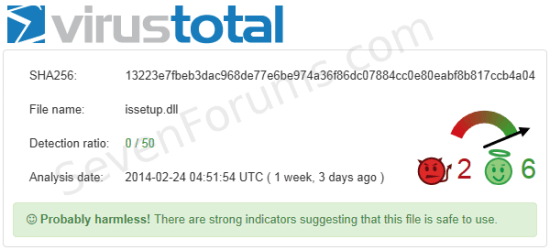
issetup.dll: None of the AV engines determined that the file is malicious (Detection ratio 0 / 50)
The Probably harmless! green bar indicates that the file is probably safe to restore to it's original location.
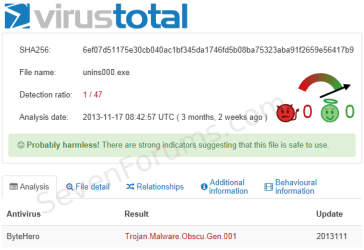
uninsooo.exe: One of the AV engines determined that the file is malicious (Detection ratio 1 / 47)
This report provides information on the AV engine that detected the file as malicious. You can read more information on the research tabs.
The Probably harmless! green bar indicates that the file is probably safe to restore to it's original location.
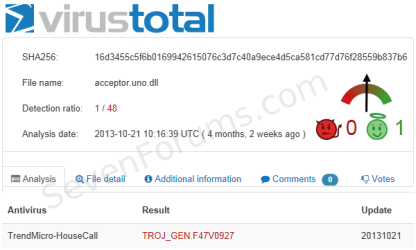
acceptor.uno.dll: One of the AV engines determined that the file is malicious (Detection ratio 1 / 48)
This report provides information on the AV engine that detected the file as malicious. You can read more information on the research tabs.
The report on this file is indeterminate, there is no Probably harmless! green bar.
You have to decide the disposition of the file based on the Detection ratio and by reading the information on the additional research tabs.
If SF members are assisting you, post a screen shot of the VirusTotal report for any file in question.
See: How to attach files and screen shots
Related Tutorials
Last edited:

