Vista 32 bit to Windows 7 32 bit

craney5

New member
Power User
Local time
2:49 AM
Messages
212
Hi all

Im thinking of upgrading my dell laptop to windows 7, currently running vista 32 bit and i hate vista more than anything. Anyway my main point is im looking to buy windows 7 32 bit to install to the laptop, on my main desktop i also have windows 7 installed but i used the 64 bit disk. As I have both the 32 bit and 64 bit home premium disks can i use the 32 bit disk i already have to install onto my laptop and say go and buy a 64 bit oem disk and use that license to activate the 32bit install on my laptop?

I would rather install the 64 bit but not sure if my laptop cpu supports it, its a dual core Pentium t4200 2.0ghz

Just curious to know also how long do you get until you need to activate windows? i was thinking of ordering it tonight and installing it tonight with the disk i have then activate it once the oem key come thru?

hope you can help

many thanks

EDIT

I have just run the upgrade advisor and i can install windows 7 32 bit and all the devices on the laptop will work fine. Will i need to download all the drivers from the dell site 1st or will windows pick them up by itself?
 
Last edited:

My Computer My Computer

At a glance

Windows 7 64bitPhenom IIx4 955 Black Edition4GB Kingston 1066mhz DDR2Gigabyte 260GTX
OS
Windows 7 64bit
CPU
Phenom IIx4 955 Black Edition
Memory
4GB Kingston 1066mhz DDR2
Graphics Card(s)
Gigabyte 260GTX
Monitor(s) Displays
Samsung syncmaster 2033
Hard Drives
500GB Samsung ATA
500GB Segate ATA
PSU
Antec True blue 750W Modular
Case
Antec 1200
Cooling
Prolimatech Megahalems Performance CPU Cooler/2x Apache Fan

My Computer My Computer

At a glance

W 7 64-bit UltimateIntel Q9550 Yorkfield8GB Dominator 8500C5DATI : XFX 5870
Computer Manufacturer/Model Number
* BFK Customs *
OS
W 7 64-bit Ultimate
CPU
Intel Q9550 Yorkfield
Motherboard
ASUS P5Q Pro
Memory
8GB Dominator 8500C5D
Graphics Card(s)
ATI : XFX 5870
Sound Card
Realtek HD Audio 7-1
Monitor(s) Displays
1x 47" LCD HDMI & 3x 26" LCD HDMI
Screen Resolution
1920x1080P & 1920x1200
Hard Drives
1x 80GB Intel X25-M G2 SSD : 1x 500GB & 1x 640GB WD Caviar Black(s)
PSU
Corsair 620HX
Case
Cooler Master RC-690
Cooling
Tuniq Tower 120, 2x 140mm and 3x 120mm case fans
Keyboard
Microsoft 500
Mouse
Razer Diamondback 3G
Internet Speed
14 Mb/s
Other Info
1x Koutech 3Gb/s SATA HDD Hot Swap Rack
If you use a OEM key 32 or 64,& Retail key 64bit you need to do Clean Install.
If you use a Retail key 32bit, you can UpGrade from Vista.
Download all drivers from dell to USB stick.
 

My Computer My Computer

At a glance

ME/XP/Vista/Win7
OS
ME/XP/Vista/Win7
HI mate i have run the test and it says the 32 bit will work fine so i would prob go with that. I only have 3gb of RAM so i wont really benefit from 64bit i guess anyway.

All the devices seemed to be compat with 7 as well which was a good sign. Would i have to download all the drivers from the dell site 1st or will windows pick them up? im guessing i would have to install the wireless adaptor driver manually or i would not be able to even get on the internet :)

As i already have a 32b bit home premium disk from my desktop installation could i install 7 onto my laptop using that disk and then activate it once i have bought another disk or could i even purchase a license online?

Thanks again barefoot
 

My Computer My Computer

At a glance

Windows 7 64bitPhenom IIx4 955 Black Edition4GB Kingston 1066mhz DDR2Gigabyte 260GTX
OS
Windows 7 64bit
CPU
Phenom IIx4 955 Black Edition
Memory
4GB Kingston 1066mhz DDR2
Graphics Card(s)
Gigabyte 260GTX
Monitor(s) Displays
Samsung syncmaster 2033
Hard Drives
500GB Samsung ATA
500GB Segate ATA
PSU
Antec True blue 750W Modular
Case
Antec 1200
Cooling
Prolimatech Megahalems Performance CPU Cooler/2x Apache Fan
As i already have a 32b bit home premium disk from my desktop installation could i install 7 onto my laptop using that disk and then activate it once i have bought another disk or could i even purchase a license online?


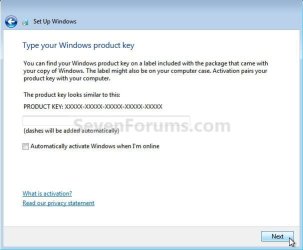
Just don't enter a activation key when presented with this dialog box during the installation process, then use the tutorial I posted above to extend the activation period until you get a new key.

See the post made by theog above.

click to enlarge
No Key.jpg
 

My Computer My Computer

At a glance

W 7 64-bit UltimateIntel Q9550 Yorkfield8GB Dominator 8500C5DATI : XFX 5870
Computer Manufacturer/Model Number
* BFK Customs *
OS
W 7 64-bit Ultimate
CPU
Intel Q9550 Yorkfield
Motherboard
ASUS P5Q Pro
Memory
8GB Dominator 8500C5D
Graphics Card(s)
ATI : XFX 5870
Sound Card
Realtek HD Audio 7-1
Monitor(s) Displays
1x 47" LCD HDMI & 3x 26" LCD HDMI
Screen Resolution
1920x1080P & 1920x1200
Hard Drives
1x 80GB Intel X25-M G2 SSD : 1x 500GB & 1x 640GB WD Caviar Black(s)
PSU
Corsair 620HX
Case
Cooler Master RC-690
Cooling
Tuniq Tower 120, 2x 140mm and 3x 120mm case fans
Keyboard
Microsoft 500
Mouse
Razer Diamondback 3G
Internet Speed
14 Mb/s
Other Info
1x Koutech 3Gb/s SATA HDD Hot Swap Rack
You're not qualified to run OEM to upgrade your laptop from Vista whether you clean install or in-place Upgrade.

Builder's OEM is restricted to use by a computer builder only: http://www.sevenforums.com/general-discussion/109054-windows-7-oem-regular.html#post944882

You need a retail Upgrade version. The best deal right now is Home Premium Family 3-pack at $125 on Amazon and newegg.com which is almost 3 licenses for the price of one. These can migrate to any qualifying computer for life, as long as it has XP or Vista or you have a retail Xp/Vista on hand as qualifier.
 
Back
Top