Vista cannot access W7 files

namron2

New member
Local time
4:32 AM
Messages
2
HI

I am trying to access W7 files from Vista on wireless network.

I have set the folders in 7 to share and Vista can see them on the network.

However when I try to open any folder from Vista I get "not accessible" message every time?

I can see and access the vista PC from 7 with no problems?

I have tried every trick I know (firewalls etc) and both PC's are part of Workgroup.
Any help would be appreciated.

Norm
 

My Computer

OS
mac

My Computer

Computer Manufacturer/Model Number
Dell XPS 15 L502x
OS
Windows 7 Ultimate x64 SP1
CPU
Core i7-2670QM
Memory
8GB DDR3 PC3-10600
Graphics Card(s)
Intel HD Graphics 3000 + GeForce GT 540M
Screen Resolution
1920x1080
Hard Drives
1TB 5400RPM Seagate
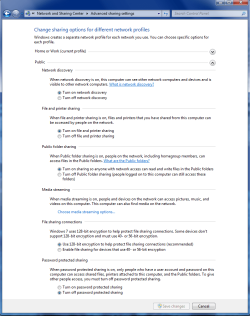
Try going into public file sharing and turn "off" password protected sharing. Almost always clears up that error message.

Set everything to how I have it in the picture below then retest and see if you can get to your files.
 

Attachments

  • public sharing enabled all.PNG
    public sharing enabled all.PNG
    39.7 KB · Views: 735

My Computer

Computer type
PC/Desktop
Computer Manufacturer/Model Number
Home built
OS
Windows 7 Ult, Windows 8.1 Pro,
CPU
Q9650-4.275GHz, E8600 4.5GHz, E6750-3.8GHz
Motherboard
Evga 780i FTW
Memory
G.Skill PC2 9600 1200Mhz 5 5 5 15 2T
Graphics Card(s)
GTX480
Sound Card
Asus Xonar D2
Monitor(s) Displays
HannsG
Screen Resolution
1680X1050
Hard Drives
GSkill Phoenix Pro 120GB SSD
PSU
ThermalTake Toughpower 1000Watt modular
Case
ThermalTake XaserV
Cooling
Xigmatek S1283
Keyboard
Logitech G15
Mouse
Logitech G9
Internet Speed
T1
Thanks for the help, I will try those things tonight.

Norm
 

My Computer

OS
mac
Back
Top