Well i downloaded the drivers from Intel for my express family drivers(graphic drivers ofcourse) built for vista OS when i install them it says its not for the OS i have?
Besides opening the compatibility tab in the right click properties screen the troubleshoot compatibilty item is now seen in 7 as a better option since that will create a new value in the registry for the installer or main executable once any program is installed.
That's been a great help seeing older XP programs installed on 7 that simply will not install on Vista despite various efforts.
W7 Ultimate x64/W10 Pro x64/W11 Pro Triple Boot - Main PC W7 Remote PC Micro ATX W7 Pro x64/W11 Pro
CPU
AMD Phenom II X4 975 Deneb 3.6ghz - 965 2nd remote pc
Motherboard
Gigabyte GA-790XTA-UD4-Gigabyte GA-880GM-D2H remote pc
Memory
Kingston Hyper X DDR3 1600 1.5v 16gb - Hyper X Fury 8gb 2nd
Graphics Card(s)
MSI HD Radeon 5750 1gb - MSI HD Radeon 6450 on mini tower
Sound Card
Creative Labs X-Fi Xtreme Audio P - Realtek onooard 2nd case
Monitor(s) Displays
ASUS VW199T-P 19" HP 2082a Main-HP 2082a 20" remote pc
Screen Resolution
Asus 1440x900 - HP 1600x900
Hard Drives
WD Black 1TB HD per OS W7, W10, and pending W11 presently on 500gb OS Drive - Pending Triple 1TB HDs for Spanned Storage/backup volume
Single 2TB external USB enclosure, single 1TB System 7 Host/Boot drive, Pending 8TB external HD for system image b
PSU
Corsair 750TX - primary / Corsair CX600 - second
Case
Antec 900-2 - SSD compatible / NZXT Vulcan mini tower
The best to try now is to look to see if there are 7 beta drivers or Vista/7 beta updates available. I've been running into that a few times on the 7 builds here replacing the ATI Catalyst 9.2 latest for Vista with a new 9.3 listing Vista/7 beta. Or you may have to fight a little harder with the troubleshooting tool in order to finally see any results.
If none are available and you have the software disk for a card installed on a custom build try browsing to the setup.exe file seen on the disk itself and right click on that to see that will work. For prebuild the only option would be looking for something beta if found.
With the 7000 build I saw the Vista updates go on without fuss. When trying the same on the 7068 that's where the 9.3 was needed for that. If you are running a newer build that's probably the time for any beta version from Intel you can find.
W7 Ultimate x64/W10 Pro x64/W11 Pro Triple Boot - Main PC W7 Remote PC Micro ATX W7 Pro x64/W11 Pro
CPU
AMD Phenom II X4 975 Deneb 3.6ghz - 965 2nd remote pc
Motherboard
Gigabyte GA-790XTA-UD4-Gigabyte GA-880GM-D2H remote pc
Memory
Kingston Hyper X DDR3 1600 1.5v 16gb - Hyper X Fury 8gb 2nd
Graphics Card(s)
MSI HD Radeon 5750 1gb - MSI HD Radeon 6450 on mini tower
Sound Card
Creative Labs X-Fi Xtreme Audio P - Realtek onooard 2nd case
Monitor(s) Displays
ASUS VW199T-P 19" HP 2082a Main-HP 2082a 20" remote pc
Screen Resolution
Asus 1440x900 - HP 1600x900
Hard Drives
WD Black 1TB HD per OS W7, W10, and pending W11 presently on 500gb OS Drive - Pending Triple 1TB HDs for Spanned Storage/backup volume
Single 2TB external USB enclosure, single 1TB System 7 Host/Boot drive, Pending 8TB external HD for system image b
PSU
Corsair 750TX - primary / Corsair CX600 - second
Case
Antec 900-2 - SSD compatible / NZXT Vulcan mini tower
well i have been running windows xp so far so in disk i have drivers for xp only there fore i downloaded vista drivers from the intel site which gives that error..
again can you explain what do you mean i have to try harder over troubleshooting?
P.S is there difference btween [FONT=arial, helvetica]Intel® 82945G Express Chipset and [/FONT][FONT=arial, helvetica]Intel® 82945G Express Chipset Family? and also do i need to download windows vista drivers or windows vista ultimate drivers?[/FONT][FONT=arial, helvetica] [/FONT]
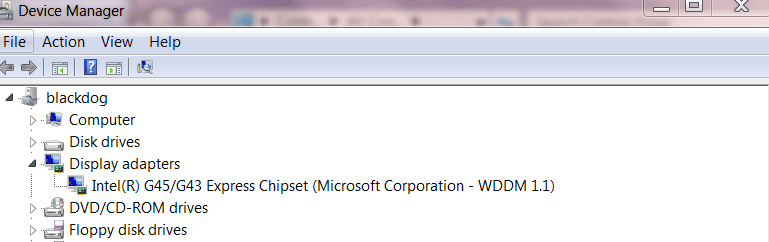
Mine installed fine both the 965 chipset for Laptop and the G45/G43 for a desktop.
You might get a message "Did this install correctly" with a choice install again in compatability mode. Just do that and Windows 7 will install it correctly.
There are now some chipset drivers available on the Microsoft update site.
For example the G45/G43 chipset.
Cheers
jimbo
Attachments
video.png
14 KB
· Views: 44
My Computer
Computer type
PC/Desktop
Computer Manufacturer/Model Number
Custom built, several laptops HP/ASUS
OS
Linux CENTOS 7 / various Windows OS'es and servers
i saw at the same place i have the drivers there which are version 8 where as for xp there is only version 7. but still when i run a game it says i need to install updated version of my graphic drivers where as i can run that same game in windows xp with version 7? what could be the problem?
I ran into an OpenGL problem lately with the Catalyst 9.2 I was mentioning before where the 9.3 now seen out indicated 7 beta on it. That cleaned that problem right up.
For older games in 7 one thing besides which driver set is the game's own executable once installed may need to be set to run in XP or Vista compatibility mode. I found that the case with quite few XP programs not able to be installed on Vista yet go on 7 using the troubleshooter on the installer or main exe file once on to see more actually working.
XP itself is a totally separate older version of Windows from 7 like 7 is from Vista with the game written for XP primarily while 7 is working in backwards compatibility already. If you were able to run a 98 game in XP that would be a similar example.
The board here that lacks Vista/7 updates at Asus while NVidia.com and the MS updates will see all of those needed in the optional hardwares. When checking for updates on your own select the custom not express option to look over any optional updates available.
W7 Ultimate x64/W10 Pro x64/W11 Pro Triple Boot - Main PC W7 Remote PC Micro ATX W7 Pro x64/W11 Pro
CPU
AMD Phenom II X4 975 Deneb 3.6ghz - 965 2nd remote pc
Motherboard
Gigabyte GA-790XTA-UD4-Gigabyte GA-880GM-D2H remote pc
Memory
Kingston Hyper X DDR3 1600 1.5v 16gb - Hyper X Fury 8gb 2nd
Graphics Card(s)
MSI HD Radeon 5750 1gb - MSI HD Radeon 6450 on mini tower
Sound Card
Creative Labs X-Fi Xtreme Audio P - Realtek onooard 2nd case
Monitor(s) Displays
ASUS VW199T-P 19" HP 2082a Main-HP 2082a 20" remote pc
Screen Resolution
Asus 1440x900 - HP 1600x900
Hard Drives
WD Black 1TB HD per OS W7, W10, and pending W11 presently on 500gb OS Drive - Pending Triple 1TB HDs for Spanned Storage/backup volume
Single 2TB external USB enclosure, single 1TB System 7 Host/Boot drive, Pending 8TB external HD for system image b
PSU
Corsair 750TX - primary / Corsair CX600 - second
Case
Antec 900-2 - SSD compatible / NZXT Vulcan mini tower
I did that it did not work.
and also any program that i run in other OS capability mode i end up having error or the application stops responding without starting.
well you might want to know the name of the game and try it at your pc here it is.
First of all that's a beta version of the vSide's "party online" you download from their site. It went on here without a glitch and without a need for any compatibility option used.
In fact too fast for another screen showing the installation progress. But the same end result was seen just the same. It went on here fast.
W7 Ultimate x64/W10 Pro x64/W11 Pro Triple Boot - Main PC W7 Remote PC Micro ATX W7 Pro x64/W11 Pro
CPU
AMD Phenom II X4 975 Deneb 3.6ghz - 965 2nd remote pc
Motherboard
Gigabyte GA-790XTA-UD4-Gigabyte GA-880GM-D2H remote pc
Memory
Kingston Hyper X DDR3 1600 1.5v 16gb - Hyper X Fury 8gb 2nd
Graphics Card(s)
MSI HD Radeon 5750 1gb - MSI HD Radeon 6450 on mini tower
Sound Card
Creative Labs X-Fi Xtreme Audio P - Realtek onooard 2nd case
Monitor(s) Displays
ASUS VW199T-P 19" HP 2082a Main-HP 2082a 20" remote pc
Screen Resolution
Asus 1440x900 - HP 1600x900
Hard Drives
WD Black 1TB HD per OS W7, W10, and pending W11 presently on 500gb OS Drive - Pending Triple 1TB HDs for Spanned Storage/backup volume
Single 2TB external USB enclosure, single 1TB System 7 Host/Boot drive, Pending 8TB external HD for system image b
PSU
Corsair 750TX - primary / Corsair CX600 - second
Case
Antec 900-2 - SSD compatible / NZXT Vulcan mini tower
The old system file checker with the 7 dvd you burned in the drive when running that. You type that in at the Run command line and hit enter. It may also be a good idea to simply toss the copy you already downloaded in case that was bad and go for a new one. Keep in mind that it is also a beta just like 7 until the RCs are out(leaked, whatever).
W7 Ultimate x64/W10 Pro x64/W11 Pro Triple Boot - Main PC W7 Remote PC Micro ATX W7 Pro x64/W11 Pro
CPU
AMD Phenom II X4 975 Deneb 3.6ghz - 965 2nd remote pc
Motherboard
Gigabyte GA-790XTA-UD4-Gigabyte GA-880GM-D2H remote pc
Memory
Kingston Hyper X DDR3 1600 1.5v 16gb - Hyper X Fury 8gb 2nd
Graphics Card(s)
MSI HD Radeon 5750 1gb - MSI HD Radeon 6450 on mini tower
Sound Card
Creative Labs X-Fi Xtreme Audio P - Realtek onooard 2nd case
Monitor(s) Displays
ASUS VW199T-P 19" HP 2082a Main-HP 2082a 20" remote pc
Screen Resolution
Asus 1440x900 - HP 1600x900
Hard Drives
WD Black 1TB HD per OS W7, W10, and pending W11 presently on 500gb OS Drive - Pending Triple 1TB HDs for Spanned Storage/backup volume
Single 2TB external USB enclosure, single 1TB System 7 Host/Boot drive, Pending 8TB external HD for system image b
PSU
Corsair 750TX - primary / Corsair CX600 - second
Case
Antec 900-2 - SSD compatible / NZXT Vulcan mini tower
The old system file checker with the 7 dvd you burned in the drive when running that. You type that in at the Run command line and hit enter. It may also be a good idea to simply toss the copy you already downloaded in case that was bad and go for a new one. Keep in mind that it is also a beta just like 7 until the RCs are out(leaked, whatever).
On that thread there you are talking about the 7000 build seeing a bad burn to disk. I've tossed a few frisbees at times here too! The comment someone made about not being able to install 7 more then once with the same disk is false however. They likely had a bad install the second time around if nothing happened to the disk following the first install there.
In fact the only problem install seen was from a first burn to rw media for a quick look to verify the 7068 followed by a good burn to a dvd-r. I still haven't plugged that one back in yet after seeing a good install of the 7077 now seen for a look over.
W7 Ultimate x64/W10 Pro x64/W11 Pro Triple Boot - Main PC W7 Remote PC Micro ATX W7 Pro x64/W11 Pro
CPU
AMD Phenom II X4 975 Deneb 3.6ghz - 965 2nd remote pc
Motherboard
Gigabyte GA-790XTA-UD4-Gigabyte GA-880GM-D2H remote pc
Memory
Kingston Hyper X DDR3 1600 1.5v 16gb - Hyper X Fury 8gb 2nd
Graphics Card(s)
MSI HD Radeon 5750 1gb - MSI HD Radeon 6450 on mini tower
Sound Card
Creative Labs X-Fi Xtreme Audio P - Realtek onooard 2nd case
Monitor(s) Displays
ASUS VW199T-P 19" HP 2082a Main-HP 2082a 20" remote pc
Screen Resolution
Asus 1440x900 - HP 1600x900
Hard Drives
WD Black 1TB HD per OS W7, W10, and pending W11 presently on 500gb OS Drive - Pending Triple 1TB HDs for Spanned Storage/backup volume
Single 2TB external USB enclosure, single 1TB System 7 Host/Boot drive, Pending 8TB external HD for system image b
PSU
Corsair 750TX - primary / Corsair CX600 - second
Case
Antec 900-2 - SSD compatible / NZXT Vulcan mini tower