
You are using an out of date browser. It may not display this or other websites correctly.
You should upgrade or use an alternative browser.
You should upgrade or use an alternative browser.
Solved Vista - Notepad - cannot read the texts
- Thread starter oday1
- Start date

Change the language ?
Are you running Vista Ultimate ?
Run Windows update.
Are you running Vista Ultimate ?
Run Windows update.
My Computer
- Computer type
- PC/Desktop
- Computer Manufacturer/Model Number
- Skylake Special #666
- OS
- Windows 10 Pro x64
- CPU
- Intel Core i7 6700K
- Motherboard
- Asus Sabertooth Z170 Mark 1
- Memory
- GSkill TridentZ RGB 16GB 3600 16-16-16-36
- Graphics Card(s)
- EVGA GTX 980 Ti SC x2
- Sound Card
- Realtek High Definition
- Monitor(s) Displays
- AOC G2460PG
- Screen Resolution
- 1920 x 1080 144Hz
- Hard Drives
- Samsung 860 Pro 256GB, Seagate Barracuda 4TB x2
- PSU
- EVGA 1000 P2, EVGA White Custom Braided Cables
- Case
- Corsair Vengeance C70 Gunmetal Black
- Cooling
- Corsair H100i v2, Corsair ML120 x2, Thermal Grizzly Kryonaut
- Keyboard
- Logitech G910 Orion Spectrum
- Mouse
- Logitech G700s
- Internet Speed
- Verizon Fios Quantum Gateway 75/75
- Antivirus
- Windows Defender, Malwarebytes Free 3.8.3
- Browser
- Chrome
- Other Info
- Corsair SP120 x4, LG Blu-ray Drive, Durabrand HT-395 100 Watt Dolby Digital Amp, Corsair H2100 Wireless 7.1 Headset
The system I have is Vista Home Premium. I went to the Regional and Language options then ===> Change keyboard ==> add Arabic keyboard.
Still nothing changed from the symbol writings.
Still nothing changed from the symbol writings.
My Computer
- OS
- Windows Vista - Home Premium 32 bit

Hi Oday1, welcome to the Seven Forums.
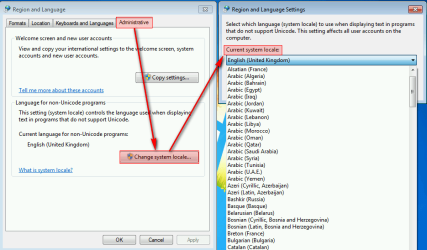
Did you remember to set system locale to Arabic in Control Panel > Region and Language settings after resetting to factory settings:
Kari
Did you remember to set system locale to Arabic in Control Panel > Region and Language settings after resetting to factory settings:
Kari
My Computer
- Computer type
- Laptop
- Computer Manufacturer/Model Number
- HP ENVY 17-1150eg
- OS
- Windows 10 Pro x64 EN-GB
- CPU
- 1.6 GHz Intel Core i7-720QM Processor
- Memory
- 6 GB
- Graphics Card(s)
- ATI Mobility Radeon HD 5850 Graphics
- Sound Card
- Beats sound system with integrated subwoofer
- Monitor(s) Displays
- 17" laptop display, 22" LED and 32" Full HD TV through HDMI
- Screen Resolution
- 1600*900 (1), 1920*1080 (2&3)
- Hard Drives
- Internal: 2 x 500 GB SATA Hard Disk Drive 7200 rpm
External: 2TB for backups, 3TB USB3 network drive for media
- Cooling
- As Envy runs a bit warm, I have it on a Cooler Master pad
- Keyboard
- Logitech diNovo Media Desktop Laser (bluetooth)
- Mouse
- Logitech Performance Mouse MX
- Internet Speed
- 50/10 Mbps VDSL
- Antivirus
- Windows Defender 4.3.9431.0
- Browser
- Maxthon 3.5.2., IE11
Dear Kari,
The problem is solved , thanks to you. The snapshot was a brilliant idea and made it easier for me to follow.
Best
Oday
The problem is solved
, thanks to you. The snapshot was a brilliant idea and made it easier for me to follow. Hi Oday1, welcome to the Seven Forums.
Did you remember to set system locale to Arabic in Control Panel > Region and Language settings after resetting to factory settings:
View attachment 249016
Kari
Best
Oday
My Computer
- OS
- Windows Vista - Home Premium 32 bit
You are welcome.
Kari
Kari
My Computer
- Computer type
- Laptop
- Computer Manufacturer/Model Number
- HP ENVY 17-1150eg
- OS
- Windows 10 Pro x64 EN-GB
- CPU
- 1.6 GHz Intel Core i7-720QM Processor
- Memory
- 6 GB
- Graphics Card(s)
- ATI Mobility Radeon HD 5850 Graphics
- Sound Card
- Beats sound system with integrated subwoofer
- Monitor(s) Displays
- 17" laptop display, 22" LED and 32" Full HD TV through HDMI
- Screen Resolution
- 1600*900 (1), 1920*1080 (2&3)
- Hard Drives
- Internal: 2 x 500 GB SATA Hard Disk Drive 7200 rpm
External: 2TB for backups, 3TB USB3 network drive for media
- Cooling
- As Envy runs a bit warm, I have it on a Cooler Master pad
- Keyboard
- Logitech diNovo Media Desktop Laser (bluetooth)
- Mouse
- Logitech Performance Mouse MX
- Internet Speed
- 50/10 Mbps VDSL
- Antivirus
- Windows Defender 4.3.9431.0
- Browser
- Maxthon 3.5.2., IE11