Vista Startup Screen on Win 7 installation

dvdluvver

New member
Local time
1:26 PM
Messages
46
This may seem trivial, but it's bugging me.

For some reason, my clean installation on my HTPC still boots with the old Vista startup screen (the green scrolling bar). I really like the new one that 7 has with the floating colors that come together to form the "windows" logo that works fine on my other machines. I did notice that I would always get the Vista logon when my desktop was dual boot, but now that I've eliminated all Vista installations, I get the 7 startup screen - thus I was surprised to see the old green bar show up on my HTPC, seeing as though the only OS that's on it now is Windows 7 7100 (which works GREAT!).

My HTPC has 3 drives in it, one for Media, one for extra storage (is completely empty now) and one 80GB drive for the OS. (Interestingly enough, the "Media" drive (E:\) is listed as the "System" drive, even though I did the installation with all the other drives unplugged.

Is there a way that I can fix this so I get the Windows 7 startup screen?

Again, I know this is trivial, but I'd like to fix it! :p
 

My Computer My Computer

OS
Windows Vista and 7 dual boot
Hi,

Boot into 7, open an elevated command prompt and type:

bcdedit /set {current} locale en-US

press enter.

Hope it helps
 

My Computers My Computers

System One System Two

  • Computer type
    PC/Desktop
    OS
    7 X64
    CPU
    i5 8400
    Motherboard
    gigabyte b365m ds3h
    Memory
    2x8gb 3200mhz
    Hard Drives
    various
    PSU
    pure power 11 400w cm
    Case
    Coolermaster
    Cooling
    cryorig m9i
  • Computer type
    PC/Desktop
    OS
    7x64
    CPU
    g5400
    Motherboard
    ga b365m ds3h
    Memory
    8gb ddr4 2400
    PSU
    xfx pro 450w
Hi,

Boot into 7, open an elevated command prompt and type:

bcdedit /set {current} locale en-US

press enter.

Hope it helps

Did this, reported as successful, but still get the old Vista startup screen. Any other ideas?
 

My Computer My Computer

OS
Windows Vista and 7 dual boot
There is a minimum graphics requirement with the 7 bootscreen as it displays at 1024x768.

If you have a lower res., you will get the Vista bootscreen.

Could that be it?
 

My Computers My Computers

System One System Two

  • Computer type
    PC/Desktop
    OS
    7 X64
    CPU
    i5 8400
    Motherboard
    gigabyte b365m ds3h
    Memory
    2x8gb 3200mhz
    Hard Drives
    various
    PSU
    pure power 11 400w cm
    Case
    Coolermaster
    Cooling
    cryorig m9i
  • Computer type
    PC/Desktop
    OS
    7x64
    CPU
    g5400
    Motherboard
    ga b365m ds3h
    Memory
    8gb ddr4 2400
    PSU
    xfx pro 450w
Hmmm... This is my HTPC, which I have set to 1080i to watch HDTV. I get the Win 7 logon screen on MUCH less powerful systems (even my HP laptop from 1999), so while I guess it *could* be, I kinda doubt it. Graphics card is NVidia 9500GS.
 

My Computer My Computer

OS
Windows Vista and 7 dual boot

My Computers My Computers

System One System Two

  • Computer type
    PC/Desktop
    OS
    7 X64
    CPU
    i5 8400
    Motherboard
    gigabyte b365m ds3h
    Memory
    2x8gb 3200mhz
    Hard Drives
    various
    PSU
    pure power 11 400w cm
    Case
    Coolermaster
    Cooling
    cryorig m9i
  • Computer type
    PC/Desktop
    OS
    7x64
    CPU
    g5400
    Motherboard
    ga b365m ds3h
    Memory
    8gb ddr4 2400
    PSU
    xfx pro 450w
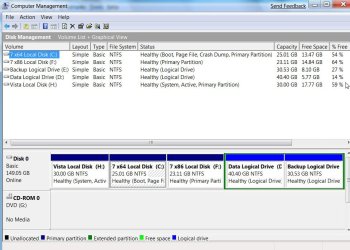
If you post a screenshot of Disk Management like this:

DISKMANAGEMENT2009-02-04_031947.jpg

we can see how to get change the System drive to the one your o/s is on.

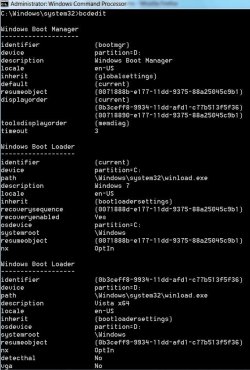
Also useful would be a screenshot of bcdedit.

Open an elevated command prompt, type:

bcdedit {return}

like this:

BCDEDIT2009-03-07_235226.jpg
 

My Computers My Computers

System One System Two

  • Computer type
    PC/Desktop
    OS
    7 X64
    CPU
    i5 8400
    Motherboard
    gigabyte b365m ds3h
    Memory
    2x8gb 3200mhz
    Hard Drives
    various
    PSU
    pure power 11 400w cm
    Case
    Coolermaster
    Cooling
    cryorig m9i
  • Computer type
    PC/Desktop
    OS
    7x64
    CPU
    g5400
    Motherboard
    ga b365m ds3h
    Memory
    8gb ddr4 2400
    PSU
    xfx pro 450w
I have the exact same issue, it has the correct startup on my girls laptop and it had it on the PC in question before i upgraded the hard drive, graphics, memory, processor, soundcard and optical drives.

I did a clean install and now it show ths vista logo, i have tried the suggestions in the thread and it hasnt worked for me, the only thing i can think of that it may be is this - the performance assessment tool, i have not completed it and i know that certain graphical effects are withheld until this is completed ( Have you done this dvdluvver ?) I would do it myself to test but unfortunately it will no complete on my PC, it just reboots during the tests, i think this is down to the dual GPU card but i have installed the proper Windows 7 drivers so i dont know but thats another issue.

I will keep my eye on the thread for any progression

Thanks
 

My Computer My Computer

OS
7
I read an explaination that makes sense, did you run the boot repair from the RC1 disc ?

I did (when i installed a data disk and it defaulted to before my system disk in the boot sequence and when i turned it on i got a boot menu with 6x windows xp and i thought what has happened to my windows 7) ran the repair and then relaised it was just due to the old disk which ha dbeen an OS once but turned into data disc. I have read that the repair wizard just doenst have teh correct startup picture files in RC1 so looks like we have to wait for the proper release.

hope you followed that : )
 

My Computer My Computer

OS
7
1 way to possible solve this is to run an elevated command prompt. Type cmd in the Start Menu then right-click cmd and select 'run as administrator'. Within command prompt type sfc /scannow, this will check system file integrity & will replace any files that have become corrupt or damaged.

Hope this helps :)
 

My Computer My Computer

Computer Manufacturer/Model Number
Compaq Desktop
OS
Windows 7 Ultimate x64
CPU
AMD Sempron Dual Core
Memory
3GB
Graphics Card(s)
NVIDIA GeForce 6150SE nForce 430
Screen Resolution
1024x768
Hard Drives
150GB Sata
Tried that but no luck for me :cry:

I had to disable AVG resident whilst it did it too as it was thrashing teh CPU and taking A G E S


Any more suggestions ? ima guess its down to what was described abouve but happy to try out and fixes

Cheers for the input
 

My Computer My Computer

OS
7
The same thing happens to me on my system. I have found that the problem seems to be caused by my HDMI connection. When i disconnect my 46 inch screen and connect a standard computer screen via Vga or DVI the old vista loader goes away and I can see the new Windows 7 boot animation. So try Hooking up your screen via DVI or Vga and see if that solves your problem
 

My Computer My Computer

OS
vista or 7 7100
yep you are correct, i found this out yesterday though i had a suspiction.

wierd that HDMI wont allow it, i cant understand why that would be, must be due to resolution differences, but i would have thought HDMI wouldhave been better if not the same as DVI

I cant say it is a fix to use VGA as i want to send audio and video through a 15m HDMI cable to another room and employing a VGA connection would break this but at least its another question answered

Thanks for confirming that !
 

My Computer My Computer

OS
7
Re: Windows 7 Startup

None of the stuff suggested has helped!
 

My Computer My Computer

Computer Manufacturer/Model Number
MSI (Micro-Star International)
OS
Windows XP Home Edition
CPU
Netbook
Screen Resolution
1024 x 600
Cooling
Fan
Mouse
Laptop Mouse and Bluetooth Mouse
I can confirm the hdmi issue.. just installed the RTM (7600) version of Ultimate x64 on both my computers.. laptop has 7 logo, desktop with dvi>hdmi to my 40" LED has vista logo.. tried all the fixes.. this needs an update fix, definately..
 

My Computer My Computer

OS
7 Ultimate x64
CPU
Dual Core 2140 @3Ghz
Motherboard
Gigabyte P35-DS4 rev.1.1
Memory
Teamgroup 2x1GB @938Mhz
Graphics Card(s)
Gainward 8600 GT Passive
Sound Card
Realtek 889a (onboard)
Monitor(s) Displays
Samsung UE40B6000
Hard Drives
Samsung F1 640GB + 500GB
PSU
Corsair HX-520
Case
Antec P180
Cooling
Scythe Ninja Plus w/ noctua 800rpm
Back
Top