Vista taskbar in win 7 ?

Thewiruz

New member
Local time
2:27 AM
Messages
11
Okey well this is making me a bit angry.I really hate Win 7 taskbar.I cant get enough room for all my icons and i`m not sure if the developers are retarded over at Microsoft?Are they?

Is there any way to get back the old taskbar?I don`t mean that lame guide which is in every corner on the Internet.I want to decrees the icon size and remove the room between the icons so i can get my 20 other icons to fit in the taskbar which i could in Vista.:mad:

Why make it simple when you can ruin it all?thats the MS slogan i think.
Must be a way to shrink the icons in regedit and decrees the space between as well
 

My Computer

OS
Windows 7
CPU
Core I7 920
Motherboard
Gigabyte EX58-UD5
Memory
Cosair XMS DDR3
Graphics Card(s)
Gigabyte HD5870
Monitor(s) Displays
Sony Trinitron 22
Hard Drives
WD raptor 74Gb
WD 7200rpm 2TB
PSU
OCZ Powerstream 600W
Case
Termaltake
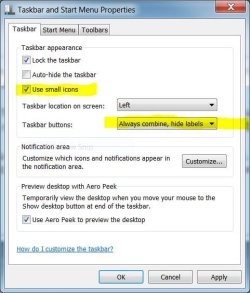
No need. (at least for shrinking the icons)Right click on the taskbar, and go to Properties. In there, click the "Use Small Icons" checkbox. Then hit Apply.

I think that this decreases distance between icons, but I don't know. If you want total customization in distance, size of icons, and many other things, download ObjectDock. It's free, at least for the simple version.
 

My Computer

OS
Windows 7 Home Premium x64
No need. (at least for shrinking the icons)Right click on the taskbar, and go to Properties. In there, click the "Use Small Icons" checkbox. Then hit Apply.

In addition, ensure ' Always combine, hide labels ' is selected.


notretarded.JPG
 

My Computer

Computer type
PC/Desktop
Computer Manufacturer/Model Number
Systems by SmartEyeball
OS
8 Pro x64
CPU
i7 3770K 4.6GHz
Motherboard
ASUS P8Z77 WS
Memory
16GB G.Skill Trident X 2666mhz
Graphics Card(s)
x2 EVGA 780 Ti Superclocked SLI
Sound Card
SB X-FI Surround 5.1 PRO USB / ATH-AD900 Headphones
Monitor(s) Displays
x3 Dell U2410 / 58" Samsung
Screen Resolution
5760*1200/ 1920*1200
Hard Drives
2x Intel 520 240GB (RAID 0) * 2x WD Caviar Blacks 2TB (RAID 0) * 2TB WD Caviar Black * Sony Optirac DVD
PSU
Silverstone Strider Evolution 1200W
Case
Thermaltake Level 10 GT Snow Edition
Cooling
Noctua NH-D14
Keyboard
Topre Realforce // Ducky Shine MX Black // Filco Ninja TKL
Mouse
Thermaltake Theron (Highly Recommended) + Razer Imperator
Antivirus
MSE
Browser
IE, FF, WaterFox
Other Info
GT Extreme V2 Sim Racing Cockpit + 40" LCD and K/B Mouse stand ▼
Fanatec CSR Elite Wheel + Clubsport V1 Pedals + CSR shifter/7G-H ▼Saitek X52 Pro ▼ TrackIR 5 Pro
Buttkicker v2 Seat Rumbler with Dedicated 5.1 and Sub Woofer attached to frame ▼
=
Bloody Big Grin
Thanks but thats not even close!That guide is everywhere on the internet!
I get a gap between the icons and i need to shrink that space that is between the icons.
I want the old vista look back and if there is a register hack for this i really need it!

It doesn't matter if i shrink the icons ,i need to have open apps in a separate column in the right as in vista.Not as now its the same icon but its just highlighted.
icons on left and open apps in the right side as in this picture
windows-vista-ultimate
http://www.planetmy.com/Vista/Vista_Calculator.JPG
Thanks for the reply guys!
 
Last edited:

My Computer

OS
Windows 7
CPU
Core I7 920
Motherboard
Gigabyte EX58-UD5
Memory
Cosair XMS DDR3
Graphics Card(s)
Gigabyte HD5870
Monitor(s) Displays
Sony Trinitron 22
Hard Drives
WD raptor 74Gb
WD 7200rpm 2TB
PSU
OCZ Powerstream 600W
Case
Termaltake
well i use to press the icon twice as in this picture
ImageShack® - Online Photo and Video Hosting
and thats the workflow i still want to use.May be better to go back to Vista and sell this copy of win7.
Find it more and more frustrating!Why have they messed up WIn7? It takes more time to do something simple in win7 then in the older OS!
 

My Computer

OS
Windows 7
CPU
Core I7 920
Motherboard
Gigabyte EX58-UD5
Memory
Cosair XMS DDR3
Graphics Card(s)
Gigabyte HD5870
Monitor(s) Displays
Sony Trinitron 22
Hard Drives
WD raptor 74Gb
WD 7200rpm 2TB
PSU
OCZ Powerstream 600W
Case
Termaltake
Just because you don't like it doesn't mean they have messed it up!! Most other people seem to get on just fine , but no one is forcing you to use Win 7 if you don't want to ..
 

My Computer

OS
Windows 7 64bit RTM
CPU
AMD Athlon 64 X2 3800+
Motherboard
ASUS M2N-E SLI
Memory
4G Dual channel
Graphics Card(s)
POV GeForce 7600 GT
Sound Card
USB 2.1
Monitor(s) Displays
Samsung 17 in LCD
Hard Drives
80G Western Digital
250G Western Digital
500G Buffalo Drivestation

My Computer

Computer Manufacturer/Model Number
HP Pavillion dv5t (generation 1)
OS
Vista 64 bit and 32 bit (SP2)
CPU
Intel(R) Core(TM)2 Duo Processor T9400 (2.53 GHz
Memory
4GB DDR2 System Memory (2 Dimm)
Graphics Card(s)
512 MB NVIDIA GeForce 9600M GT
Monitor(s) Displays
15.4" diagonal WSXGA+ High-Definition HP BrightView Widescre
Screen Resolution
1680 x 1050
Hard Drives
320GB 5400RPM SATA Hard Drive with HP ProtectSmart Hard Drive Protection
Keyboard
Built-in HP
Mouse
Built in - Synaptics TouchPad V6.5 on PS/2 Port
Internet Speed
Max
Other Info
~ Intel Next-Gen Wireless-N Mini-card w/Bluetooth ~ Blu-Ray ROM DVD+/-R/RW ~ Integ. HDTV Hybrid Tuner ~ 12 Cell Battery ~ MS Office (Home Premium) 2007 ~
Ohh sorry ! yes of course there is people who like to click 7 more times then they should!
I dont!
And yes this is a failure! I will sell this stupid OS for sure!It has nothing thats better compare to Vista.If you like eye candy sure Win7 is the way to go but i work with my computer!
 

My Computer

OS
Windows 7
CPU
Core I7 920
Motherboard
Gigabyte EX58-UD5
Memory
Cosair XMS DDR3
Graphics Card(s)
Gigabyte HD5870
Monitor(s) Displays
Sony Trinitron 22
Hard Drives
WD raptor 74Gb
WD 7200rpm 2TB
PSU
OCZ Powerstream 600W
Case
Termaltake
Besides the ability to show just icons, there isn't all that much difference in my taskbar than there is on my Vista machine. I have just as much room on it.....I don't see the issue.
 

My Computer

Computer Manufacturer/Model Number
Toshiba Satellite L455D
OS
Windows 7 Home Premium
CPU
Amd Semperon 2.10GHz
Memory
2 Gig
Graphics Card(s)
ATI Radeon 3100
Sound Card
Realtek
Monitor(s) Displays
15.6 inch
Screen Resolution
1366x768
Hard Drives
250gig
Mouse
Logitech Wireless
Internet Speed
16/2 cable
Don't pin so many icons onto the taskbar then you will have room!
*rolls eyes* You do not need to pin every single application you have you know?
 

My Computer

Computer type
PC/Desktop
Computer Manufacturer/Model Number
Alienware Aurora ALX R4
OS
Windows 10 Pro (x64)
CPU
Intel Core i7-3930K (3.2GHz - 4.5GHz)
Motherboard
Alienware Aurora-R4 x79
Memory
4x Samsung 4GB PC3-12800 DDR3 (16GB 1600MHz)
Graphics Card(s)
Nvidia Geforce GTX 690
Sound Card
SteelSeries Siberia Elite
Monitor(s) Displays
Dell UltraSharp U3011
Screen Resolution
2560x1600
Hard Drives
Samsung 850 Pro 256 GB, Seagate 1TB Desktop Hybrid HDD, 2x Western Digital 4TB Green HDD
PSU
875W Some Dell PSU <.<
Case
Alienware Aurora ALX
Cooling
Custom Liquid Cooling (EK CPU & GPU blocks) dual EK 480RAD
Keyboard
Logitech G710+ Mechanical
Mouse
Logitech G700s
Internet Speed
Verizon Fios (50 mbps average)
Other Info
Server: Intel NUC D54250WYK: i5-4250U, 16GB, 256 GB mSATA, Windows Server 2012 R2
Ok i guess thats a new feature? Waste of space...

Anyway thanks guys! But i did go back to the last good OS!
hope i get some money back when i sell this crap os
 

My Computer

OS
Windows 7
CPU
Core I7 920
Motherboard
Gigabyte EX58-UD5
Memory
Cosair XMS DDR3
Graphics Card(s)
Gigabyte HD5870
Monitor(s) Displays
Sony Trinitron 22
Hard Drives
WD raptor 74Gb
WD 7200rpm 2TB
PSU
OCZ Powerstream 600W
Case
Termaltake
I'm sure that there should be a Vista shell modification available for Windows 7. Google might help with that. I mean they do have shell modifications to make Windows 7 look like the Mac OS and Window classic. However, those are all unofficial and you should proceed carefully (the customization forum has some helpful people there that do this stuff regularly.)

Anyway thanks guys! But i did go back to the last good OS!

If someone likes using a computer a certain way, then that's just fine. Besides, changing habits is not always easy for people.
 

My Computer

Computer Manufacturer/Model Number
HP DV6 1330sa
OS
Windows 7 Professional 64 Bit SP1
CPU
INTEL DUAL CORE 2.1Ghz
Motherboard
N/A
Memory
4GB DDR3
Graphics Card(s)
INTEL
Sound Card
LAPTOP
Monitor(s) Displays
2
Screen Resolution
3200x1080
Hard Drives
250GB
PSU
LAPTOP
Case
LAPTOP
Cooling
LAPTOP
Keyboard
SOLID YEAR 260U
Mouse
USB
Internet Speed
20 MB/S
*shakes head* Is all common sense lost on our society? Just because you aren't happy with one simple feature (because you aren't willing to get used to something new) in an OS that a company most make for billions of people....doesn't mean it is a failuire! Is it really that difficult to understand?

Besides, if you really think Vista is better than Windows 7, well...that's just laughable at best. It's really sad that so many people come in hear ranting and raving, making themselves look foolish, just because they don't see the EXACT same things they did in previous OSes. It makes me think these people never want anything new and better. They just want the same old same old. That's like using a black and white TV because everything new that takes time or newer hardware to adjust to is bad.
 

My Computer

OS
Windows 7 Ultimate x64 SP1
CPU
Intel Core i7-2600
Motherboard
Gigabyte GA-P67A-UD3P-B3
Memory
12 GB Patriot Extreme DDR3-1333
Graphics Card(s)
Nvidia GTX 470
Monitor(s) Displays
Dell UltraSharp 2209WA
Hard Drives
OCZ Agility3 240 GB, WD5001AALS, WD7501AALS
PSU
OCZ ModStream 700W
Case
CoolerMaster HAF 912 Advanced
Cooling
CoolerMaster Hyper 212 Plus
well i use to press the icon twice as in this picture
ImageShack® - Online Photo and Video Hosting
and thats the workflow i still want to use.May be better to go back to Vista and sell this copy of win7.
Find it more and more frustrating!Why have they messed up WIn7? It takes more time to do something simple in win7 then in the older OS!


You can shift click to open two explorer windows. You can also use the middle mouse button.
 

My Computer

Computer Manufacturer/Model Number
Self Build
OS
Windows 7 Ultimate 64bit
CPU
Intel Xeon 3110 (Same as Core 2 Duo E8400) 3.0Ghz @ 3.6Ghz
Motherboard
Gigabyte EX38-DS4
Memory
8GB G. Skill PC2-8500
Graphics Card(s)
PALiT GeForce 9600 GT PCI Express 2.0
Sound Card
OnBoard - Realtek ALC889A High Definition Audio
Monitor(s) Displays
Dell 24" LCD
Screen Resolution
1920x1200
Hard Drives
Western Digital VelociRaptor WD3000GLFS - 300GB | Western Digital Caviar SE16 WD7500AAKS - 750GB | LaCie d2Next-Quadra external - 1TB
PSU
Corsair HS620W
Case
Lian Li PC-V1100b Plus II
Cooling
Thermalright Ultra 120 eXtreme
Keyboard
Logitech
Mouse
Logitech MX Laser
Internet Speed
SLOW - HughesNet Satellite Internet - SUCKS!
Back
Top