Visual C++

vycence

New member
Local time
6:52 AM
Messages
5
Hello,

I have

Visual C++ 2008 Redistributable - x86 9.0.30729.6161
Visual C++ 2008 Redistributable - x64 9.0.30729.6161
Visual C++ 2010 x86 Redistributable - 10.0.40219
Visual C++ 2010 x64 Redistributable - 10.0.40219
among the programs installed in my Windows 7 - 64 bits

I read that it is preferable to keep different versions of Visual C++,
OK so I will keep a 2008 and a 2010 versions.

But I think that keeping the x86 versions is completely useless.

I'd like to have a confirmation of my opinion.

Thank you
 

My Computer

Computer type
Laptop
Computer Manufacturer/Model Number
Toshiba
OS
Windows 7 Professional 64 bits
CPU
i5 Haswell
Memory
4 GB
Hard Drives
SSD 128 GB
No, it's not correct. You most likely need to have both 2008 and 2010, each one in x86 and x64 versions.

Reason for this is that those are the runtimes for programs built using Visual C++, in various versions. Each program was compiled against one particular one, and since they do NOT include older or 86/64 bits together, to run each one you need that particular version, which can't be replaced by any other.

The exact "need" for each version lies in which programs are you running exactly, each one may impose a requirement for a specific runtime. The usual recommendation of installing everything is because we can't know for sure which programs are you running.
 

My Computer

Computer type
Laptop
Computer Manufacturer/Model Number
Toshiba Sattelite A665-S6092
OS
Windows 7 Ultimate x64
CPU
Intel Core i7-740QM
Memory
8 GB DDR3
Graphics Card(s)
NVIDIA GeForce 330GT
Screen Resolution
1366x768
Hard Drives
Samsung 840 SSD 500GB
1TB USB3 external HD
Cooling
Coolermaster Notepal U3 notebook cooling pad
Internet Speed
3mbps ASDL
Antivirus
ClamWin 0.98.7
Browser
Opera 12.17 x86 (main), Firefox 38 (sec), IE11 (last resort)
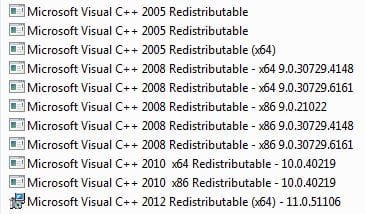
In other words different software, program, will use different versions of Visual C++, see my list.

C++.JPG
 

My Computer

Computer type
PC/Desktop
Computer Manufacturer/Model Number
Home Built Desktop By DataTech
OS
Windows 7 Ultimate X64 SP1
CPU
Intel i5-2550K, Differing ~4.4-4.8GHz No built in GPU
Motherboard
ASUS P8Z68-V PRO/GEN3
Memory
16GB G.Skill Sniper 1866MHz @ 2133MHz 2x8GB
Graphics Card(s)
ASUS GTX650TIB-DC2OC-2GD5, (650TI Boost)
Sound Card
Onboard Realtek 5-1
Monitor(s) Displays
Samsung P2570HD
Screen Resolution
1920x1080
Hard Drives
Samsung 840 Pro 256GB SSD for OS, 500GB Seagate Constellation (Enterprise drive) for Data
PSU
Corsair HX650W
Case
Inwin Dragon Rider
Cooling
Hyper 212 EVO w/two Noctua fans, push-pull, @1300 RPM
Keyboard
E-Z Eyes, bright yellow keys with large characters
Mouse
steelseries SENSEI Laser Pro Gaming
Internet Speed
48-51Mbs Mbs down, 11 Mbs up Xfinity Cable
Antivirus
Norton Internet Security 2013
Browser
IE 10, Opera, Pale Moon if needed
Other Info
4 case fans, LG BluRay-RE, ASUS DVD-RW, Mr. Fusion power supply, 1.21 gigawatts.
Thank you Alejandro and Britton.

I think you can't have not seen that my Windows 7 is x64 and I must believe what you wrote, but then I wonder why a program running on my machine would have to use a x86 version of a Visual C++ version. I'd like to understand the reason why.


I also wonder how do I know which year version of Visual C++ I need.
Must I install Visual C++ 2005 that is n't on my machine.
In case a program needs one precise Visual C++ version, will a warning and information be displayed ?


I also wonder why in the list of Britton, there are
two Visual C++ 2008 x64 with different numbers
three Visual C++ x86 vesrions with different numbers,
two Visual C++ 2005 versions without bit version and numbers

Thank you
 

My Computer

Computer type
Laptop
Computer Manufacturer/Model Number
Toshiba
OS
Windows 7 Professional 64 bits
CPU
i5 Haswell
Memory
4 GB
Hard Drives
SSD 128 GB
The x86 version of the C++ runtimes are necessary for 32 bit applications, as are the 64 bit versions for 64 bit applications.

The virtually identical user interface tends to hide the fact that internally 32 bit and 64 bit operating systems are very different. As are 32 bit and 64 bit applications. 64 bit systems do not have an automatic ability to run 32 bit applications, it is something that must be specifically built in. A 64 bit OS must provide an artificial environment for 32 bit applications that is very different than that for native applications. 32 bit Visual C++ applications must use the 32 bit runtimes. The 64 bit runtimes are totally alien and unusable.

Visual C++ versions are complex.Unless you are a real expert, and you don't become one just by reading forum posts, the only safe thing to do is keep them all.
 

My Computer

Computer type
PC/Desktop
Computer Manufacturer/Model Number
HP
OS
Windows 7 Pro 64 bit
CPU
Xeon W3520
Memory
8 GB
Graphics Card(s)
Nvidia Geforce 210
One in my case is MS Streets and Trips which is a 32 bit program so needs it. w7 64 bit has a special folder, Syswow, which is Windows on Windows so 32 bit software will execute in a 64 bit system.
 

My Computer

Computer type
PC/Desktop
Computer Manufacturer/Model Number
Home Built Desktop By DataTech
OS
Windows 7 Ultimate X64 SP1
CPU
Intel i5-2550K, Differing ~4.4-4.8GHz No built in GPU
Motherboard
ASUS P8Z68-V PRO/GEN3
Memory
16GB G.Skill Sniper 1866MHz @ 2133MHz 2x8GB
Graphics Card(s)
ASUS GTX650TIB-DC2OC-2GD5, (650TI Boost)
Sound Card
Onboard Realtek 5-1
Monitor(s) Displays
Samsung P2570HD
Screen Resolution
1920x1080
Hard Drives
Samsung 840 Pro 256GB SSD for OS, 500GB Seagate Constellation (Enterprise drive) for Data
PSU
Corsair HX650W
Case
Inwin Dragon Rider
Cooling
Hyper 212 EVO w/two Noctua fans, push-pull, @1300 RPM
Keyboard
E-Z Eyes, bright yellow keys with large characters
Mouse
steelseries SENSEI Laser Pro Gaming
Internet Speed
48-51Mbs Mbs down, 11 Mbs up Xfinity Cable
Antivirus
Norton Internet Security 2013
Browser
IE 10, Opera, Pale Moon if needed
Other Info
4 case fans, LG BluRay-RE, ASUS DVD-RW, Mr. Fusion power supply, 1.21 gigawatts.
Back
Top