
Visual Display Glitch!

Faithful1

New member
Local time
8:28 AM
Messages
13
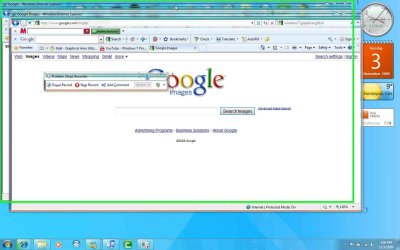
Ever since I have installed Windows 7 onto my Dell Studio Notebook, I have come across a visual problem, now I did not have this in Vista prior to installing Windows 7, but I have a screen shot as to what the visual problem is, it goes like that very frequent, with the more and more windows i open up, internet explorer etc...I've been told this is a driver issue, can anyone confirm or help out?
 

Attachments
  • display problems.jpg
    display problems.jpg
    95.4 KB · Views: 384

My Computer

Computer Manufacturer/Model Number
Dell Studio 1737 Laptop
OS
Windows 7
Memory
230 gbs/ 3 gb ram
Hard Drives
230 gb
That's a driver issue. Open up device manager. type dev in the start menu, and look for your gpu, then download the newest driver direct from the manufacturer.
 

My Computer

Computer Manufacturer/Model Number
Sony Vaio Z46GDU
OS
Windows 7 Ultimate x86-64
CPU
[email protected] 1066MHz FSB
Motherboard
Sony branded
Memory
6GB DDR3 1066MHz
Graphics Card(s)
9300M GS 256MB Dedicated (Speed) + Intel4500MHD (Stamina)
Sound Card
Realtek HD Audio
Monitor(s) Displays
13.1' WXGA
Screen Resolution
1600x900
Hard Drives
320GB 7200RPM w/ 16MB cache
Internet Speed
1MB/s
ok

Is that my Mobile Intel (R) 4 series Express Chipset Family? ifso, then it says that its upto date :confused:
 

My Computer

Computer Manufacturer/Model Number
Dell Studio 1737 Laptop
OS
Windows 7
Memory
230 gbs/ 3 gb ram
Hard Drives
230 gb
Go to the intel website and let the add-on install in IE8. Then it will recommend drivers if your's are outdated. Integrated performance is pretty poor with Aero, what is your subscore for the 2 graphics categories?
 

My Computer

Computer Manufacturer/Model Number
Sony Vaio Z46GDU
OS
Windows 7 Ultimate x86-64
CPU
[email protected] 1066MHz FSB
Motherboard
Sony branded
Memory
6GB DDR3 1066MHz
Graphics Card(s)
9300M GS 256MB Dedicated (Speed) + Intel4500MHD (Stamina)
Sound Card
Realtek HD Audio
Monitor(s) Displays
13.1' WXGA
Screen Resolution
1600x900
Hard Drives
320GB 7200RPM w/ 16MB cache
Internet Speed
1MB/s
3.7 for Desktop performance for windows aero
is that good or bad?
 

My Computer

Computer Manufacturer/Model Number
Dell Studio 1737 Laptop
OS
Windows 7
Memory
230 gbs/ 3 gb ram
Hard Drives
230 gb
For that card, its OK. The higher, the better. That is roughly average. Have you got the newest drivers?
 

My Computer

Computer Manufacturer/Model Number
Sony Vaio Z46GDU
OS
Windows 7 Ultimate x86-64
CPU
[email protected] 1066MHz FSB
Motherboard
Sony branded
Memory
6GB DDR3 1066MHz
Graphics Card(s)
9300M GS 256MB Dedicated (Speed) + Intel4500MHD (Stamina)
Sound Card
Realtek HD Audio
Monitor(s) Displays
13.1' WXGA
Screen Resolution
1600x900
Hard Drives
320GB 7200RPM w/ 16MB cache
Internet Speed
1MB/s
yeah i have a driver update program that notify's me if my drivers are out of date, and also, when i check properties of my my intel chipset driver, and click on upgrade, it says that it doesnt need anymore upgrading, or its the best one out.
 

My Computer

Computer Manufacturer/Model Number
Dell Studio 1737 Laptop
OS
Windows 7
Memory
230 gbs/ 3 gb ram
Hard Drives
230 gb
Don't use driver update programs. They are using. Visit the Intel web site.
 

My Computer

Computer Manufacturer/Model Number
Sony Vaio Z46GDU
OS
Windows 7 Ultimate x86-64
CPU
[email protected] 1066MHz FSB
Motherboard
Sony branded
Memory
6GB DDR3 1066MHz
Graphics Card(s)
9300M GS 256MB Dedicated (Speed) + Intel4500MHD (Stamina)
Sound Card
Realtek HD Audio
Monitor(s) Displays
13.1' WXGA
Screen Resolution
1600x900
Hard Drives
320GB 7200RPM w/ 16MB cache
Internet Speed
1MB/s

My Computer

Computer Manufacturer/Model Number
self built
OS
7600.20510 x86
CPU
P4 550 3.4 GHz HT running at 3.5 GHz
Motherboard
MSI PM8M3-V (MS-7211 v1.x) Micro-ATX mainboard
Memory
OCZ 2 GB(2x1GB) DDR400mHz running @ 414 mHz
Graphics Card(s)
HIS Radeon HD 3850 IceQ 3 Turbo HDMI Dual DL-DVI AGP
Sound Card
MOTU Traveler firewire studio interface 192 kHz 24 bit
Monitor(s) Displays
22" widescreen Acer X223W LCD, 17" Compaq P75 CRT
Screen Resolution
1680x1050 and 1280x1024
Hard Drives
SATA I x2 WD, 400 GB and 120 GB, SATA 2 WD Caviar Black 1 TB
PSU
350W generic
Case
Cybertronpc, it glows blue
Cooling
stock cpu fan, Ice-Q 3 gpu and system, many case fans
Keyboard
Logitch Classical Keyboard 200
Mouse
Logitech Mediaplay cordless
Internet Speed
1792/448 kbits/sec
Other Info
SATA II PCI fake RAID adapter, 1 GB Readyboost, original ATI Remote Wonder (even works with WMC perfectly), Logitech Rumblepad 2 game controller x2
I've been having the exact same problem. I've tried updating my drivers through the Device Manager and also through Intel's site. I have a Mobile Intel 4 Series Express Chipset Family. I've rebooted multiple times, lowered my resolution and none of this works. I still am getting the same sort of visual glitches. Has anyone found a solution to this problem?
 

My Computer

Computer Manufacturer/Model Number
Windows 7
OS
Windows 7
CPU
Intel Core 2 Duo CPU T5800 @ 2.00 GHz
Memory
3.00 GB
Graphics Card(s)
Mobile Intel 4 Series Express Chipset Family

My Computer

Computer Manufacturer/Model Number
self built
OS
7600.20510 x86
CPU
P4 550 3.4 GHz HT running at 3.5 GHz
Motherboard
MSI PM8M3-V (MS-7211 v1.x) Micro-ATX mainboard
Memory
OCZ 2 GB(2x1GB) DDR400mHz running @ 414 mHz
Graphics Card(s)
HIS Radeon HD 3850 IceQ 3 Turbo HDMI Dual DL-DVI AGP
Sound Card
MOTU Traveler firewire studio interface 192 kHz 24 bit
Monitor(s) Displays
22" widescreen Acer X223W LCD, 17" Compaq P75 CRT
Screen Resolution
1680x1050 and 1280x1024
Hard Drives
SATA I x2 WD, 400 GB and 120 GB, SATA 2 WD Caviar Black 1 TB
PSU
350W generic
Case
Cybertronpc, it glows blue
Cooling
stock cpu fan, Ice-Q 3 gpu and system, many case fans
Keyboard
Logitch Classical Keyboard 200
Mouse
Logitech Mediaplay cordless
Internet Speed
1792/448 kbits/sec
Other Info
SATA II PCI fake RAID adapter, 1 GB Readyboost, original ATI Remote Wonder (even works with WMC perfectly), Logitech Rumblepad 2 game controller x2
So if I install that will it clear up my display problems? I'm downloading it as we speak.
 

My Computer

Computer Manufacturer/Model Number
Dell Studio 1737 Laptop
OS
Windows 7
Memory
230 gbs/ 3 gb ram
Hard Drives
230 gb
It should.
 

My Computer

Computer Manufacturer/Model Number
self built
OS
7600.20510 x86
CPU
P4 550 3.4 GHz HT running at 3.5 GHz
Motherboard
MSI PM8M3-V (MS-7211 v1.x) Micro-ATX mainboard
Memory
OCZ 2 GB(2x1GB) DDR400mHz running @ 414 mHz
Graphics Card(s)
HIS Radeon HD 3850 IceQ 3 Turbo HDMI Dual DL-DVI AGP
Sound Card
MOTU Traveler firewire studio interface 192 kHz 24 bit
Monitor(s) Displays
22" widescreen Acer X223W LCD, 17" Compaq P75 CRT
Screen Resolution
1680x1050 and 1280x1024
Hard Drives
SATA I x2 WD, 400 GB and 120 GB, SATA 2 WD Caviar Black 1 TB
PSU
350W generic
Case
Cybertronpc, it glows blue
Cooling
stock cpu fan, Ice-Q 3 gpu and system, many case fans
Keyboard
Logitch Classical Keyboard 200
Mouse
Logitech Mediaplay cordless
Internet Speed
1792/448 kbits/sec
Other Info
SATA II PCI fake RAID adapter, 1 GB Readyboost, original ATI Remote Wonder (even works with WMC perfectly), Logitech Rumblepad 2 game controller x2
is there anything i need to do after it installs? or will it automatically clear up? sorry if im sounding like such a noob lol
 

My Computer

Computer Manufacturer/Model Number
Dell Studio 1737 Laptop
OS
Windows 7
Memory
230 gbs/ 3 gb ram
Hard Drives
230 gb

My Computer

Computer Manufacturer/Model Number
Windows 7
OS
Windows 7
CPU
Intel Core 2 Duo CPU T5800 @ 2.00 GHz
Memory
3.00 GB
Graphics Card(s)
Mobile Intel 4 Series Express Chipset Family
My graphics subscore was 3.9 (just an FYI). I know my card isn't anything special but it shouldn't be affecting it too much.
 

My Computer

Computer Manufacturer/Model Number
Windows 7
OS
Windows 7
CPU
Intel Core 2 Duo CPU T5800 @ 2.00 GHz
Memory
3.00 GB
Graphics Card(s)
Mobile Intel 4 Series Express Chipset Family
Yeah I've never had this problem with Vista, just as soon as I installed Windows 7 this started to happen, and i've been tryna fix it ever since, and I just installed that intel driver you linked, and i'll know in abit if it worked, cause it takes a short while for it to get all glitchy, as soon as it does, i'll let you guys know.
 

My Computer

Computer Manufacturer/Model Number
Dell Studio 1737 Laptop
OS
Windows 7
Memory
230 gbs/ 3 gb ram
Hard Drives
230 gb
Same here Faithful1. The problem you're having sounds identical to mine. I had 2 monitors hooked up and tried using just one, but that still didn't help the problem. I never had an issue with Vista Home Premium (using Aero), but after installing Windows 7 Today I've had the problem all day, even after installing the driver.
 

My Computer

Computer Manufacturer/Model Number
Windows 7
OS
Windows 7
CPU
Intel Core 2 Duo CPU T5800 @ 2.00 GHz
Memory
3.00 GB
Graphics Card(s)
Mobile Intel 4 Series Express Chipset Family
Yeah i've had the problem ever since I installed 7 a couple days ago, when i have alot of windows opened up and/programs running, the screens would glitch up, look blurry n stuff, as it shows in my screen shot. so far so good after I installed that intel driver, but its still early, the glitch might kick in soon, hope not tho lol so your problems identical to mine jBlangston?
 

My Computer

Computer Manufacturer/Model Number
Dell Studio 1737 Laptop
OS
Windows 7
Memory
230 gbs/ 3 gb ram
Hard Drives
230 gb
nope, it didn't help, some programs still go all scetchy, is there any other ways to fix this problem? anyones help will be appreciated. I just want to get this fixed.
 

My Computer

Computer Manufacturer/Model Number
Dell Studio 1737 Laptop
OS
Windows 7
Memory
230 gbs/ 3 gb ram
Hard Drives
230 gb
Back
Top