
Solved visual studio .NET 2003 -- compatibility problem

dale5351

New member
Member
Local time
11:39 AM
Messages
74
Location
Columbia, MD
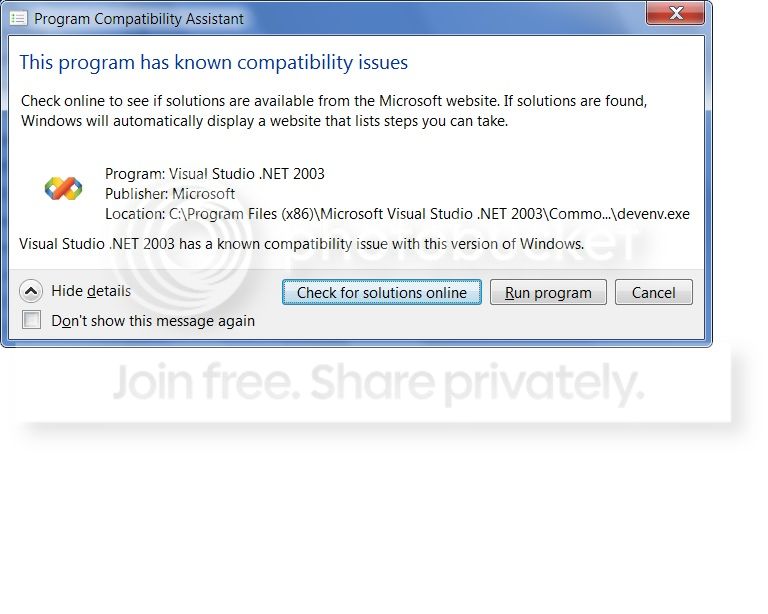
I have just installed this program suite onto my new WIN 7 Pro (64bit). I get a message that it has compatibility problems.

I only want to use it to develop and run console type applications on my computer. I have a considerable library of old projects I have written, and would like to continue using the same environment *IF* possible.

I did a test build of one of my programs, and every thing seemed to compile, build and run without any errors or warnings.

Does any one know what compatibility problems the install might be refering to? When or if they would rise up and bite me?
 

My Computer

Computer type
PC/Desktop
Computer Manufacturer/Model Number
DELL xps8500
OS
Microsoft Windows 7 Professional 64-bit 7601 Multiprocessor Free Service Pack 1
CPU
Intel(R) Core(TM) i7-3770 CPU @ 3.40GHz
Motherboard
Dell Inc. 0NW73C
Memory
16.00 GB
Graphics Card(s)
NVIDIA GeForce GT 620
Sound Card
(1) NVIDIA High Definition Audio (2) Realtek High Definiti
Screen Resolution
1280 x 1024 x 32 bits (4294967296 colors) @ 60 Hz
Hard Drives
(1) WDC WD10EZEX-75ZF5A0 (2) Generic- Compact Flash USB Device (3) Generic- MS/MS-Pro USB Device (4) Generic- SD/MMC USB Device (5) Generic- SM/xD-Picture USB Device (6) WD My Passport 0820 USB Device

My Computer

Computer type
PC/Desktop
OS
Windows 10 Home x64
CPU
INTEL Core i5-750 Quad-Core 3.37GHz
Motherboard
ASUS P7P55D
Memory
HyperX Fury Black Series 8GB (2 x 4GB) 1866Mhz
Graphics Card(s)
EVGA GeForce GTX 750 Superclocked 1GB 128-Bit GDDR5
Monitor(s) Displays
LG 32MA68HY 32" IPS
Screen Resolution
1920 x 1080
Hard Drives
Samsung 840 Evo 120GB, SEAGATE 500GB Barracuda® 7200.12, SATA 3 Gb/s, 7200 RPM, 16MB cache
PSU
ANTEC TruePower New TP-550, 80 PLUS, 550W
Case
ANTEC Three Hundred Illusion
Cooling
COOLER MASTER Hyper 212 Plus, 4 x 120mm 1 x 140mm Noctua's
Internet Speed
85 + Mbps
Antivirus
Avast
Browser
Vivaldi
I get the error message every time I run the program. It seems to run ok -- at least for the things I want which is to compile executable console programs.


How does one "install in compatibility mode"?

Here is the error message:
error_zps2ac11985.jpg
 

My Computer

Computer type
PC/Desktop
Computer Manufacturer/Model Number
DELL xps8500
OS
Microsoft Windows 7 Professional 64-bit 7601 Multiprocessor Free Service Pack 1
CPU
Intel(R) Core(TM) i7-3770 CPU @ 3.40GHz
Motherboard
Dell Inc. 0NW73C
Memory
16.00 GB
Graphics Card(s)
NVIDIA GeForce GT 620
Sound Card
(1) NVIDIA High Definition Audio (2) Realtek High Definiti
Screen Resolution
1280 x 1024 x 32 bits (4294967296 colors) @ 60 Hz
Hard Drives
(1) WDC WD10EZEX-75ZF5A0 (2) Generic- Compact Flash USB Device (3) Generic- MS/MS-Pro USB Device (4) Generic- SD/MMC USB Device (5) Generic- SM/xD-Picture USB Device (6) WD My Passport 0820 USB Device
Ahhh, I see. It is not supported for Windows 7. But apparently it will run, but give you that box each time. You can prevent it by clicking the Don't show this message again, and setting the shortcut to always run as administrator. I found this page that has some good info for you.

Visual Studio .NET 2003 and Windows 7 can get along – Seriously… | Technikhil Writing

Looks like you should be OK as long as you are able to load your projects, but is suggested to run the program in XP Mode instead.

http://www.sevenforums.com/tutorials/8247-windows-xp-mode-install-setup.html

A Guy
 

My Computer

Computer type
PC/Desktop
OS
Windows 10 Home x64
CPU
INTEL Core i5-750 Quad-Core 3.37GHz
Motherboard
ASUS P7P55D
Memory
HyperX Fury Black Series 8GB (2 x 4GB) 1866Mhz
Graphics Card(s)
EVGA GeForce GTX 750 Superclocked 1GB 128-Bit GDDR5
Monitor(s) Displays
LG 32MA68HY 32" IPS
Screen Resolution
1920 x 1080
Hard Drives
Samsung 840 Evo 120GB, SEAGATE 500GB Barracuda® 7200.12, SATA 3 Gb/s, 7200 RPM, 16MB cache
PSU
ANTEC TruePower New TP-550, 80 PLUS, 550W
Case
ANTEC Three Hundred Illusion
Cooling
COOLER MASTER Hyper 212 Plus, 4 x 120mm 1 x 140mm Noctua's
Internet Speed
85 + Mbps
Antivirus
Avast
Browser
Vivaldi
Thanks for the response, and the link to that article. It seems as most, if not all, the problems discussed relate to creating web projects. Since I am not going to be doing that, but only creating console applications to run on my own computer, it seems as if I might be ok.

I don't run it from a shortcut, but usually from clicking on a *.vprocj file or *.sln file -- either of which open up VS 2003 on that particular project.

I'll try to live with it -- if push comes to shove, I can always install it in the XP Mode virtual window, but would prefer running it in Win7 directly.

I'll mark this thread as solved, thanks to your help and info.
 

My Computer

Computer type
PC/Desktop
Computer Manufacturer/Model Number
DELL xps8500
OS
Microsoft Windows 7 Professional 64-bit 7601 Multiprocessor Free Service Pack 1
CPU
Intel(R) Core(TM) i7-3770 CPU @ 3.40GHz
Motherboard
Dell Inc. 0NW73C
Memory
16.00 GB
Graphics Card(s)
NVIDIA GeForce GT 620
Sound Card
(1) NVIDIA High Definition Audio (2) Realtek High Definiti
Screen Resolution
1280 x 1024 x 32 bits (4294967296 colors) @ 60 Hz
Hard Drives
(1) WDC WD10EZEX-75ZF5A0 (2) Generic- Compact Flash USB Device (3) Generic- MS/MS-Pro USB Device (4) Generic- SD/MMC USB Device (5) Generic- SM/xD-Picture USB Device (6) WD My Passport 0820 USB Device
Glad we could help. Have a Happy Holidays ;)

A Guy
 

My Computer

Computer type
PC/Desktop
OS
Windows 10 Home x64
CPU
INTEL Core i5-750 Quad-Core 3.37GHz
Motherboard
ASUS P7P55D
Memory
HyperX Fury Black Series 8GB (2 x 4GB) 1866Mhz
Graphics Card(s)
EVGA GeForce GTX 750 Superclocked 1GB 128-Bit GDDR5
Monitor(s) Displays
LG 32MA68HY 32" IPS
Screen Resolution
1920 x 1080
Hard Drives
Samsung 840 Evo 120GB, SEAGATE 500GB Barracuda® 7200.12, SATA 3 Gb/s, 7200 RPM, 16MB cache
PSU
ANTEC TruePower New TP-550, 80 PLUS, 550W
Case
ANTEC Three Hundred Illusion
Cooling
COOLER MASTER Hyper 212 Plus, 4 x 120mm 1 x 140mm Noctua's
Internet Speed
85 + Mbps
Antivirus
Avast
Browser
Vivaldi
Back
Top