VLC 1.0.0 Released

jblazea50

New member
For those who uses VLC, here's the latest release.

VideoLAN - Open Source multimedia and streaming solutions for every OS!

New Features:
Free, Open Source and cross-platform
Independant of systems codecs to support most video types
Live recording
Instant pausing and Frame-by-Frame support
Finer speed controls
New HD codecs (AES3, Dolby Digital Plus, TrueHD, Blu-Ray Linear PCM, Real Video 3.0 and 4.0, ...)
New formats (Raw Dirac, M2TS, ...) and major improvements in many formats...
New Dirac encoder and MP3 fixed-point encoder
Video scaling in fullscreen
RTSP Trickplay support
Zipped file playback
Customizable toolbars
Easier encoding GUI in Qt interface
Better integration in Gtk environments
MTP devices on linux
AirTunes streaming
New skin for the skins2 interface

VideoLAN - Download from mirror
or
VideoLAN - Download from mirror
or
VideoLAN - Download from mirror
 

My Computer

OS
Windows 7
CPU
AMD Phenom 9950 Quad Core
Motherboard
Gigabyte GA-MA78GM-US2H
Memory
4gb
Graphics Card(s)
ATI Radeon HD 3200
Sound Card
Realtek HD Audio
Hard Drives
Seagate 500GB 32MB cache 7200 RPM 3.5" Barracuda
PSU
Stealth X Stream 500W
Case
Xion Solaris
Cooling
G-Power Lite Cooler (GH-PDU22-SC)
Internet Speed
20/5
Thanks for the notice and have downloaded. However I still have the pixelation problem.
 

My Computer

Computer Manufacturer/Model Number
self built
OS
Windows 7 Professional 64-bit
CPU
Intel E8400 3GHz
Motherboard
Intel DX48BT2
Memory
Kingston PC3-10700H 4Gb
Graphics Card(s)
XFX Radeon HD 5850 BlackEd.
Sound Card
Asus Xonar DG
Monitor(s) Displays
2x Samsung SM-T220HD 22"
Screen Resolution
1680x1050 on two monitors
Hard Drives
OCZ Vertex 2 120gb 3.5" (OS)
Seagate Momentus XT 500gb
Samsung F3 1Tb (games)
2x Samsung F1 1Tb
PSU
Thermaltake ToughPower 850w
Case
Thermaltake Armor
Cooling
Scythe Mugen II
Keyboard
Microsoft Comfort Curve USB
Mouse
Razer Diamondback 3G
Internet Speed
8128/443
Thanks for the notice and have downloaded. However I still have the pixelation problem.

Yer I still have that pixelation issue aswell, its quite annoying at times especially as we know VLC is probably the best player out there.
 

My Computer

Computer Manufacturer/Model Number
Custom Assembled
OS
Windows 7 Build 7600.16385 (Clean Install)
CPU
AMD Black Edition AMD Phenom X3 8750 / 2.4 GHz processor
Motherboard
Gigabyte GA-MA78GM-S2H 780G Socket AM2+ onboard VGA 8 channe
Memory
Kingston 4GB (4x1GB) DDR2 1066MHz/PC2-8500 Hyperx Memory
Graphics Card(s)
Intergrated ATI HD3200
Sound Card
Realtek High Definition Audio
Monitor(s) Displays
Acer 19"
Screen Resolution
1280 x 1024
Hard Drives
2 x Maxtor STM3250310AS 250GB SATAII 7200rpm 8MB Cache

3 x 500gb Seagate External HDD
PSU
CM eXtreme Power 460W PSU
Case
Coolermaster Elite 330 Black Case
Keyboard
Zippy Multimedia
Mouse
Logitech MX™518 Gaming-Grade Optical Mouse
Internet Speed
8Mbps down / 1Mbps up
Other Info
I haz floppyz
Its annoying that they have turned their forums off. I guess their overloaded today.
 

My Computer

Computer Manufacturer/Model Number
self built
OS
Windows 7 Professional 64-bit
CPU
Intel E8400 3GHz
Motherboard
Intel DX48BT2
Memory
Kingston PC3-10700H 4Gb
Graphics Card(s)
XFX Radeon HD 5850 BlackEd.
Sound Card
Asus Xonar DG
Monitor(s) Displays
2x Samsung SM-T220HD 22"
Screen Resolution
1680x1050 on two monitors
Hard Drives
OCZ Vertex 2 120gb 3.5" (OS)
Seagate Momentus XT 500gb
Samsung F3 1Tb (games)
2x Samsung F1 1Tb
PSU
Thermaltake ToughPower 850w
Case
Thermaltake Armor
Cooling
Scythe Mugen II
Keyboard
Microsoft Comfort Curve USB
Mouse
Razer Diamondback 3G
Internet Speed
8128/443
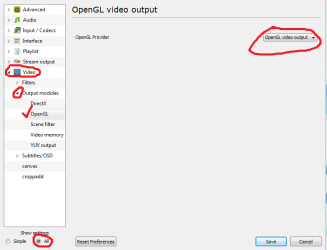
to fix the pixel issue, try this and see if it works (got it from another forum, although i don't have any issue with the pixels)

Go to tools-->preferences-->show settings ALL-->expand Video-->expand Output Modules-->OpenGL and set it to OpenGL Video Output instead of default
 

Attachments

  • Capture.PNG
    Capture.PNG
    41.5 KB · Views: 224

My Computer

OS
Windows 7
CPU
AMD Phenom 9950 Quad Core
Motherboard
Gigabyte GA-MA78GM-US2H
Memory
4gb
Graphics Card(s)
ATI Radeon HD 3200
Sound Card
Realtek HD Audio
Hard Drives
Seagate 500GB 32MB cache 7200 RPM 3.5" Barracuda
PSU
Stealth X Stream 500W
Case
Xion Solaris
Cooling
G-Power Lite Cooler (GH-PDU22-SC)
Internet Speed
20/5
Thanks for the suggestion, unfortunately its still pixelated.
 

My Computer

Computer Manufacturer/Model Number
self built
OS
Windows 7 Professional 64-bit
CPU
Intel E8400 3GHz
Motherboard
Intel DX48BT2
Memory
Kingston PC3-10700H 4Gb
Graphics Card(s)
XFX Radeon HD 5850 BlackEd.
Sound Card
Asus Xonar DG
Monitor(s) Displays
2x Samsung SM-T220HD 22"
Screen Resolution
1680x1050 on two monitors
Hard Drives
OCZ Vertex 2 120gb 3.5" (OS)
Seagate Momentus XT 500gb
Samsung F3 1Tb (games)
2x Samsung F1 1Tb
PSU
Thermaltake ToughPower 850w
Case
Thermaltake Armor
Cooling
Scythe Mugen II
Keyboard
Microsoft Comfort Curve USB
Mouse
Razer Diamondback 3G
Internet Speed
8128/443
to fix the pixel issue, try this and see if it works (got it from another forum, although i don't have any issue with the pixels)

Go to tools-->preferences-->show settings ALL-->expand Video-->expand Output Modules-->OpenGL and set it to OpenGL Video Output instead of default

I tried that but had no joy. I added a step and am now a happy camper.

I clicked on "Output Modules" and set that to use OpenGL video output. Previously, even after using your setting, it was set to "Default".

I left enabled what you had specified to set.

But you still get the credit for this, you put me on the right track. :)

Thank you, the pixelation and edge aliasing are now gone in two files I used to test this.

capture_07072009_214134.jpg
 

My Computer

OS
Windows 7
Update

The method I stated above worked with my lesser quality video files but gave me issues with some higher bit rate ones.

As an experiment I switched the output method to DirectX video output and my issues went away.

There is a small tradeoff though. Windows temporarily disables my desktop theme by reverting it to basic as long as the video is playing. But it sets it back when I close The VLC Player.

On the plus side it seems hardware video acceleration is working well with some types of files. With some 1080p files I think it might be working, but not as efficiently as, say, Media Player Classic Home Cinema.

I'm happy with this.
 

My Computer

OS
Windows 7
swarfega, what is this pixelite issue you talk about? is it only with vlc player or happens with other players as well? have you tried GOM player I started using it as a replacement for VLC and it's really good, you can download it from here
 

My Computer

Computer Manufacturer/Model Number
home made
OS
Windows 7 7264x64(main), 7260x86(secendary), XP SP3 Triple Boot
CPU
Intel Core 2 Duo E7400 2.8Mhz
Motherboard
Intel G33 express chipset
Memory
2GB DD2 667
Graphics Card(s)
Intel(R) 82G33 Graphics and Memory Controller Hub
Sound Card
Realtek Built into the G31
Monitor(s) Displays
19"
Screen Resolution
1280x1024
Hard Drives
320GB SATA (Main), 160GB IDE (Backup)
Case
Gigabyte SETTO
Keyboard
Genius
Mouse
Logitech
Internet Speed
1MB Download, 128k Upload
I tried that but had no joy. I added a step and am now a happy camper.

I clicked on "Output Modules" and set that to use OpenGL video output. Previously, even after using your setting, it was set to "Default".

I left enabled what you had specified to set.

But you still get the credit for this, you put me on the right track. :)

Thank you, the pixelation and edge aliasing are now gone in two files I used to test this.

capture_07072009_214134.jpg


Thanks, that sorted it!

swarfega, what is this pixelite issue you talk about? is it only with vlc player or happens with other players as well? have you tried GOM player I started using it as a replacement for VLC and it's really good, you can download it from here

It appeared to be only vlc, WMP was fine.
 

My Computer

Computer Manufacturer/Model Number
self built
OS
Windows 7 Professional 64-bit
CPU
Intel E8400 3GHz
Motherboard
Intel DX48BT2
Memory
Kingston PC3-10700H 4Gb
Graphics Card(s)
XFX Radeon HD 5850 BlackEd.
Sound Card
Asus Xonar DG
Monitor(s) Displays
2x Samsung SM-T220HD 22"
Screen Resolution
1680x1050 on two monitors
Hard Drives
OCZ Vertex 2 120gb 3.5" (OS)
Seagate Momentus XT 500gb
Samsung F3 1Tb (games)
2x Samsung F1 1Tb
PSU
Thermaltake ToughPower 850w
Case
Thermaltake Armor
Cooling
Scythe Mugen II
Keyboard
Microsoft Comfort Curve USB
Mouse
Razer Diamondback 3G
Internet Speed
8128/443
MPC was pixelated too. The solution is to disable all the Internat/Transform filters but leave the AVI one checked, then install an external codec, like ffdshow and no more pixels. I don't know if this works with VLC too. It's however 7 problem not VLC's.
 

My Computer

OS
Win 7 RC 64bit b7229
CPU
Intel Core 2 DUO E8400 3,0Ghz 6Mb STEP E0
Motherboard
ASUS P5Q-E
Memory
TEAM GROUP ELITE DDR2 800 PC8500 (5-5-5-15) 2*2GB
Graphics Card(s)
Club3D ATI HD4850 Acrtic Cooling Ed. 512Mb 256Bit GDDR-3
Sound Card
Sound Blaster Audigy 2ZS
Monitor(s) Displays
LG 22" W2252TQ 2Ms 10000:1 DVI
Screen Resolution
1680X1050
Hard Drives
WD SATA2 400GB
Maxtor SATA2 500GB
Samsung SATA2 250GB
PSU
Top Silent ATX 560W
Case
ThermalTake Tsunami Dream
Cooling
Zalman CNPS 9700 NT
Keyboard
Trust Slim
Mouse
Razer Copperhead 2000 DPI
Internet Speed
8mbps
how do you disable all the Internat/Transform filters?
 

My Computer

Computer Manufacturer/Model Number
self built
OS
Windows 7 Professional 64-bit
CPU
Intel E8400 3GHz
Motherboard
Intel DX48BT2
Memory
Kingston PC3-10700H 4Gb
Graphics Card(s)
XFX Radeon HD 5850 BlackEd.
Sound Card
Asus Xonar DG
Monitor(s) Displays
2x Samsung SM-T220HD 22"
Screen Resolution
1680x1050 on two monitors
Hard Drives
OCZ Vertex 2 120gb 3.5" (OS)
Seagate Momentus XT 500gb
Samsung F3 1Tb (games)
2x Samsung F1 1Tb
PSU
Thermaltake ToughPower 850w
Case
Thermaltake Armor
Cooling
Scythe Mugen II
Keyboard
Microsoft Comfort Curve USB
Mouse
Razer Diamondback 3G
Internet Speed
8128/443
Thanks for the notice and have downloaded. However I still have the pixelation problem.

I had this same problem previously too. I'm using Windows7 and VLC started pixilating on me. All other media players worked fine.

I downloaded the new VLC 1.0.0 Goldeneye then went Tools> Video > change output to 'OpenGL video output'

Restart VLC and it started working fine when I adjust the screen size.
 

My Computer

OS
Windows 7
CPU
AMD Phenom 9850
Motherboard
Asus M3A32 - MVP Deluxe
Memory
8 Gb
Graphics Card(s)
ATI Radeon HD 4870 X2 (R700)
Sound Card
onboard
Monitor(s) Displays
Dual 24"
PSU
Asus 1000w
Case
Antec P900
Cooling
Fan
how do you disable all the Internat/Transform filters?

*Internal, mistyped.

I have no idea in VLC as I mentioned before, but in MPC oyu cna do it throu the options-filters.
 

My Computer

OS
Win 7 RC 64bit b7229
CPU
Intel Core 2 DUO E8400 3,0Ghz 6Mb STEP E0
Motherboard
ASUS P5Q-E
Memory
TEAM GROUP ELITE DDR2 800 PC8500 (5-5-5-15) 2*2GB
Graphics Card(s)
Club3D ATI HD4850 Acrtic Cooling Ed. 512Mb 256Bit GDDR-3
Sound Card
Sound Blaster Audigy 2ZS
Monitor(s) Displays
LG 22" W2252TQ 2Ms 10000:1 DVI
Screen Resolution
1680X1050
Hard Drives
WD SATA2 400GB
Maxtor SATA2 500GB
Samsung SATA2 250GB
PSU
Top Silent ATX 560W
Case
ThermalTake Tsunami Dream
Cooling
Zalman CNPS 9700 NT
Keyboard
Trust Slim
Mouse
Razer Copperhead 2000 DPI
Internet Speed
8mbps
Back
Top