VLC not working

Agrevail

New member
Local time
4:53 AM
Messages
19
Seems I've come across a bug or issue with VLC in 7068 and 7057 64 bit. Or its triggered some response with my system so it doesnt work.

Basically I've been using VLC for all media and for no apparent reason it no longer functions. The vlc process is listed under task manager, and in fact it leeches system resources as it ?struggles? to play a video (which i have to manually shut down else 20%+ of my damn resources are sucked away). VLC opens but refuses to play any video or audio. Windows Media Player works fine.

Tried a full reinstall of vlc, even a system restore to 2 days before the issue started. No luck. When i upgraded from 7057 to 7068, it was working fine again, and then by the next day, not working again. Kinda at a loss. Some association bug? Also, it may be a coincidence but my multimedia keyboard's play/pause buttons stopped working roughly same time (Merc Stealth kb). Wont work with winamp or wmp when it did before. Again, tried reinstall of drivers, programs affected etc. And I DO have the keyboard functionality ticked for winamp aswell.
 

My Computer

OS
Windows Vista SP3 + Windows 7
Working great for me.
 

My Computer

Computer Manufacturer/Model Number
PNY Technologies
OS
Windows 7 Ultimate Build 7100 RC x86/Windows XP SP3 x86 (Dual Boot)
CPU
Intel Pentium Dual CPU E2200 @ 2.20 GHz
Motherboard
PNY Technologies MBM630I7150 1.0
Memory
2GB
Graphics Card(s)
NVIDIA GeForce 9600 GSO
Sound Card
NVIDIA HDMI Audio Device
Monitor(s) Displays
Acer LCD Monitor V223W
Screen Resolution
1680x1050
Hard Drives
WDC WD7500AYPS-01ZKB0 [Hard drive] (750.16 GB)
Keyboard
Gateway
Mouse
Logitech
Internet Speed
DSL
This is one program that I've NEVER had trouble with (including running on Linux systems).

Running fine on W7 X-64 build 7068.

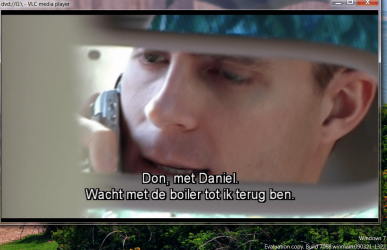
Enc screenshot of DVD working on VLC build X-64 (watching in a Bar at Schipol Airport Amsterdam waiting for my flight).
 

Attachments

  • dvd.png
    dvd.png
    265.8 KB · Views: 201

My Computer

Computer type
PC/Desktop
Computer Manufacturer/Model Number
Custom built, several laptops HP/ASUS
OS
Linux CENTOS 7 / various Windows OS'es and servers
CPU
Intel i7 Intel i5
Memory
8GB, 16GB
Graphics Card(s)
On Motherboard
Sound Card
Realtek HD audio
Monitor(s) Displays
Apple Cinema display, Samsung LCD
Screen Resolution
1920 X 1080
Hard Drives
4 X 1TB SATA
Mouse
Toshiba wireless laser
Internet Speed
> 20MB up
update shows error message. trouble shoot probem with

sh ows error message while updating vlc media player. trouble shoot error probl
 

My Computer

OS
wndows vista basic with 3 2 bit
Vlc Not working

Even I am experiencing the same issue with my Vlc Twoflower (2.0.0) in Widows Vista. But it works fine when I reinstall it. Did you check any other forums?
 

My Computer

Computer Manufacturer/Model Number
Dell Inspiron 1525
OS
Windows Vista Home Premium 32 bit
Gave up on VLC

It worked great for so many years, loved how I could run it off a thumb drive! Anyways, whether it be windows 7 or the last update it doesnt work, had an update about 10 months ago and it stopped..I would have issues with running full screen or it would display a black screen or it would start to stutter..it just became unstable in every imaginable way. I spent months working on it. I did system restores, I uninstalled, reinstalled, I loaded older versions. It wasnt just me...all of a sudden something happened and the ability to play DVD's stopped for my brother, my buddy at work said he suddenly stopped getting sound after an update. I run it on an old xp machine but I give up and had to move on to GOM which works ..I mean it just works. I am no fan of their ads, I feel VLC when it worked was superior, but I am tired of spending so much time wrestling with one program out of 50 and feel the same rumorseful way I did when I finally dropped netscape, adobe, and now VLC. Thanks for the many years of quality free support and what was once the best player you could own.
 

My Computer

Computer type
PC/Desktop
Computer Manufacturer/Model Number
gateway with customization
OS
windows 7 pro X 64
CPU
phenom
Motherboard
asus
Memory
4 gigs
Graphics Card(s)
ATI
Hard Drives
2 tb seagate
Browser
varies
Back
Top