VLC playback blocky/pixelated?

despite its popularity and ease of use, VLC is not a very good player. its internal filters are definitely not the best available, and it tends to smooth the picture too much, causing apparent pixelation for most videos.

for a superior all-in-one solution, try KMplayer. for the best possible video playback (xvid), just install the CCCP codec pack, and use Media Player Classic which comes with it.

if you're dealing with videos encoded with H.264, it's best to purchase CoreAVC and use that with MPC (it's cheap).

Thanks for the suggestions!, ill have a look into each of them :)
 

My Computer

OS
W7 7127 X64
despite its popularity and ease of use, VLC is not a very good player. its internal filters are definitely not the best available, and it tends to smooth the picture too much, causing apparent pixelation for most videos.

for a superior all-in-one solution, try KMplayer. for the best possible video playback (xvid), just install the CCCP codec pack, and use Media Player Classic which comes with it.

if you're dealing with videos encoded with H.264, it's best to purchase CoreAVC and use that with MPC (it's cheap).


Generally speaking vlc is a good player because you need not mess with the havoc of downloading all sorts of codec packs to watch a few differently encoded movies.

As to the CCCP I have had less then satisfactory experiences there, so I will stick to other players.

My video drivers where the ones causing the problems with vlc playback in the first place, I simply went to an older version and no problem.

:p
 

My Computer

OS
Windows 7 Ultimate x64
:sarc: havoc?

what's so hard about installing a few codecs to get good quality playback?

CCCP is basically just ffdshow with a few splitters added for good measure. using ffdshow with MPC gives excellent quality for xvid, mpeg and wmv. if you experienced problems using it, chances are you tried to run it on top of other codec packs like that bloated k-lite rubbish, or you just didn't set it up properly in your player.

i use AC3Filter for audio, it offers a great set of features, including excellent normalization.

Real Alternative and Quicktime Alternative are two others i install, they also work nicely with MPC.

finally, Matroska Splitter (part of CCCP) for videos using the MKV container, and CoreAVC to deal with H.264 playback.

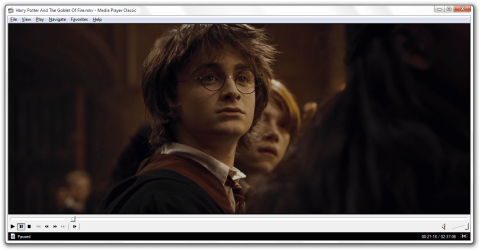
but enough words, let's let these screenshots do the talking :)
 

Attachments

  • 1 VLC.png
    1 VLC.png
    700.7 KB · Views: 2,946
  • 1 MPC.png
    1 MPC.png
    755.4 KB · Views: 2,923

My Computer

OS
7600 x86
CPU
Core 2 Duo e7200, 2.53 ghz
Motherboard
Micro-Star MS-7529
Memory
2x DDR2 PC5300 1gb, 667 mhz
Graphics Card(s)
GeForce 9500gt, 512mb
Monitor(s) Displays
22" LG Flatron w2234s
Screen Resolution
1680x1050
Hard Drives
Excelstor SATA-II 250gb 7200rpm, 8mb cache
PSU
CoolerMaster M520
Internet Speed
30/20 mbits
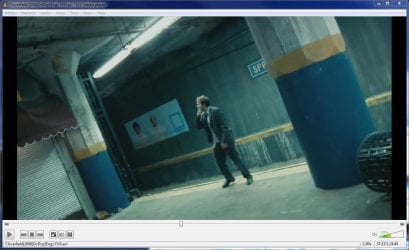
I tested VLC with KMPlayer and you can see the difference from the screenshots below, so I think its clear which is the better quality player:

vlcclover.JPG kmpclover.JPG
 

My Computer

Computer Manufacturer/Model Number
self built
OS
Windows 7 Professional 64-bit
CPU
Intel E8400 3GHz
Motherboard
Intel DX48BT2
Memory
Kingston PC3-10700H 4Gb
Graphics Card(s)
XFX Radeon HD 5850 BlackEd.
Sound Card
Asus Xonar DG
Monitor(s) Displays
2x Samsung SM-T220HD 22"
Screen Resolution
1680x1050 on two monitors
Hard Drives
OCZ Vertex 2 120gb 3.5" (OS)
Seagate Momentus XT 500gb
Samsung F3 1Tb (games)
2x Samsung F1 1Tb
PSU
Thermaltake ToughPower 850w
Case
Thermaltake Armor
Cooling
Scythe Mugen II
Keyboard
Microsoft Comfort Curve USB
Mouse
Razer Diamondback 3G
Internet Speed
8128/443
after installing shark007 codecs and using MPC x64 the result is pixelated as VLC, while it's not with WMP.
 

My Computer

OS
Win 7 RC 64bit b7229
CPU
Intel Core 2 DUO E8400 3,0Ghz 6Mb STEP E0
Motherboard
ASUS P5Q-E
Memory
TEAM GROUP ELITE DDR2 800 PC8500 (5-5-5-15) 2*2GB
Graphics Card(s)
Club3D ATI HD4850 Acrtic Cooling Ed. 512Mb 256Bit GDDR-3
Sound Card
Sound Blaster Audigy 2ZS
Monitor(s) Displays
LG 22" W2252TQ 2Ms 10000:1 DVI
Screen Resolution
1680X1050
Hard Drives
WD SATA2 400GB
Maxtor SATA2 500GB
Samsung SATA2 250GB
PSU
Top Silent ATX 560W
Case
ThermalTake Tsunami Dream
Cooling
Zalman CNPS 9700 NT
Keyboard
Trust Slim
Mouse
Razer Copperhead 2000 DPI
Internet Speed
8mbps

My Computer

Computer Manufacturer/Model Number
Selfbuilt
OS
Windows 7 Ultimate 64bit
CPU
i7 2600k
Motherboard
asus P8Z68-V LE
Memory
16GB (4x4) corsair vengeance
Graphics Card(s)
Intel HD3000 iGPU / AMD HD6870 1024MB
Sound Card
bitstreamed to an Onkyo 609
Monitor(s) Displays
Asus VE278 27" LED / Bravia EX7 60" LED
Screen Resolution
native 1080p x2
Hard Drives
4x 2TB int. + 2x 2TB external and a SSD for the boot drive.
PSU
650w Antec
Case
NZXT tempest evo
Cooling
air/stock
Keyboard
Dell
Mouse
logitech m505
Internet Speed
dual: cable/blackberry tether for travel use
Other Info
BD re-writer //
asus notebook G73Jw
It would be good if all I had to use was WMP but it can't play streamed .nuv files over the network from my mythtv box.

WMP also has less options during playback, like cropping and aspect ratio etc.

I suppose this would be a matter of installing the right codecs but VLC with play anything out of the box where WMP doesn't.

WMP 12 still seems bugged to me. eg. I just went to play an mp4 game trailer and less than a min into the vid wmp encounters a problem and stops playing but VLC plays it all the way through no problem.
 

My Computer

OS
Windows 7 Home Premium x64
CPU
i7 5930K
Motherboard
Asus X99-A
Memory
Corsair Dominator, DDR4 16GB
Graphics Card(s)
EVGA GTX 980 SLI
Sound Card
Onboard Realtek HD
Monitor(s) Displays
Dell U3011
Screen Resolution
2560x1600 (16:10, as god intended)
Hard Drives
Samsung 850 EVO 1TB SSD (Boot OS)
2 x Hitachi 7K3000 2TB (Storage)
PSU
Seasonic 1250W
Case
Corsair 900D
Cooling
Corsair H110 280
Keyboard
Logitech Wireless Illuminated keyboard K800
Mouse
Loigitech M950 Performance
Internet Speed
ADSL 2+
Antivirus
MS SE
Browser
Chrome
oh... VLC

i also was having issues with VLC, if it was a standard def file it would look grainy as can be and look absolutely horrible. the only solution i found was when watching a .mkv format file (12 gig file 2 hr movie) and it looked clear and sharp... for a minute. VLC would skip all over the place and i have radeon 4650 with 1 gig vram so there was no reason for it. i then downloaded and installed GOM player. everything runs smooth, no issues, standard def files sharp... its free too so go with that
 

My Computer

Computer Manufacturer/Model Number
ME
OS
Windows 7 RC 7100
CPU
Intel Core i7 920 @ 3.81 gHz
Motherboard
Asus P6T Deluxe
Memory
9 GB OCZ GOLD @ 1066 mHz
Graphics Card(s)
Radeon HD 4650
Sound Card
Onboard
Monitor(s) Displays
Asus 23"
Screen Resolution
1680 x 1050
Hard Drives
Seagate 7200 RPM 500 GB
PSU
OCZ MOD-X-Treme 700 Watt Modular
Case
Cooler Master 932 HAF
Cooling
Liquid
Keyboard
Logitech G15
Mouse
Logitech MX518
I just tried KMPlayer with internal codecs and it's pixelated too. Anyone has the well working configuration?
 

My Computer

OS
Win 7 RC 64bit b7229
CPU
Intel Core 2 DUO E8400 3,0Ghz 6Mb STEP E0
Motherboard
ASUS P5Q-E
Memory
TEAM GROUP ELITE DDR2 800 PC8500 (5-5-5-15) 2*2GB
Graphics Card(s)
Club3D ATI HD4850 Acrtic Cooling Ed. 512Mb 256Bit GDDR-3
Sound Card
Sound Blaster Audigy 2ZS
Monitor(s) Displays
LG 22" W2252TQ 2Ms 10000:1 DVI
Screen Resolution
1680X1050
Hard Drives
WD SATA2 400GB
Maxtor SATA2 500GB
Samsung SATA2 250GB
PSU
Top Silent ATX 560W
Case
ThermalTake Tsunami Dream
Cooling
Zalman CNPS 9700 NT
Keyboard
Trust Slim
Mouse
Razer Copperhead 2000 DPI
Internet Speed
8mbps
that's really not enough information to troubleshoot.

what's the container/codec of your source?
what splitter/filter have you assigned to that container/codec?
what other players have you tried, and what's the result?
are you certain that the source itself isn't pixelated, and that other players are artificially smoothing the output?
 

My Computer

OS
7600 x86
CPU
Core 2 Duo e7200, 2.53 ghz
Motherboard
Micro-Star MS-7529
Memory
2x DDR2 PC5300 1gb, 667 mhz
Graphics Card(s)
GeForce 9500gt, 512mb
Monitor(s) Displays
22" LG Flatron w2234s
Screen Resolution
1680x1050
Hard Drives
Excelstor SATA-II 250gb 7200rpm, 8mb cache
PSU
CoolerMaster M520
Internet Speed
30/20 mbits
In VLC
Tools-Preferences-Video
set video output to DirectX and pixelation is gone for videos and unfortunately aero transparency too, but it is back when you close VLC. VLC needs an update for compatibility with windows 7 and directx apparently. I don't recall any problems with KMPlayer, I use sharks codecs and WMP for video.
 

My Computer

OS
Windows 7 7232b x64
CPU
Intel Q8300 @ 2500 Mhz
Motherboard
Gigabyte EP45-DS3R
Memory
OCZ 4x2GB DDR2 1066 Mhz
Graphics Card(s)
Palit 512MB 9800GTX+
Sound Card
Realtek HD
Monitor(s) Displays
Samsung T220
Screen Resolution
1680x1050
Hard Drives
WD 500GB 32MB, Samsung 200GB 8MB
PSU
OCZ 600SXS
Case
CoolerMaster Centurion CAC-T05
Cooling
Arctic Cooling Fans
Other Info
Epson v500
that's really not enough information to troubleshoot.

what's the container/codec of your source?
what splitter/filter have you assigned to that container/codec?
what other players have you tried, and what's the result?
are you certain that the source itself isn't pixelated, and that other players are artificially smoothing the output?

KMPlayer codecs are default, didn't touch them.
External codecs are Haali Matroska Splitter, FFdshow Tryouts, AC3Filter.
I tried with WMP and MPC-HC, both working fine. I disabled all the internal codecs in MPC-HC. And yes i'm sure the source isn't pixelated. They are dvdrips mkv 1,4gb each with ac3 audio made by pro users. This is one of the videos info:

FourCC: xvid/XVID
Res: 592 x 320
Frame aspect ratio: 37:20 = 1.85
Pixel aspect ratio: 1:1 = 1
Display aspect ratio: 37:20 = 1.85
Framerate: 25 fps
Frames tot: 174751
Stream size: 769,762,672 bytes
Bitrate: 880.982279 kbps
Qf: 0.186018
Key frames: 2156 (0; 250; 368; 618; 668; ... 174641)
Null frames: 0
Min key int: 1
Max key int: 250
Key int medio: 81.053339
Latency: 0 ms


Res: Medium (592 x 320)
Width: moltip of 16 (GOOD)
Height: moltip of 32 (GOOD)
Quality DRF medium: HIGH (2.742118)
Quality deviation standard: HIGH (0.539778)
Medium dev. std.: HIGH (0.345032)
DO i actually have to use external codecs in KMP?
 

My Computer

OS
Win 7 RC 64bit b7229
CPU
Intel Core 2 DUO E8400 3,0Ghz 6Mb STEP E0
Motherboard
ASUS P5Q-E
Memory
TEAM GROUP ELITE DDR2 800 PC8500 (5-5-5-15) 2*2GB
Graphics Card(s)
Club3D ATI HD4850 Acrtic Cooling Ed. 512Mb 256Bit GDDR-3
Sound Card
Sound Blaster Audigy 2ZS
Monitor(s) Displays
LG 22" W2252TQ 2Ms 10000:1 DVI
Screen Resolution
1680X1050
Hard Drives
WD SATA2 400GB
Maxtor SATA2 500GB
Samsung SATA2 250GB
PSU
Top Silent ATX 560W
Case
ThermalTake Tsunami Dream
Cooling
Zalman CNPS 9700 NT
Keyboard
Trust Slim
Mouse
Razer Copperhead 2000 DPI
Internet Speed
8mbps
if you have not touched the filter sectoin of KMP's options, then Haali Matroska Splitter, FFdshow Tryouts, and AC3Filter are doing absolutely nothing.

even disabling internal filters in MPC won't activate these - you have to manually add them and tell your player when to use them.

video players aren't magical things. they need a lot of tweaking to get set just right so they work properly with your system. this is one of the main reasons i prefer MPC. i use a portable install that keeps settings in a local INI. i keep it on a non-system partition, so when i have to reinstall, i don't lose my settings, which took forever to get just right! i just have to reinstall a Matroska, AC3, ffdshow, and CoreAVC, and i'm good to go.
 

My Computer

OS
7600 x86
CPU
Core 2 Duo e7200, 2.53 ghz
Motherboard
Micro-Star MS-7529
Memory
2x DDR2 PC5300 1gb, 667 mhz
Graphics Card(s)
GeForce 9500gt, 512mb
Monitor(s) Displays
22" LG Flatron w2234s
Screen Resolution
1680x1050
Hard Drives
Excelstor SATA-II 250gb 7200rpm, 8mb cache
PSU
CoolerMaster M520
Internet Speed
30/20 mbits
if you have not touched the filter sectoin of KMP's options, then Haali Matroska Splitter, FFdshow Tryouts, and AC3Filter are doing absolutely nothing.

even disabling internal filters in MPC won't activate these - you have to manually add them and tell your player when to use them.

video players aren't magical things. they need a lot of tweaking to get set just right so they work properly with your system. this is one of the main reasons i prefer MPC. i use a portable install that keeps settings in a local INI. i keep it on a non-system partition, so when i have to reinstall, i don't lose my settings, which took forever to get just right! i just have to reinstall a Matroska, AC3, ffdshow, and CoreAVC, and i'm good to go.

I'm using MPC too, but since a lot of users says KMP is very good and simple, just install and watch. I didn't feel the same. My results are worse than VLC default installation.

Where do i find the INI of mpc-hc? I did look in the AppData folder and Program FIles and there are no INI at all.
 

My Computer

OS
Win 7 RC 64bit b7229
CPU
Intel Core 2 DUO E8400 3,0Ghz 6Mb STEP E0
Motherboard
ASUS P5Q-E
Memory
TEAM GROUP ELITE DDR2 800 PC8500 (5-5-5-15) 2*2GB
Graphics Card(s)
Club3D ATI HD4850 Acrtic Cooling Ed. 512Mb 256Bit GDDR-3
Sound Card
Sound Blaster Audigy 2ZS
Monitor(s) Displays
LG 22" W2252TQ 2Ms 10000:1 DVI
Screen Resolution
1680X1050
Hard Drives
WD SATA2 400GB
Maxtor SATA2 500GB
Samsung SATA2 250GB
PSU
Top Silent ATX 560W
Case
ThermalTake Tsunami Dream
Cooling
Zalman CNPS 9700 NT
Keyboard
Trust Slim
Mouse
Razer Copperhead 2000 DPI
Internet Speed
8mbps
install-and-go systems that rely exclusively on internal filters are ok for most users, but then again, most people are ok watching single dvd rips of 2 hour films encoded by some click-and-go app. VLC tends to perform a lot of smoothing and other post-processing actions to make videos appear smoother, while KMP offer a more authentic output, but neither are ideal right out of the box.

for a portable install of MPC, just go to the options screen, and right there on the first page, right hand column about half-way down, there is an option "Store settings to .ini file". that's all it needs. set that, exit, then you can copy the whole MPC folder to a thumb drive or wherever and keep all the settings intact.
 

My Computer

OS
7600 x86
CPU
Core 2 Duo e7200, 2.53 ghz
Motherboard
Micro-Star MS-7529
Memory
2x DDR2 PC5300 1gb, 667 mhz
Graphics Card(s)
GeForce 9500gt, 512mb
Monitor(s) Displays
22" LG Flatron w2234s
Screen Resolution
1680x1050
Hard Drives
Excelstor SATA-II 250gb 7200rpm, 8mb cache
PSU
CoolerMaster M520
Internet Speed
30/20 mbits
install-and-go systems that rely exclusively on internal filters are ok for most users, but then again, most people are ok watching single dvd rips of 2 hour films encoded by some click-and-go app. VLC tends to perform a lot of smoothing and other post-processing actions to make videos appear smoother, while KMP offer a more authentic output, but neither are ideal right out of the box.

for a portable install of MPC, just go to the options screen, and right there on the first page, right hand column about half-way down, there is an option "Store settings to .ini file". that's all it needs. set that, exit, then you can copy the whole MPC folder to a thumb drive or wherever and keep all the settings intact.


Thank you mate!
 

My Computer

OS
Win 7 RC 64bit b7229
CPU
Intel Core 2 DUO E8400 3,0Ghz 6Mb STEP E0
Motherboard
ASUS P5Q-E
Memory
TEAM GROUP ELITE DDR2 800 PC8500 (5-5-5-15) 2*2GB
Graphics Card(s)
Club3D ATI HD4850 Acrtic Cooling Ed. 512Mb 256Bit GDDR-3
Sound Card
Sound Blaster Audigy 2ZS
Monitor(s) Displays
LG 22" W2252TQ 2Ms 10000:1 DVI
Screen Resolution
1680X1050
Hard Drives
WD SATA2 400GB
Maxtor SATA2 500GB
Samsung SATA2 250GB
PSU
Top Silent ATX 560W
Case
ThermalTake Tsunami Dream
Cooling
Zalman CNPS 9700 NT
Keyboard
Trust Slim
Mouse
Razer Copperhead 2000 DPI
Internet Speed
8mbps
Garbanzo,

I just installed a fresh copy of W7 Ultimate 64bit. On my laptop, I use BS.Player Pro and it plays everything sharp and clear for me with no problems. This time, on my desktop, I decided to go back to VLC and see if the new update had fixed anything. Unfortunately, not.

Now, I went on VLC's settings, turned Video Output from Default to OpenGL, I get no extreme pixelation but the video quality is a lot poorer than that of BS.Player back on my laptop.

My problem with installing something like MPC or BS.Player on the desktop is whenever I install these custom codecs. They screw up big time with my Audio Playback. Last time I installed BS.Player with its codec manager which installed FFDSHOW Video and Audio codecs, My audio got so muffled to the point where I couldn't play any of my movies for the sheer fact that I couldn't hear the audio properly.

I have an SB X-FI 5.1 sound card and having 5.1 playback is key for me. What can I use that would be able to play all my XVID/MKV rips without screwing with my online video playback and my audio channels. I am sick and tired of downloading random codecs and ending up screwing everything altogether.

K-Lite codec pack, wrecked havoc on my computer the last time I installed it. And CCCP installs a bunch of Audio codecs and AC3 filters that screw up my audio big time. How the hell does someone watch videos on Windows 7?

Sorry for my tone, but I'm extremely frustrated with this matter. I wish VLC would just study this matter and fix it. It used to be my favorite player.
 

My Computer

Computer Manufacturer/Model Number
Custom Built
OS
Microsoft Windows 7 Ultimate 64-Bit (Build 7600)
CPU
Core2Quad Q6600 G0 3.60Ghz OC
Motherboard
Gigabyte EP45-UD3R
Memory
4x 1GB Corsair XMS2 800 PC2-6400
Graphics Card(s)
EVGA GeForce GTX 285 1GB 512Bit
Sound Card
Creative X-FI FATAL1TY Gamer Champion Edition
Monitor(s) Displays
2x Samsung SyncMaster 2053BWX
Hard Drives
2x 150GB WD Raptor (RAID0)
4x 500GB SAMSUNG
2x 640GB WD Caviar
PSU
Corsair HX-620
Case
Antec Nine Hundred
Cooling
XIGMATEK Dark Knight
ShazaM

what I would do is un-install all the codecs. they install all sorts of thing we dont even know. Then try vlc (new rev is out). Vlc does play mkv files. there are several threads abt codecs causing problems and solutions for them Just search here at sevenforums

Ken
 

My Computer

Computer Manufacturer/Model Number
HP Pavillion dv-7 1005 Tx
OS
Win 8 Release candidate 8400
CPU
[email protected]
Memory
4 gigs
Graphics Card(s)
Nvidia 9600M
Sound Card
HD built-in
Monitor(s) Displays
17" Wxga
Screen Resolution
1440x900
Cooling
none
Internet Speed
45Mb down 5Mb up
i use gom player seems alot better than vlc these days
 

My Computer

OS
windows 7 RTM
CPU
Q6600 @ 3.9
Motherboard
IP 35-E
Memory
8GB GEIL BLACK DRAGON
Graphics Card(s)
GTX 260-216
Monitor(s) Displays
SAMSUNG T240
Screen Resolution
1920X1200
Hard Drives
2X 500GB
PSU
COOLERMASTER 750 WATT
Case
HAF 932
Cooling
SYTHE MINE
Keyboard
TRUST WIRELESS KEYBOARD
Internet Speed
8 MEG
Combined Community Codec Pack works fine for WMP, also I like media player classic, and vlc is ok for a lot of file codecs, as far as ease of access.
 

My Computer

OS
Windows 7 Ultimate x64
Back
Top