VmWare Issue, WinXP Doesnt Load up

Merty

New member
Local time
7:30 AM
Messages
6
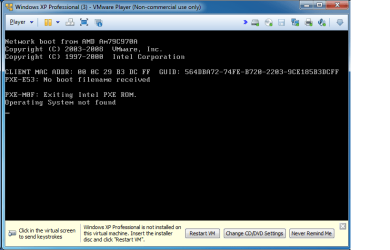
Hi guys i have this issue with VWmare and cant seem to work out how to resolve it can somebody help please? check attachment of screen shot
 

Attachments

  • Untitled.png
    Untitled.png
    16.3 KB · Views: 29

My Computer

Computer Manufacturer/Model Number
Samsung
OS
Windows 7 Ultimate 64Bit
CPU
i3
Hard Drives
SSD
I'm not sure, but It looks like it might be trying to do a network boot.
Is your network working?
 

My Computer

Computer type
PC/Desktop
Computer Manufacturer/Model Number
n/a
OS
W7 Ultimate SP1, LM19.2 MATE, W10 Home 1703, W10 Pro 1703 VM, #All 64 bit
CPU
AMD Phenom II x6 1100T, 3.3 GHz
Motherboard
ASUS M4A88T-M/USB3 (AM3)
Memory
12GB DDR3 1333 G-Skill (4GB x 2), G-Skill (2GB x 2)
Graphics Card(s)
NVIDIA GeForce GTX 660
Sound Card
Realtek?
Monitor(s) Displays
Samsung S23B350
Screen Resolution
1920x1080
Hard Drives
WD Green 2TB (SATA), WD Green 3TB (SATA), WD Blue 4TB (SATA), WD Blue 6TB (SATA)
PSU
Cooler Master
Case
Antec GX300 Tower
Cooling
3x Antec TRICOOL 120mm Fans
Mouse
Wired Optical
Internet Speed
DSL
Antivirus
Avast
Browser
Pale Moon (64 bit)
Other Info
2018-12-27 Upgraded HDDs
2015-12-10 Upgraded case, graphics card, storage
2015-08-15 Upgraded motherboard & RAM
2015-07-15 Upgraded LM17.1 to LM17.2
Yes everything is ok working ok
 

My Computer

Computer Manufacturer/Model Number
Samsung
OS
Windows 7 Ultimate 64Bit
CPU
i3
Hard Drives
SSD
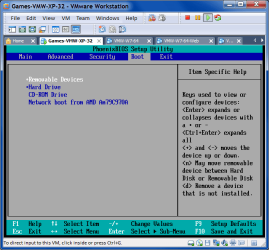
VM BIOS Settings

Are you able to access the VM BIOS settings (it can be tricky)?

Hold the "F2" key when the VM is booting (it may take several attempts due to the load speed).

Make sure your boot order is correct.
VM - BIOS Screen.png
 

My Computer

Computer type
PC/Desktop
Computer Manufacturer/Model Number
n/a
OS
W7 Ultimate SP1, LM19.2 MATE, W10 Home 1703, W10 Pro 1703 VM, #All 64 bit
CPU
AMD Phenom II x6 1100T, 3.3 GHz
Motherboard
ASUS M4A88T-M/USB3 (AM3)
Memory
12GB DDR3 1333 G-Skill (4GB x 2), G-Skill (2GB x 2)
Graphics Card(s)
NVIDIA GeForce GTX 660
Sound Card
Realtek?
Monitor(s) Displays
Samsung S23B350
Screen Resolution
1920x1080
Hard Drives
WD Green 2TB (SATA), WD Green 3TB (SATA), WD Blue 4TB (SATA), WD Blue 6TB (SATA)
PSU
Cooler Master
Case
Antec GX300 Tower
Cooling
3x Antec TRICOOL 120mm Fans
Mouse
Wired Optical
Internet Speed
DSL
Antivirus
Avast
Browser
Pale Moon (64 bit)
Other Info
2018-12-27 Upgraded HDDs
2015-12-10 Upgraded case, graphics card, storage
2015-08-15 Upgraded motherboard & RAM
2015-07-15 Upgraded LM17.1 to LM17.2
It is in the right order
 

My Computer

Computer Manufacturer/Model Number
Samsung
OS
Windows 7 Ultimate 64Bit
CPU
i3
Hard Drives
SSD
Just to confirm, you are trying to do a "Network boot from AMD Am79C970A"?

Will it boot if you set the BIOS to "Hard Drive"?
 

My Computer

Computer type
PC/Desktop
Computer Manufacturer/Model Number
n/a
OS
W7 Ultimate SP1, LM19.2 MATE, W10 Home 1703, W10 Pro 1703 VM, #All 64 bit
CPU
AMD Phenom II x6 1100T, 3.3 GHz
Motherboard
ASUS M4A88T-M/USB3 (AM3)
Memory
12GB DDR3 1333 G-Skill (4GB x 2), G-Skill (2GB x 2)
Graphics Card(s)
NVIDIA GeForce GTX 660
Sound Card
Realtek?
Monitor(s) Displays
Samsung S23B350
Screen Resolution
1920x1080
Hard Drives
WD Green 2TB (SATA), WD Green 3TB (SATA), WD Blue 4TB (SATA), WD Blue 6TB (SATA)
PSU
Cooler Master
Case
Antec GX300 Tower
Cooling
3x Antec TRICOOL 120mm Fans
Mouse
Wired Optical
Internet Speed
DSL
Antivirus
Avast
Browser
Pale Moon (64 bit)
Other Info
2018-12-27 Upgraded HDDs
2015-12-10 Upgraded case, graphics card, storage
2015-08-15 Upgraded motherboard & RAM
2015-07-15 Upgraded LM17.1 to LM17.2
I set it to both and still wont wok
 

My Computer

Computer Manufacturer/Model Number
Samsung
OS
Windows 7 Ultimate 64Bit
CPU
i3
Hard Drives
SSD
Last edited:

My Computer

Computer type
PC/Desktop
Computer Manufacturer/Model Number
n/a
OS
W7 Ultimate SP1, LM19.2 MATE, W10 Home 1703, W10 Pro 1703 VM, #All 64 bit
CPU
AMD Phenom II x6 1100T, 3.3 GHz
Motherboard
ASUS M4A88T-M/USB3 (AM3)
Memory
12GB DDR3 1333 G-Skill (4GB x 2), G-Skill (2GB x 2)
Graphics Card(s)
NVIDIA GeForce GTX 660
Sound Card
Realtek?
Monitor(s) Displays
Samsung S23B350
Screen Resolution
1920x1080
Hard Drives
WD Green 2TB (SATA), WD Green 3TB (SATA), WD Blue 4TB (SATA), WD Blue 6TB (SATA)
PSU
Cooler Master
Case
Antec GX300 Tower
Cooling
3x Antec TRICOOL 120mm Fans
Mouse
Wired Optical
Internet Speed
DSL
Antivirus
Avast
Browser
Pale Moon (64 bit)
Other Info
2018-12-27 Upgraded HDDs
2015-12-10 Upgraded case, graphics card, storage
2015-08-15 Upgraded motherboard & RAM
2015-07-15 Upgraded LM17.1 to LM17.2
There is something wrong with the O/s(xp) so on monday im back at uni ill get the technician who created the vmware for us . Thanks for your advice and help
 

My Computer

Computer Manufacturer/Model Number
Samsung
OS
Windows 7 Ultimate 64Bit
CPU
i3
Hard Drives
SSD
Hi guys i have this issue with VWmare and cant seem to work out how to resolve it can somebody help please? check attachment of screen shot

This one is easy to fix -- this screen simply shows your VM can't find any device which is bootable or has an OS on it.

In other words The VM can't find your boot device.

so

1) Have you actually INSTALLED the Guest OS

2) have you set the Virtual BIOS to boot from the correct device. That's the BIOS you can get when powering on your Guest OS. It's functionally equivalent to the BIOS when starting the MAIN computer

Remember for all intents and purposes a Virtual Machine is a separate computer with its own (Virtual) hardware and Bios.

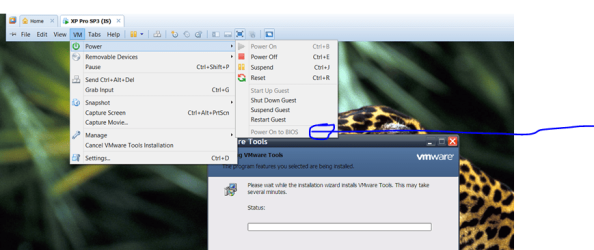
In the vm settings (on the Host machine) you can set the VM to open the Virtual BIOS at the VM's next boot --if you don't do this using the traditional Func key probably won't work as the boot process will start too quickly for you to enter the correct key.

Enc screenshot -- note the option in my screenshot is greyed out here as I'm already in the GUEST OS. If you enable the option BEFORE powering on the guest the option will be available (not greyed out) and you'll boot straight into the virtual BIOS where you can change Boot order of devices etc etc.


Cheers
jimbo
 

Attachments

  • vmbios.png
    vmbios.png
    83.5 KB · Views: 10

My Computer

Computer type
PC/Desktop
Computer Manufacturer/Model Number
Custom built, several laptops HP/ASUS
OS
Linux CENTOS 7 / various Windows OS'es and servers
CPU
Intel i7 Intel i5
Memory
8GB, 16GB
Graphics Card(s)
On Motherboard
Sound Card
Realtek HD audio
Monitor(s) Displays
Apple Cinema display, Samsung LCD
Screen Resolution
1920 X 1080
Hard Drives
4 X 1TB SATA
Mouse
Toshiba wireless laser
Internet Speed
> 20MB up
In the vm settings (on the Host machine) you can set the VM to open the Virtual BIOS at the VM's next boot --if you don't do this using the traditional Func key probably won't work as the boot process will start too quickly for you to enter the correct key.

That setting doesn't appear in my version of VMware Player (v3.1.6 build-744570).
VMware Player - Power 01.png
 

My Computer

Computer type
PC/Desktop
Computer Manufacturer/Model Number
n/a
OS
W7 Ultimate SP1, LM19.2 MATE, W10 Home 1703, W10 Pro 1703 VM, #All 64 bit
CPU
AMD Phenom II x6 1100T, 3.3 GHz
Motherboard
ASUS M4A88T-M/USB3 (AM3)
Memory
12GB DDR3 1333 G-Skill (4GB x 2), G-Skill (2GB x 2)
Graphics Card(s)
NVIDIA GeForce GTX 660
Sound Card
Realtek?
Monitor(s) Displays
Samsung S23B350
Screen Resolution
1920x1080
Hard Drives
WD Green 2TB (SATA), WD Green 3TB (SATA), WD Blue 4TB (SATA), WD Blue 6TB (SATA)
PSU
Cooler Master
Case
Antec GX300 Tower
Cooling
3x Antec TRICOOL 120mm Fans
Mouse
Wired Optical
Internet Speed
DSL
Antivirus
Avast
Browser
Pale Moon (64 bit)
Other Info
2018-12-27 Upgraded HDDs
2015-12-10 Upgraded case, graphics card, storage
2015-08-15 Upgraded motherboard & RAM
2015-07-15 Upgraded LM17.1 to LM17.2
Im gna try and play with it tnyt, a one of mate was suppose to help me by connecting thru Teamviewer but he isnt availabe tonight either. Is anybody able to help via teamviewr?
 

My Computer

Computer Manufacturer/Model Number
Samsung
OS
Windows 7 Ultimate 64Bit
CPU
i3
Hard Drives
SSD
In the vm settings (on the Host machine) you can set the VM to open the Virtual BIOS at the VM's next boot --if you don't do this using the traditional Func key probably won't work as the boot process will start too quickly for you to enter the correct key.

That setting doesn't appear in my version of VMware Player (v3.1.6 build-744570).


Hi there
I thought you were using VMware workstation - - never mind just hold your finger on F2 while you power on the VM -- this *should* bring you into the virtual BIOS and then set your boot device.
Hold your finger on the key while powering on the Guest -- modern CPU's are so fast these days that you probably won't have time to react to the quick prompt screen when powering on the VM --sometimes it's so fast you won't even SEE it.

If that fails I believe you can set a delay in the .vmx configuration file --I haven't done that for ages but try this

http://www.howtogeek.com/howto/16876/how-to-increase-the-vmware-boot-screen-delay/

The screen you got INVARIABLY means the Guest OS hasn't been installed properly or the Virtual BIOS can't find the boot device.


It really is as simple as that. -- This should be really easy for you to check.

If you are INSTALLING a guest VM from a physical device ensure that the CD / DVD device is set in the configuration settings for the VM. You can also use an ISO image on a HDD or any other device that the Virtual BIOS detects as a boot device .

Cheers
jimbo
 

My Computer

Computer type
PC/Desktop
Computer Manufacturer/Model Number
Custom built, several laptops HP/ASUS
OS
Linux CENTOS 7 / various Windows OS'es and servers
CPU
Intel i7 Intel i5
Memory
8GB, 16GB
Graphics Card(s)
On Motherboard
Sound Card
Realtek HD audio
Monitor(s) Displays
Apple Cinema display, Samsung LCD
Screen Resolution
1920 X 1080
Hard Drives
4 X 1TB SATA
Mouse
Toshiba wireless laser
Internet Speed
> 20MB up
Workstation installs Player

I thought you were using VMware workstation - - never mind just hold your finger on F2 while you power on the VM -- this *should* bring you into the virtual BIOS and then set your boot device.


Indeed I am. :)

Workstation installs Player as well (I'm not sure why).

I mentioned the "F2" key earlier. :)
 

My Computer

Computer type
PC/Desktop
Computer Manufacturer/Model Number
n/a
OS
W7 Ultimate SP1, LM19.2 MATE, W10 Home 1703, W10 Pro 1703 VM, #All 64 bit
CPU
AMD Phenom II x6 1100T, 3.3 GHz
Motherboard
ASUS M4A88T-M/USB3 (AM3)
Memory
12GB DDR3 1333 G-Skill (4GB x 2), G-Skill (2GB x 2)
Graphics Card(s)
NVIDIA GeForce GTX 660
Sound Card
Realtek?
Monitor(s) Displays
Samsung S23B350
Screen Resolution
1920x1080
Hard Drives
WD Green 2TB (SATA), WD Green 3TB (SATA), WD Blue 4TB (SATA), WD Blue 6TB (SATA)
PSU
Cooler Master
Case
Antec GX300 Tower
Cooling
3x Antec TRICOOL 120mm Fans
Mouse
Wired Optical
Internet Speed
DSL
Antivirus
Avast
Browser
Pale Moon (64 bit)
Other Info
2018-12-27 Upgraded HDDs
2015-12-10 Upgraded case, graphics card, storage
2015-08-15 Upgraded motherboard & RAM
2015-07-15 Upgraded LM17.1 to LM17.2
Back
Top