Solved VMware Player 4.0 - unable to access internet

BobB9

New member
Local time
6:29 PM
Messages
9
VMware Player 4.0 installed easily under Win 7 Home. Win XP Pro also installed easily but won't allow internet access. Err msg suggests DNS error or server problem (altho i tried several different websites).

Since i'm a newbie to VMware is there:
(1) a simple fix ?
(2) a checklist i can follow if re-install is needed ?

Thanx,
Bewildered Bob :confused:
 

My Computer My Computer

OS
Win 7 Home 64-bit
Hi Bob,

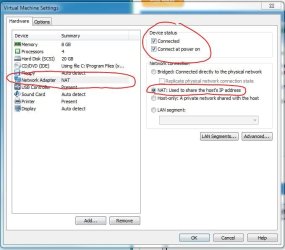
Do your VMWare settings look as shown below?

Regards,
Golden
 

Attachments

  • Capture.JPG
    Capture.JPG
    52.9 KB · Views: 177

My Computer My Computer

Computer type
PC/Desktop
Computer Manufacturer/Model Number
Golden Mk. I.4
OS
Windows 10 Pro x64 ; Xubuntu x64
CPU
Intel i7 860 @ 2.80 GHz O/C'ed to 4.0GHz
Motherboard
Gigabyte P55A-UD3R Rev.1. Award BIOS F13
Memory
16GB Corsair Vengance DDR3 @ 661 MHz Dual Channel (9-9-9-24)
Graphics Card(s)
EVGA NVidia GTX 560 1024MB
Sound Card
Realtek Integrated
Monitor(s) Displays
Dual Samsung SyncMaster 2494HS
Screen Resolution
1920*1080 and 1920*1080
Hard Drives
1*Samsung 840 EVO 120GB SSD;
1*OCZ Vertex 2 60GB SSD;
2*Samsung F3 SpinPoint 1TB in RAID0;
1*Samsung F1 SpinPoint 1TB;
2*Western Digital 1TB External USB 3.0
1*Western Digital 500GB External USB 3.0
1*Seagate 500GB External USB 2.0
PSU
Thermaltake ToughPower QFan 750W
Case
Thermaltake Element S VK60001W2Z
Cooling
Corsair H60 Water Cooling, 2*230mm and 2*80mm case fans

Keyboard
Logitech G110
Mouse
Logitech MX518
Hi Golden: YES the parameters are as you have recommended. However under Network Connections -> Local Area Connections the icon shows a big red X and err msg - "network cable unplugged". This is strange since the host (Win 7) is able to access the internet successfully using the same high-speed cable (i think). The ethernet cable connects the network adapter to a Linksys router and then to a high speed cable modem which allows access to the internet. Why would the guest (Win XP Pro) not be able to use the same hardware ? Thanx.

Bewildered Bob
 

My Computer My Computer

OS
Win 7 Home 64-bit
Hi Bob,

I'm unsure. Could you try the Bridged setting and see if that works?

Regards,
Golden
 

My Computer My Computer

Computer type
PC/Desktop
Computer Manufacturer/Model Number
Golden Mk. I.4
OS
Windows 10 Pro x64 ; Xubuntu x64
CPU
Intel i7 860 @ 2.80 GHz O/C'ed to 4.0GHz
Motherboard
Gigabyte P55A-UD3R Rev.1. Award BIOS F13
Memory
16GB Corsair Vengance DDR3 @ 661 MHz Dual Channel (9-9-9-24)
Graphics Card(s)
EVGA NVidia GTX 560 1024MB
Sound Card
Realtek Integrated
Monitor(s) Displays
Dual Samsung SyncMaster 2494HS
Screen Resolution
1920*1080 and 1920*1080
Hard Drives
1*Samsung 840 EVO 120GB SSD;
1*OCZ Vertex 2 60GB SSD;
2*Samsung F3 SpinPoint 1TB in RAID0;
1*Samsung F1 SpinPoint 1TB;
2*Western Digital 1TB External USB 3.0
1*Western Digital 500GB External USB 3.0
1*Seagate 500GB External USB 2.0
PSU
Thermaltake ToughPower QFan 750W
Case
Thermaltake Element S VK60001W2Z
Cooling
Corsair H60 Water Cooling, 2*230mm and 2*80mm case fans
Keyboard
Logitech G110
Mouse
Logitech MX518
I'd have to agree with the bridged mode. That will assign the VM it's own ip address
 

My Computer My Computer

Computer Manufacturer/Model Number
Joshua Delaughter
OS
Windows 7 Pro x64
CPU
AMD Athlon 64 x2 6000+ Oc'd @ 3.30GHz
Motherboard
Gigabyte GA-MA790GP-UD4H
Memory
G.Skill Pi 1066Mhz 2 x 2GB
Graphics Card(s)
Sapphire 512MB 256bit ddr3 Radeon HD 3850
Sound Card
Integrated HD Realtek
Monitor(s) Displays
Asus 22" LCD
Hard Drives
WD Black 1TB
WD Green 640GB
PSU
Rosewill Stallion 500w
Case
Rosewill Tu-20
Cooling
AC 64 Freezer pro, and lots of other fans
Internet Speed
13Mbps(22 if you count power boost) Cox
Success at last !

Soadrocksever & Golden were both right on - the winning combo for me is : BRIDGED connection + replicate physical network connection state (check box) + connect at power on (check box).

Thanx for the helpful tips.

(no longer) Bewildered Bob :D
 

My Computer My Computer

OS
Win 7 Home 64-bit
Well done Bob :D
 

My Computer My Computer

Computer type
PC/Desktop
Computer Manufacturer/Model Number
Golden Mk. I.4
OS
Windows 10 Pro x64 ; Xubuntu x64
CPU
Intel i7 860 @ 2.80 GHz O/C'ed to 4.0GHz
Motherboard
Gigabyte P55A-UD3R Rev.1. Award BIOS F13
Memory
16GB Corsair Vengance DDR3 @ 661 MHz Dual Channel (9-9-9-24)
Graphics Card(s)
EVGA NVidia GTX 560 1024MB
Sound Card
Realtek Integrated
Monitor(s) Displays
Dual Samsung SyncMaster 2494HS
Screen Resolution
1920*1080 and 1920*1080
Hard Drives
1*Samsung 840 EVO 120GB SSD;
1*OCZ Vertex 2 60GB SSD;
2*Samsung F3 SpinPoint 1TB in RAID0;
1*Samsung F1 SpinPoint 1TB;
2*Western Digital 1TB External USB 3.0
1*Western Digital 500GB External USB 3.0
1*Seagate 500GB External USB 2.0
PSU
Thermaltake ToughPower QFan 750W
Case
Thermaltake Element S VK60001W2Z
Cooling
Corsair H60 Water Cooling, 2*230mm and 2*80mm case fans
Keyboard
Logitech G110
Mouse
Logitech MX518
VMware Player works swell !!

Golden: Your help & patience are sincerely appreciated. If you are ever in my part of the world (near Orlando) i'll buy the beer & pizza.

GOOD ON YA MATE !!
Bob :cool:
Palm Bay, FL
 
Last edited:

My Computer My Computer

OS
Win 7 Home 64-bit
Back
Top