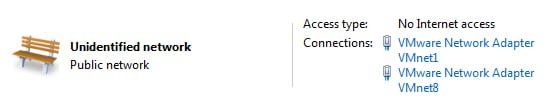
I have just installed VMware player to run Windows 8 consumer preview.But I have one issue with the program. When I boot up it loads 4 services and connects 2 network adapters. This slows my PC down and the network adapter sometimes causes issues.
So my question is this. Can I make a script or schedule a task to run the 4 VMware services and enable the network adapter. My idea is to disable them at boot but when I open VMware player, it connects the network adapter and runs the 4 services.
By the way, setting the 4 services to manual in services.msc doesn't work because they are not started when VMware player is opened for some reason. I have them currently set to Automatic (Delayed start).
First, remove all the VMWare entries from the startup. Then configure VMware settings, under network, set it as Bridged ... where host's network will be used by the guest.
There are no VMware entries under msconfig. Changing network setting on the VM to bridged still leaves the issue of network adapters. I've attached a screen shot of the adapters.
It is possible for me to disable everything but it's starting it again that takes the time. I really want a script or something to start them again. I could then click it and then run VMware player
Thanks for the starting help
Stephen
EDIT - Oops, it's hard for you to see the screenshot when I don't attach it!
EDIT 2 - Just remembered there's are virtulisation sub forum. Mods, you can move it there if you like.
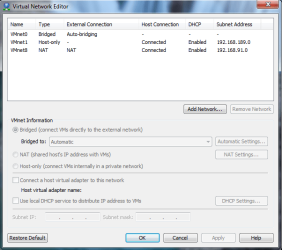
There is one option called Virtual Network Editor. I will attach picture.
Today, I used VMware Workstation Trial , and uinstalled it. I will go back to VMware Player, and tommorow I will know that function detailed for Player.
For first go to your VMware directory (for ex. C:\Program Files\VMware Player) and find :
netcfg or vmnetcfg or etc. other with cfg and/or net.
Run this, and with this tool you can edit network preferences for VMs.
Trinty
Attachments
vneditor.png
82.8 KB
· Views: 44
My Computer
Computer Manufacturer/Model Number
Trinty Self Build 2011
OS
Windows 7 Ultimate x64 - Service Pack 1
CPU
Intel(R) Pentium(R) CPU G620 @ 2.60GHz
Motherboard
ASUSTeK Computer INC. P8H61-M LX2
Memory
Transcend Informations - 2*2048GB DDR3 @ 1066MHz
Graphics Card(s)
ATI Radeon HD 5670 - 1024MB DDR5 - Driver : 19.04.2011
Realtek High Definition Audio Driver ALC660 @ MCP61S
Monitor(s) Displays
HP S2031 20" LED HD Widescreen Display Monitor
Screen Resolution
1600 x 900 px
Hard Drives
Maxtor Diamond Max 10 (160 GB, 7200 RPM, SATA-II Hard Disk)
Western Digital Scorpion Blue (250 GB, 5400 RPM, SATA-II External Hard Disk - Personal Data)
Toshiba MQ01ABD050 (500 GB, 5400 RPM, SATA-II External Hard Disk - Software & ISOs)
PSU
Pixxo Transformer 850W 80+ Certification PSU
Case
Compaq 5BW353 Case
Cooling
Many solutions, see other info...
Keyboard
Green Leaf (Mitzu) Standard Keyboard
Mouse
Microsoft USB Lasser Pointing Device
Internet Speed
10 MB
Antivirus
Avast Antivirus Free
Browser
Firefox, Chrome, Internet Explorer
Other Info
Windows Experience Index Result: 3.8 of 7.9.
Cooling solutions:
- AVC @ 2000/5000 RPM Copper Heatpipes (For Athlon 64 X2 6000+ CPU used in an Athlon 64 X2 5200+)
- Rear Fan 80 mm @ 2700 RPM for heat extraction
- Manhatan Chipset Cooler @ 4700/7200 RPM (For nVidia Chipset in MoBo)
- Foxconn @ 2500 RPM (Old Pentium III heatsink fan) in XFX ATI Radeon HD 4350
Thanks, I've set the services to manual but they don't automatically enable when I open VMware player like other manual services. However the script part, with some editing will probably do it.
I'm not actually noticing any real performance degradation so I will mark this a solved.


 But I have one issue with the program. When I boot up it loads 4 services and connects 2 network adapters. This slows my PC down and the network adapter sometimes causes issues.