Solved VMWare Server NAT problem

  • Thread starter Thread starter Enridis
  • Start date Start date
E

Enridis

Guest
I am using VMWare Server 2 on my Windows 7 Workstation.

Guest OS is FreeBSD, but it is not important.

I could not connect to any host (except master IP) from Guest OS when I am using NAT. But I can ping any host. I have not problems when I use bridget network.

I have tried to disable Windows Firewall - no changes.

This configuration has worked in Windows Vista ideal. I have submited feedback to MS.

May be anybody have any idea?
 
Seems like the same trouble I´ve been having.

I run Ubuntu and Fedora with VMware Workstation, and I can ping all I want, but thats it. Only way I can get it to work is running bridged.

I prefer bridge tho, so it dosen´t matter to me. But youre not the only one with problems running NAT networking on VM guest.
 

My Computer

OS
Windows 7 7000 64bit
CPU
Intel Core i7 920 @ 4000Mhz
Motherboard
Gigabyte EX58-UD3R
Memory
3x2 GB OCZ Platinum 1600Mhz 7-7-7-19
Graphics Card(s)
Asus GTX 260 216SP @ 720/1520/1050
Sound Card
Integrated
Monitor(s) Displays
BenQ Senseye FP202W + Mermaid Ventura
Screen Resolution
1680x1050
Hard Drives
2x Raptor @ RAID0
2x Seagate 250GB
1x WD 320GB
1x MaxWhore 160GB
PSU
Tagan TG780-U33II 780W SuperRock
Case
Cooler Master Stacker
Cooling
Stock
Keyboard
Logitec something
Mouse
Logitec MX518
Internet Speed
20/3.6 Mbit
but how did you get it to connect via bridge?
i've tried a lot of different ways but still can't get my xubuntu connect to the internet.....
 

My Computer

Computer Manufacturer/Model Number
DIY
OS
XP
CPU
Q9550
Motherboard
P5Q - D
Memory
G-Skills 1066 CL5 2*2G
Graphics Card(s)
HIS HD4870
Monitor(s) Displays
ViewSonic 22"
Screen Resolution
192081080
PSU
Antec EA650
Case
CoolerMaster CM590
Cooling
Coolermaster V8
Mouse
Gigabyte Gaming Mouse
but how did you get it to connect via bridge?
i've tried a lot of different ways but still can't get my xubuntu connect to the internet.....

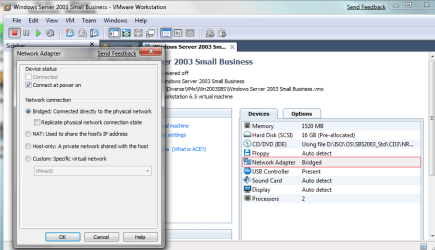
I just select Bridge in VMware control panel, and then I enter IP-info manually on the guest.
 

My Computer

OS
Windows 7 7000 64bit
CPU
Intel Core i7 920 @ 4000Mhz
Motherboard
Gigabyte EX58-UD3R
Memory
3x2 GB OCZ Platinum 1600Mhz 7-7-7-19
Graphics Card(s)
Asus GTX 260 216SP @ 720/1520/1050
Sound Card
Integrated
Monitor(s) Displays
BenQ Senseye FP202W + Mermaid Ventura
Screen Resolution
1680x1050
Hard Drives
2x Raptor @ RAID0
2x Seagate 250GB
1x WD 320GB
1x MaxWhore 160GB
PSU
Tagan TG780-U33II 780W SuperRock
Case
Cooler Master Stacker
Cooling
Stock
Keyboard
Logitec something
Mouse
Logitec MX518
Internet Speed
20/3.6 Mbit
I am using VMWare Server 2 on my Windows 7 Workstation.

Guest OS is FreeBSD, but it is not important.

I could not connect to any host (except master IP) from Guest OS when I am using NAT. But I can ping any host. I have not problems when I use bridget network.

I have tried to disable Windows Firewall - no changes.

This configuration has worked in Windows Vista ideal. I have submited feedback to MS.

May be anybody have any idea?


Hi there
VMWARE has a problem with NAT in W7. You'll have to use "Bridged".

Will be fixed later. (Both vmware server and workstation)

Her's the answer to a question I posted on the vmware site.
VMware Communities: Windows 7 - both X-64 and X-86 NAT Broken

Cheers
jimbo
 

My Computer

Computer type
PC/Desktop
Computer Manufacturer/Model Number
Custom built, several laptops HP/ASUS
OS
Linux CENTOS 7 / various Windows OS'es and servers
CPU
Intel i7 Intel i5
Memory
8GB, 16GB
Graphics Card(s)
On Motherboard
Sound Card
Realtek HD audio
Monitor(s) Displays
Apple Cinema display, Samsung LCD
Screen Resolution
1920 X 1080
Hard Drives
4 X 1TB SATA
Mouse
Toshiba wireless laser
Internet Speed
> 20MB up
I just select Bridge in VMware control panel, and then I enter IP-info manually on the guest.

you mean Bridge in VMWare, do you mean double click the little green adapter then select Host Only?

and another problem is, i know it's not under network anymore, i can't uninstall the vmware anymore, whenever i uninstall it, it said cannot connect to host sth like that....
 

My Computer

Computer Manufacturer/Model Number
DIY
OS
XP
CPU
Q9550
Motherboard
P5Q - D
Memory
G-Skills 1066 CL5 2*2G
Graphics Card(s)
HIS HD4870
Monitor(s) Displays
ViewSonic 22"
Screen Resolution
192081080
PSU
Antec EA650
Case
CoolerMaster CM590
Cooling
Coolermaster V8
Mouse
Gigabyte Gaming Mouse
you mean Bridge in VMWare, do you mean double click the little green adapter then select Host Only?

and another problem is, i know it's not under network anymore, i can't uninstall the vmware anymore, whenever i uninstall it, it said cannot connect to host sth like that....

Here you go :)

Not sure whats up with it not letting you uninstall tho. Should be easy from the "Add/Remove programs" in Control Panel.
 

Attachments

  • WMv_NAT.png
    WMv_NAT.png
    41.1 KB · Views: 5,775

My Computer

OS
Windows 7 7000 64bit
CPU
Intel Core i7 920 @ 4000Mhz
Motherboard
Gigabyte EX58-UD3R
Memory
3x2 GB OCZ Platinum 1600Mhz 7-7-7-19
Graphics Card(s)
Asus GTX 260 216SP @ 720/1520/1050
Sound Card
Integrated
Monitor(s) Displays
BenQ Senseye FP202W + Mermaid Ventura
Screen Resolution
1680x1050
Hard Drives
2x Raptor @ RAID0
2x Seagate 250GB
1x WD 320GB
1x MaxWhore 160GB
PSU
Tagan TG780-U33II 780W SuperRock
Case
Cooler Master Stacker
Cooling
Stock
Keyboard
Logitec something
Mouse
Logitec MX518
Internet Speed
20/3.6 Mbit
but then did you change any settings in vmware and inside your guest machine?
 

My Computer

Computer Manufacturer/Model Number
DIY
OS
XP
CPU
Q9550
Motherboard
P5Q - D
Memory
G-Skills 1066 CL5 2*2G
Graphics Card(s)
HIS HD4870
Monitor(s) Displays
ViewSonic 22"
Screen Resolution
192081080
PSU
Antec EA650
Case
CoolerMaster CM590
Cooling
Coolermaster V8
Mouse
Gigabyte Gaming Mouse
but then did you change any settings in vmware and inside your guest machine?

Im not sure what you mean. The picured I attached is VMware settings. But on the guest I only entered the IPs manually. IE. static IP.
 

My Computer

OS
Windows 7 7000 64bit
CPU
Intel Core i7 920 @ 4000Mhz
Motherboard
Gigabyte EX58-UD3R
Memory
3x2 GB OCZ Platinum 1600Mhz 7-7-7-19
Graphics Card(s)
Asus GTX 260 216SP @ 720/1520/1050
Sound Card
Integrated
Monitor(s) Displays
BenQ Senseye FP202W + Mermaid Ventura
Screen Resolution
1680x1050
Hard Drives
2x Raptor @ RAID0
2x Seagate 250GB
1x WD 320GB
1x MaxWhore 160GB
PSU
Tagan TG780-U33II 780W SuperRock
Case
Cooler Master Stacker
Cooling
Stock
Keyboard
Logitec something
Mouse
Logitec MX518
Internet Speed
20/3.6 Mbit
Hi there
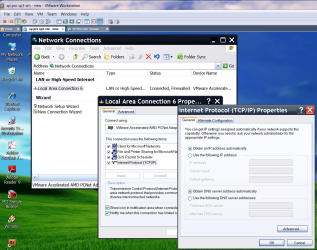
just leave the VM's network setting as "Obtain automatically via DHCP".

VMWare's virtual DHCP will manage all the network conversions to a real IP address

for example for a windows XP virtual machine here's an image of it's "virtual" network setting. (See attachment).

BTW no probs in runnimg VMWARE virtual machines and "W7 in XP compatability mode" with virtual PC concurrently -- so long as your Real machine has enough RAM -- that's normally the problem resource in running a lot of VM's --CPU power is more than adequate usually.

Cheers
jimbo
 

Attachments

  • vm1.png
    vm1.png
    177.3 KB · Views: 2,545

My Computer

Computer type
PC/Desktop
Computer Manufacturer/Model Number
Custom built, several laptops HP/ASUS
OS
Linux CENTOS 7 / various Windows OS'es and servers
CPU
Intel i7 Intel i5
Memory
8GB, 16GB
Graphics Card(s)
On Motherboard
Sound Card
Realtek HD audio
Monitor(s) Displays
Apple Cinema display, Samsung LCD
Screen Resolution
1920 X 1080
Hard Drives
4 X 1TB SATA
Mouse
Toshiba wireless laser
Internet Speed
> 20MB up

My Computer

Computer Manufacturer/Model Number
DIY
OS
XP
CPU
Q9550
Motherboard
P5Q - D
Memory
G-Skills 1066 CL5 2*2G
Graphics Card(s)
HIS HD4870
Monitor(s) Displays
ViewSonic 22"
Screen Resolution
192081080
PSU
Antec EA650
Case
CoolerMaster CM590
Cooling
Coolermaster V8
Mouse
Gigabyte Gaming Mouse
Hi there
just leave the VM's network setting as "Obtain automatically via DHCP".

VMWare's virtual DHCP will manage all the network conversions to a real IP address

for example for a windows XP virtual machine here's an image of it's "virtual" network setting. (See attachment).

BTW no probs in runnimg VMWARE virtual machines and "W7 in XP compatability mode" with virtual PC concurrently -- so long as your Real machine has enough RAM -- that's normally the problem resource in running a lot of VM's --CPU power is more than adequate usually.

Cheers
jimbo

humm..... I've tried letting it to mange by itself... but seems it's not working.... will there be any difference in xubuntu?
 

My Computer

Computer Manufacturer/Model Number
DIY
OS
XP
CPU
Q9550
Motherboard
P5Q - D
Memory
G-Skills 1066 CL5 2*2G
Graphics Card(s)
HIS HD4870
Monitor(s) Displays
ViewSonic 22"
Screen Resolution
192081080
PSU
Antec EA650
Case
CoolerMaster CM590
Cooling
Coolermaster V8
Mouse
Gigabyte Gaming Mouse
Back
Top